
1. Introduction
Thank you for choosing the Sevenine 52-inch Ceiling Fan. This manual provides essential information for the safe installation, operation, and maintenance of your new ceiling fan. Please read all instructions carefully before beginning installation and retain this manual for future reference.

Figure 1: Sevenine 52-inch black ceiling fan with light in a living room setting.
2. Safety Information
- Always disconnect power at the main fuse box or circuit breaker before beginning installation or performing any maintenance.
- All wiring must be in accordance with national and local electrical codes. If you are unfamiliar with wiring, consult a qualified electrician.
- The fan must be mounted with a minimum of 7 feet (2.1 meters) clearance from the floor to the blade trailing edge.
- Ensure the mounting structure can support the weight of the fan (approximately 15.05 lbs).
- Do not operate the fan if any part is damaged.
- This fan is rated for indoor use only. Not waterproof; avoid exposed outdoor installation.
3. Package Contents
Verify that all components listed below are included in your package:
- DC Motor Assembly
- 5 Fan Blades (Dual-finish: Black/Wood Grain)
- Light Kit (Integrated Dimmable LED)
- Remote Control Module
- Remote Control with 2 AAAA batteries
- Downrod (5 inches)
- Mounting Bracket
- Hardware Pack (screws, wire nuts, etc.)
- Installation Instructions Manual
4. Specifications
| Feature | Specification |
|---|---|
| Brand | Sevenine |
| Model Name | Sevenine Ceiling Fan (DY1134-5B/52) |
| Size | 52 Inch |
| Color | Black |
| Number of Blades | 5 |
| Motor Type | Reversible DC Motor |
| Speed Settings | 6 |
| Light Type | Dimmable LED |
| Color Temperature | 3000K (Warm White), 4500K (Natural White), 6000K (Cool White) |
| Air Flow Capacity | 5100 CFM (Max) |
| Noise Level | 32 Decibels |
| Control Method | Remote Controlled |
| Power Source | DC, 120 Volts, 24 Watts |
| Downrod Length | 5 Inches |
| Indoor/Outdoor Usage | Indoor (Covered Outdoor Areas) |
| Certification | ETL Listed |
5. Setup and Installation
Follow these steps for proper installation. It is recommended to have a second person for assistance.
5.1 Preparing the Fan Blades
The fan includes five dual-finish blades (black/wood grain). Choose the desired side for your aesthetic preference.

Figure 2: Dual-finish blades and remote control overview.
5.2 Mounting the Fan
The fan supports both downrod and flush mount installations. Refer to the videos below for detailed instructions specific to your chosen mounting method.
Video 1: Detailed instructions for 52/42 inch Ceiling Fan Downrod Installation by Seveninellc.
Video 2: Detailed instructions for 52/42 inch Ceiling Fan Flush Mount Installation by Seveninellc.
5.3 Wiring and Final Assembly
After securing the mounting bracket, connect the fan's wiring to your household wiring as per local electrical codes. Then, attach the fan motor assembly and blades. Finally, install the LED light kit and light cover.
Video 3: Visual demonstration of the Sevenine Low Profile Ceiling Fan assembly and installation process by Seveninellc.
6. Operating Instructions
Your Sevenine ceiling fan is operated using the included remote control.
6.1 Fan Speed Control
The fan features 6 intelligent speed settings:
- Levels 1-2: Soft airflow
- Levels 3-4: Natural airflow
- Levels 5-6: Powerful airflow
6.2 Light Control
The integrated LED light offers 3 color temperatures and stepless dimming (20%-100% brightness).
- 3000K: Warm White
- 4500K: Natural White
- 6000K: Cool White
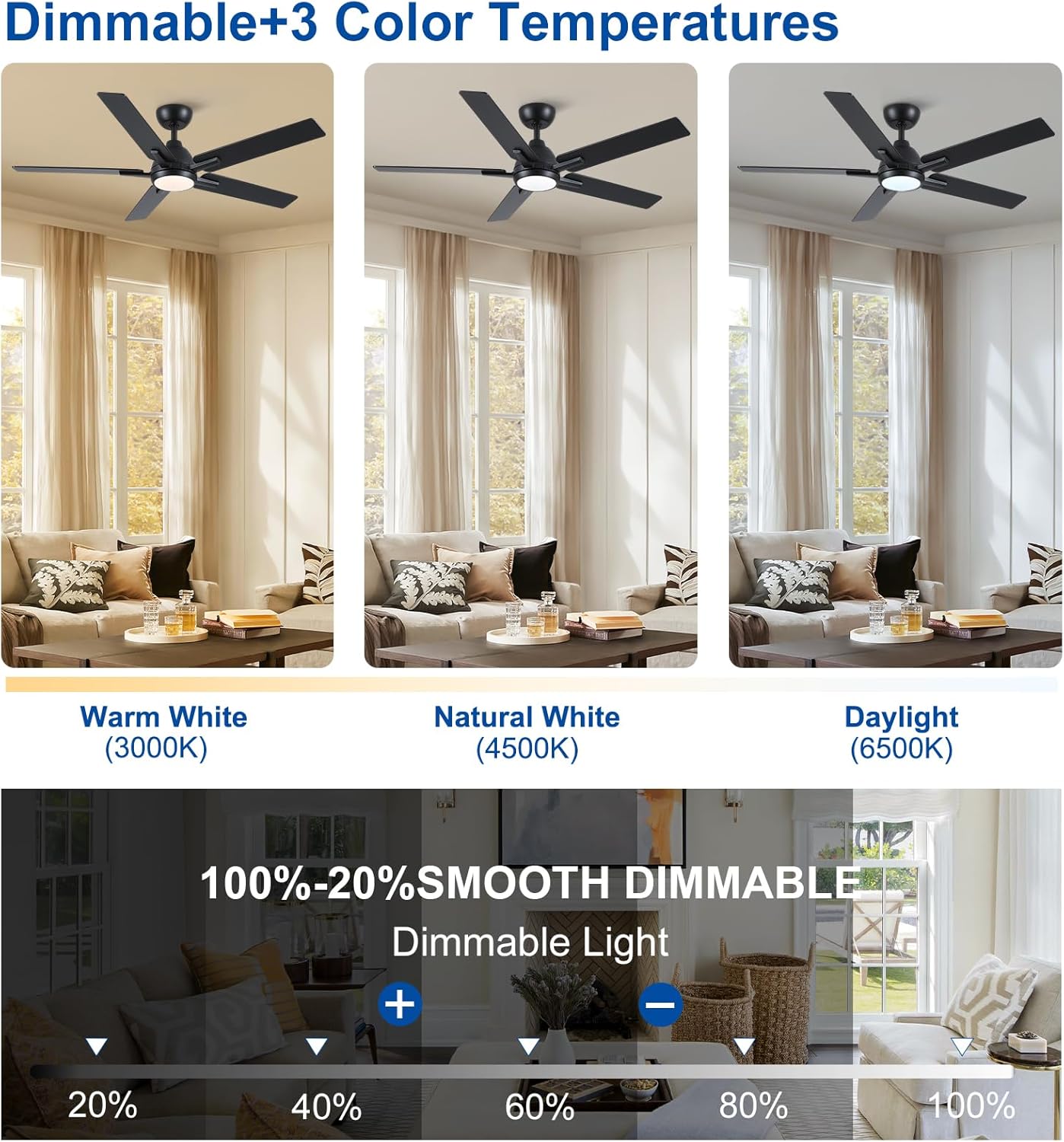
Figure 3: Three color temperature options for the LED light.
6.3 Reversible DC Motor
The reversible DC motor allows for year-round use:
- Summer Mode (Downdraft): Creates a cooling breeze.
- Winter Mode (Updraft): Circulates warm air trapped near the ceiling.

Figure 4: Reversible airflow for seasonal comfort.
6.4 Timer Function
Set the fan to turn off automatically after 1, 3, or 6 hours using the remote control.
6.5 Memory Function
When powered off for over 10 seconds and restarted, the fan automatically restores your previous settings for color temperature, brightness, and fan speed. This function does not activate during quick restarts within 10 seconds.
7. Maintenance
- Cleaning: Periodically clean the fan blades and motor housing with a soft, damp cloth. Do not use abrasive cleaners or solvents.
- Tightening Screws: Check all screws and connections annually to ensure they are secure.
- Lubrication: The DC motor is permanently lubricated and does not require additional oiling.
8. Troubleshooting
| Problem | Possible Cause | Solution |
|---|---|---|
| Fan does not start | No power to the fan; Loose wire connections; Remote control battery low. | Check circuit breaker/fuse; Ensure all wire connections are secure; Replace remote control batteries. |
| Fan is noisy | Loose mounting screws; Blades are unbalanced; Motor housing rubbing. | Tighten all mounting screws; Check blade balance and tighten screws; Ensure no parts are touching. |
| Light does not work | Loose wire connections in light kit; Faulty LED driver. | Check light kit wiring; Contact customer service for replacement. |
| Remote control not working | Batteries are dead or incorrectly installed; Remote not paired. | Replace batteries, ensure correct polarity; Refer to remote pairing instructions in the full manual. |
9. Warranty and Support
Every Sevenine product is covered with a brand assurance. All ceiling fans are ETL-certified and come with a 1-year hassle-free replacement warranty. For any issues during purchase or operation, our 24/7 customer service team guarantees responses within 24 hours.
For further assistance, please refer to the detailed instructions and installation videos provided with your product or contact Sevenine customer support.