
Introduction
This manual provides detailed instructions for the YOWU Cat Ear Headphones CE, designed for an immersive audio experience with customizable features. Please read this manual carefully before using the product to ensure proper operation and to maximize its lifespan.
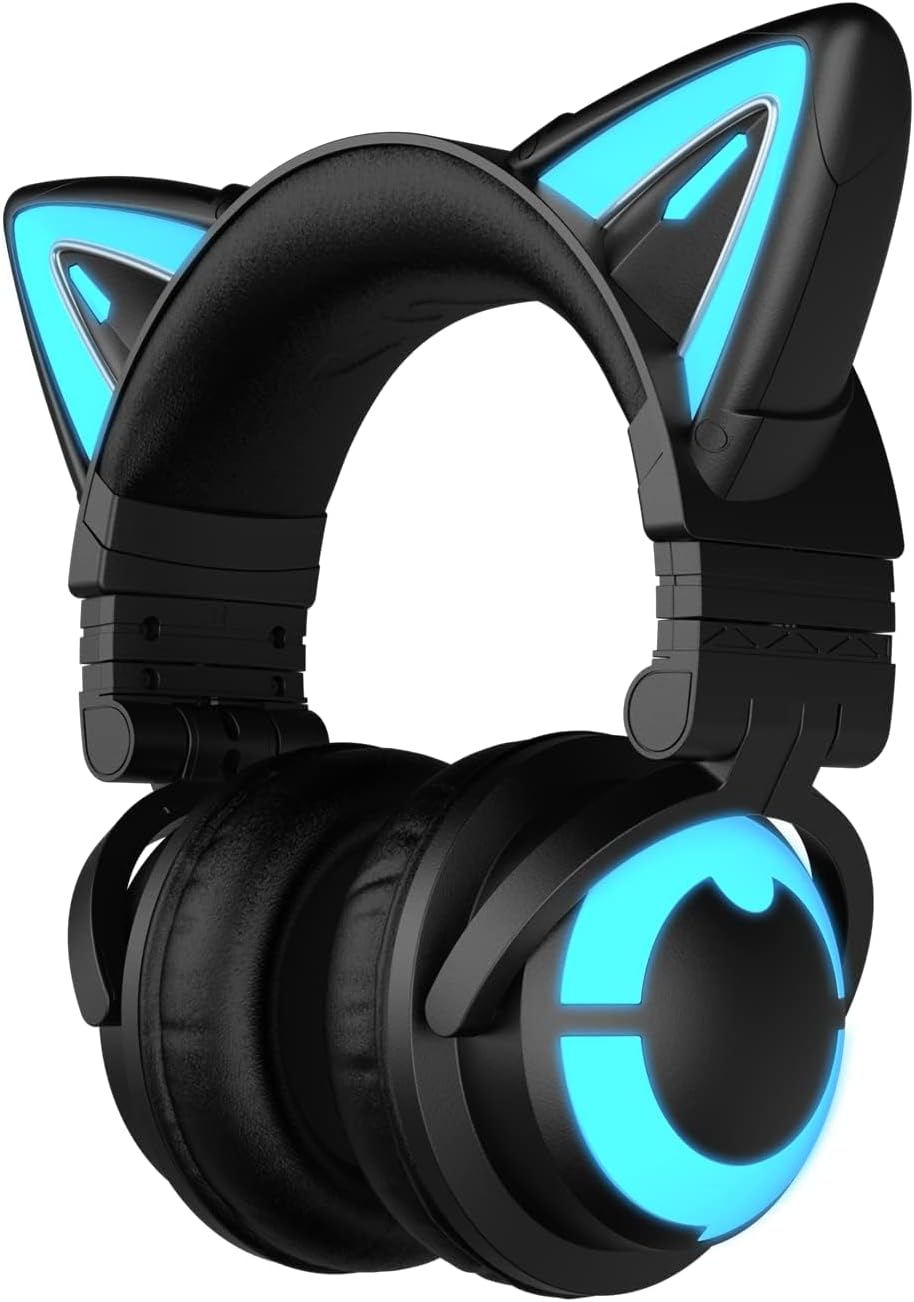
Image: The YOWU Cat Ear Headphones CE, featuring a sleek black design with vibrant blue LED lighting on the cat ears and circular earcups.
What's in the Box
Upon unboxing your YOWU Cat Ear Headphones CE, please verify that all the following components are included:
- YOWU Cat Ear Headphones CE
- User Manual (this document)
- 2-in-1 Type-C Audio/Charging Cable

Image: The YOWU Cat Ear Headphones CE, its user manual, and the included Type-C charging cable neatly arranged within the product packaging.
Safety Information
To ensure safe and optimal use of your YOWU Cat Ear Headphones CE, please adhere to the following guidelines:
- Avoid prolonged listening at high volumes to prevent hearing damage.
- Do not expose the headphones to extreme temperatures, humidity, or liquids.
- Use only the original charger or a 5V2A rated charger to prevent product damage.
- Keep out of reach of small children.
- Do not attempt to disassemble or modify the headphones.
Setup Guide
1. Charging the Headphones
Before first use, fully charge your headphones. Connect the provided Type-C cable to the charging port on the headphones and the other end to a compatible USB power source (e.g., computer USB port, wall adapter). The charging indicator will show the charging status.
- Charging Time: Approximately 1.6 hours for a full charge.
- Battery Life: Up to 48 hours without lighting, 2-10 hours with lighting, depending on usage.

Image: A close-up of the YOWU Cat Ear Headphones CE showing the USB-C charging port and cable, highlighting its fast charging capability and extended battery life.
2. Power On/Off
To power on the headphones, press and hold the power button until the indicator lights illuminate. To power off, press and hold the power button again until the lights turn off.
3. Bluetooth Pairing (Wireless Connection)
The YOWU Cat Ear Headphones CE utilize Bluetooth 5.2 for stable wireless connectivity.
- Ensure the headphones are powered on and in pairing mode (indicator light may flash).
- On your device (PC, phone, tablet, Switch), navigate to Bluetooth settings.
- Select "YOWU CE" from the list of available devices to connect.
- Once connected, the indicator light will typically become solid.

Image: An internal view diagram of the YOWU Cat Ear Headphones CE, showcasing the Qualcomm Bluetooth 5.2 chip for stable connection and the SoundMage acoustic system for enhanced audio quality.
4. Wired Connection
For devices that do not support Bluetooth or for a zero-latency connection, use the provided 2-in-1 Type-C audio/charging cable.
- Connect the Type-C end to the headphone's port.
- Connect the other end to your device's compatible audio input (e.g., USB-C port).
- Note: PS4/PS5 connections only support wired mode. Xbox connections may require an additional Bluetooth adapter for wireless use.
Operating Instructions
1. Controls
The headphones feature intuitive controls for managing audio and lighting effects. Specific button functions are typically located on the earcups.
- Power Button: Press and hold to power on/off. Short press for play/pause (in Bluetooth mode).
- Volume Control: Adjust volume up or down using the designated buttons or scroll wheel.
- Microphone: The built-in microphone is automatically active when connected. Ensure it is not muted if communication issues arise.
- RGB Lighting Control: Cycle through different lighting effects or turn them off using the dedicated RGB button.
2. RGB Lighting Customization
The YOWU Cat Ear Headphones CE offer customizable RGB light effects. These can be controlled via the headphones' buttons or potentially through a dedicated mobile application (if available for your device).
- Cycle through 5 distinct light effects.
- Adjust brightness or turn off lighting to conserve battery.
3. Noise Canceling
These headphones feature E-sports grade noise canceling to minimize external distractions, ensuring clear audio and communication.

Image: A user demonstrating the YOWU Cat Ear Headphones CE, emphasizing its E-sports Grade Noise Canceling capability for focused audio experiences.
4. Sound Experience
Enjoy an immersive audio experience with 7.1 Pro Surround Sound, powered by the SoundMage acoustic system, providing delicate music and gaming audio.

Image: A visual summary of the YOWU Cat Ear Headphones CE's core features, including advanced lighting, noise cancellation, surround sound, ergonomic comfort, customizable options, and Bluetooth 5.2 connectivity.
Compatibility
The YOWU Cat Ear Headphones CE offer wide compatibility with various devices:
- Wireless (Bluetooth 5.2): PC, Phone, Tablet, Nintendo Switch, Laptops, Desktops.
- Wired (Type-C Cable): PC, PS4, PS5, Phone.
- Note: Xbox connections may require an additional Bluetooth adapter for wireless use.
Maintenance
Proper maintenance will extend the life and performance of your headphones:
- Cleaning: Use a soft, dry cloth to wipe the headphones. Do not use abrasive cleaners or immerse in water.
- Storage: Store the headphones in their protective hard case when not in use to prevent damage. Avoid placing heavy objects on them.
- Battery Care: Avoid fully discharging the battery frequently. Charge regularly, even if not in constant use, to maintain battery health.
Troubleshooting
If you encounter issues with your YOWU Cat Ear Headphones CE, please refer to the following common solutions:
| Problem | Possible Cause | Solution |
|---|---|---|
| Headphones do not power on. | Low battery. | Charge the headphones fully. |
| Cannot connect via Bluetooth. | Headphones not in pairing mode; device Bluetooth off; interference. | Ensure headphones are in pairing mode. Turn device Bluetooth off and on. Move closer to the device. Forget device and re-pair. |
| No sound or low volume. | Volume too low; incorrect audio output selected; loose wired connection. | Increase headphone and device volume. Select headphones as audio output on your device. Re-insert wired connection firmly. |
| Microphone not working. | Microphone muted; incorrect input device selected. | Check if the microphone is muted. Select headphones' microphone as input device in your system settings. |
| RGB lights not working. | Lights turned off; low battery. | Press the RGB control button to cycle modes. Charge the headphones. |
Specifications
| Brand | YOWU |
| Model Name | CAT-CE-BK-450743 |
| Connectivity Technology | Wireless (Bluetooth 5.2), Wired (USB-C) |
| Noise Control | Active Noise Cancellation (E-sports Grade) |
| Sensitivity | 105 dB |
| Headphones Jack | USB-C Jack |
| Included Components | Cable, User Manual |
| Charging Time | 1.6 Hours |
| Battery Life | 48 Hours (without lighting), 2-10 Hours (with lighting) |
| Item Weight | 435 Grams (15.3 ounces) |
| Frequency Range | 20 Hz - 20,000 Hz |
| Impedance | 32 Ohm |
| Earpiece Shape | Over Ear |
| Special Feature | Foldable |
| Color | Black |
Warranty and Support
YOWU offers a 1-year warranty for the Cat Ear Headphones CE, ensuring peace of mind with your purchase.
For any inquiries, technical assistance, or warranty claims, please contact YOWU customer support. They provide 24-hour customer support dedicated to enhancing your shopping experience.
You can typically find contact information on the official YOWU website or through the retailer where you purchased the product.