
1. Introduction
The HENNCHEE RTPB-015P Portable Heated Blanket is designed to provide versatile warmth and comfort in various environments. This innovative product can be used as a heated poncho or a traditional blanket, making it suitable for both indoor and outdoor activities. Its battery-operated design ensures portability, while multiple heating zones and safety features enhance the user experience.
2. Product Features
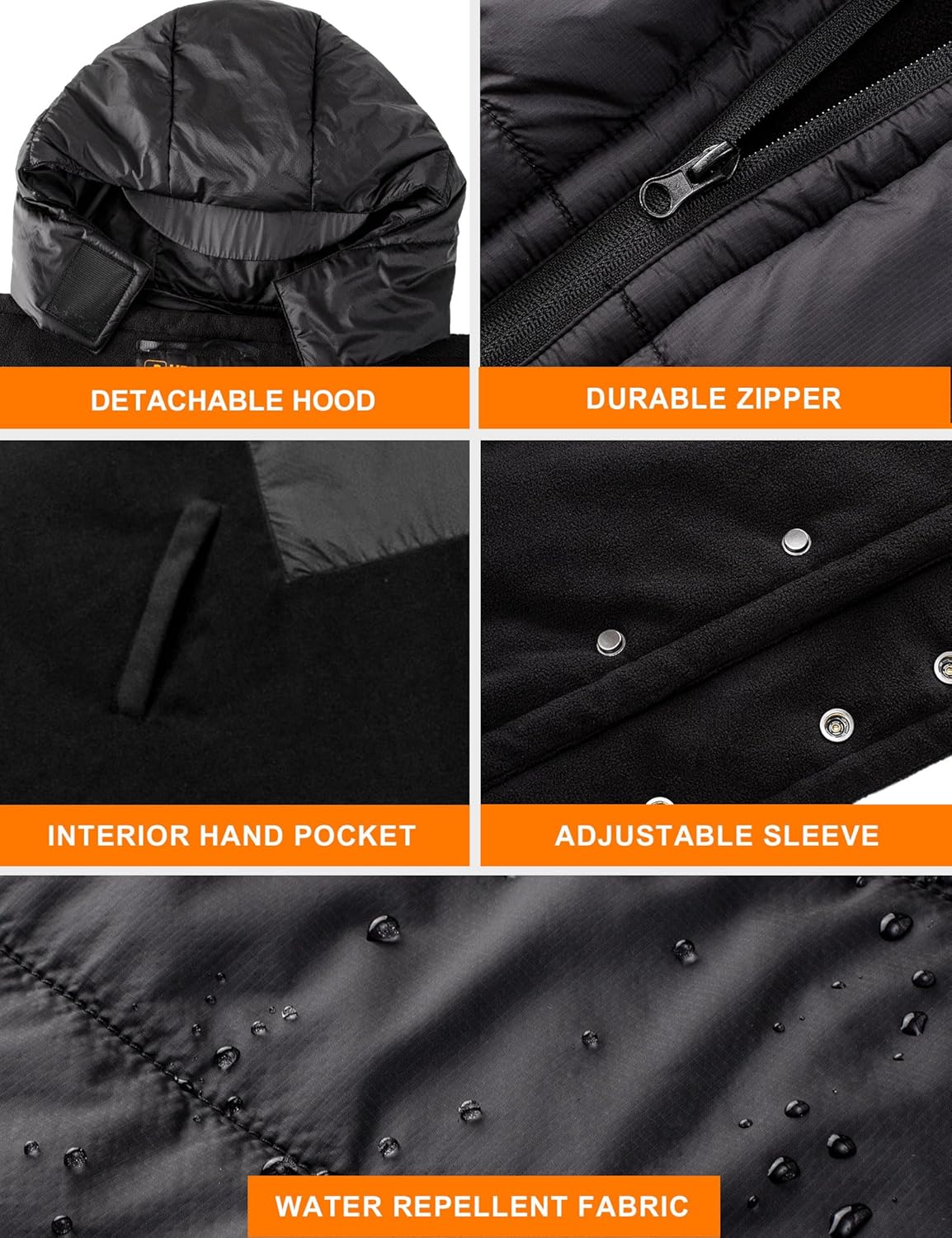
- Portable Design: Features a zippered design with a removable hood, allowing use as a heated poncho or blanket. Dimensions: 42 x 70 inches.
- Waterproof Fabric: Constructed from durable, waterproof material, ideal for outdoor use.
- Dual Control 5 Heating Zones: Two independent power buttons control five carbon fiber heating zones. One switch warms the pockets, while the other heats the front chest and back for core warmth.
- Three Heat Levels: Adjustable heat settings: High (149°F), Medium (131°F), and Low (113°F).
- Long-lasting 16000mAh Battery Pack: Provides hours of continuous heat and can also charge mobile devices.
- NTC Overheating Protection: Smart NTC technology continuously monitors temperature and adjusts heat to prevent overheating, ensuring safety.

The blanket's design allows for versatile use, adapting to various situations from relaxing at home to outdoor adventures. The removable hood provides additional warmth and protection when needed.
3. Package Contents
Verify that all items are present in your package:
- HENNCHEE Portable Heated Blanket (Model: RTPB-015P)
- 16000mAh Lithium Polymer Battery Pack
- Charging Cable for Battery Pack
- User Manual
4. Setup
4.1 Charging the Battery Pack
- Locate the provided charging cable and connect it to the 16000mAh battery pack.
- Connect the other end of the charging cable to a compatible USB power adapter (not always included) or a USB port.
- Allow the battery pack to fully charge before first use. The battery indicator lights will show the charging status.
4.2 Connecting the Battery to the Blanket
- Locate the zippered pocket on the blanket, typically near the control buttons.
- Inside the pocket, you will find a USB connector cable.
- Connect the USB connector cable from the blanket to the fully charged 16000mAh battery pack.
- Carefully place the connected battery pack into the zippered pocket and close the zipper to secure it.
5. Operation
5.1 Powering On and Adjusting Heat Levels
- Once the battery pack is connected, locate the control buttons on the blanket. There are two independent buttons for dual control.
- Press and hold one of the power buttons for approximately 3 seconds to turn on the heating elements. The button will illuminate, indicating the current heat level.
- Press the button repeatedly to cycle through the three heat settings:
- Red Light: High Temperature (approx. 149°F)
- White Light: Medium Temperature (approx. 131°F)
- Blue Light: Low Temperature (approx. 113°F)
- Use the second control button to adjust the heat for the other zone (e.g., pockets vs. chest/back) independently.
5.2 Powering Off
To turn off the heating, press and hold the power button for approximately 3 seconds until the light turns off. It is recommended to disconnect the battery pack from the blanket when not in use for extended periods.
6. Care and Maintenance
6.1 Cleaning Instructions
To ensure the longevity of your heated blanket, follow these cleaning guidelines:
- Always disconnect the battery pack before cleaning.
- Hand Wash Only: Gently hand wash the blanket with mild detergent in cold water. Do not wring or twist the fabric.
- Do not bleach, iron, or dry clean.
- Hang dry thoroughly in a well-ventilated area. Ensure the blanket is completely dry before reconnecting the battery or storing.
6.2 Storage
When not in use, store the blanket in a cool, dry place away from direct sunlight. Ensure the battery pack is disconnected and stored separately.
7. Troubleshooting
- Blanket Not Heating:
- Ensure the battery pack is fully charged and properly connected to the blanket's USB cable.
- Press and hold the power button for 3 seconds to activate. If the light does not turn on, the battery may be depleted or improperly connected.
- Battery Not Charging:
- Verify that the charging cable is securely connected to both the battery pack and the power source.
- Try using a different USB power adapter or port.
- Inconsistent Heating:
- Ensure the blanket is spread evenly and not bunched up, which can affect heat distribution.
- The NTC overheating protection may temporarily reduce heat if a specific area becomes too warm.
If issues persist after following these steps, please refer to the warranty and support section for further assistance.
8. Specifications
| Model Name | RTPB-015P |
| Brand | HENNCHEE |
| Material | 100% Polyester |
| Color | Black |
| Product Dimensions | 70"L x 42"W |
| Special Feature | Cordless, Removable Hood, 5 Heating Zones, Waterproof |
| Battery Capacity | 16000mAh Lithium Polymer (included) |
| Heat Levels | High (149°F), Medium (131°F), Low (113°F) |
| Product Care Instructions | Hand Wash Only |
| Item Weight | 3.19 pounds |
9. Warranty and Support
For warranty information or customer support, please contact HENNCHEE directly through their official website or the retailer where the product was purchased. Keep your purchase receipt as proof of purchase for any warranty claims.