
1. Introduction
This manual provides detailed instructions for the assembly, operation, maintenance, and troubleshooting of your GOFLAME CB10684GR Computer Desk with Hutch. Please read this manual thoroughly before assembly and use to ensure safe and correct operation. Keep this manual for future reference.
2. Product Overview
The GOFLAME CB10684GR Computer Desk is a versatile workstation designed for home office, study, or bedroom use. It features a spacious desktop, a raised display shelf, a storage cabinet with a door, and two open shelves, providing ample space for organization.
Key Features:
- Wide Desktop: Provides generous space for working essentials.
- Raised Display Shelf: Offers additional storage and easy access for monitors or decorative items.
- Detachable & Adjustable Shelf: A 3-position adjustable shelf within the cabinet allows for customized storage. The middle panel can be removed to accommodate a computer tower.
- Storage Cabinet with Door: Keeps items neatly concealed.
- Two Open Shelves: Ideal for books, binders, or other frequently accessed items.
- Cable Management: Includes two wire holes for organized cable routing.
- Anti-falling Design: Ensures items on shelves remain secure.
- Anti-tipping Devices: Enhances stability and safety.

Figure 2.1: Overview of the GOFLAME Computer Desk's multifunctional design, highlighting the raised display shelf, wide desktop, cabinet with door, and two open shelves. Icons below illustrate its use for computers, office supplies, books, documents, plants, and decorations.
3. Safety Information
WARNING: Failure to follow these safety instructions may result in injury or damage to the product.
- Weight Capacity: The desk has a maximum weight capacity of 210 lbs (95 kg). Do not exceed this limit.
- Anti-tipping Devices: Always install the included anti-tipping devices to secure the desk to the wall. This prevents accidental tipping, especially in households with children or pets.
- Stable Surface: Place the desk on a flat, level, and stable surface.
- Assembly: Ensure all parts are correctly assembled and fasteners are tightened before use. Periodically check and re-tighten fasteners as needed.
- Children: Do not allow children to climb on or play with the desk.

Figure 3.1: Illustration of the two anti-tipping devices and screws, emphasizing their importance for safe and stable use of the desk.
4. Setup and Assembly
Assembly is required for this product. Please follow the step-by-step instructions provided in the separate assembly guide included with your purchase. A screwdriver is recommended for assembly (not included).
General Assembly Tips:
- Unpack all components and verify against the parts list in the assembly guide.
- Assemble on a soft, clean surface to prevent scratching.
- Do not overtighten screws during initial assembly; tighten fully once all parts are aligned.
- Ensure all connections are secure before moving or using the desk.
- Install anti-tipping devices as instructed in the assembly guide.
5. Operating Instructions
5.1 Adjustable Shelf
The shelf within the cabinet is adjustable to three different positions. To adjust, remove the shelf, reposition the support pins to the desired height, and reinsert the shelf. The middle panel of the cabinet can also be removed to create a larger space, suitable for storing a computer host.
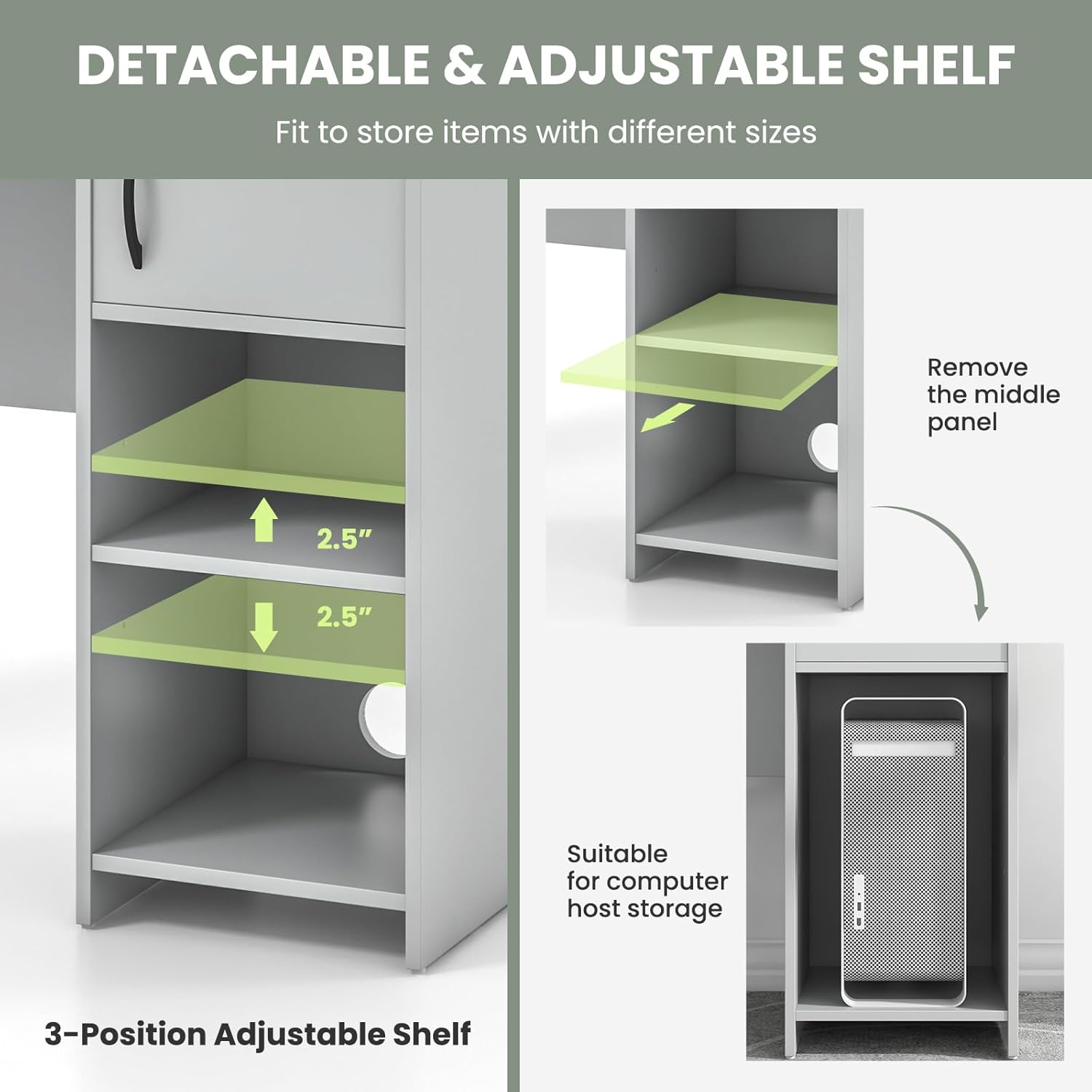
Figure 5.1: Diagram showing the 3-position adjustable shelf and the option to remove the middle panel for computer host storage.
5.2 Cable Management
Utilize the two integrated wire holes on the desktop and the back panel to route and organize your cables. This helps maintain a tidy workspace and prevents cable clutter.
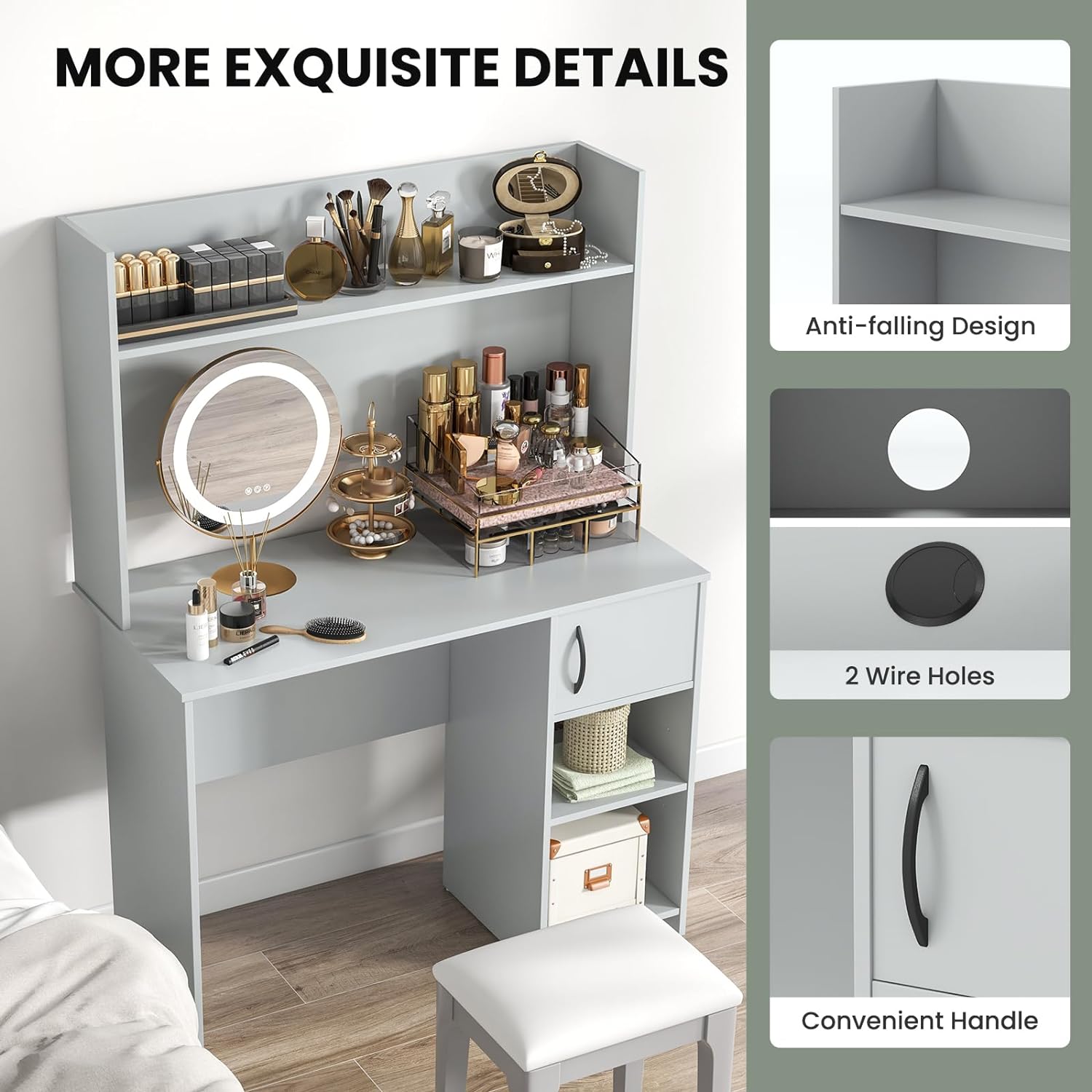
Figure 5.2: Detailed view of the anti-falling design on the hutch, the two wire holes for cable management, and the convenient handle for the cabinet door.
6. Maintenance
- Cleaning: Wipe the desk surfaces with a soft, damp cloth. Avoid harsh chemicals or abrasive cleaners that may damage the finish.
- Spills: Clean up spills immediately to prevent staining or damage to the engineered wood material.
- Fasteners: Periodically check all screws and fasteners to ensure they remain tight. Re-tighten as necessary to maintain stability.
- Avoid Direct Sunlight: Prolonged exposure to direct sunlight may cause fading or discoloration.
7. Troubleshooting
Common Issues and Solutions:
- Desk feels wobbly:
- Ensure all screws and fasteners are fully tightened.
- Verify the desk is placed on a level surface.
- Confirm the anti-tipping devices are correctly installed and secured to the wall.
- Parts do not fit together:
- Double-check the assembly guide to ensure you are using the correct parts for each step.
- Ensure parts are oriented correctly as shown in the diagrams.
- Do not force parts together; if a part seems incorrect, re-examine the instructions.
- Missing or damaged parts:
- Contact GOFLAME customer support immediately with your purchase details and a description of the missing or damaged part. Do not attempt to assemble with missing or damaged components.
8. Specifications
| Attribute | Detail |
|---|---|
| Brand | GOFLAME |
| Model Number | CB10684GR |
| Product Dimensions (L x W x H) | 41.5 x 19.5 x 58 inches (105.41 x 49.53 x 147.32 cm) |
| Color | Grey |
| Material | MDF, Engineered Wood |
| Weight Capacity | 210 lbs (95 kg) |
| Number of Shelves | 4 (including hutch shelf and 3-position adjustable shelf) |
| Assembly Required | Yes |
| Included Components | 1 x computer desk, assembly hardware, anti-tipping devices |

Figure 8.1: Detailed product dimensions including height, width, and depth of various sections of the desk.
9. Warranty and Support
The GOFLAME CB10684GR Computer Desk comes with a limited warranty. Please refer to the warranty information provided with your purchase for specific terms and conditions.
For technical assistance, missing parts, or warranty claims, please contact GOFLAME customer support through the retailer where the product was purchased or visit the official GOFLAME website for contact information.