
1. Introduction
This manual provides detailed instructions for the safe and effective use of the PEAKMETER PM8225C Digital Multimeter. This device is designed for measuring AC/DC voltage, AC/DC current, resistance, capacitance, frequency, diode, continuity, and Non-Contact Voltage (NCV) detection. Please read this manual thoroughly before operation and retain it for future reference.
2. Safety Information
WARNING: To avoid possible electric shock, fire, or personal injury, please read all safety information before using the product.
- Always ensure the multimeter is in good working condition and free from damage before use.
- Do not apply more than the rated voltage, as marked on the meter, between the terminals or between any terminal and earth ground.
- Use caution when working with voltages above 30V AC RMS, 42V peak, or 60V DC. These voltages pose a shock hazard.
- Always disconnect the test leads from the circuit before changing functions or ranges.
- Ensure the correct function and range are selected for the measurement.
- Replace the battery immediately when the low battery indicator appears to ensure accurate readings.
- Do not operate the meter around explosive gas, vapor, or dust.
- Adhere to local and national safety codes.
3. Product Overview
The PEAKMETER PM8225C is a robust digital multimeter designed for electricians and DIY enthusiasts. It features a large digital display and a smooth rotary dial for easy function selection.

Figure 3.1: PEAKMETER PM8225C Digital Multimeter showing its large screen and 20-position rotary dial.
The device is equipped with a high-quality PVC soft rubber protection cover and ABS fireproof material, providing double protection, double insulation, anti-drop, and wear-resistance for comfortable handling.

Figure 3.2: The PM8225C multimeter showcasing its durable protective casing.
3.1 Key Features
- Full Functioning: Measures AC/DC Voltage, AC/DC Current, Resistance, Capacitance, Frequency, Diode, Continuity, and NCV.
- Large Digital Display: 2.0-inch screen for clear readings.
- Rotary Dial: 20-position smooth rotary dial for easy function selection.
- Overload Protection: Designed with an oversized measurement range to prevent damage from accidental overloads.
- Durable Construction: PVC soft rubber protection cover and ABS fireproof material for enhanced durability and safety.

Figure 3.3: Icons representing the full range of functions available on the PM8225C multimeter.
4. Setup
4.1 Battery Installation
The PEAKMETER PM8225C requires 1 Lithium Polymer battery (included). To install or replace the battery:
- Ensure the multimeter is turned OFF and disconnect all test leads.
- Locate the battery compartment cover on the back of the device.
- Use a screwdriver to open the battery compartment.
- Insert the battery, observing the correct polarity (+ and -).
- Replace the battery compartment cover and secure it with the screw.
5. Operating Instructions
5.1 Power On/Off
To turn the multimeter ON, rotate the function dial from the 'OFF' position to any desired measurement function. To turn it OFF, rotate the dial back to the 'OFF' position. The device features an 'Auto Power Off' function to conserve battery life.
5.2 Basic Measurements
Always connect the black test lead to the 'COM' jack and the red test lead to the appropriate input jack (VΩmA for voltage, resistance, continuity, diode, capacitance, frequency; 10A for high current measurements).
5.2.1 DC Voltage Measurement (VDC)
- Set the rotary dial to the 'VDC' range.
- Connect the test leads in parallel to the circuit or component to be measured.
- Read the voltage value on the display.
5.2.2 AC Voltage Measurement (VAC)
- Set the rotary dial to the 'VAC' range.
- Connect the test leads in parallel to the circuit or component to be measured.
- Read the voltage value on the display.
5.2.3 DC Current Measurement (ADC)
- Set the rotary dial to the 'ADC' range (e.g., 400µA, 4mA, 40mA, 400mA, 10A).
- WARNING: Ensure the circuit is de-energized before connecting the meter in series.
- Connect the test leads in series with the circuit. For currents up to 400mA, use the VΩmA jack. For currents up to 10A, use the 10A jack.
- Apply power to the circuit and read the current value.
5.2.4 AC Current Measurement (AAC)
- Set the rotary dial to the 'AAC' range.
- WARNING: Ensure the circuit is de-energized before connecting the meter in series.
- Connect the test leads in series with the circuit. For currents up to 400mA, use the VΩmA jack. For currents up to 10A, use the 10A jack.
- Apply power to the circuit and read the current value.
5.2.5 Resistance Measurement (Ω)
- Set the rotary dial to the 'Ω' range.
- Ensure the circuit is de-energized and any capacitors are discharged.
- Connect the test leads across the component to be measured.
- Read the resistance value.
5.2.6 Non-Contact Voltage (NCV) Detection
- Set the rotary dial to the 'NCV' position.
- Move the top of the multimeter near a live conductor.
- The meter will indicate the presence of AC voltage through an audible beep and/or visual indicator.

Figure 5.1: Overview of the PM8225C's measurement ranges, including DC Voltage (400mV-600V), AC Voltage (40V-600V), DC Current (400µA-10A), and Resistance (400Ω-40MΩ).
6. Maintenance
6.1 Cleaning
Wipe the case with a damp cloth and mild detergent. Do not use abrasives or solvents. Ensure the meter is completely dry before use.
6.2 Battery Replacement
Refer to Section 4.1 for battery replacement instructions. Always use the specified battery type.
6.3 Fuse Replacement
If the current measurement function fails, the fuse may need replacement. Refer to the specifications for the correct fuse type and rating. Fuse replacement should only be performed by qualified personnel.
7. Troubleshooting
- No Display: Check battery installation and charge level. Replace batteries if necessary.
- Incorrect Readings: Ensure test leads are properly connected, the correct function/range is selected, and the battery is not low.
- Current Measurement Not Working: Check the fuse. If blown, replace with the correct type and rating.
- 'OL' or 'OVER' on Display: Indicates an overload or out-of-range measurement. Select a higher range or ensure the input is within the meter's limits.
8. Specifications
The following table details the specifications for the PEAKMETER PM8225C Digital Multimeter.

Figure 8.1: Detailed specifications and features for PM8225C and PM8225D models.
| Measurement Function | Range | Accuracy |
|---|---|---|
| DC Voltage | 600mV / 6V / 60V / 600V | ± (0.8% + 3) |
| AC Voltage | 6V / 60V / 600V | ± (1.2% + 5) |
| DC Current | 600µA / 6mA / 60mA / 600mA / 10A | ± (1.0% + 3) / ± (1.2% + 3) for 10A |
| AC Current | 600µA / 6mA / 60mA / 600mA / 10A | ± (1.2% + 3) / ± (1.5% + 3) for 10A |
| Resistance | 600Ω / 6kΩ / 60kΩ / 600kΩ / 6MΩ / 60MΩ | ± (1.0% + 3) / ± (1.2% + 3) for 60MΩ |
| Capacitance | 6nF / 60nF / 600nF / 6µF / 60µF / 600µF / 6mF / 60mF | ± (4.0% + 5) |
| Frequency | 10Hz - 10MHz | ± (1.0% + 3) |
| Duty Cycle | 1% - 99% | ± (3.0% + 3) |
| K-Type Thermocouple | -20°C - 1000°C / -4°F - 1832°F | ± (3.0% + 5) |
General Specifications
- Display: 6000 Counts
- Power Supply: 2 x 1.5V AAA Batteries (Note: Product specs mention 1 Lithium Polymer battery included, but the image table specifies 2xAAA. Please verify with product packaging.)
- Weight: Approximately 268g
- Dimensions: 166mm x 78mm x 64mm
- Safety Standard/Rating: EN61010-1, EN61010-2-033, EN61326, CAT.III 600V
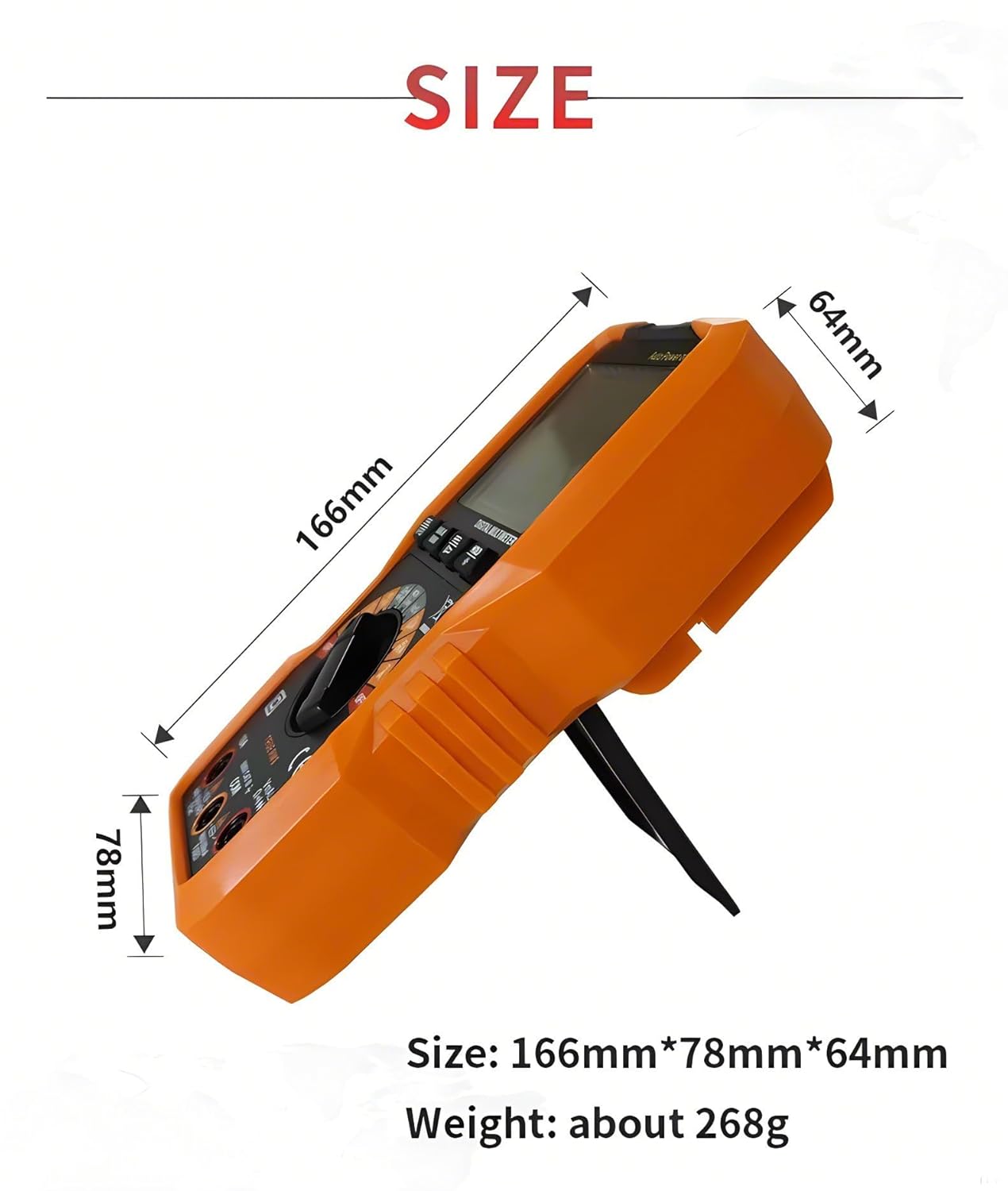
Figure 8.2: Physical dimensions and weight of the PM8225C multimeter.


