
1. Introduction
The KYORITSU Digital Multimeter series (KEW-1050, KEW-1051, KEW-1061, KEW-1062) offers high accuracy, performance, and reliability for a wide range of electrical measurements. These multimeters are designed for professional use in various applications, from basic electrical testing to advanced troubleshooting and laboratory work. This manual provides essential information for the safe and effective operation of your KYORITSU Digital Multimeter, specifically focusing on the KEW-1061 model.
2. Safety Information
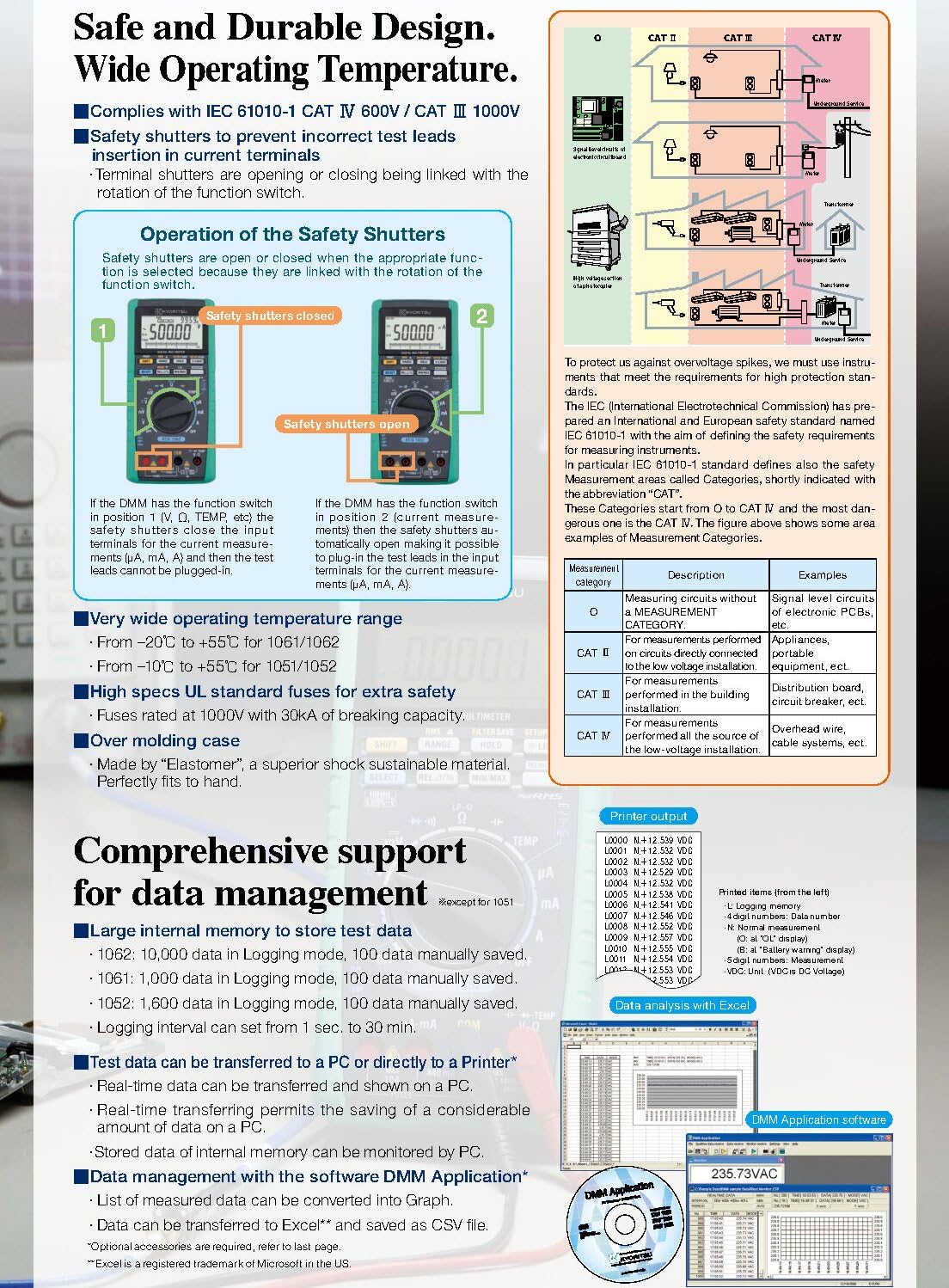
Always adhere to safety precautions when operating the multimeter. This device complies with IEC 61010-1 CAT IV 600V and CAT III 1000V safety standards, ensuring a high level of protection for industrial use. Key safety features include a terminal shutter mechanism to prevent incorrect test lead insertion into current terminals.
- Ensure the correct function and range are selected before making any measurements.
- Do not exceed the maximum input ratings for any function.
- Always inspect test leads for damage before use.
- Avoid working on live circuits whenever possible.
- Use appropriate personal protective equipment (PPE).
3. Product Overview
The KYORITSU Digital Multimeter is a robust and versatile instrument. It features a large 50,000-count display, dual display capability for simultaneous indication of AC and DC values or voltage and frequency, and True-RMS measurements for accurate readings of non-sinusoidal waveforms.

The multimeter's design includes a rotary switch for function selection, push buttons for range, hold, and other advanced features, and clearly labeled input terminals for various measurements.
4. Unboxing and Accessories
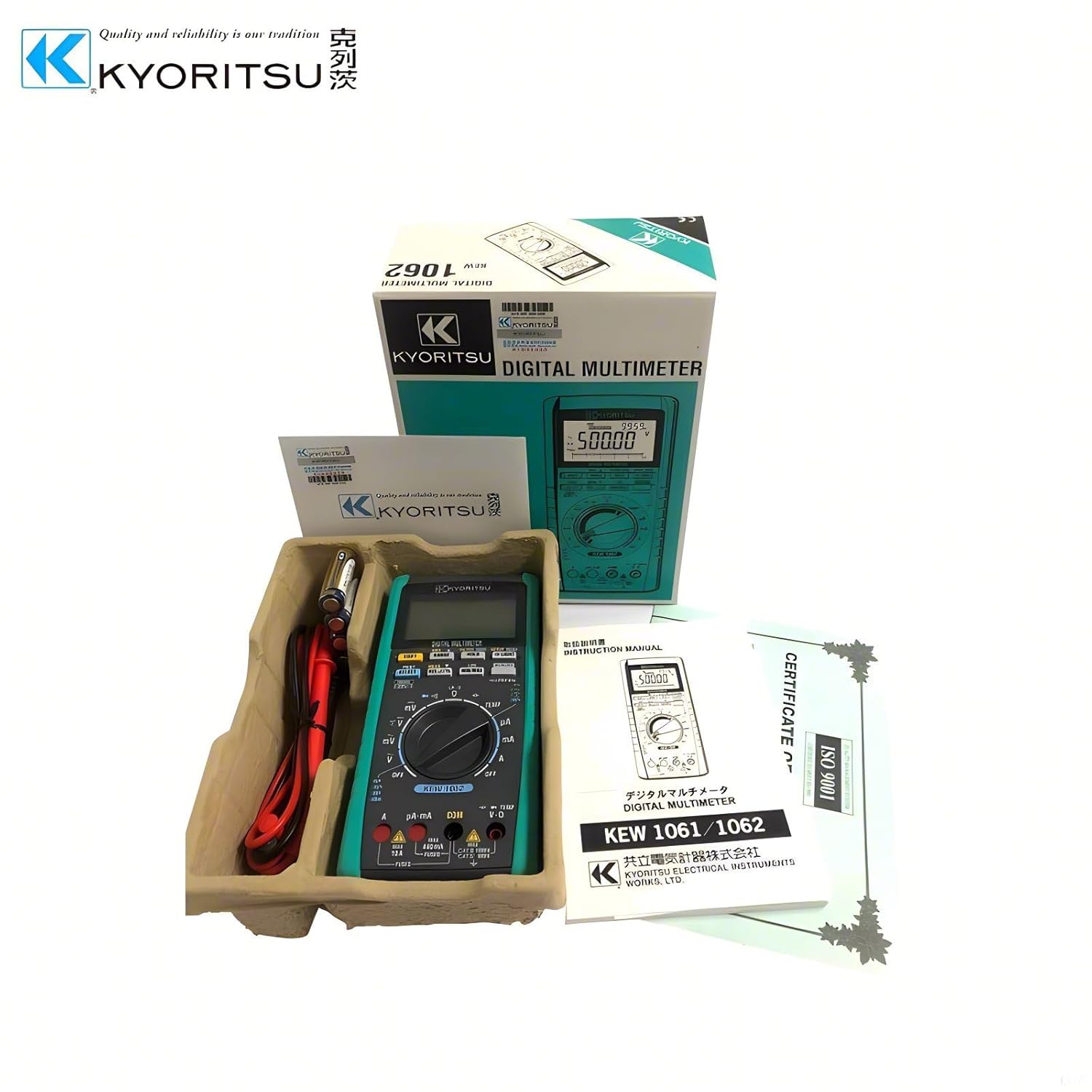
Upon opening the product packaging, verify that all standard accessories are included. The typical package contents are:
- KYORITSU Digital Multimeter (KEW-1061)
- Test Leads (Model 7220A)
- R6 (AA) 1.5V Batteries (x4)
- Instruction Manual
- Fuse (440mA/1000V) (Model 8926) (x1, included)
- Fuse (10A/1000V) (Model 8927) (x1, included)
5. Setup
Before initial use, install the batteries into the multimeter. The device requires four R6 (AA) 1.5V batteries. Locate the battery compartment on the rear of the unit, open it, insert the batteries observing polarity, and then securely close the compartment.
6. Operating Instructions
The KYORITSU Digital Multimeter offers a variety of measurement functions. Always ensure the correct function and range are selected using the rotary switch and function buttons before connecting the test leads to the circuit under test.
6.1. DC Voltage Measurement (DC V)
To measure DC voltage, set the rotary switch to the 'V' position and select DCV. Connect the red test lead to the 'VΩmA' terminal and the black test lead to the 'COM' terminal. Apply the test leads across the component or circuit to be measured.
6.2. AC Voltage Measurement (AC V)
For AC voltage measurements, set the rotary switch to the 'V' position and select ACV. Connect the red test lead to the 'VΩmA' terminal and the black test lead to the 'COM' terminal. The multimeter provides True-RMS measurements for accurate readings of complex AC waveforms.

6.3. Current Measurement (A, mA, µA)
To measure current, ensure the circuit is de-energized before connecting the multimeter in series. Select the appropriate current range (A, mA, or µA) on the rotary switch. Connect the red test lead to the 'A' or 'mA/µA' terminal and the black test lead to the 'COM' terminal. The terminal shutter system helps prevent incorrect connections.
6.4. Resistance (Ω), Capacitance, and Frequency (Hz)
These functions are selected via the rotary switch. Connect the test leads to the 'VΩmA' and 'COM' terminals for resistance and capacitance measurements. For frequency, connect the leads to the appropriate terminals as indicated on the meter.

6.5. Advanced Functions and Data Management
The KEW-1061 model includes advanced features such as Fast Peak Hold (250µs response time), Min/Max/AVG recording, and a large internal memory for data logging (1,000 data points for logging, 100 for manual). Data can be transferred to a PC via an optional USB interface for live monitoring and analysis.

7. Maintenance
To ensure the longevity and accuracy of your multimeter, perform regular maintenance. Keep the device clean and free from dust and moisture. Replace batteries when the low battery indicator appears on the display. If fuses blow, replace them with the specified types (8926 for 440mA/1000V and 8927 for 10A/1000V) to maintain safety and functionality.
8. Troubleshooting
If the multimeter does not function as expected, first check the battery level and ensure test leads are correctly inserted and not damaged. Verify that the correct function and range are selected for the measurement. For persistent issues, refer to the comprehensive troubleshooting section in the full instruction manual or contact KYORITSU customer support.
9. Specifications
| Specification | Detail |
|---|---|
| Detection Mode | True RMS |
| DC V Range | 50.000/500.00/2400.0mV/5.0000/50.000/500.00/1000.0V |
| DC V Basic Accuracy | ±0.02%rdg±2dgt |
| AC V Range | 500.00mV/5.0000/50.000/500.00/1000.0V |
| AC V Basic Accuracy | ±0.7%rdg±30dgt |
| Power Source | R6 (1.5V) × 4 (Auto power off: approx. 20 minutes) |
| Dimensions (L×W×D) | 192mm × 90mm × 49mm |
| Weight | Approx. 560g (including batteries) |
| Operating Temperature | -20 to 55°C |
| Safety Compliance | IEC 61010-1 CAT IV 600V, CAT III 1000V |
| Internal Memory (KEW 1061) | 1,000 data (logging), 100 data (manual) |
| Item Model Number | EC-KEW-1061 |
| Country of Origin | Japan |
10. Warranty and Support
The KYORITSU Digital Multimeter comes with a 1-year warranty from the date of purchase. For technical support, service, or warranty claims, please contact your authorized KYORITSU distributor or service center. Retain your proof of purchase for warranty validation.


