
1. Product Overview
The 2NLF Outdoor Wireless 5MP AI Security Camera Kit provides comprehensive surveillance for your home or business. This system features a 10.1-inch LCD touch monitor for intuitive control, 5-megapixel cameras for superior image quality, and advanced AI human motion detection. Designed for both indoor and outdoor use, the IP66-rated cameras ensure durability and resistance to various weather conditions.
2. What's in the Box
Your 2NLF Security Camera Kit includes the following components:
- 1x NVR with 10.1-inch LCD Touch Monitor
- 4x 5MP Wireless Cameras
- 1x Power Adapter for NVR (12V 2A)
- 4x Power Adapters for Cameras (12V 1A)
- 1x USB Mouse
- 1x HDMI Cable
- 1x Ethernet Cable
- Mounting Screws and Anchors for cameras
- User Manual
- Warning Stickers
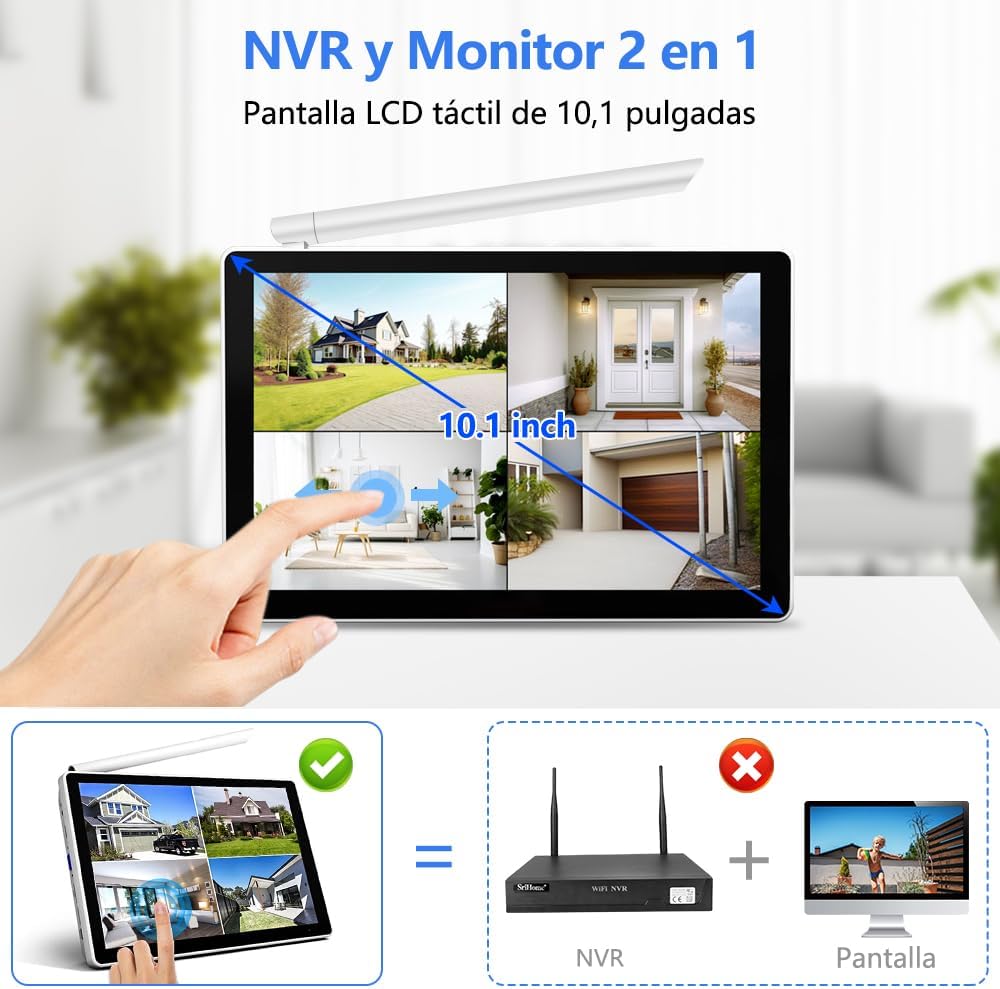
Figure 2.1: Overview of the 2NLF Security Camera Kit components, including the NVR with integrated 10.1-inch LCD touch monitor, four wireless cameras, and various accessories.
Video 2.1: This video demonstrates the unboxing process and shows all included items for a similar 2NLF wireless camera system. It provides a visual guide to verify package contents.
3. Setup Guide
3.1 Initial System Connection
- Connect the NVR: Plug the 12V 2A power adapter into the NVR. If using an external monitor, connect it to the NVR via the HDMI cable.
- Connect the Mouse: Plug the USB mouse into one of the NVR's USB ports.
- Power On: The NVR will power on automatically. Follow the on-screen prompts to select your language and configure basic settings.
- Network Setup: Connect the NVR to your router using the Ethernet cable for internet access, or configure the wireless network settings directly on the NVR's touch screen.
- Set System Password: Create a strong password for your NVR system as prompted.
Video 3.1: This video provides a product overview and demonstrates the initial connection of the NVR to a monitor and power for a similar 2NLF system.
3.2 Camera Installation
- Choose Location: Select a suitable location for each camera, ensuring good Wi-Fi signal strength and clear line of sight for surveillance. The cameras are IP66 rated for outdoor use.
- Mount the Camera: Use the provided mounting screws and anchors to securely attach the camera base to a wall or ceiling.
- Connect Power: Plug each camera into its respective 12V 1A power adapter.
- Solar Panel (Optional): If using solar panels (sold separately or included in specific kits), mount the solar panel in a location with direct sunlight and connect it to the camera's power input.

Figure 3.1: The camera is designed with IP66 waterproofing, making it suitable for outdoor installation and resistant to various weather conditions like rain and dust.

Figure 3.2: The system supports a wireless bridge mode, extending Wi-Fi coverage for cameras up to 60 meters, allowing flexible placement around your property.
Video 3.2: This video demonstrates the proper use of a waterproof cover for camera connections, ensuring protection against environmental elements.
4. Operating Instructions
4.1 Live View and Playback
Access live video feeds from all connected cameras directly on the 10.1-inch LCD touch monitor. Use the touch interface or USB mouse to navigate between single-camera view and multi-channel split-screen view (up to 8 channels). Recorded footage can be reviewed through the playback function on the NVR.
Figure 4.1: The 10.1-inch LCD touch monitor provides an integrated display for live viewing and system control, eliminating the need for an external screen.
4.2 AI Human Motion Detection and Alerts
The system features intelligent AI human motion detection to accurately identify human figures, reducing false alarms. When motion is detected, you will receive real-time alerts on your mobile device via the companion app.

Figure 4.2: The AI-powered detection system accurately identifies human movement, sending instant alerts to your mobile device for potential security risks.
4.3 Two-Way Audio
Each camera is equipped with a microphone and speaker, enabling two-way audio communication. You can listen in on the camera's surroundings and speak through the camera using the mobile app.
4.4 Night Vision
The cameras offer advanced night vision capabilities, including full-color night vision in low-light conditions and infrared (IR) night vision for complete darkness, ensuring clear surveillance 24/7.

Figure 4.3: The camera features intelligent night vision, offering both full-color and infrared (IR) modes to provide clear images in various low-light and dark environments.
4.5 PTZ Control (Pan-Tilt-Zoom)
Utilize the PTZ function to remotely pan, tilt, and zoom the camera's view. This feature allows you to adjust the camera's angle and focus as needed, providing flexible coverage.
Video 4.1: This video demonstrates partial functions of a similar 2NLF camera, including PTZ control, allowing users to remotely adjust the camera's viewing angle.
4.6 Mobile App Remote Access
Download the dedicated mobile application (e.g., SriHome or Eseecloud, refer to NVR screen for QR code) to your smartphone. After registering an account and adding your device by scanning the QR code on the NVR, you can view live feeds, receive alerts, and control your cameras remotely from anywhere.

Figure 4.4: The mobile application allows for multi-user viewing and provides a reference for NVR HDD recording capacity based on camera resolution.
5. Maintenance
- Regular Cleaning: Periodically clean the camera lenses and housing with a soft, damp cloth to ensure clear image quality. Avoid abrasive cleaners.
- Check Connections: Ensure all power and network cables are securely connected and free from damage.
- Firmware Updates: Check for and install any available firmware updates for the NVR and cameras to ensure optimal performance and security.
- Storage Management: Regularly review recorded footage and manage storage space. The system supports up to 16TB of storage, allowing for extended recording periods (e.g., 30 days with 500GB HDD).
- Environmental Protection: While cameras are IP66 rated, avoid directing high-pressure water jets directly at them during cleaning.
6. Troubleshooting
| Problem | Possible Solution |
|---|---|
| No Video Display on Monitor |
|
| Cameras Not Connecting/Offline |
|
| No Mobile App Notifications |
|
| Poor Image Quality |
|
7. Specifications
- Model Number: GAD3016WT1
- Video Capture Resolution: 1920p (5MP cameras)
- Monitor: 10.1-inch LCD Touch Screen
- Number of Channels: 8 (supports up to 8 cameras)
- Night Vision Range: 20 Meters
- Connectivity Technology: Wireless (Wi-Fi)
- Special Features: Siren Alarm, Two-Way Audio, PTZ Control, App Control, Night Vision (Color/IR), AI Human Motion Detection
- Indoor/Outdoor Use: Outdoor, Indoor (IP66 rated)
- Power Source: Corded Electric
- Storage: 500GB HDD included, expandable up to 16TB
- Dimensions (NVR): 32 x 22 x 25.4 cm

Figure 7.1: Detailed diagram showing the NVR's ports (audio out, HDMI, VGA, LAN, USB, 12V power) and camera components (antenna, HD lens, white light, infrared light, reset button, power port, speaker).

Figure 7.2: An image representing the 2NLF brand's commitment to home security solutions.
8. Warranty and Support
2NLF is committed to providing reliable security solutions. For any product-related inquiries or technical assistance, please refer to the contact information provided in your product packaging or visit the official 2NLF website. The product typically includes a 1-year warranty and 30-day money-back guarantee. Lifetime technical support is also generally provided.
For further assistance, you may contact customer support through the provided channels:
- Local Business Support
- Live Chat
- Email Support
Your security and privacy are our top priorities, with data protection measures such as AES128 and TLS 1.2 encryption.