
1. Product Overview
The Seevoo Ergonomic Office Chair (Model SV23) is designed to provide comfort and support for extended periods of sitting. It features adjustable components to customize your seating experience, including lumbar support, seat height, and recline angle. The chair combines breathable mesh for the backrest with a durable PU leather seat cushion, all supported by a robust steel base and smooth-gliding blade wheels.

Figure 1: Seevoo Ergonomic Office Chair in a typical office environment.
2. Safety Information
Please read and understand all instructions before assembly and use. Retain this manual for future reference.
- Maximum Weight Capacity: This chair has a maximum weight capacity of 300 pounds (136 kg). Do not exceed this limit.
- Proper Use: Improper use of adjustable features, such as the lumbar support, reclining angle, and flip-up armrests, could lead to instability or injury. Always follow the assembly instructions and guidelines for safe use.
- Assembly: Ensure all screws and bolts are securely tightened before using the chair. Periodically check and re-tighten fasteners as needed.
- Floor Protection: While blade wheels are designed for smooth movement, consider using a chair mat on delicate flooring to prevent potential marks or scratches.
3. Setup and Assembly
The Seevoo Ergonomic Office Chair is designed for straightforward assembly. All necessary tools and hardware are included. Follow the step-by-step instructions provided in the packaging for detailed guidance.
Key Assembly Steps:
- Attach the casters (blade wheels) to the steel base.
- Insert the gas lift cylinder into the center of the base.
- Secure the armrests to the seat cushion using the provided screws.
- Attach the backrest to the seat cushion and armrests.
- Mount the headrest to the top of the backrest.
- Place the assembled seat and backrest onto the gas lift cylinder.

Figure 2: Overview of ergonomic features and adjustable components.
4. Operating Instructions
4.1 Seat Height Adjustment
To adjust the seat height, locate the lever on the right side beneath the seat. Pull the lever upwards while taking your weight off the seat to raise it. To lower the seat, pull the lever upwards while remaining seated. The chair offers a 4.7-inch adjustable height range.
4.2 Reclining Function
The chair features a reclining angle from 90° to 130°. To recline, pull the lever on the left side of the seat outwards. Lean back to your desired angle and push the lever inwards to lock the position. To return to an upright position, pull the lever outwards, lean forward slightly, and then push the lever inwards to lock.

Figure 3: Illustration of the chair's reclining capabilities and tilt tension adjustment.
4.3 Adjustable Lumbar Support
The chair includes adjustable lumbar support designed to conform to the shape of the human spine. Adjust the knob on the backrest to increase or decrease the lumbar pressure for personalized comfort.
4.4 Flip-Up Armrests
The padded armrests can be flipped up to provide more seating space or to allow the chair to be pushed closer to a desk. Simply lift the armrests upwards until they lock into the vertical position. To lower them, pull them slightly outwards and then push them down.
4.5 Adjustable Headrest
The large-area headrest can be adjusted in height and angle. To adjust the height, pull the headrest upwards or push it downwards. To adjust the angle, tilt it forward or backward to find your preferred position for neck support.
5. Maintenance
To ensure the longevity and appearance of your Seevoo Ergonomic Office Chair, follow these simple maintenance guidelines:
- Cleaning: Wipe clean with a damp cloth. Avoid harsh chemicals or abrasive cleaners that may damage the mesh fabric or PU leather.
- Inspection: Periodically check all screws and connections to ensure they are tight. Re-tighten if necessary.
- Avoid Direct Sunlight: Prolonged exposure to direct sunlight can cause the materials to fade or degrade.
6. Troubleshooting
If you encounter any issues with your Seevoo Ergonomic Office Chair, please refer to the following common solutions:
- Chair feels unstable: Ensure all assembly screws are fully tightened. Check that the gas lift is properly seated in the base.
- Difficulty adjusting height/recline: Verify that the levers are engaged correctly. Ensure no obstructions are preventing movement.
- Squeaking noises: Check and tighten any loose screws. A small amount of lubricant can be applied to moving parts if necessary.
For persistent issues, please contact customer support.
7. Specifications
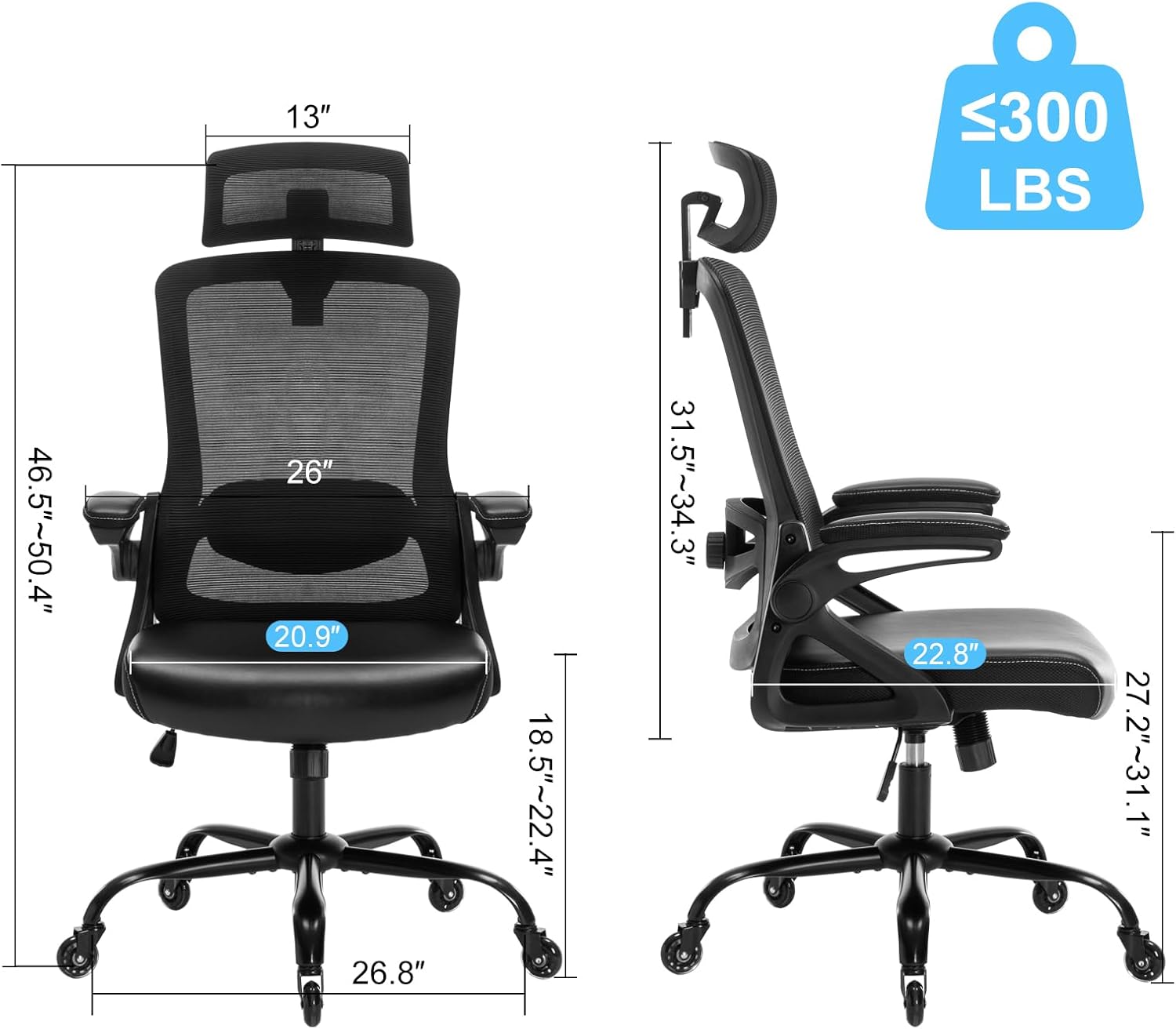
Figure 4: Detailed dimensions of the Seevoo Ergonomic Office Chair.
| Feature | Detail |
|---|---|
| Brand | Seevoo |
| Model Name | SV23 |
| Product Dimensions | 26"D x 26"W x 50.4"H |
| Maximum Weight Recommendation | 300 Pounds |
| Seat Height | Adjustable (approx. 18.5" - 22.4") |
| Seat Length | 20.9 Inches |
| Reclining Position Count | 3 (90°-130°) |
| Special Features | Adjustable Height, Adjustable Lumbar, Ergonomic, Reclining, Flip-up Armrests, Blade Wheels |
| Back Style | High back mesh |
| Seat Material | PU Leather with 4-inch thick foam cushion |
| Base Material | Steel |
| Item Weight | 32 pounds |
8. Warranty and Support
Seevoo offers a 5-year warranty on this product. This warranty covers manufacturing defects and ensures the quality and durability of your office chair.
For any questions, concerns, or warranty claims, please contact our professional after-sales service team via email. We are committed to providing a 100% satisfactory response within 24 hours.
Thank you for choosing the Seevoo Ergonomic Office Chair.