
1. Introduction
This manual provides detailed instructions for the installation, setup, and operation of your NINETOM 10.25 inch Touchscreen Wireless CarPlay Android Auto Multimedia Car Radio Receiver. This unit is designed to enhance your driving experience by integrating modern connectivity and entertainment features while retaining your vehicle's original functionalities.

Figure 1: NINETOM 10.25 inch Touchscreen Car Radio Receiver
Key Features:
- Built-in Wireless CarPlay & Android Auto for seamless smartphone integration.
- Retains all original vehicle functions, including radio, amplifier, joystick control, and original reversing camera.
- Upgraded 1920x720 HD resolution touchscreen for clear visuals.
- Automatic light sensitivity for day and night mode adjustment.
- Plug-and-play installation without cutting or breaking original car cables.
Compatibility Notes:
This touchscreen is specifically compatible with the BMW NBT system found in BMW 5 Series F10 / F11 models from 2012 to 2016. It is not compatible with other systems (e.g., CIC, EVO ID5, EVO ID6) or the BMW F07 model. Please verify your vehicle's system before installation.

Figure 2: NBT System Compatibility Check
2. Package Contents
Please ensure all the following items are included in your package:
- 10.25 inch Touchscreen Unit
- Power Cable Harness
- USB Cable
- AUX Cable
- GPS Antenna
- Other necessary installation accessories

Figure 3: Product Unit and Included Accessories
3. Installation Guide
The installation process is designed to be plug-and-play, utilizing the original car cables to avoid cutting or damaging existing wiring. If you encounter any difficulties, please contact support.
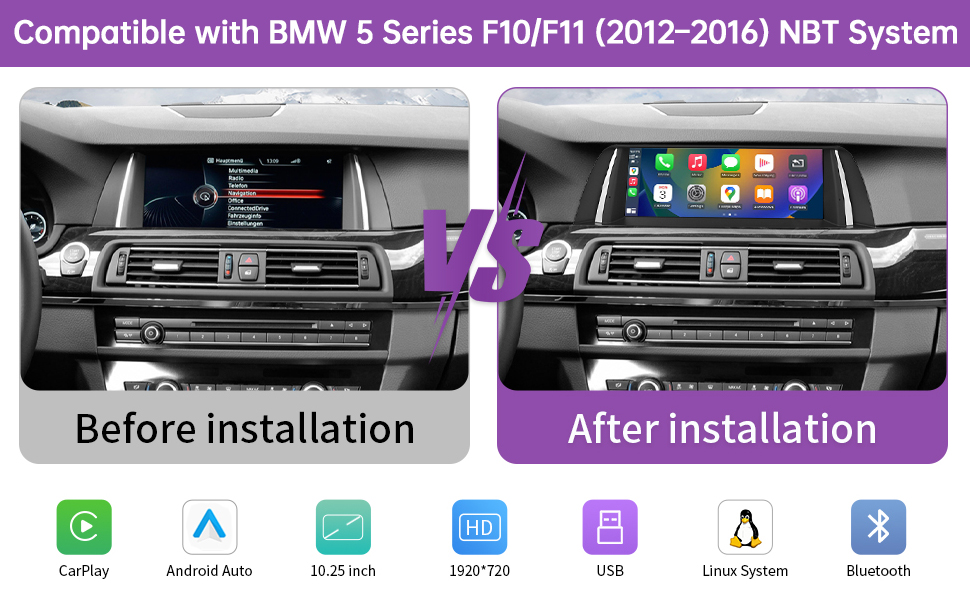
Figure 4: Before and After Installation View
Optical Fiber Cable Installation:
If your original vehicle has an optical fiber cable, it must be transferred from the original connector to the new power harness to ensure proper functionality.
Video 1: How to Relocate Optic Cables to Linux Harness for BMW. This video demonstrates the process of moving the optical fiber cable from the original car harness to the new power cable harness for correct audio signal transmission.
Follow the steps in the video to correctly relocate the optical fiber cable.
4. Setup
System Switching:
The NINETOM unit allows seamless switching between its Linux system (with CarPlay/Android Auto) and your original BMW NBT system. To switch, simply long-press the 'MENU' button on your iDrive controller for 3 seconds. You can also touch the 'Original car interface' icon on the new screen to return to the original system, and touch anywhere on the original system screen to return to the new system.
Video 2: System Switching for BMW CIC and NBT. This video demonstrates how to switch between the new system and the original vehicle system using both touchscreen and iDrive controller.

Figure 5: System Switching via MENU Button
Sound Setup:
Proper sound configuration is crucial for optimal audio quality. Ensure your AUX input is correctly set up and Bluetooth connections are managed to avoid sound distortion.
Video 3: Audio Settings for Linux Screen for BMW CIC and NBT. This video guides you through the necessary audio settings for the new Linux screen, including AUX and Bluetooth configurations.
Resolution Setup:
To ensure the best visual experience and correct display of the original OEM system, set the screen resolution appropriately. Incorrect resolution settings can lead to display issues.
Video 4: Original Resolution Settings for BMW. This video demonstrates how to adjust the screen resolution to match your original BMW system for optimal display.

Figure 6: Resolution Comparison (1920x720 HD)
5. Operating Instructions
Wireless CarPlay & Android Auto:
The unit features built-in wireless CarPlay and Android Auto. Connect your smartphone via Bluetooth and Wi-Fi to access navigation, make calls, send messages, and enjoy music directly on the touchscreen.
Video 5: How to Set Up Wireless CarPlay on BMW. This video provides a step-by-step guide to connecting your iPhone for wireless CarPlay functionality.

Figure 7: Wireless CarPlay and Android Auto Interface
Mirror Link Functionality (AirPlay & AutoLink):
The unit supports screen mirroring via AirPlay for iPhones and AutoLink for Android devices, allowing you to display your phone's screen directly on the car's display.
Video 6: How to Set Up AirPlay on BMW. This video demonstrates the process of setting up AirPlay to mirror your iPhone's screen to the NINETOM display.

Figure 8: Mirror Link in Operation
Day and Night Mode:
The screen features automatic light sensitivity, adjusting its display between day and night modes based on your car's original headlights for comfortable viewing.

Figure 9: Automatic Day and Night Mode
Original Functions Retention:
The NINETOM touchscreen is designed to retain all original vehicle functions, ensuring no loss of existing features.
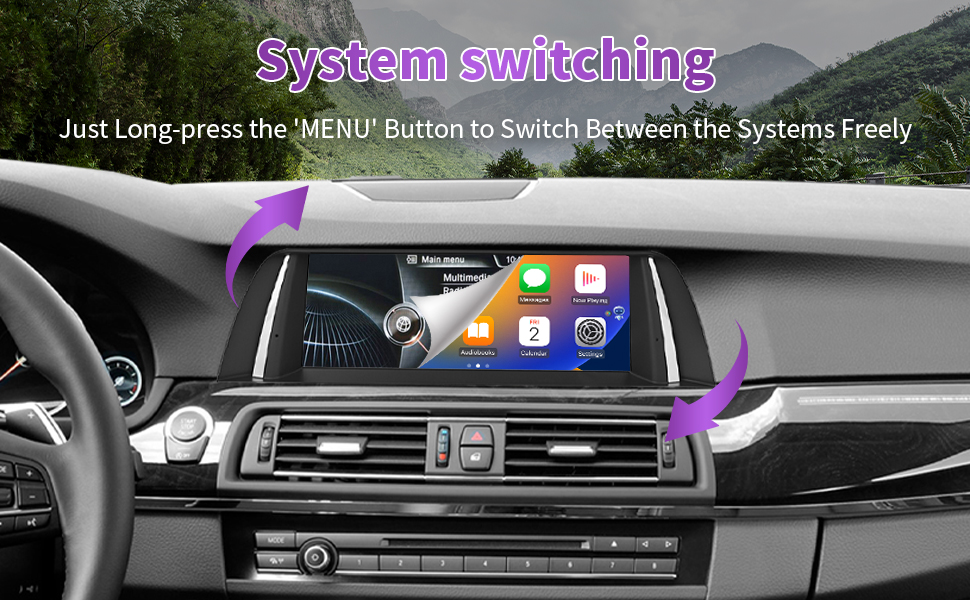
Figure 10: Retained Original Car Functions
Rear Camera and Radar Support:
The unit supports both original OEM and aftermarket rearview cameras, as well as parking radar systems, integrating them seamlessly into the new display.
Video 7: 10.25" Touchscreen for BMW 5 Series NBT F10/F11. This video provides a general overview of the touchscreen's features, including a demonstration of the reverse camera functionality.
6. Troubleshooting
Troubleshooting AUX Input Issues:
- Has the optical fiber cable been transferred to the new power harness?
- Has the "Use Car's BT Channel" option been turned off?
- Has the phone's Bluetooth connection to the vehicle been disconnected?
- Has the AUX cable been connected, and its input volume turned up?
- If there is noise, try connecting or disconnecting the GND cable.
Troubleshooting Vehicle Bluetooth Audio Issues:
- Has the optical fiber cable been transferred to the new power harness?
- Has the "Use Car's BT Channel" option been turned on?
- Has the phone's Bluetooth been connected to the vehicle's Bluetooth instead of the screen's Bluetooth?
- Has the Bluetooth been selected as the audio output in the original vehicle system?
- Has the phone's sound output mode been set to the vehicle's Bluetooth rather than its speaker?
Important Sound Reminder:
The vehicle's Bluetooth sound mode only supports CarPlay and Android Auto. If you are using screen mirroring or USB to play music/videos, please use AUX sound mode for audio output.
7. Specifications
| Feature | Specification |
|---|---|
| Display Size | 10.25 Inches |
| Screen Resolution | 1920 x 720 HD |
| Operating System | Linux |
| Connectivity Technology | USB, Wireless |
| Controller Type | Touch Screen |
| Special Feature | Built-in Wired and Wireless CarPlay & Android Auto |
| Compatible Devices | Smartphone |
| Item Weight | 4.18 pounds (1.9 Kilograms) |
| Package Dimensions | 15.35 x 7.32 x 6.81 inches |
| Model Number | 799f77e8-a408-46b7-9d53-8810488f5539 |
8. Warranty and Support
NINETOM is committed to providing reliable, high-performing products and excellent customer service. Your product is covered by a manufacturer's warranty. For specific warranty details, please refer to the documentation included with your purchase or contact NINETOM customer support.
If you encounter any installation issues, operational problems, or require technical assistance, please do not hesitate to reach out to our support team. Contact information can typically be found on our official website or through your purchase platform.
