
1. Introduction
The ENERGYWELL P6 is an external LiFePO4 battery pack designed to provide extended power to your dashcam, particularly for parking surveillance modes. With an 8000 mAh capacity, it can power a dashcam for up to 36 hours in parking mode. This battery pack features an LCD screen that automatically calculates remaining parking mode autonomy. Utilizing an external battery like the P6 can also help protect your vehicle's battery from discharge. The ENERGYWELL P6 is compatible with most dashcams that support a parking surveillance mode.
2. Package Contents
Please check the box for the following items:
- ENERGYWELL P6 Battery Pack
- Cigarette Lighter Power Cable (Male)
- Dashcam Output Cable (3-wire power cable)
- Hardwiring Power Cable for Dashcam (Fuse Box Connection)
- Fuse Tap Kit (3 types)
- 4 Velcro Strips
- User Manual

Image: The ENERGYWELL P6 battery pack shown with all its included accessories, such as various power cables, fuse taps, and Velcro strips.
3. Product Overview
The ENERGYWELL P6 battery pack features a robust design with multiple input and output options, along with an intuitive LCD display for monitoring status.
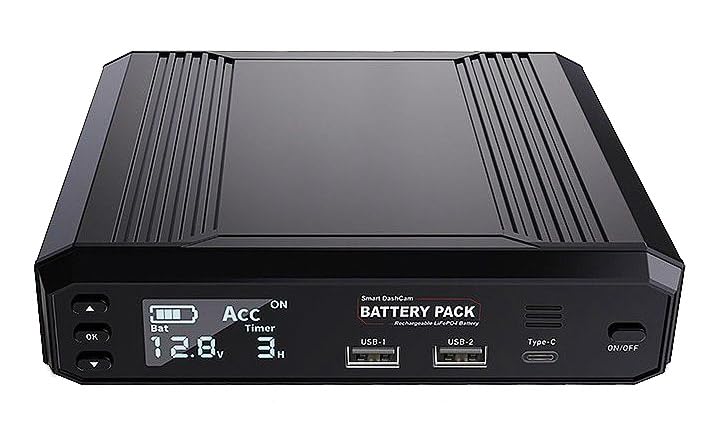
Image: Front view of the ENERGYWELL P6 battery pack, displaying the LCD screen, two USB-A ports, one USB-C port, and the On/Off button.
3.1. Front Panel
- LCD Screen: Displays battery level, voltage, ACC status, and estimated parking mode duration.
- OK Button: For menu navigation and confirmation.
- Up/Down Buttons: For adjusting settings or navigating menus.
- USB-1 & USB-2 Ports: 5-12V / 20W 3A maximum output.
- Type-C Port: 5-20V / 45W 3A maximum output, also supports 5-20V / MAX45W-20V2.25A input.
- ON/OFF Button: Powers the unit on or off.
3.2. Rear Panel

Image: Rear view of two ENERGYWELL P6 battery packs, highlighting the DC IN 12V port, MODE switch, LIGHT button, EXT BAT port, and the main OUTPUT port.
- DC IN 12V Port: Main power input (11.5-15V / 5A).
- MODE Switch: For selecting operating modes.
- LIGHT Button: Activates the LED light.
- EXT BAT Port: For connecting an optional complementary battery.
- OUTPUT Port: Main output for dashcam (11-14.2V / 2A max).
4. Installation
The ENERGYWELL P6 offers flexible installation options to suit your vehicle's setup. Ensure the vehicle is turned off before beginning installation.

Image: A diagram illustrating two primary connection methods for the ENERGYWELL P6: via a cigarette lighter socket or by hardwiring to the vehicle's fuse box.
4.1. Option 1: Cigarette Lighter Input
- Connect the provided cigarette lighter power cable to the DC IN 12V port on the ENERGYWELL P6.
- Plug the cigarette lighter adapter into your vehicle's 12V accessory socket.
- Connect your dashcam's original power cable to the OUTPUT port of the ENERGYWELL P6.
- Ensure the dashcam is set to parking surveillance mode if applicable.
Note: With ACC on, the dashcam will function normally. With ACC off, the dashcam will enter parking mode, providing 30+ hours of recording.
4.2. Option 2: Fuse Box Hardwiring (Recommended)
This method provides a more secure and permanent installation, recommended for optimal performance of parking mode surveillance.
- Identify a suitable fuse in your vehicle's fuse box for constant power (B+) and an ACC (Accessory) fuse that is only active when the ignition is on. Consult your vehicle's manual for fuse box diagrams.
- Using the provided hardwiring power cable and fuse tap kit, connect the B+ wire to a constant power fuse and the ACC wire to an accessory fuse. The ground wire (GND) should be securely attached to a metal part of the vehicle chassis.
- Connect the hardwiring cable to the DC IN 12V port on the ENERGYWELL P6.
- Connect your dashcam's original power cable to the OUTPUT port of the ENERGYWELL P6.
- Ensure the dashcam is configured for parking surveillance mode.
Note: This setup allows the ENERGYWELL P6 to charge when the vehicle is running (ACC on) and power the dashcam in parking mode when the vehicle is off (ACC off).
5. Operating Instructions
5.1. Powering On/Off
Press and hold the ON/OFF button on the front panel to power the unit on or off.
5.2. LCD Display
The LCD screen provides real-time information about the battery pack's status:
- Battery Icon: Indicates the current charge level.
- Voltage (e.g., 12.8V): Shows the current output voltage.
- ACC ON/OFF: Indicates whether the vehicle's accessory power is active.
- Timer (e.g., 3H): Estimates the remaining operating time in parking mode based on current dashcam consumption.
5.3. Parking Surveillance Mode
When the ENERGYWELL P6 is connected via hardwiring (Option 2) and the vehicle's ignition is turned off (ACC off), the battery pack will automatically switch to powering the dashcam for parking surveillance. The LCD screen will display the estimated remaining time for this mode.
5.4. USB and Type-C Outputs
The USB-A and Type-C ports provide independent power output and are always on, allowing you to charge other devices even when the main dashcam output is off or in parking mode.
5.5. LED Light
Press the LIGHT button on the rear panel to activate the integrated LED light for convenience in low-light conditions.
6. Maintenance and Care
6.1. Battery Charging
The ENERGYWELL P6 charges automatically when connected to the vehicle's ACC power (ignition on) via either the cigarette lighter or hardwiring connection. Ensure regular vehicle use to keep the battery pack charged.
6.2. Temperature Guidelines
To ensure optimal performance and longevity of the LiFePO4 battery, adhere to the following temperature ranges:
- Charging Temperature: 0 °C to 45 °C (32 °F to 113 °F)
- Discharge Temperature: -10 °C to 60 °C (14 °F to 140 °F)
- Storage Temperature: -20 °C to 45 °C (-4 °F to 113 °F)
The unit features high-temperature cutoff at approximately 80 °C (176 °F) and low-temperature cutoff below 0 °C (32 °F) to protect the battery.
6.3. General Care
- Keep the battery pack dry and away from moisture.
- Avoid exposing the unit to direct sunlight for prolonged periods, especially in hot climates.
- Clean the exterior with a soft, dry cloth. Do not use harsh chemicals or abrasive cleaners.
7. Troubleshooting
7.1. Battery Pack Not Charging
- Ensure all cables are securely connected to the battery pack and the vehicle's power source.
- Verify that the vehicle's ignition is on (ACC active) if using the hardwiring or cigarette lighter connection.
- Check the vehicle's fuse for the cigarette lighter socket or the hardwired connection. Replace if blown.
7.2. Dashcam Not Receiving Power
- Confirm the ENERGYWELL P6 is powered on.
- Check the connection between the battery pack's OUTPUT port and the dashcam.
- Ensure the battery pack has sufficient charge.
7.3. LCD Screen Not Displaying Information
- Ensure the battery pack is powered on.
- If the screen remains blank, try cycling the power.
7.4. Short Parking Mode Duration
- Ensure the battery pack is fully charged.
- Verify your dashcam's power consumption in parking mode. Higher consumption will reduce duration.
- Consider connecting an optional complementary battery to the EXT BAT port for extended duration.
8. Specifications
| Feature | Specification |
|---|---|
| Model Name | ENERGYWELL P6 |
| Battery Type | LiFePO4 (Lithium Iron Phosphate) |
| Capacity | 12.8 V / 8000 mAh |
| Product Dimensions | 16.2 x 16.0 x 3.8 cm (Length x Width x Thickness) |
| Charging Temperature | 0 °C – 45 °C (32 °F – 113 °F) |
| Discharge Temperature | -10 °C – 60 °C (14 °F – 140 °F) |
| Storage Temperature | -20 °C – 45 °C (-4 °F – 113 °F) |
| High Temperature Cutoff | Approx. 80 °C (176 °F) |
| Low Temperature Cutoff | Below 0 °C (32 °F) |
| ACC/DC-IN Input | 12V – 11.5-15 V / 5A |
| Type-C Input | 5-20 V / MAX45W-20V2.25A |
| ACC Output | 11.5-12 V / 3A |
| Type-C Output | 5-20 V / 45 W 3A Max |
| USB-1/2 Output | 5-12V / 20W 3A maximum |
| Dashcam Output Support | 11 V–14.2 V / 2 A (max) |
| Additional Features | LED lighting, BMS (Battery Management System) |
9. Safety Information
Please read and follow these safety precautions to prevent damage to the product or injury to yourself:
- Do not disassemble, modify, or repair the battery pack. This may cause fire, electric shock, or damage.
- Keep the unit away from water, high humidity, and extreme temperatures.
- Avoid dropping or subjecting the unit to strong impacts.
- Do not expose the battery pack to open flames or dispose of it in fire.
- Use only the provided cables and accessories with the ENERGYWELL P6.
- Keep out of reach of children.
- If the battery pack shows signs of damage, swelling, or leakage, discontinue use immediately and contact customer support.
10. Warranty and Support
Information regarding warranty coverage and customer support for the ENERGYWELL P6 battery pack is typically provided at the point of purchase or within separate warranty documentation. Please refer to your purchase receipt or contact the retailer/manufacturer directly for details on warranty terms, technical assistance, and service.