
MEIKEE d28207c9-0c9c-40c4-8e62-3e51ed291ee8
MEIKEE Solar Spotlights User Manual
Model: d28207c9-0c9c-40c4-8e62-3e51ed291ee8
1. Product Overview
The MEIKEE Solar Spotlights are designed to illuminate your outdoor spaces with efficiency and versatility. These solar-powered landscape lights feature a durable, waterproof design and offer multiple lighting modes and color temperatures to suit various needs.

Image: Overview of the MEIKEE Solar Spotlights, showing both the 6-in-1 and 4-in-1 configurations with their respective solar panels, spotlights, and remote controls. Different light colors are also depicted.
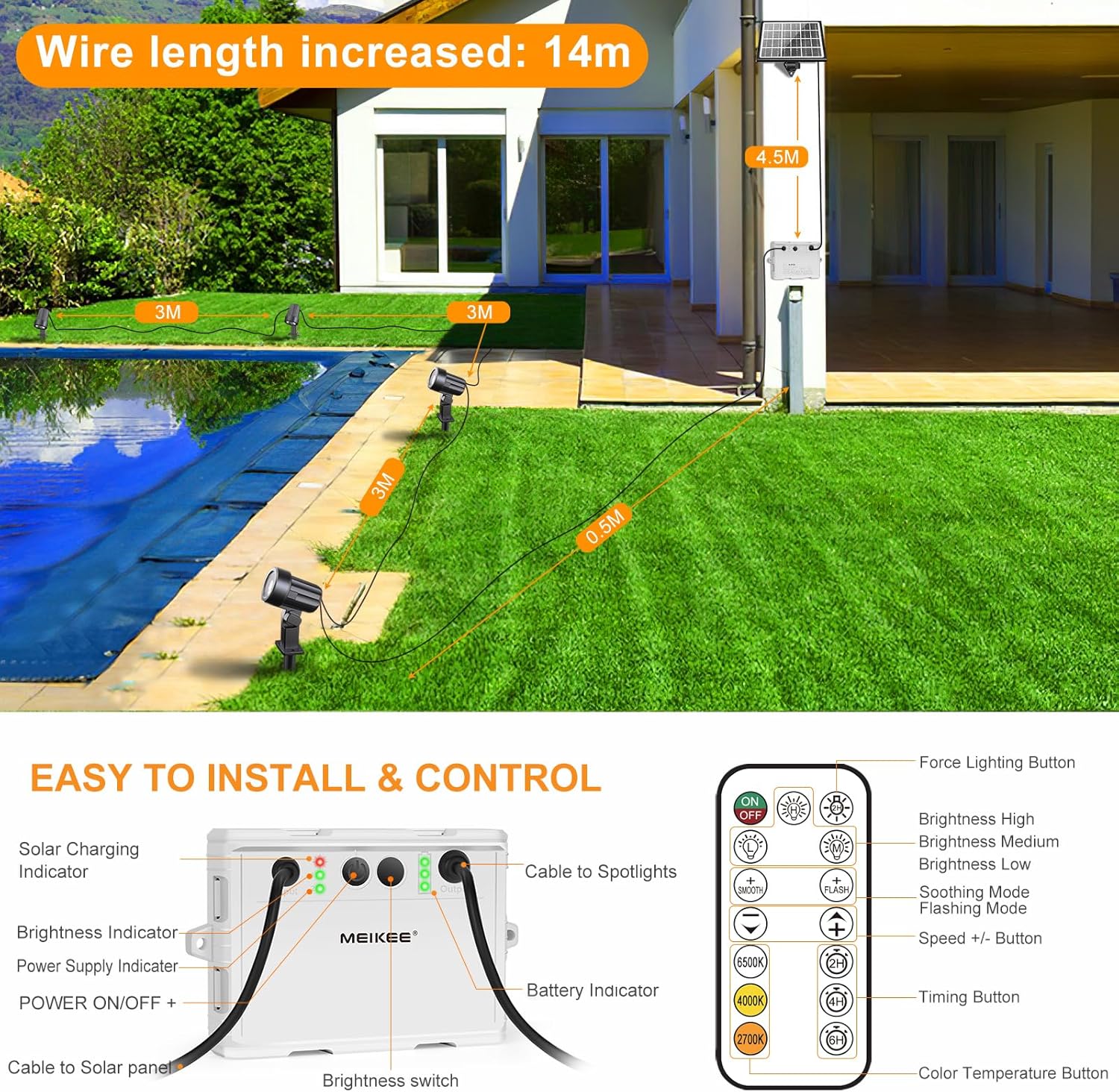
Image: Detailed view of the MEIKEE Solar Spotlights control box and the remote control. Labels indicate connections for the solar panel and spotlights, brightness indicators, and various remote functions like brightness, timing, and color temperature adjustments.
Key Features:
- Solar Powered: Equipped with high-efficiency solar panels and built-in rechargeable batteries for automatic dusk-to-dawn operation.
- Multiple Brightness Levels: Offers 3 levels of brightness (50%, 70%, 100%) to customize illumination.
- Adjustable Color Temperatures: Choose from 2700K (warm white), 4000K (neutral white), and 6500K (cool white).
- Versatile Working Modes: Includes Static, Breathing, and Strobe modes for dynamic lighting effects.
- IP66 Waterproof: Fully sealed control box and durable construction ensure resistance to rain, snow, and other harsh weather conditions.
- Remote Control: Conveniently adjust settings, modes, and timing functions from a distance.
- Timing Function: Set the lights to automatically turn off after 2, 4, or 6 hours.
- Memory Function: The lights remember your last setting, eliminating the need to reset them each time.
- Flexible Installation: Can be installed in the ground using stakes or mounted on a wall with included screws.
- Long Cable Length: Each ground light comes with a 118-inch (3m) cable, allowing for flexible placement.
2. Specifications
| Feature | Detail |
|---|---|
| Brand | MEIKEE |
| Model Number | d28207c9-0c9c-40c4-8e62-3e51ed291ee8 |
| Power Source | Solar Powered, Battery Powered |
| Battery Type | Rechargeable (5000mAh capacity) |
| Light Source Type | LED |
| Brightness | Up to 800 lumens |
| Color Temperatures | 2700K (Warm White), 4000K (Neutral White), 6500K (Cool White) |
| Water Resistance Level | IP66 Waterproof |
| Control Method | Remote Control |
| Cable Length (per light) | 118 inches (3 meters) |
| Adjustability | 180° adjustable (up or down) |
| Included Components | Remote Control, Mounting Hardware |
| Remote Batteries | 2 AAA batteries (included) |
3. Setup and Installation
The MEIKEE Solar Spotlights offer flexible installation options for various outdoor environments.
What's in the Box:
- Solar Panel with Control Box
- Spotlight Units (4 or 6 depending on model)
- Ground Stakes
- Mounting Screws and Wall Plugs
- Remote Control (with 2 AAA batteries)
- User Manual (this document)
Installation Steps:
- Choose a Location: Select a location for the solar panel that receives direct sunlight for at least 6-8 hours a day to ensure optimal charging. The spotlights can be placed in desired areas within the cable's reach.
- Assemble Spotlights: Attach the ground stakes to the bottom of each spotlight unit if you plan to install them in the ground.
- Install Solar Panel:
- Ground Installation: Attach the solar panel to its ground stake and firmly insert it into the ground in your chosen sunny location.
- Wall Mounting: Use the included screws and wall plugs to securely mount the solar panel's bracket to a wall or fence. Ensure it is positioned to maximize sun exposure.
- Connect Spotlights: Connect each spotlight's cable to the corresponding "OUT" ports on the control box. Ensure connections are secure.
- Position Spotlights: Place or mount the spotlights in your desired locations. Adjust the angle of each spotlight up to 180° to direct the light as needed.
Image: An illustration demonstrating the wire length from the solar panel to the control box (4.5m) and from the control box to each spotlight (3m), along with various installation scenarios like ground staking and wall mounting.
4. Operating Instructions
The MEIKEE Solar Spotlights are designed for automatic operation but can be controlled and customized using the included remote.
Automatic Operation:
The lights will automatically charge during the day and turn on at dusk, operating until dawn or until the battery is depleted. The built-in light sensor detects ambient light levels.

Image: Depicts the solar panel charging during the day under sunlight and the spotlights illuminating an outdoor area at night, illustrating the dusk-to-dawn functionality.

Image: Highlights the IP66 waterproof rating with icons for snow, rain, and thunder, and shows the solar panel charging during the day and lights automatically turning on at night.
Remote Control Functions:
The remote control allows for full customization of your MEIKEE Solar Spotlights. Ensure the remote has 2 AAA batteries installed.

Image: A comprehensive diagram of the remote control, detailing buttons for 3 levels of brightness, forced lighting mode, smooth mode, 3 color temperatures (2700K, 4000K, 6500K), 2H/4H/6H timing function, and memory function.
- ON/OFF Button: Turns the lights on or off manually.
- Brightness Adjustment: Use the brightness buttons (e.g., 50%, 70%, 100% or High/Medium/Low) to cycle through the three brightness levels.
- Color Temperature Selection: Press buttons labeled 2700K, 4000K, or 6500K to change the light color.
- Working Modes:
- Static Mode: Standard continuous illumination.
- Breathing Mode: Light slowly fades in and out.
- Strobe Mode: Light flashes rapidly.
- Smooth Mode: Gradually transitions between colors or brightness levels.
- Timing Function: Press the 2H, 4H, or 6H button to set the lights to automatically turn off after the specified duration.
- Forced Lighting Mode: Press twice to activate a continuous high brightness mode for 2 hours.
- Memory Function: The system automatically saves your last selected settings (brightness, color, mode, timing) and will resume them when the lights turn on again.
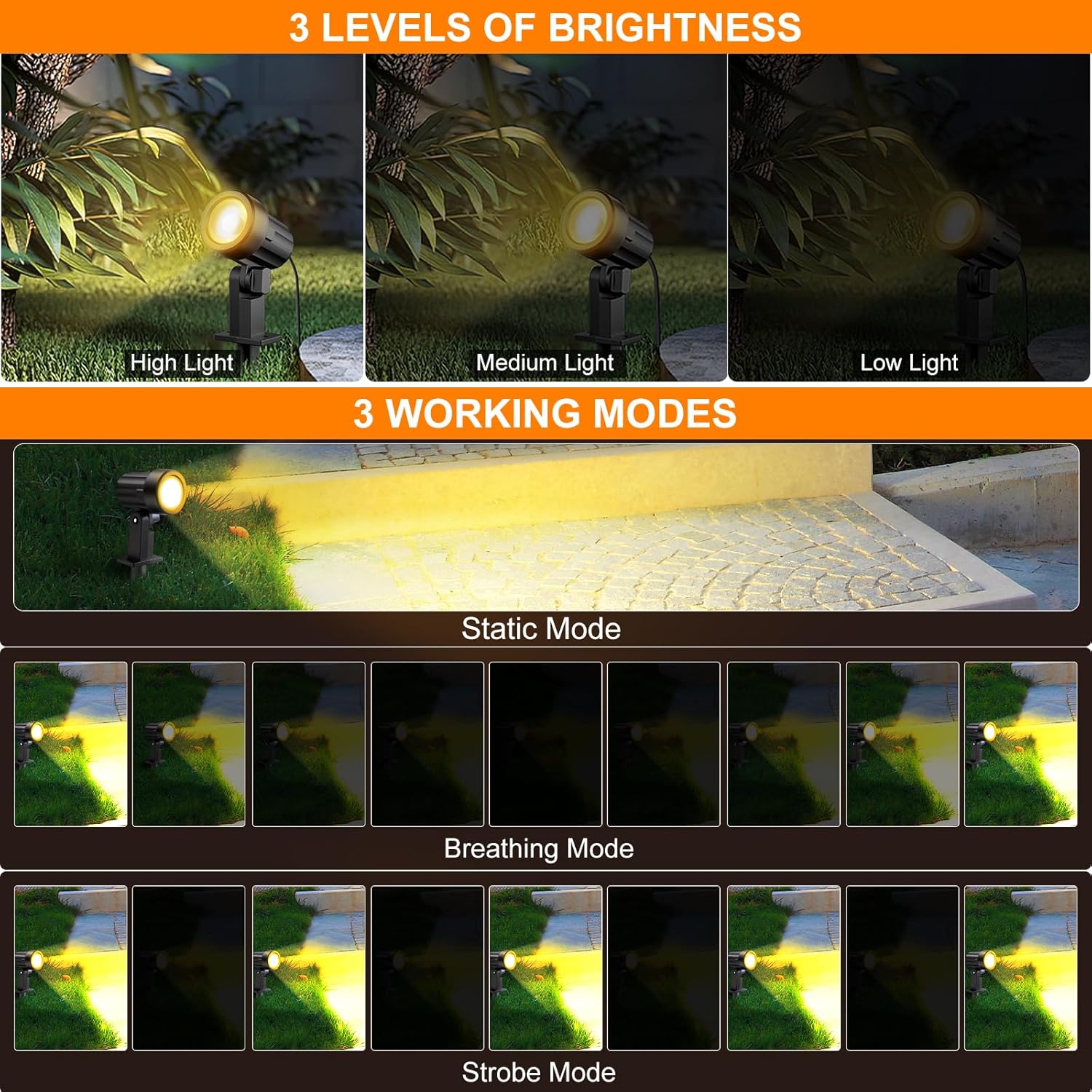
Image: Illustrates the three brightness levels (High, Medium, Low) and the three main working modes: Static Mode (constant light), Breathing Mode (slow fade), and Strobe Mode (rapid flashing).
5. Maintenance
Proper maintenance ensures the longevity and optimal performance of your MEIKEE Solar Spotlights.
- Clean Solar Panel: Regularly wipe the solar panel with a soft, damp cloth to remove dust, dirt, leaves, or snow. A clean panel ensures maximum sunlight absorption and charging efficiency.
- Check Connections: Periodically inspect all cable connections to the control box and spotlights to ensure they are secure and free from corrosion.
- Clear Obstructions: Ensure no trees, bushes, or structures are blocking direct sunlight from reaching the solar panel, especially during peak charging hours.
- Battery Replacement (if applicable): While the main battery is built-in, if the remote control batteries (2 AAA) need replacement, ensure to use new, high-quality batteries.
- Winter Care: In areas with heavy snow, clear snow from the solar panel to allow for charging. The IP66 rating ensures resistance to cold and moisture.

Image: Shows the solar panel charging the battery during the day and the battery indicator lights on the control box displaying charge levels (30%, 70%, 100%).
6. Troubleshooting
If you encounter issues with your MEIKEE Solar Spotlights, refer to the following common problems and solutions:
| Problem | Solution |
|---|---|
| Lights do not turn on at night. |
|
| Lights are dim or only stay on for a short time. |
|
| Remote control is not working. |
|
| Lights flicker or behave erratically. |
|
7. Warranty and Support
MEIKEE products are designed for durability and performance. For warranty information and customer support, please refer to the following:
- Warranty: Please retain your proof of purchase for warranty claims. Specific warranty periods may vary; refer to the product packaging or contact MEIKEE customer service for details.
- Customer Support: If you have any questions, require technical assistance, or need to report a defect, please contact MEIKEE customer support through their official website or the retailer where you purchased the product.
- Online Resources: Visit the official MEIKEE store on Amazon for product updates, FAQs, and additional support: MEIKEE Store
Ask a question about this manual
Ask about setup, troubleshooting, compatibility, parts, safety, or missing instructions. Manuals+ will review the question and use this page’s manual context to help answer it.