1. Introduction
Thank you for choosing the Unikito King Size Headboard. This manual provides detailed instructions for the assembly, operation, and maintenance of your new headboard. Please read this manual thoroughly before assembly and use to ensure proper function and longevity of the product.

Image 1.1: Overview of the Unikito King Size Headboard.
2. Safety Information
- Keep the product dry and away from liquids to prevent electrical hazards and material damage.
- Ensure all electrical connections are secure and meet local safety standards.
- Do not overload the charging station outlets or USB ports.
- Assemble the headboard on a soft, clean surface to prevent scratches.
- Always use the provided hardware and follow assembly instructions carefully.
- Keep small parts and packaging materials away from children.
3. Package Contents
Please verify that all components are present before beginning assembly. If any parts are missing or damaged, contact Unikito customer support.
- Headboard Panels (Wood)
- Metal Frame Components
- Storage Shelf Components
- Integrated Charging Station (3 AC Outlets, 2 USB Ports, 6.5FT Power Cord)
- RGB LED Light Strip with Controller
- Assembly Hardware (Screws, bolts, nuts, etc.)
- Bed Frame Adapters (for specific bed frames)
- Instruction Manual
4. Assembly Instructions
Assembly typically requires two adults. Clear a spacious area and lay out all components before starting. Do not fully tighten screws until all parts are aligned.
- Step 1: Assemble the Metal Frame. Connect the vertical and horizontal metal frame components using the provided bolts and nuts. Ensure all connections are stable.
- Step 2: Attach Wood Panels. Secure the main wood headboard panels to the assembled metal frame using the designated screws.
- Step 3: Install Storage Shelves. Mount the 3-tier storage shelves onto the upper section of the headboard frame. Ensure they are level and securely fastened.
- Step 4: Integrate Charging Station. Place the charging station into its designated slot on the headboard. Route the 6.5FT power cord as instructed to avoid pinching.
- Step 5: Install RGB LED Light Strip. Adhere the LED light strip to the underside of the storage shelves or other designated areas. Connect it to the power source and controller.
- Step 6: Attach to Bed Frame (Optional). If your bed frame has leg holes, use the provided bed frame adapters to securely attach the headboard. If your bed frame has insufficient width, the adapters can help ensure a perfect fit. The headboard can also be used freestanding.

Image 4.1: Bed frame adapters for secure attachment.

Image 4.2: Fully assembled headboard integrated with a bed.
5. Operating Instructions
5.1. Charging Station
The headboard features a built-in charging station with 3 standard AC outlets (120V/12A) and 2 USB charging ports (5V/2A). To use:
- Ensure the headboard's main power cord is securely plugged into a wall outlet.
- Plug your electronic devices into the available AC outlets or USB ports.
- The charging station provides convenient power access for phones, tablets, smartwatches, and other devices directly from your bedside.
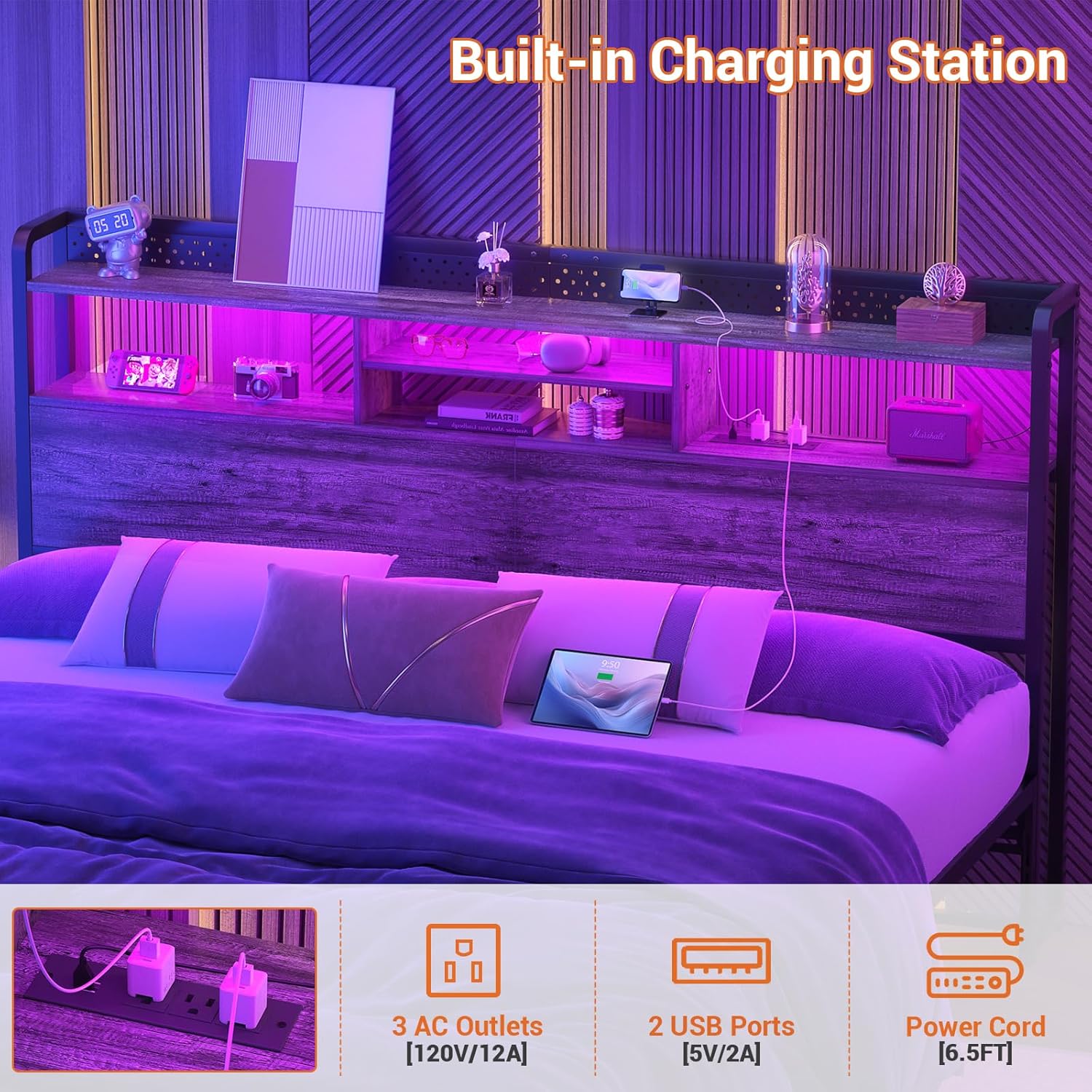
Image 5.1: Detail of the integrated charging station.
5.2. RGB LED Light System
The integrated RGB LED light system offers customizable lighting options to enhance your room's ambiance. It can be controlled via a remote control or a dedicated mobile application.
- Color Options: Choose from over 60,000 colors to match your mood or decor.
- Flashing Modes: Select from multiple dynamic flashing modes.
- Music Sync: The lights can synchronize with music or audio recordings, creating a responsive light show.
- Timer Function: Set a timer for the lights to turn on or off automatically.
- Control: Use the provided remote control or download the compatible mobile application for advanced control features.

Image 5.2: RGB LED lights in operation with control options.

Image 5.3: Visual difference between daytime and nighttime with LED lights.
6. Maintenance
To maintain the appearance and functionality of your Unikito headboard:
- Wipe surfaces with a dry, soft cloth regularly to remove dust.
- Avoid using harsh chemicals or abrasive cleaners, which can damage the finish.
- Periodically check all screws and connections to ensure they remain tight.
- Keep the headboard away from direct sunlight and extreme temperature changes to prevent material warping or fading.
7. Troubleshooting
If you encounter issues with your headboard, refer to the following common solutions:
- Charging Station Not Working: Ensure the main power cord is securely plugged into a functional wall outlet. Check if the outlet itself is receiving power.
- LED Lights Not Functioning: Verify that the LED strip is correctly connected to its power source and controller. Check the remote control battery if applicable. Ensure the LED strip is not damaged.
- Headboard Instability: Recheck all assembly screws and bolts to ensure they are tightened. If using bed frame adapters, confirm they are properly installed and secured to both the headboard and bed frame.
- Parts Missing/Damaged: If you discover missing or damaged parts during assembly, do not proceed. Contact customer support for assistance.
8. Specifications
| Feature | Detail |
|---|---|
| Model Number | UK-HBS-K-O |
| Size | King |
| Color | Black Oak |
| Product Dimensions | 77.16"W x 43.3"H |
| Item Weight | 37 pounds |
| Charging Station | 3 AC Outlets (120V/12A), 2 USB Ports (5V/2A), 6.5FT Power Cord |
| LED Light | RGB, 60000+ Colors, Multiple Modes, Music Sync, Timer Function |
| Material | High-quality Particleboard, Strong Metal |
| Mounting Type | Freestanding / Bed Frame Attachment |
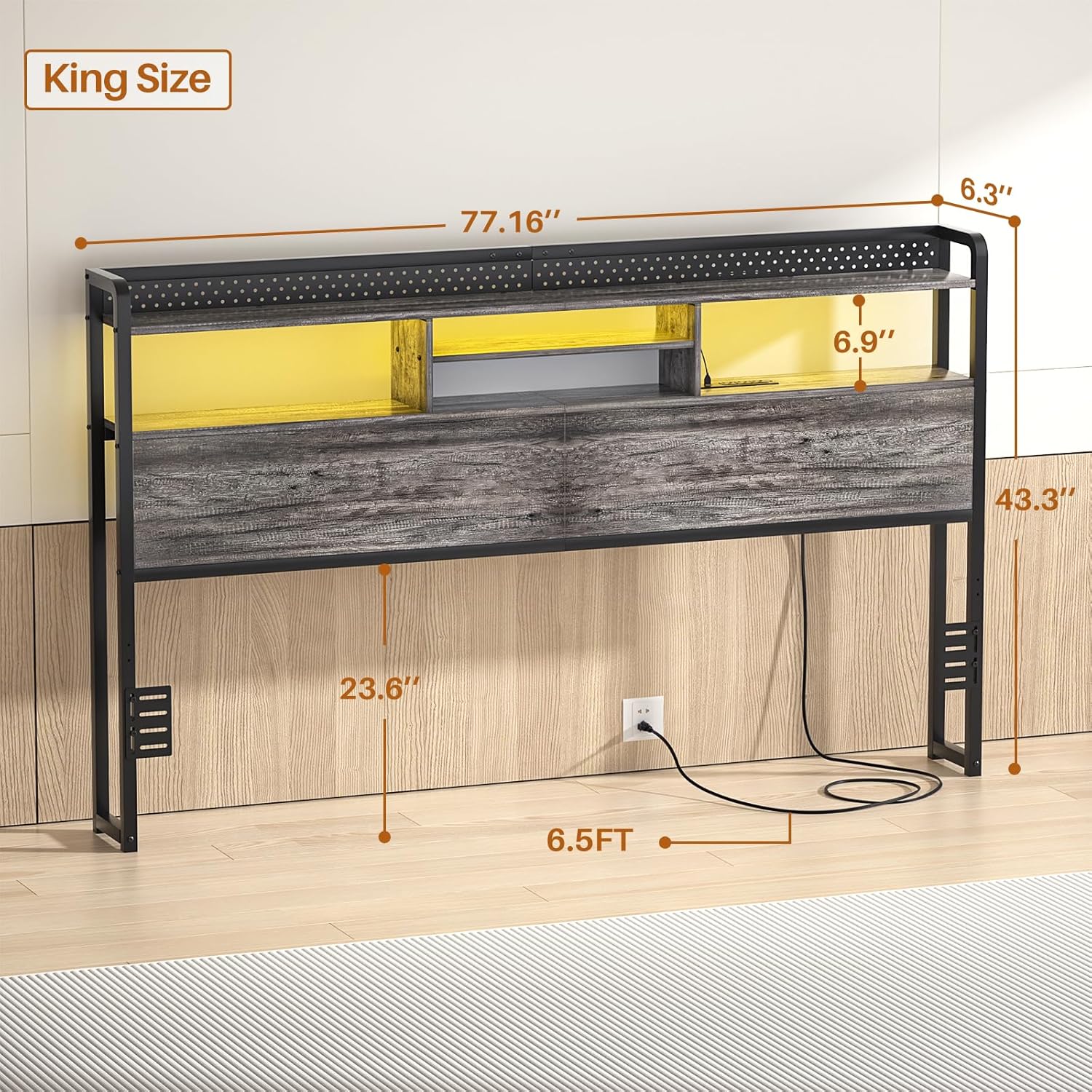
Image 8.1: Key dimensions of the King Size Headboard.
9. Warranty and Support
Unikito is committed to providing high-quality products and customer satisfaction. For specific warranty details, please refer to the warranty card included with your purchase or visit the official Unikito website. If you have any questions, require assistance with assembly, or need troubleshooting support, please do not hesitate to contact our experienced customer service team. Contact information can typically be found on our website or on the product packaging.
We are dedicated to ensuring you have a satisfactory experience with your Unikito headboard.


