
1. Introduction
Thank you for purchasing the Fessiconys S+ GPS Drone with 4K Camera. This manual provides essential information for safe operation, setup, and maintenance of your drone. Please read it thoroughly before first use to ensure proper functionality and to maximize your flying experience.
2. Safety Guidelines
Always prioritize safety during drone operation. Failure to follow these guidelines may result in injury, damage to property, or legal issues.
- Local Regulations: Always comply with local drone regulations and restrictions.
- Pre-Flight Check: Before each flight, inspect the drone, propellers, and battery for any damage.
- Weather Conditions: Do not fly in strong winds, rain, snow, or fog.
- Line of Sight: Maintain visual line of sight with your drone at all times.
- Obstacle Avoidance: While the drone features obstacle avoidance, always be aware of your surroundings and avoid flying near people, animals, or obstacles.
- Battery Safety: Use only approved chargers and batteries. Do not overcharge or puncture batteries.
- Age Recommendation: This drone is recommended for adults.
3. Package Contents
Verify that all items are present in your package:

Image showing the Fessiconys S+ drone and its included accessories.
- Fessiconys S+ Drone x1
- Remote Control x1
- Lithium Polymer Batteries x2 (1600 mAh each)
- Charging Cable x1
- Spare Fan Blades x4
- Phone Holder x1
- Screwdriver x1
- User Manual x1
4. Product Overview
The Fessiconys S+ is a foldable GPS drone equipped with a 4K UHD camera, designed for ease of use and advanced flight capabilities. Its lightweight design (under 249g) and robust features make it suitable for various aerial photography and exploration needs.

The Fessiconys S+ drone showcasing its 5G WiFi transmission and 4K UHD camera capabilities.
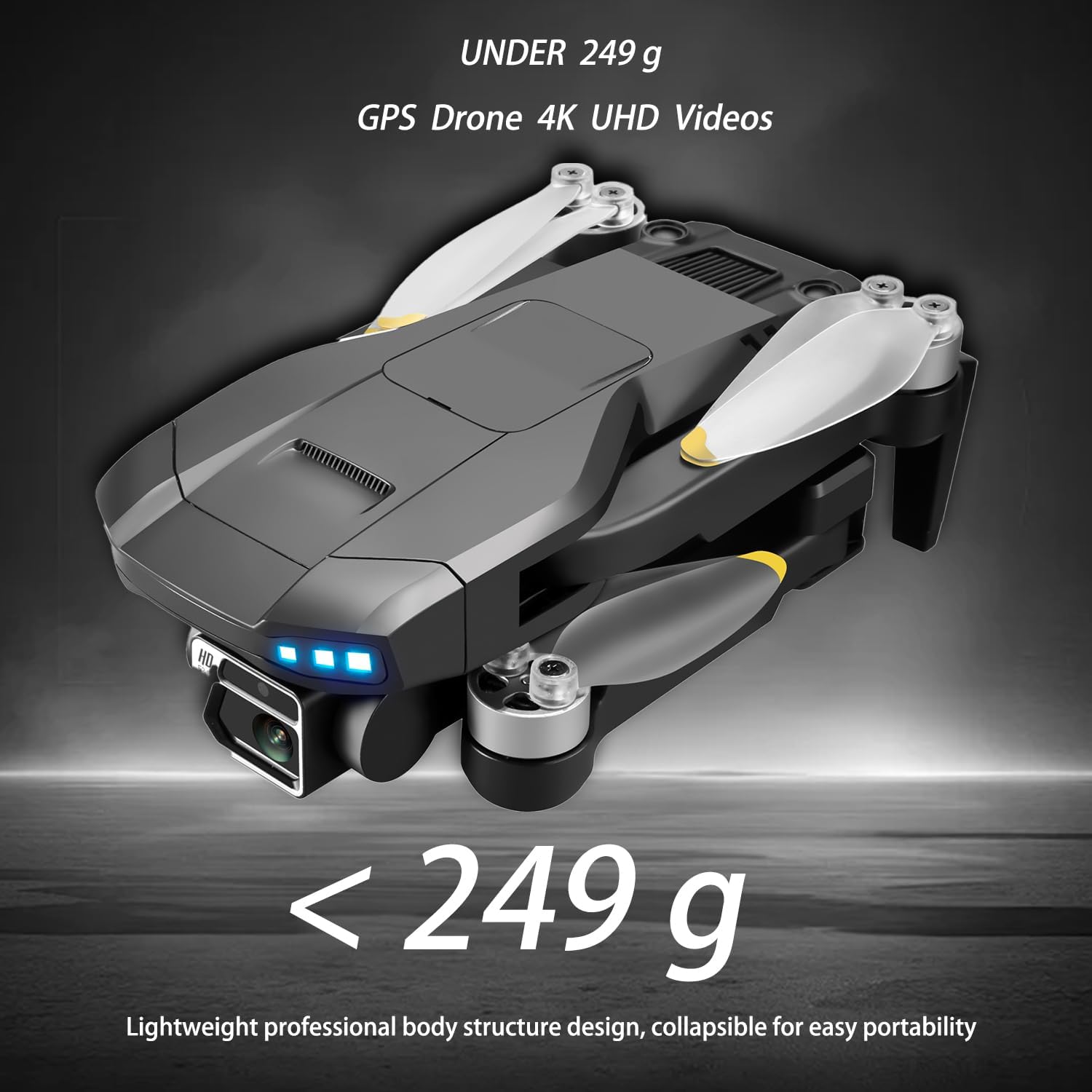
The foldable design of the Fessiconys S+ drone, highlighting its portability and weight under 249g.
5. Setup
5.1 Charging Batteries
The drone comes with two Lithium Polymer batteries. Ensure both are fully charged before use.
- Connect the charging cable to the battery and a suitable USB power adapter (not included).
- The battery indicator lights will show charging status. All lights solid indicate a full charge.
- A full charge provides approximately 25 minutes of flight time per battery, totaling up to 50 minutes with both.

Image illustrating the drone's battery compartment and indicating a 50-minute total flight time with two batteries.
5.2 Installing Propellers
Attach the propellers to the motor shafts. Ensure correct orientation as indicated in the user manual or on the drone arms (usually marked A and B).
5.3 Installing Obstacle Avoidance Module
The 360° laser obstacle avoidance module can be installed on top of the drone for enhanced safety.
- Carefully align the module with the designated slot on the drone's top casing.
- Gently press down until it clicks into place, ensuring a secure connection.

The Fessiconys S+ drone equipped with its 360° laser obstacle avoidance module.
5.4 Remote Control Setup
- Install required batteries (not included) into the remote control.
- Unfold the phone holder and attach your smartphone.
- Power on the remote control.
5.5 App Installation & Connection
- Download the official Fessiconys drone app from your smartphone's app store.
- Power on the drone.
- Connect your smartphone to the drone's Wi-Fi network (usually named 'Fessiconys-S+' or similar).
- Open the app to establish a connection and view the live FPV feed.
6. Operating Instructions
6.1 Pre-Flight Checklist
- Ensure batteries are fully charged for both drone and remote control.
- Check propellers for damage and ensure they are securely attached.
- Verify the obstacle avoidance module is correctly installed (if used).
- Perform compass calibration as instructed by the app or remote control.
- Ensure GPS signal is strong before takeoff for stable flight and return-to-home functions.
6.2 Takeoff and Landing
- One-Button Takeoff: Press the designated takeoff button on the remote control or in the app. The drone will automatically ascend to a safe hovering height.
- Manual Takeoff: Push both joysticks down and outwards to start the motors, then slowly push the left joystick up to ascend.
- One-Button Landing: Press the designated landing button. The drone will automatically descend and land.
- Manual Landing: Slowly pull the left joystick down to descend.
6.3 Flight Modes and Features
The Fessiconys S+ drone offers several intelligent flight modes:
- GPS Positioning: Provides stable hovering and precise flight path control.
- Optical Flow Fixed Point Hovering: Utilizes a downward-facing camera for stable hovering indoors or in areas with weak GPS signal.
- Smart Follow Me: The drone will automatically follow the remote control or a designated subject, capturing dynamic footage.
- Waypoint Flight: Set specific points on the map within the app, and the drone will fly along the predefined route.
- Surround Flight (Rotating Flight): The drone will orbit around a central point or subject, capturing 360° footage.
- Gesture Photography/Video: Use specific hand gestures to trigger photo or video recording.
- 360° Laser Obstacle Avoidance: The drone can detect and avoid obstacles in its path, enhancing flight safety.

Illustration of the drone utilizing optical flow for precise fixed-point air hovering.

The drone in Smart Follow Me mode, locking onto a target and following movement.

The drone executing a flight path based on user-defined waypoints on a map.

The drone performing a 360° surround flight around a subject.
Demonstration of the drone's intelligent recognition of hand gestures for photo and video capture.
6.4 Camera Operation
The Fessiconys S+ features a 4K UHD dual-camera with ESC gimbal stabilization and 50x zoom. The camera angle can be remotely adjusted 90°.
- Access camera controls via the mobile app.
- Adjust the camera angle using the dedicated button/joystick on the remote control or within the app interface.
- Capture photos and videos in 4K resolution.

Close-up of the Fessiconys S+ drone's 4K UHD camera with 50x zoom and 90° electro-adjustable feature.
6.5 Smart Return Functions
The drone is equipped with intelligent return functions to ensure flight safety:
- One-Key Return: Press the Return-to-Home button on the remote control or app. The drone will automatically return to its takeoff point.
- Low Battery Return: The drone will automatically return when the battery level is critically low.
- Out of Control Return: If the drone loses connection with the remote control, it will automatically return to the takeoff point.
- Beyond Remote Control Distance Return: If the drone flies beyond the remote control's range, it will initiate an automatic return.

Visual representation of the drone's GPS Auto Return function, showing it returning to a marked home point.
7. Maintenance
Regular maintenance ensures the longevity and optimal performance of your Fessiconys S+ drone.
- Cleaning: Use a soft, dry cloth to clean the drone body and camera lens. Avoid using harsh chemicals.
- Propeller Replacement: If propellers are damaged or bent, replace them immediately using the provided screwdriver and spare blades. Ensure new blades are installed correctly.
- Battery Care: Store batteries in a cool, dry place. Do not store fully charged or completely depleted for extended periods. Charge them to about 50-60% for long-term storage.
- Motor Inspection: Periodically check the brushless motors for any debris or signs of wear.
8. Troubleshooting
If you encounter issues with your drone, refer to the following common problems and solutions:
| Problem | Possible Cause | Solution |
|---|---|---|
| Drone does not power on | Low battery; incorrect battery installation | Charge battery fully; ensure battery is inserted correctly. |
| Drone cannot connect to remote control/app | Incorrect pairing; Wi-Fi interference | Ensure drone and remote are powered on; re-pair according to instructions; try connecting in an area with less Wi-Fi interference. |
| Unstable flight/drifting | No GPS signal; uncalibrated compass; damaged propellers | Fly in an open area with strong GPS signal; perform compass calibration; replace damaged propellers. |
| Poor image/video quality | Dirty lens; low light; unstable flight | Clean camera lens; fly in well-lit conditions; ensure stable flight. |
| Obstacle avoidance not working | Module not installed; sensor blocked; specific flight mode not active | Ensure obstacle avoidance module is correctly installed; clean sensors; verify obstacle avoidance mode is enabled in the app. |
If the problem persists, please contact customer support.
9. Specifications
| Feature | Detail |
|---|---|
| Model Name | S+ |
| Brand | Fessiconys |
| Product Dimensions | 27 x 23 x 5.5 cm |
| Item Weight | 243 Grams |
| Material Type | Plastic |
| Video Capture Resolution | 4K UHD |
| Camera Features | ESC Gimbal, 50x Zoom, 90° Remote Adjustment |
| Connectivity Technology | Wi-Fi (5G Transmission) |
| Remote Control Technology | Bluetooth |
| Maximum Range | 2 Kilometers |
| Battery Type | Lithium Polymer |
| Battery Capacity | 1600 Milliamp Hours (x2 included) |
| Flight Time | Up to 50 minutes (with 2 batteries) |
| Special Features | 360° Laser Obstacle Avoidance, Foldable, GPS Follow Me, Gesture Photography, One Button Return, Optical Flow Hovering, Waypoint Flight, Surround Flight |
| Motor Type | Brushless Motor |
| Skill Level | All |
10. Warranty and Support
Fessiconys provides a standard manufacturer's warranty for the S+ GPS Drone. Please refer to the warranty card included in your package for specific terms and conditions.
For technical support, troubleshooting assistance, or warranty claims, please contact Fessiconys customer service through the contact information provided on the product packaging or the official Fessiconys website.
When contacting support, please have your product model (S+) and purchase details ready.