
ROYELLE Sirene-01
Solar Outdoor Motion Sensor Alarm User Manual
Model: Sirene-01
Brand: ROYELLE
Introduction
This manual provides detailed instructions for the installation, operation, and maintenance of your ROYELLE Solar Outdoor Motion Sensor Alarm. Designed to deter intruders and unwanted animals, this device offers 360-degree motion detection and powerful sound alarms.

Image: The ROYELLE Solar Outdoor Motion Sensor Alarm unit, showing its main body, a ground stake, a wall mount, a USB charging cable, and a wireless remote control.
Safety Information
- Read all instructions carefully before use.
- Do not attempt to disassemble or modify the device.
- Keep out of reach of children.
- Ensure proper installation to prevent falling or damage.
- The device is designed for outdoor use and is weather-resistant (IP55).
- Do not expose to extreme temperatures or corrosive substances.
Package Contents
Verify that all components are present in the package:
- 1 x Solar Alarm Unit
- 1 x Wireless Remote Control
- 1 x USB Charging Cable
- 1 x Ground Stake
- 1 x Wall Mounting Bracket
- 1 x Instruction Manual (this document)
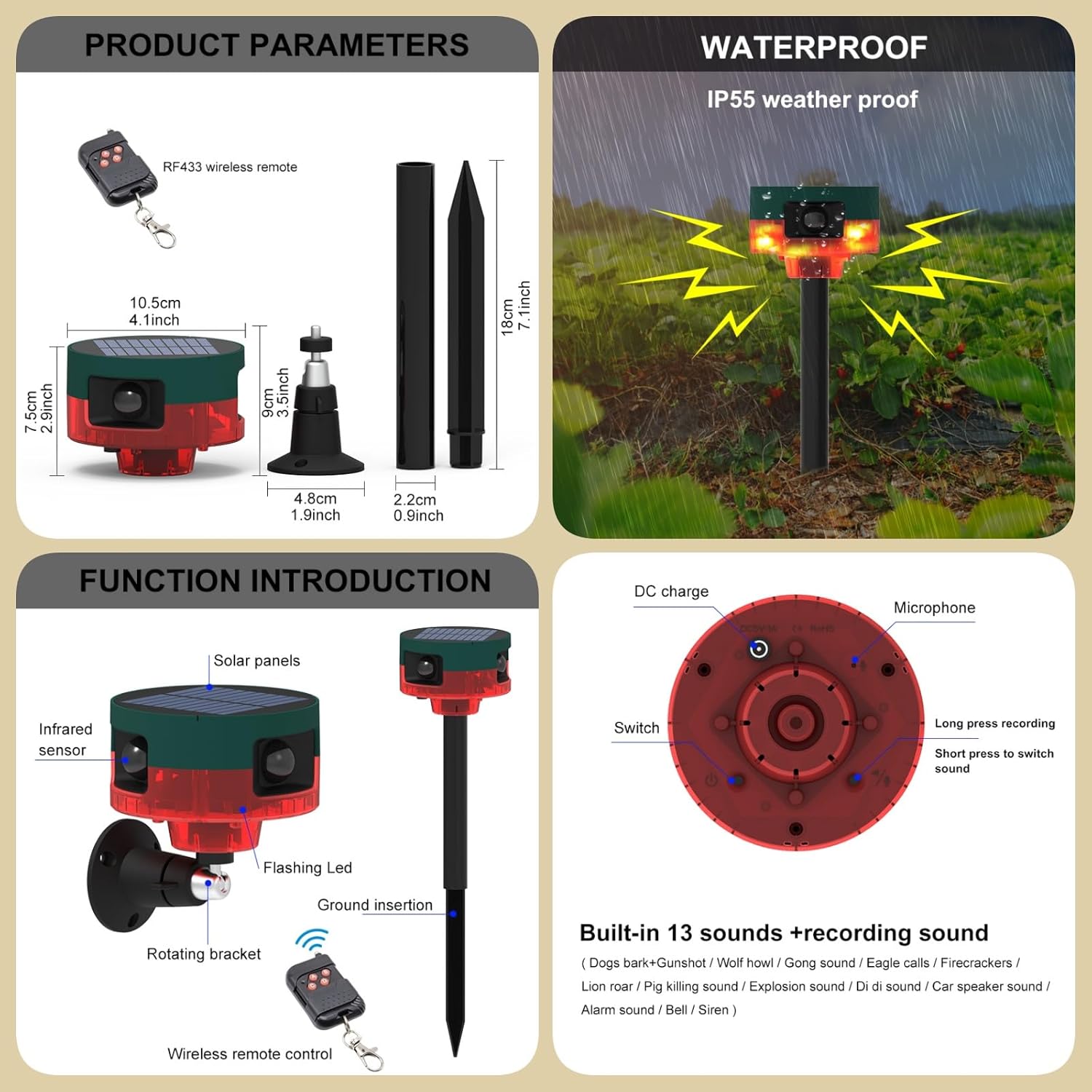
Image: Detailed diagram illustrating the solar alarm unit, its dimensions, the wireless remote control, and various parts like the solar panel, infrared sensor, flashing LED, rotating bracket, and ground insertion.
Setup and Installation
The Solar Outdoor Motion Sensor Alarm offers flexible installation options to suit your needs.
Mounting Options
- Ground Insertion: Attach the ground stake to the bottom of the alarm unit and firmly insert it into soft ground in your garden, lawn, or field.
- Wall/Fence Mounting: Use the provided wall mounting bracket to secure the alarm unit to a wall, fence, or post. Ensure it is mounted at a height that allows for optimal motion detection and solar charging.

Image: Visual representation of different installation methods, including ground insertion and wall/fence mounting, demonstrating how the device can be placed in various outdoor environments.
Initial Charging
Before first use, it is recommended to fully charge the device using the provided USB cable. Connect the USB cable to the DC charge port on the unit and a suitable USB power source.
The device also charges via its solar panel when exposed to direct sunlight.
Operating Instructions
The alarm unit features a switch and a microphone for sound customization.
Control Buttons
- Switch: Located on the bottom of the unit. This button is used for power on/off and mode selection.
- Long Press Recording: Press and hold the microphone button to record a custom sound.
- Short Press to Switch Sound: Briefly press the microphone button to cycle through the built-in alarm sounds.

Image: Close-up diagram of the bottom of the solar alarm unit, highlighting the DC charge port, microphone, switch, and explaining the functions of long press for recording and short press for switching sounds.
Operating Modes
The device offers customizable operating modes:
- 24-Hour Ultrasonic + Alarm + Flashing: The device will emit ultrasonic waves, sound an alarm, and flash lights upon motion detection at any time of day.
- Night Ultrasonic + Alarm + Flashing: The device will activate ultrasonic waves, sound an alarm, and flash lights upon motion detection only during nighttime hours.
- 24-Hour Alarm + Flashing LED: The device will sound an alarm and flash lights upon motion detection at any time of day, without ultrasonic waves.
- Night Alarm + Flashing LED: The device will sound an alarm and flash lights upon motion detection only during nighttime hours, without ultrasonic waves.
Wireless Remote Control
The included wireless remote control allows for convenient arming and disarming of the alarm. Refer to the remote's specific buttons for arm, disarm, and panic functions.
Key Features
- 360-Degree Motion Detection: Equipped with multiple infrared sensors, the alarm provides comprehensive coverage, detecting movement from all directions. This allows it to identify the direction of intrusion.
- High Decibel Alarm: Features three 129 dB alarm horns, providing a powerful deterrent against intruders and unwanted animals. The sound level is sufficient to protect your property.
- Multiple Alarm Sounds: Includes 13 built-in sounds such as dog barking, wolf howl, gunshots, gong sound, eagle calls, firecrackers, lion roar, pig killing sound, explosion sound, car alarm, and siren. Custom sounds can also be recorded.
- Solar Powered: Integrated solar panels ensure continuous operation by recharging the internal lithium-ion battery during daylight hours.
- Weatherproof Design: Rated IP55 for weather resistance, making it suitable for various outdoor conditions.

Image: The solar alarm unit positioned in a field, illustrating its 360-degree detection capability to deter various animals like birds and wild boars.
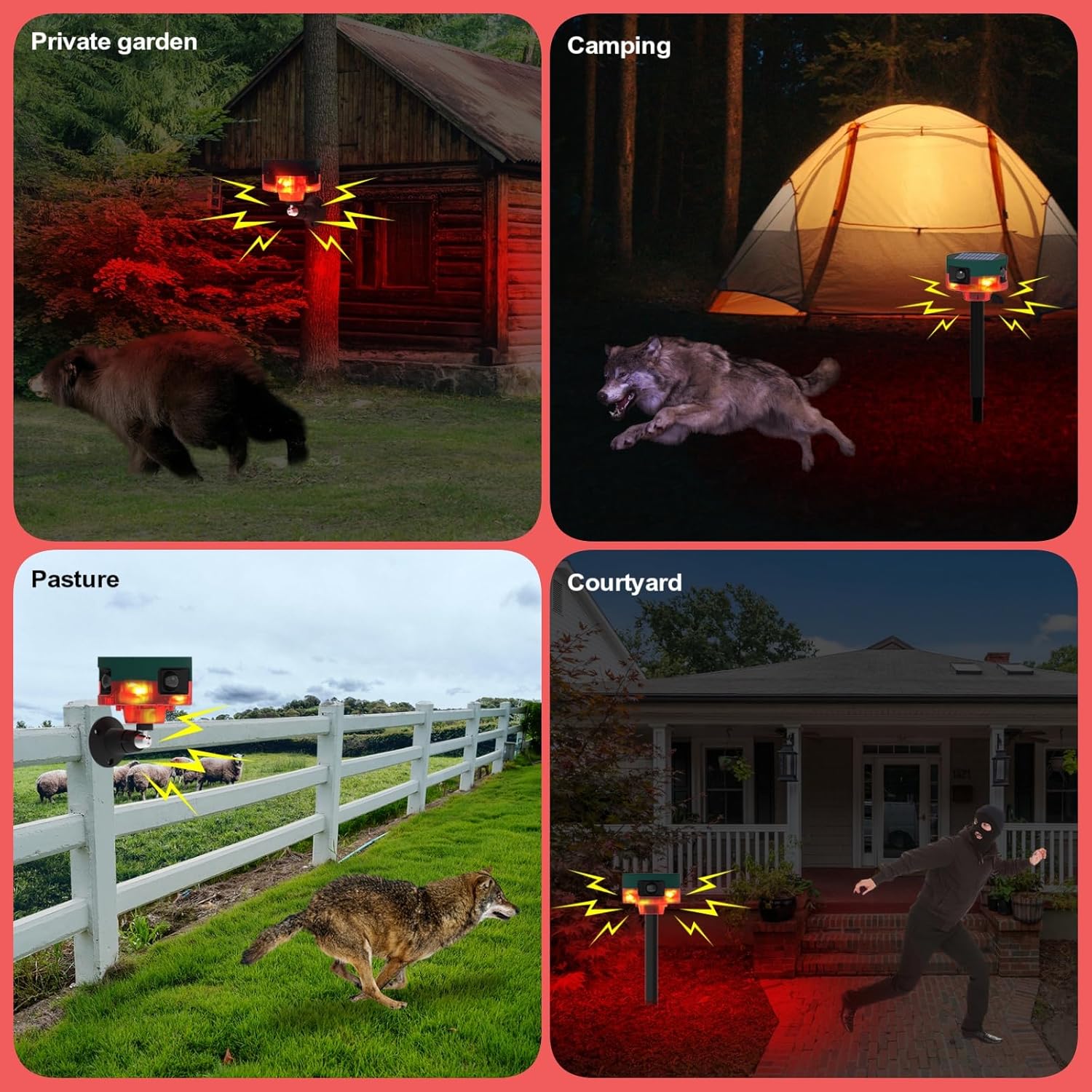
Image: A collage showing the solar alarm in different outdoor scenarios, effectively deterring animals like bears, wolves, wild boars, and birds from private gardens, camping sites, pastures, and courtyards.
Maintenance
- Cleaning: Regularly wipe the solar panel and sensor lenses with a soft, damp cloth to ensure optimal performance. Do not use abrasive cleaners.
- Battery: The device uses a built-in lithium-ion battery. If the device is stored for an extended period, ensure it is fully charged every 3 months to maintain battery health.
- Placement: Ensure the solar panel receives adequate direct sunlight for efficient charging. Clear any obstructions that may block sunlight.
Troubleshooting
| Problem | Possible Cause | Solution |
|---|---|---|
| Device not turning on/no alarm | Low battery; Device is off; Sensor obstructed | Charge the device via USB or place in direct sunlight; Ensure the power switch is ON; Clear any obstructions from the sensor. |
| Alarm too quiet | Distance from listener; Environmental noise | Ensure the device is placed optimally for sound projection. Note that advertised dB levels are measured at source. |
| False alarms | Movement of trees/bushes; Small animals; Incorrect sensitivity setting | Adjust placement to avoid swaying vegetation; Consider a different operating mode if small animals are an issue. |
| Remote control not working | Remote battery low; Out of range; Obstruction | Replace remote battery; Move closer to the alarm unit; Ensure clear line of sight. |
Specifications
- Model: Sirene-01
- Power Source: Solar Powered
- Battery: 1 x Lithium-ion (included)
- Voltage: 12 Volts (DC)
- Sound Level: 130 dB
- Sensor Technology: 360-degree Motion Detection (PIR)
- Control Method: Tactile (on device), Remote Control
- Mounting Type: Wall Mount, Ground Stake
- Product Dimensions (L x W x H): 10.16 x 7.62 x 10.16 cm (4.0 x 3.0 x 4.0 inches)
- Weight: 415 grams
- Manufacturer: ROYELLE
Warranty and Support
For warranty information and customer support, please refer to the contact details provided by your retailer or visit the official ROYELLE website. Keep your purchase receipt as proof of purchase.
Ask a question about this manual
Ask about setup, troubleshooting, compatibility, parts, safety, or missing instructions. Manuals+ will review the question and use this page’s manual context to help answer it.