
1. Introduction
Thank you for choosing the BASETBL ErgoGame Max Ergonomic Office Chair. This manual provides detailed instructions for the assembly, operation, and maintenance of your new chair. Please read this manual thoroughly before assembly and use to ensure proper function and safety.
1.1 Safety Warnings
- Do not use the chair if your weight exceeds 200 kg (440 lbs) to prevent damage or accidents.
- Ensure all screws and bolts are securely tightened before use. Periodically check and re-tighten as necessary.
- Keep children and pets away during assembly. Small parts may pose a choking hazard.
- Use the chair only for its intended purpose as an office chair.
- Avoid standing on the chair or using it as a step stool.
1.2 Product Overview
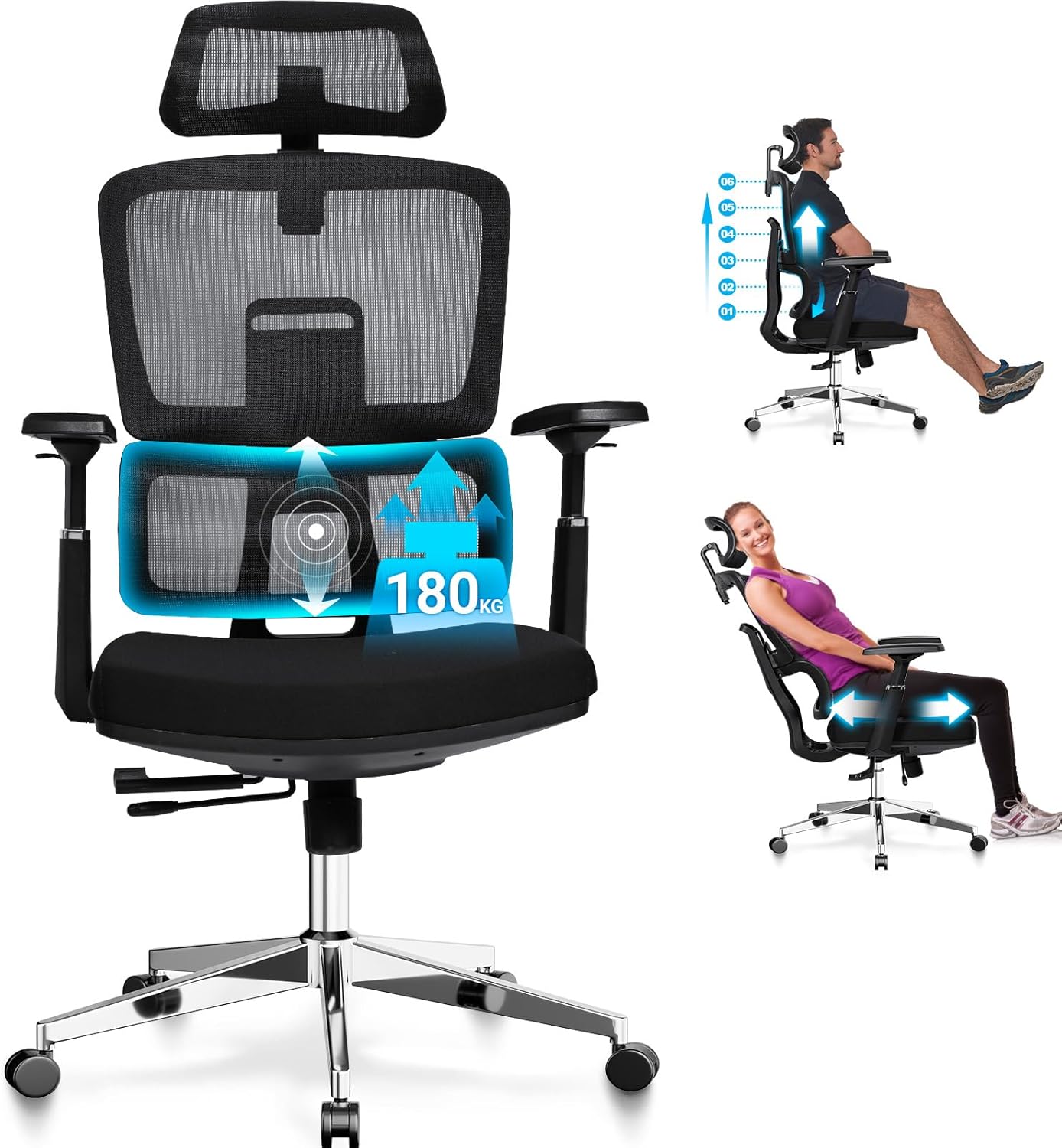
The BASETBL ErgoGame Max is an ergonomic office chair designed for comfort and support during long periods of sitting. It features dynamic lumbar support, adjustable seat depth, backrest height, headrest, and 3D armrests, along with a multi-level recline lock. The chair is built with a robust SGS-certified gas lift and silent PU casters, supporting users up to 200 kg.
2. Assembly Instructions
Please follow these steps carefully to assemble your BASETBL ErgoGame Max office chair. It is recommended to assemble the chair on a soft, clean surface to prevent damage.
2.1 Package Contents
Before starting, ensure all components are present:
- Backrest
- Seat Cushion
- Armrests (Left and Right)
- Headrest
- Mechanism (Control Unit)
- Gas Lift Cylinder
- Five-Star Base
- Casters (5 pieces)
- Hardware Kit (screws, washers, Allen wrench)
2.2 Step-by-Step Assembly
- Attach Casters to Base: Insert the five casters into the holes at the end of each leg of the five-star base. Push firmly until they click into place.
- Insert Gas Lift: Place the gas lift cylinder into the center hole of the five-star base. Ensure it is seated securely.
- Attach Mechanism to Seat: Align the mechanism (control unit) with the pre-drilled holes on the underside of the seat cushion. Secure it with the provided screws, ensuring the front of the mechanism faces the front of the seat.
- Attach Armrests to Seat: Secure the armrests to the sides of the seat cushion using the designated screws. Pay attention to the 'L' (left) and 'R' (right) markings if present.
- Attach Backrest to Seat: Connect the backrest to the seat cushion assembly. This typically involves aligning brackets and securing with screws.
- Attach Headrest: Slide the headrest into the designated slots at the top of the backrest.
- Connect Seat Assembly to Gas Lift: Carefully place the assembled seat and backrest onto the gas lift cylinder, ensuring the center hole of the mechanism aligns with the top of the gas lift. Press down firmly to secure.
- Final Check: Verify that all screws are tightened and the chair is stable before use.
3. Operating Instructions
Your BASETBL ErgoGame Max chair offers multiple adjustment options to customize your seating experience for optimal comfort and ergonomic support.
3.1 Seat Height Adjustment
To adjust the seat height (range: 49-60 cm), locate the lever on the right side, beneath the seat. Pull the lever upwards while:
- To raise the seat: Lift your weight off the seat.
- To lower the seat: Remain seated and apply pressure.
3.2 Seat Depth Adjustment
The seat depth can be adjusted by up to 4 cm. This feature helps prevent discomfort and supports proper posture. Locate the lever or button, typically on the left side beneath the seat. Activate the control and slide the seat forward or backward to achieve a comfortable distance from the backrest, ensuring about two to three fingers' width between the edge of the seat and the back of your knees. Release the control to lock the position.
3.3 Backrest Height Adjustment
The backrest height can be adjusted by 6 cm to align the dynamic lumbar support with the natural curve of your spine. To adjust, lift the backrest upwards. It will click into different height positions. To reset to the lowest position, lift the backrest to its highest point, and it will automatically drop to the lowest setting.
3.4 Recline and Lock Function
The chair features a 4-level recline lock, allowing you to fix the backrest at angles of 95°, 110°, 120°, or 130°. To recline, pull out the recline lever (usually on the left side). Lean back to your desired angle and push the lever in to lock the position. To return to an upright position, pull the lever out, lean forward slightly, and then release the lever.
3.5 Headrest Adjustment
The 2D headrest offers 8 cm of height adjustment and 90° of rotation. Adjust the headrest vertically by sliding it up or down. Rotate the headrest pad to find the most comfortable angle for neck support.
3.6 Armrest Adjustment
The 3D polyurethane (PU) armrests provide versatile adjustment options:
- Height Adjustment: Press the button on the side of each armrest and slide it up or down (8 cm range).
- Depth/Width Adjustment: Slide the armrest pad forward or backward, or inward/outward (5 cm range).
- Rotation: Rotate the armrest pad up to 45° to support your forearms in various working postures.
4. Care and Maintenance
Proper care and maintenance will extend the life and appearance of your BASETBL office chair.
4.1 Cleaning
- General Cleaning: Wipe the chair surfaces (nylon, metal, PU) with a soft, damp cloth. For stubborn stains, use a mild soap solution and then wipe with a clean, damp cloth.
- Avoid Harsh Chemicals: Do not use abrasive cleaners, strong detergents, or solvents, as these can damage the materials.
- Mesh Backrest: Gently vacuum the mesh backrest to remove dust and debris. For spills, dab with a damp cloth and mild soap.
4.2 General Care
- Regular Inspection: Periodically check all screws and bolts to ensure they are tight. Re-tighten if necessary.
- Caster Maintenance: Keep the casters clean from hair and debris to ensure smooth movement.
- Weight Limit: Adhere strictly to the 200 kg weight limit to prevent structural damage.
5. Troubleshooting
If you encounter any issues with your BASETBL ErgoGame Max chair, refer to the following common troubleshooting tips:
- Chair Squeaks: Check all bolted connections and tighten them. A small amount of silicone lubricant can be applied to moving parts if the squeaking persists, avoiding contact with fabric or mesh.
- Gas Lift Not Adjusting: Ensure the height adjustment lever is fully engaged or disengaged. If the gas lift still doesn't function, it may require replacement.
- Chair Feels Unstable: Verify that all components are correctly assembled and all screws are securely tightened. Ensure the casters are fully inserted into the base.
- Casters Not Rolling Smoothly: Remove any hair, dust, or debris that may be caught in the caster wheels. Clean the wheels thoroughly.
- Backrest Not Locking: Check the recline lock lever to ensure it is fully engaged at one of the four specified angles.
6. Product Specifications
| Feature | Specification |
|---|---|
| Brand | BASETBL |
| Model Number | F060 |
| Product Dimensions (L x W x H) | 70 x 70 x 137 cm |
| Item Weight | 18 Kilograms |
| Maximum Weight Capacity | 200 kg |
| Material | Nylon, Metal |
| Seat Height Adjustment | 49-60 cm |
| Seat Depth Adjustment | Up to 4 cm |
| Backrest Height Adjustment | 6 cm |
| Headrest Adjustment | 8 cm height, 90° rotation |
| Armrest Adjustment | 3D (8 cm height, 5 cm depth/width, 45° rotation) |
| Recline Lock Angles | 95°, 110°, 120°, 130° |
| Gas Lift Certification | SGS Certified |
| Casters | Silent Polyurethane (PU) |
7. Warranty and Customer Support
BASETBL is committed to providing high-quality ergonomic office chairs and excellent customer service.
7.1 Warranty Information
Your BASETBL ErgoGame Max office chair comes with a 5-year warranty, exceeding industry standards. This warranty covers manufacturing defects and significant malfunctions under normal use. Please retain your proof of purchase for warranty claims.
7.2 Customer Support
If you have any questions regarding assembly, operation, maintenance, or warranty, please do not hesitate to contact BASETBL customer support. We are dedicated to finding a satisfactory solution for any issues you may encounter.
For support, please refer to the contact information provided with your purchase or visit the official BASETBL website.