
Terloogee US-CT-90325
User Manual for Terloogee Universal Toshiba TV Remote
Model: CT-90325 | Brand: Terloogee
Introduction
Thank you for choosing the Terloogee Universal Toshiba TV Remote Replacement, model CT-90325. This remote control is designed to be fully compatible with most Toshiba LCD, LED, 3D HDTV, 4K UHD Smart TVs, offering a seamless replacement for your original remote. This manual provides detailed instructions on how to set up, operate, maintain, and troubleshoot your new remote control.
Product Features
- Wide Compatibility: Supports most Toshiba LCD, LED, 3D HDTV, and 4K UHD Smart TVs. Compatible with remote models like CT-90325, CT-90326, CT-90329, CT-8037, CT-90302, CT-90275, CT-90366, and more.
- No Setup Required: Ready to use immediately after installing batteries. No programming or pairing needed.
- High-Quality Construction: Made from durable ABS material with soft, responsive keys for comfortable use.
- Strong Infrared Signal: Ensures long transmission distance (up to 12 meters / 50 feet) and stable performance with a fast response time of less than 0.2 seconds.
- Ergonomic Design: Comfortable to hold, with frequently used buttons conveniently placed for easy access.
- Energy-Saving: Designed to prolong battery lifespan.

Image: The Terloogee remote control shown alongside multiple Toshiba TV screens, illustrating its universal compatibility with LCD, LED, and Smart TV models.

Image: The Terloogee remote control is universally compatible with various Toshiba Smart TV models, including LCD, LED, 3D HDTV, and 4K UHD TVs.

Image: Showcasing the ergonomic design for comfortable grip and the use of premium ABS plastic and silicone for durability and environmental friendliness.

Image: Highlighting key benefits such as stable signal, easy pairing, energy-saving features, prolonged battery lifespan, and sustainable high-end ABS materials.
Package Contents
- 1 x Terloogee Universal Toshiba TV Remote Control (Model CT-90325)
- 1 x User Manual (This Document)
Note: 2 x AAA batteries are not included and must be purchased separately.
Setup
Battery Installation
- Locate the battery compartment on the back of the remote control.
- Slide the battery cover downwards to open it.
- Insert two (2) AAA batteries, ensuring the positive (+) and negative (-) terminals align correctly with the markings inside the compartment.
- Slide the battery cover back into place until it clicks securely.

Image: Illustration showing the front and back of the remote control, highlighting the battery compartment and indicating where to insert 2 AAA batteries (not included).
Once batteries are installed, the remote is ready for immediate use with your compatible Toshiba TV. No additional programming is required.
Operating Instructions
Basic Operation
Point the remote control directly at your Toshiba TV's infrared receiver. Ensure there are no obstructions between the remote and the TV's IR receiver. The remote operates using infrared technology, providing a quick response time.
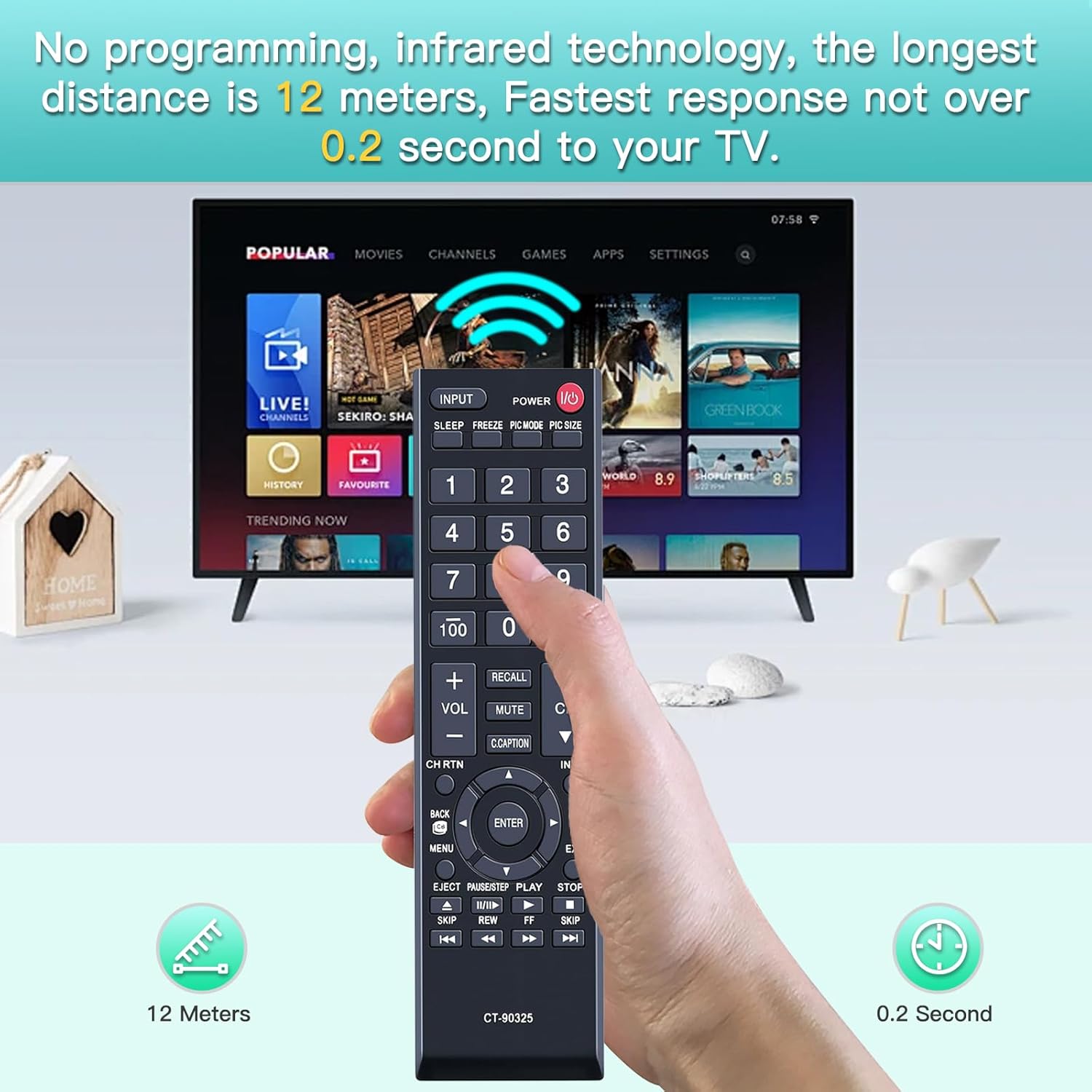
Image: A hand holding the remote control, demonstrating its effective operating range of up to 12 meters (50 feet) and a rapid response time of 0.2 seconds.

Image: A person using the remote control to operate a Toshiba TV, illustrating the precise control from a distance of up to 12 meters (50 feet).
Button Functions
The remote features all standard functions found on original Toshiba TV remotes. Below is a general overview of common button functions:

Image: A clear, detailed view of the entire CT-90325 remote control, showing all buttons and their labels.
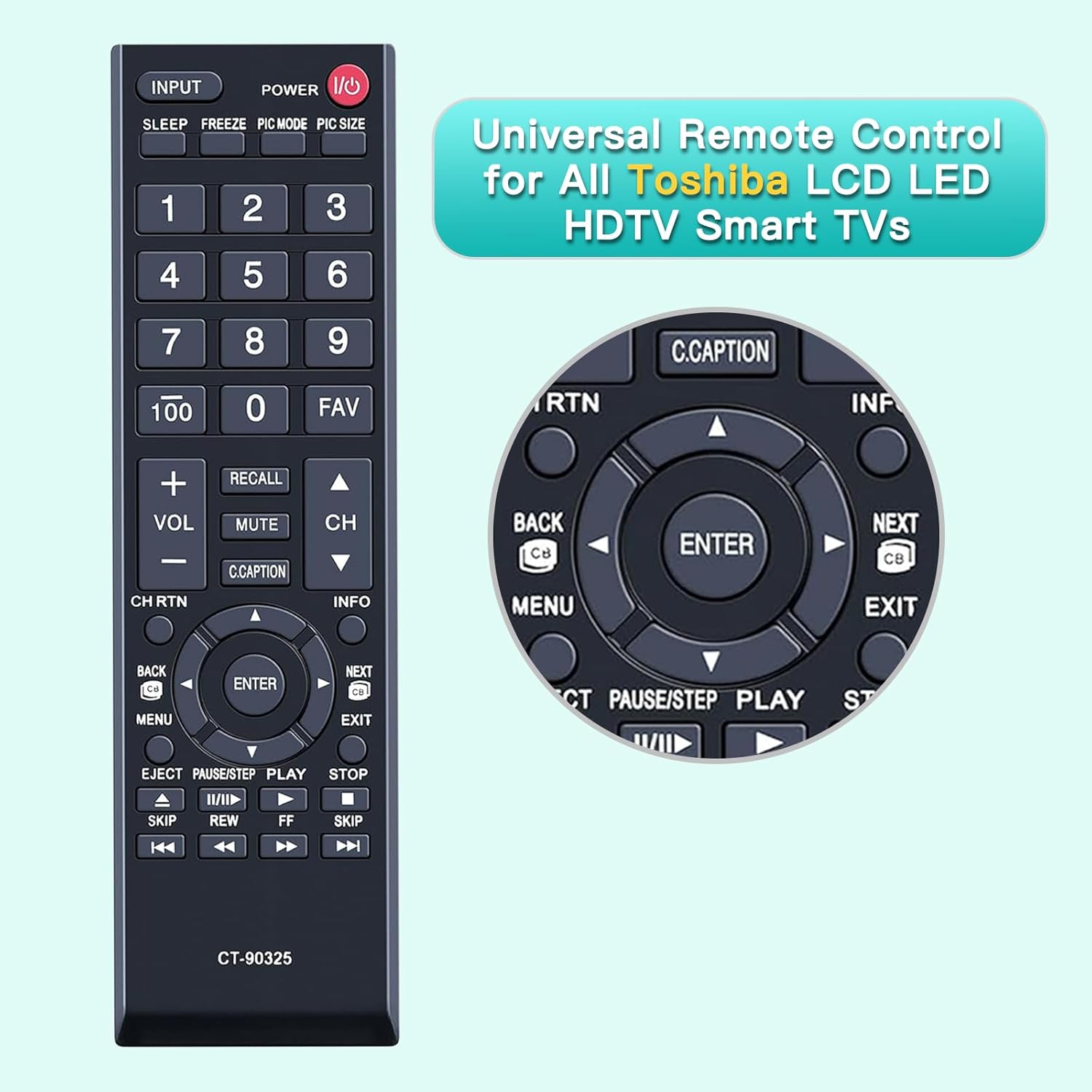
Image: A close-up view of the central navigation pad (directional arrows, ENTER), and media control buttons (PLAY, PAUSE, STOP, SKIP, REW, FF).
| Button | Function |
|---|---|
| POWER (I/O) | Turns the TV on or off. |
| INPUT | Selects the input source (HDMI, AV, etc.). |
| SLEEP | Sets the sleep timer. |
| FREEZE | Freezes the current picture. |
| PIC MODE / PIC SIZE | Adjusts picture mode or aspect ratio. |
| Number Buttons (0-9) | Direct channel selection. |
| FAV | Accesses favorite channels. |
| VOL +/- | Adjusts volume up or down. |
| CH +/- | Changes channels up or down. |
| MUTE | Mutes or unmutes the TV sound. |
| RECALL | Switches between the current and previous channel. |
| C.CAPTION | Activates or deactivates Closed Captioning. |
| INFO | Displays current program information. |
| MENU | Opens the TV's main menu. |
| Navigation Arrows (Up, Down, Left, Right) | Navigates through menus and options. |
| ENTER | Confirms selections in menus. |
| BACK / CH RTN | Goes back to the previous screen or channel. |
| EXIT / NEXT | Exits the current menu or function. |
| PLAY / PAUSE/STEP / STOP / SKIP / REW / FF | Media playback controls (if supported by TV). |
Note: Some functions may not be accessible with your specific TV model if there is no such button or feature on the original remote control or TV.
Maintenance
- Cleaning: Use a soft, dry cloth to clean the remote control. Do not use liquid cleaners or abrasive materials.
- Battery Replacement: Replace batteries when the remote's response becomes slow or inconsistent. Always replace both batteries at the same time with new ones.
- Storage: If the remote will not be used for an extended period, remove the batteries to prevent leakage and damage. Store in a cool, dry place.
- Avoid Damage: Do not drop the remote, expose it to extreme temperatures, or immerse it in water.
Troubleshooting
| Problem | Possible Cause / Solution |
|---|---|
| Remote is not working. |
|
| Some buttons do not work. |
|
| Remote response is slow. |
|
Specifications
- Model: US-CT-90325
- Brand: Terloogee
- Connectivity Technology: Infrared
- Compatible Devices: Toshiba Televisions (LCD, LED, 3D HDTV, 4K UHD Smart TVs)
- Max Number of Supported Devices: 1
- Power Source: 2 x AAA Batteries (not included)
- Item Weight: 2.39 ounces (approx. 67.7 grams)
- Package Dimensions: 6.85 x 1.97 x 0.98 inches (approx. 17.4 x 5.0 x 2.5 cm)

Image: Diagram illustrating the dimensions of the remote control: 17.5cm (6.88 inches) length, 2.3cm (0.9 inches) thickness, and 5cm (1.96 inches) width.
Warranty and Support
Terloogee is committed to providing high-quality products and ensuring customer satisfaction. If you encounter any issues or have questions regarding your Universal Toshiba TV Remote, please do not hesitate to contact us.
Return Policy: This product is typically eligible for a 30-day refund or replacement policy from the date of purchase, as per Amazon's standard return guidelines.
How to Contact Support:
- Go to your Amazon "Your Orders" page.
- Find this specific order in the list.
- Click on the "Contact Seller" option.
Our customer service team will assist you promptly.
Ask a question about this manual
Ask about setup, troubleshooting, compatibility, parts, safety, or missing instructions. Manuals+ will review the question and use this page’s manual context to help answer it.