
t215
JMMO Gadgetgyz T215 Wireless Hi-Fi Stereo Earbuds
User Instruction Manual
Introduction
This manual provides detailed instructions for the operation and maintenance of your JMMO Gadgetgyz T215 Wireless Hi-Fi Stereo Earbuds. Please read this manual thoroughly before using the product to ensure proper function and to extend the lifespan of your device.
Safety Information
- Do not expose the earbuds or charging case to extreme temperatures, direct sunlight, or fire.
- Avoid dropping or subjecting the device to strong impacts.
- Do not disassemble, repair, or modify the product yourself. This may void the warranty and cause damage.
- Keep the device away from water and liquids, although it has an IPX4 rating, prolonged submersion is not recommended.
- Use only the provided charging cable or a certified equivalent.
- Prolonged listening at high volume levels may cause hearing damage. Adjust volume to a safe level.
Package Contents
Please check the package for the following items:
- 2 x JMMO T215 Earbuds (Left and Right)
- 1 x Charging Case
- 1 x Charging Cable
- 1 x User Manual (This document)
Product Overview
Familiarize yourself with the components of your JMMO T215 Earbuds and charging case.
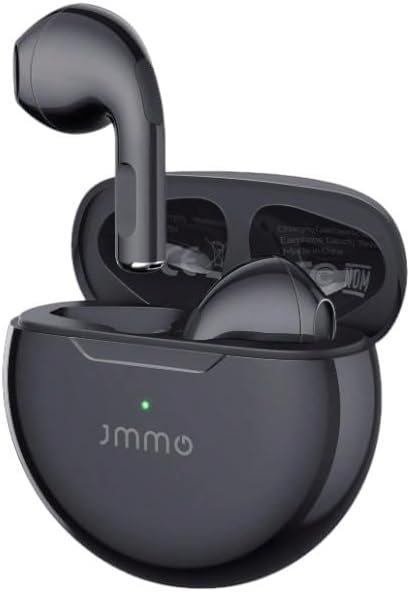
Image: The JMMO T215 earbuds resting inside their open charging case. The earbuds are black, and the case is also black with a small green indicator light visible, showing the charging status.
- Earbuds: Left and Right earbuds with touch control areas.
- Charging Case: Stores and charges the earbuds, also acts as a power bank for the earbuds.
- Charging Port: Located on the charging case for connecting the charging cable.
- LED Indicator: On the charging case and earbuds to show charging status and connection status.
Setup
1. Charging the Earbuds and Case
Before first use, fully charge the charging case and earbuds.
- Connect the provided charging cable to the charging port on the case and to a USB power source.
- The LED indicator on the case will show charging status. It will typically turn solid or off when fully charged.
- Place the earbuds into the charging case. Ensure they are correctly seated; the earbuds' indicators will light up to show they are charging.
- A full charge provides approximately 4 hours of playtime for the earbuds, with the charging case providing an additional 10 hours (total 14 hours).

Image: A diagram illustrating the battery life of the earbuds. It shows "4 Hrs Playtime" for the earbuds themselves and "14 Hrs With Charging Case", indicating the total listening time with recharges from the case.
2. Pairing with a Device
- Ensure the earbuds are charged.
- Open the charging case. The earbuds will automatically enter pairing mode, and their LED indicators will flash.
- On your device (smartphone, tablet, etc.), enable Bluetooth.
- Search for "JMMO T215" or "Gadgetgyz T215" in the list of available Bluetooth devices.
- Select "JMMO T215" to connect. Once connected, the earbud indicators will stop flashing.
- The earbuds will automatically reconnect to the last paired device when taken out of the case, if Bluetooth is enabled on the device.
Operating Instructions
The JMMO T215 earbuds feature touch controls for various functions.

Image: A visual guide to the touch controls on the earbuds. It shows icons for single click, double click, triple click, long press for 2 seconds, and long press for 5 seconds, along with their corresponding functions.
Power On/Off
- Power On: Open the charging case, or long press the MFB (Multi-Function Button) on either earbud for 2 seconds.
- Power Off: Place the earbuds back into the charging case and close the lid, or long press the MFB on either earbud for 5 seconds.
Music Playback Controls
- Play/Pause: Single click the MFB on either earbud.
- Next Track: Double click the MFB on the right earbud.
- Previous Track: Double click the MFB on the left earbud.
- Volume Up: Triple click the MFB on the right earbud.
- Volume Down: Triple click the MFB on the left earbud.
Call Management
- Answer/End Call: Single click the MFB on either earbud.
- Reject Call: Long press the MFB on either earbud for 2 seconds.
Voice Assistant
- Activate Voice Assistant (Siri, Google Assistant): Long press the MFB on either earbud for 2 seconds (when not on a call).
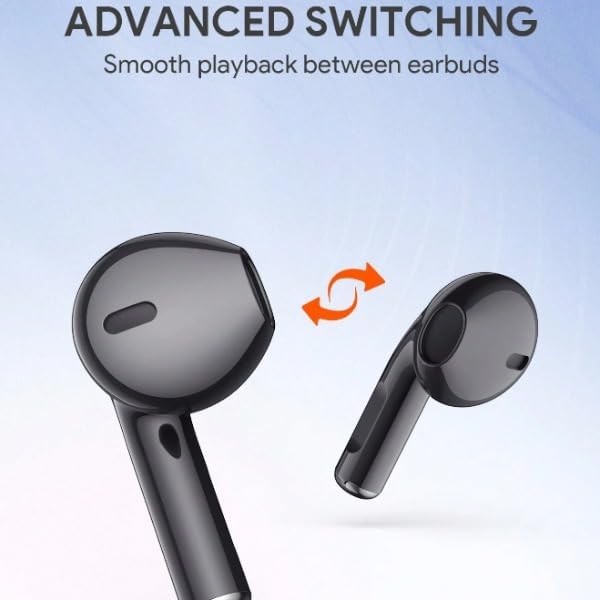
Image: A graphic illustrating "ADVANCED SWITCHING" with two earbuds and a double-headed arrow between them, signifying smooth playback transition between the left and right earbuds.
Maintenance
Cleaning
- Use a soft, dry, lint-free cloth to clean the earbuds and charging case.
- Do not use abrasive cleaners, alcohol, or chemical solvents.
- Gently clean the charging contacts on both the earbuds and the case to ensure proper charging.
Storage
- When not in use, store the earbuds in their charging case to protect them and keep them charged.
- Store the device in a cool, dry place, away from extreme temperatures and humidity.
Troubleshooting
| Problem | Possible Solution |
|---|---|
| Earbuds not charging |
|
| Earbuds not pairing/connecting |
|
| No sound or low volume |
|
| One earbud not working |
|
Specifications
| Model Name: | T215 (tws) |
| Connectivity: | Wireless (Bluetooth) |
| Form Factor: | In Ear |
| Colour: | Black |
| Special Features: | Fast Charging, Microphone Included |
| Waterproof Rating: | IPX4 (Sweat and splash resistant) |
| Playtime (Earbuds): | Up to 4 hours |
| Total Playtime (with Case): | Up to 14 hours |
| Included Components: | 2 x Earbuds, 1 x Charging Case, 1 x Charging Cable, 1 x User Manual |

Image: A detailed cutaway diagram of an earbud's internal speaker components, highlighting a 13mm composite diaphragm dynamic speaker for superior sound quality.
Warranty and Support
The JMMO Gadgetgyz T215 Earbuds come with a manufacturer's warranty of 1 year from the date of purchase. This warranty covers defects in materials and workmanship under normal use.
The warranty does not cover damage caused by misuse, accident, unauthorized modification, or normal wear and tear.
For warranty claims or technical support, please contact the seller or refer to the purchase platform for contact information. Please have your proof of purchase ready.
Spare part information is not available or provided by the manufacturer.
Related Documents - t215
 |
User Guide for i50 True Wireless Stereo Earphones This user guide provides instructions and specifications for the i50 True Wireless Stereo Earphones, covering pairing, functions, charging, storage, maintenance, and troubleshooting. |
 |
JMMO S9000 True Wireless Earbuds User Manual Official user manual for the JMMO S9000 True Wireless Earbuds. Find detailed instructions on setup, operation, charging, LED indicators, touch controls, call handling, and warranty information. |
 |
Xtreme True Wireless Stereo Transparent Earbuds User Manual User manual for Xtreme True Wireless Stereo Transparent Earbuds with LED display charging case. Includes safety instructions, warranty information, product description, operation guide, and troubleshooting tips. |
 |
F9 Upgrade TWS Bluetooth Earphones - Wireless Stereo Earbuds with Charging Case Explore the F9 Upgrade TWS Bluetooth Earphones. Enjoy immersive 9D stereo sound, a waterproof design, and the convenience of a charging case that doubles as a power bank for your phone. Features include seamless Bluetooth pairing, intuitive music and call controls, and voice assistant activation. |
 |
AMINY T23 True Wireless Earbuds User Manual User guide for AMINY T23 True Wireless Earbuds, detailing setup, Bluetooth pairing, charging, music playback, call handling, voice assistant activation, troubleshooting, and specifications. Features Bluetooth 5.0 and IPX7 waterproof. |
 |
Cellularline Aries Wireless Stereo Bluetooth Earbuds - User Manual and Specifications Comprehensive user guide for Cellularline Aries wireless stereo Bluetooth earbuds, covering preliminary operations, usage in stereo mode, technical specifications, EU declarations, warranty information, safety guidelines, and disposal instructions. |
Ask a question about this manual
Ask about setup, troubleshooting, compatibility, parts, safety, or missing instructions. Manuals+ will review the question and use this page’s manual context to help answer it.