
1. Product Overview
The NEWTRENDS Smart Ring is a wearable fitness tracker designed to monitor various health metrics. It features heart rate, blood oxygen, and sleep monitoring, along with multi-sport tracking and remote camera control. The ring connects to your smartphone via Bluetooth using the QRing application.

Image: The NEWTRENDS Smart Ring, a sleek silver band with visible internal sensors, designed for health monitoring.
2. Setup
2.1 Package Contents
- NEWTRENDS Smart Ring
- Magnetic Charging Cable
- Instruction Manual
2.2 Sizing and Wearing
Refer to the provided sizing chart to select the appropriate ring size for optimal comfort and accurate data collection. Ensure the ring fits snugly but comfortably on your finger.

Image: A table comparing international ring sizes (USA, UK, Japan, Germany, France, Switzerland, China) by length and diameter, alongside visual instructions for measuring finger circumference with a thin line and ruler.
2.3 Charging the Ring
Connect the magnetic charging cable to the ring. A full charge typically takes approximately 2 hours. Monitor the battery level through the QRing application.

Image: The NEWTRENDS Smart Ring connected to its magnetic charging cable, illustrating the charging process.
2.4 App Installation and Connection (QRing)
- Download the QRing application from your device's app store.
- Ensure Bluetooth is enabled on your smartphone.
- Open the QRing app and follow the on-screen instructions to pair your NEWTRENDS Smart Ring.
- Once connected, the app will display real-time data and allow for settings adjustments.
3. Operating Instructions
3.1 Heart Rate Monitoring
The smart ring utilizes advanced dynamic monitoring technology to accurately record your heart rate changes throughout the day. This allows you to track your heart rate during exercise and rest, providing insights into your cardiovascular health. Data is viewable in the QRing app.

Image: A person wearing the NEWTRENDS Smart Ring on their finger while holding bicycle handlebars, with a smartphone screen showing a graph of heart rate data over time.
3.2 Blood Oxygen Monitoring
The ring's optical sensor detects blood oxygen levels in real-time. This feature helps you monitor your blood oxygen saturation, providing important data for understanding your respiratory health.
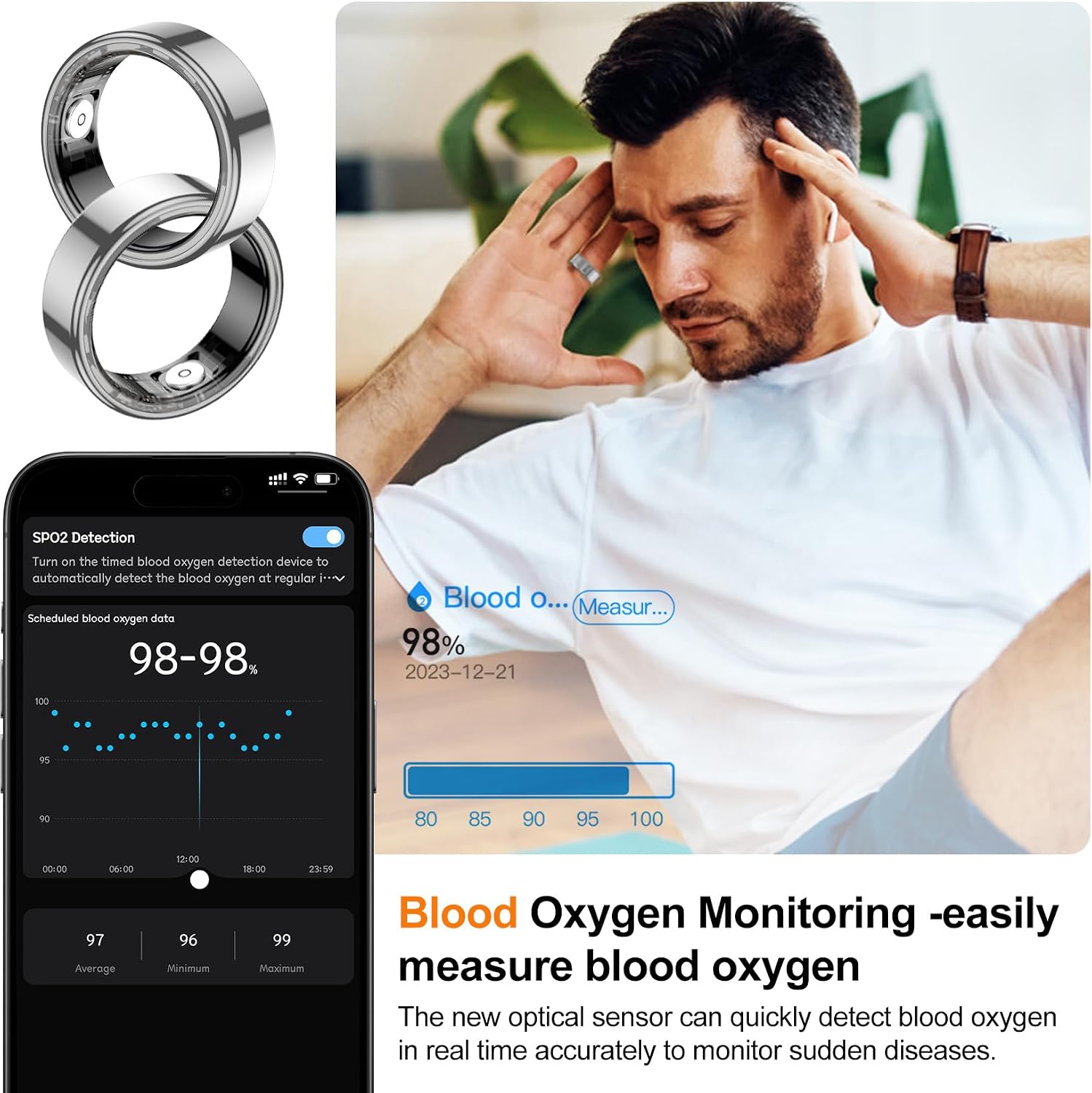
Image: A person wearing the NEWTRENDS Smart Ring, with a smartphone displaying a graph of blood oxygen detection data, showing average, minimum, and maximum SpO2 levels.
3.3 Sleep Monitoring
The smart ring records your complete sleep structure, monitoring the quality of your sleep, including the proportion of light and deep sleep phases. This data helps you understand your sleep patterns and promote better sleep habits.

Image: A person sleeping while wearing the NEWTRENDS Smart Ring, with a smartphone screen showing detailed sleep analysis, including total sleep duration, light sleep, deep sleep, and sleep efficiency.
3.4 Multi-sports Mode and Step Counting
The ring supports various sports modes, including brisk walking, running, cycling, and step counting. The QRing app records exercise data such as time, distance, heart rate changes, and calorie consumption, helping you track your fitness progress.

Image: A woman exercising outdoors, wearing the NEWTRENDS Smart Ring, with a collage of smartphone screens showing various sports modes and detailed exercise data like steps, calories, and distance.
3.5 Remote Camera Control
The smart ring allows you to remotely control your phone's camera. By performing a specific hand gesture, you can capture photos instantly, making it easier to take group pictures or selfies.

Image: A group of friends posing for a photo, with one person wearing the NEWTRENDS Smart Ring and using it to remotely trigger the smartphone camera, which is displayed on a larger screen.
4. Maintenance
4.1 Water Resistance
The NEWTRENDS Smart Ring features IP68 waterproof technology, making it suitable for activities such as swimming, showering, and washing hands. It is designed with a fully enclosed structure for enhanced durability in wet conditions.

Image: A woman in a swimming pool, wearing the NEWTRENDS Smart Ring, demonstrating its IP68 waterproof capability. Insets show the ring's classical design and lightweight nature (4.4g, 2.7mm thickness).
4.2 Cleaning
To ensure proper charging and functionality, regularly clean the charging port and the sensor area of the ring to prevent accumulation of dirt or debris.
4.3 Battery Life
The ring offers approximately 6 days of normal usage time and 8-12 days of regular standby time on a full charge. Actual battery life may vary based on usage patterns and feature activation.
5. Troubleshooting
- Inaccurate Readings: Ensure the ring is worn correctly and fits snugly on your finger. Loose fit can affect sensor accuracy. Verify that the QRing app is up-to-date and has necessary permissions.
- Connectivity Issues: If the ring disconnects from the app, ensure Bluetooth is active on your phone and the ring is charged. Restarting both the app and your phone may resolve connection problems.
- No Battery Notifications: Check app settings to ensure battery notifications are enabled. Keep the QRing app running in the background to receive timely alerts.
- Charging Problems: Clean the magnetic charging contacts on both the ring and the cable to ensure a proper connection. Use the provided charging cable.
- Physical Wear: The outer layer is made of stainless steel. While durable, it may show scratches over time with regular use.
6. Specifications
| Model Name | ZY-CGJZ SL 8 |
| Product Dimensions | 0.3 x 0.1 x 0.1 inches |
| Item Weight | 2.82 ounces (approx. 4.4g for the ring itself) |
| Battery Type | 1 Lithium Polymer battery (included), 17mAh capacity |
| Charging Time | Approx. 1-2 hours (magnetic fast charging) |
| Normal Usage Time | 5-7 days |
| Standby Time | 8-12 days |
| Waterproof Level | IP68 |
| Connectivity Technology | Bluetooth |
| Wireless Communication Standard | Bluetooth |
| App Name | QRing |
| Compatibility | Android 5.0 and above, iOS 8.0 and above |
| Product Material | Stainless steel, ceramic + filling process |
| Operating Temperature | 0-50°C |
7. Warranty and Support
7.1 Warranty Information
For detailed warranty information, please refer to the product packaging or visit the official NEWTRENDS website. Keep your proof of purchase for warranty claims.
7.2 Customer Support
If you encounter any issues or have questions regarding your NEWTRENDS Smart Ring, please consult the troubleshooting section of this manual or contact NEWTRENDS customer support through their official channels. The QRing app also provides data visualization and may offer in-app support resources.