
Introduction
This manual provides essential information for the installation, operation, and maintenance of your KICKER CXA400.1 Mono Class D Car Amplifier and CXARC Remote Bass Control. Please read this manual thoroughly to ensure proper use and to achieve optimal performance from your audio system.

Image: Top view of the KICKER CXA400.1 Mono Class D Car Amplifier.
The KICKER CXA400.1 amplifier is designed for efficient power delivery to subwoofers, featuring a Class-D power plant and a compact design. The KICKER CXARC remote control allows for convenient adjustment of bass levels.
Safety Information
Always observe the following safety precautions when installing and operating your amplifier:
- Disconnect the vehicle's battery negative terminal before making any electrical connections.
- Ensure all wiring is properly routed and secured to prevent damage or short circuits.
- Use appropriate gauge power and ground wires as specified in the installation section.
- Avoid mounting the amplifier in locations exposed to excessive heat, moisture, or vibration.
- Do not operate the amplifier if it is damaged or malfunctioning. Refer to the troubleshooting section or contact KICKER support.
- Prolonged exposure to high sound pressure levels can cause permanent hearing loss. Use caution when adjusting volume levels.
Package Contents
Verify that all items are present in your package:
- KICKER CXA400.1 Mono Class D Car Amplifier
- KICKER CXARC Remote Bass Control
- Mounting Hardware (screws, vertical mounting brackets)
- Owner's Manual (this document)
Setup and Installation
Proper installation is crucial for optimal performance and safety. If you are unsure about any part of the installation process, consult a professional installer.
Mounting the Amplifier
The CXA400.1 amplifier features a compact design and includes vertical mounting hardware for flexible installation options. Choose a location that is dry, well-ventilated, and protected from direct sunlight or excessive heat. Ensure there is sufficient space around the amplifier for air circulation.
Wiring Connections
All wiring should be done with the vehicle's battery disconnected. Use high-quality power, ground, and speaker wires of appropriate gauge.

Image: View of the KICKER CXA400.1 amplifier showing RCA input/output and control panel.
- Power Connection: Connect the main power wire from the battery (with an inline fuse) to the amplifier's +12V terminal.
- Ground Connection: Connect a short, heavy-gauge ground wire from the amplifier's GND terminal to a clean, bare metal point on the vehicle's chassis.
- Remote Turn-On: Connect the amplifier's REM terminal to the remote turn-on output of your head unit.
- Input Signal: The CXA400.1 accepts both low-level (RCA) and high-level (speaker wire) input signals. It can accept up to 40 volts of speaker-level input, eliminating the need for line-out converters in many cases. Connect your head unit's RCA outputs to the amplifier's INPUT terminals for low-level input, or use the high-level input if your head unit does not have RCA outputs.
- Speaker Output: Connect your subwoofer(s) to the amplifier's speaker output terminals. Ensure correct polarity.

Image: Side view of the KICKER CXA400.1 amplifier showing power, ground, remote, and speaker terminals.
Initial Settings
After all connections are made, reconnect the vehicle's battery. Before playing audio, set the amplifier's gain control to its minimum position. Adjust other settings like crossover and bass boost as needed for your specific audio setup.
Operating the Amplifier and Bass Knob
The KICKER CXA400.1 amplifier offers several adjustable features to fine-tune your audio experience. The CXARC remote bass control provides convenient real-time adjustments.
Gain Control
The gain control matches the amplifier's input sensitivity to the output level of your head unit. Start with the gain at minimum and slowly increase it until you hear distortion, then back off slightly. This ensures maximum clean signal from your head unit.
Crossover Settings
The amplifier features a variable 12dB low-pass crossover (50Hz–200Hz). This filter allows only frequencies below the set point to pass to the subwoofer, preventing higher frequencies from reaching it and improving overall sound clarity. Adjust this to blend smoothly with your main speakers.
Subsonic Filter
A 24dB/octave subsonic filter set at 25Hz helps protect your subwoofer by removing extremely low, inaudible frequencies that can cause excessive cone excursion and potential damage. It also improves efficiency by preventing the amplifier from wasting power on these frequencies.
KickEQ Bass Boost
The KickEQ offers a variable 0-6dB bass boost centered at 40Hz. Use this feature to enhance low-frequency response. Adjust carefully to avoid distortion and speaker damage.
CXARC Remote Bass Control
The CXARC remote bass control connects to your CXA400.1 amplifier and allows you to adjust the bass level conveniently from the driver's seat. This provides on-the-fly control over your subwoofer's output without needing to access the amplifier directly.
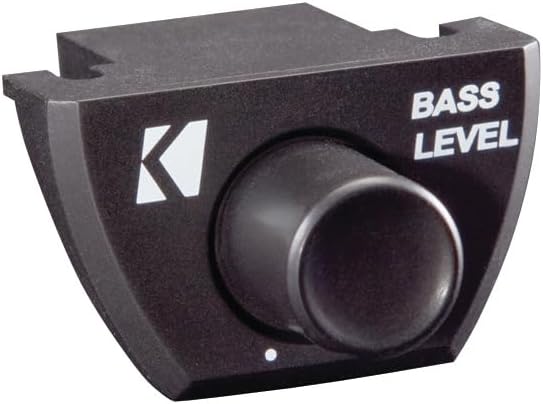
Image: The KICKER CXARC Remote Bass Control knob.
Maintenance
Your KICKER amplifier and bass knob require minimal maintenance to ensure long-lasting performance.
- Cleaning: Periodically wipe the amplifier and remote with a soft, dry cloth to remove dust and dirt. Do not use harsh chemicals or abrasive cleaners.
- Connections: Occasionally check all wiring connections to ensure they are secure and free from corrosion. Loose connections can lead to poor performance or damage.
- Ventilation: Ensure that the amplifier's cooling fins are not obstructed to allow for proper heat dissipation.
Troubleshooting
If you experience issues with your KICKER amplifier, refer to the following common problems and solutions:
- No Power: Check the inline fuse on the power wire, ensure the ground connection is solid, and verify the remote turn-on wire is receiving 12V when the head unit is on.
- No Sound: Check all input and output connections. Ensure the gain is not set to minimum. Verify the head unit is sending an audio signal. Check speaker wires for shorts or open circuits.
- Distorted Sound: Reduce the gain setting. Check for proper crossover and bass boost settings. Ensure the input signal is not overdriven.
- Amplifier Overheating: Ensure adequate ventilation around the amplifier. Check the impedance of your speakers; ensure it matches the amplifier's capabilities.
- Remote Bass Knob Not Working: Check the connection cable between the CXARC and the amplifier. Ensure the amplifier is powered on.
If problems persist after checking these points, contact KICKER customer support.
Specifications
| Feature | Specification |
|---|---|
| Power Output (RMS) | 150x1 watts/ch at 4 Ohms, 300x1 watts/ch at 2 Ohms, 400x1 watts/ch at 1 Ohm |
| Frequency Response | 25-200Hz |
| Input Sensitivity | 250mV-10V (Low Level), 1V-40V (High Level) |
| Signal-to-Noise Ratio | >95dB |
| Active Crossover | Variable Lo-pass 50Hz–200Hz, 12dB/octave |
| Subsonic Filter | 25Hz @24dB/octave |
| KickEQ Boost | Variable 0-6dB @40Hz |
| Dimensions | 8-1/8" x 5.9" x 17" (20.6cm x 15cm x 43cm) |
| Item Weight | 5.3 pounds |
| Model Number | KickerBDL240611-01 (Bundle) |
Warranty
The KICKER CXA400.1 Amplifier and CXARC Bass Knob are covered by a 1-Year Manufacturer Warranty. This warranty covers defects in materials and workmanship under normal use. Please retain your proof of purchase for warranty claims. For specific warranty terms and conditions, refer to the documentation included with your product or visit the official KICKER website.
Support
For technical assistance, troubleshooting, or warranty inquiries, please contact KICKER customer support. You can find contact information and additional resources on the official KICKER website. When contacting support, please have your product model number (CXA400.1, CXARC) and proof of purchase readily available.
Visit the KICKER Store on Amazon for more products and information.


