Introduction
The Eletechsup SMLDA01 is an adjustable Schumann Sine Wave Generator designed for various applications requiring precise frequency generation. This device outputs both sine and square waves, with a default frequency of 7.83Hz, adjustable within a broad range. This manual will guide you through the setup, operation, and maintenance of your generator.
What's in the Box
- 1 x Schumann Wave Generator Module
- 1 x USB Cable
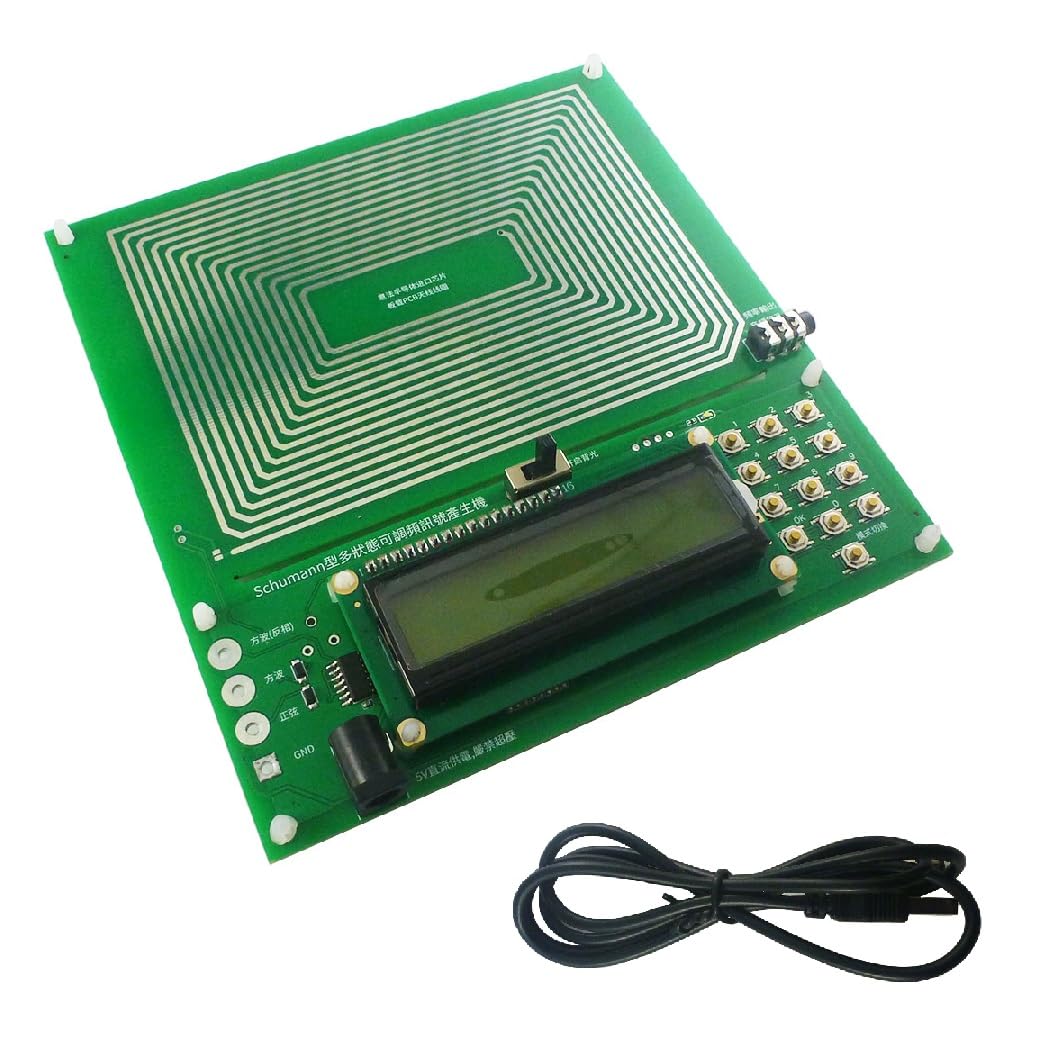
Image: The Eletechsup SMLDA01 Schumann Wave Generator module and the included USB cable.
Setup
Follow these steps to set up your Schumann Wave Generator:
- Power Connection: Connect the provided USB cable to the DC 5.5x2.1 power interface (DC 5V) on the generator module. Connect the other end of the USB cable to a compatible 5V power source (e.g., a USB wall adapter, computer USB port).
- Initial Power-On: Once powered, the device will automatically start operating at its default frequency of 7.83Hz. The frequency will be displayed on the LCD screen.
- Signal Output: The generator provides sine wave, square wave, and inverted square wave outputs simultaneously via the signal test interface located at the lower left corner of the board.
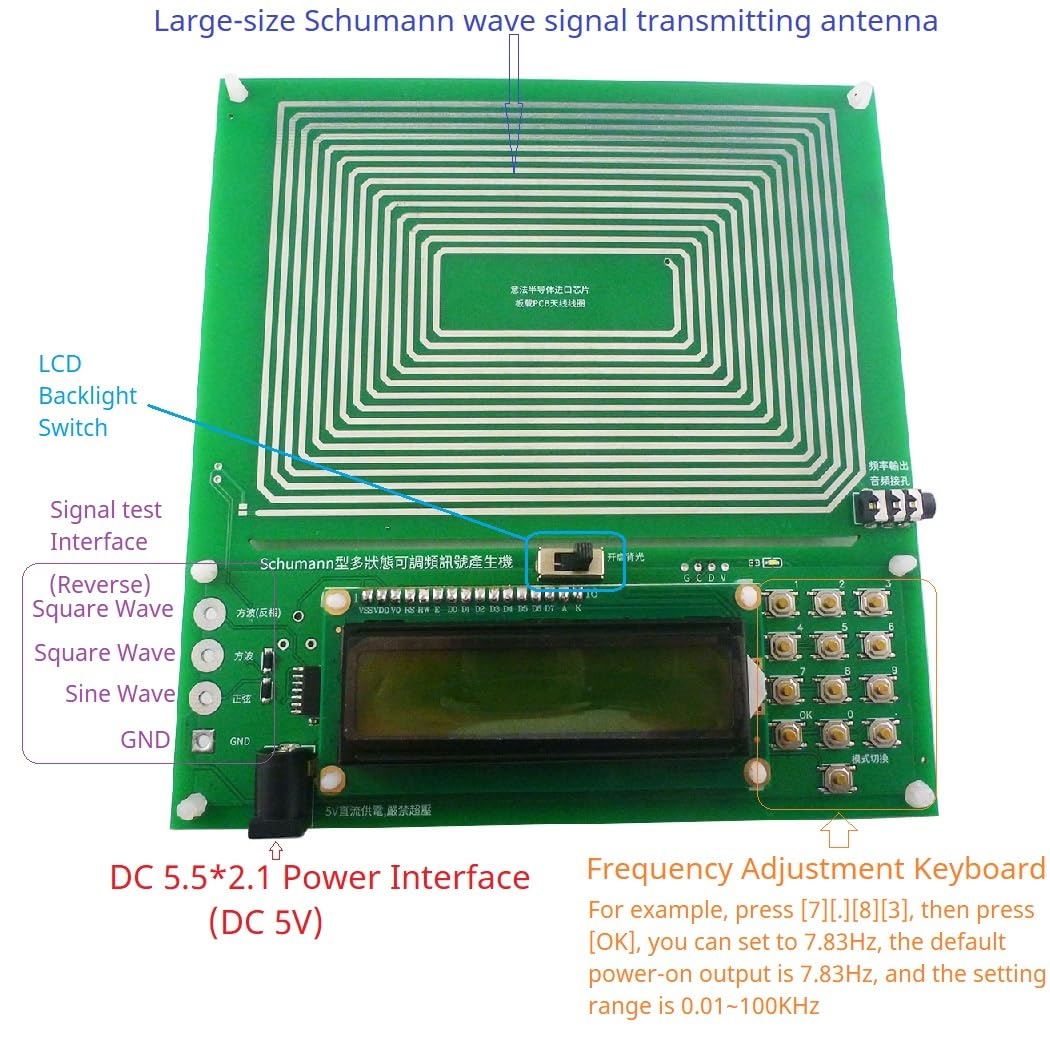
Image: Labeled components of the Eletechsup SMLDA01 Schumann Wave Generator, highlighting the DC 5.5x2.1 Power Interface, Signal Test Interface, Frequency Adjustment Keyboard, and LCD Backlight Switch.
Operating Instructions
The SMLDA01 generator is designed for straightforward operation. The primary function is frequency adjustment.
Frequency Adjustment
To change the output frequency:
- Use the numeric keypad on the right side of the board to input the desired frequency.
- After entering the frequency, press the "OK" key (located at the bottom right of the keypad) to confirm and apply the new frequency.
- Example: To set the frequency to 7.83Hz, press the keys for [7], [.], [8], [3], and then press [OK].
The adjustable frequency range is from 0.01Hz to 100,000Hz (100KHz).
Video: Demonstration of adjusting the Schumann wave generator frequency and observing the sine wave output on an oscilloscope.
Video: Detailed demonstration of setting various frequencies on the Schumann wave generator and verifying the output on an oscilloscope.
Specifications
| Feature | Specification |
|---|---|
| Item Type | Schumann Wave Generator |
| Material | PCB Board |
| Board Size | Approx. 15x15cm / 5.9x5.9in |
| Antenna Waveform | Sine Wave |
| Interface Waveforms | Sine Wave, Square Wave, Inverted Square Wave |
| Power Supply Interface | DC5.5x2.1 |
| Supply Voltage | 5V |
| Rated Power Consumption | <1W |
| Default Frequency | 7.83Hz |
| Adjustment Range | 0.01Hz - 100,000Hz (100KHz) |
| Sine Signal Voltage Amplitude | 3V |
| Square Wave Signal Voltage Amplitude | 5V |
| Color | Green |
| Item Weight | 0.06 ounces |
Maintenance
- Keep the device clean and free from dust. Use a soft, dry cloth for cleaning.
- Avoid exposing the generator to extreme temperatures, humidity, or direct sunlight.
- Do not attempt to disassemble or modify the device, as this may void the warranty and cause damage.
- Store the generator in a safe place when not in use to prevent physical damage.
Troubleshooting
No Power/Display
- Ensure the USB cable is securely connected to both the generator and the 5V power source.
- Verify that the power source is functional and providing 5V output.
- Check the USB cable for any damage. Try a different USB cable if necessary.
Incorrect Frequency Output
- Double-check the frequency input on the keypad. Ensure the correct numbers and decimal point are entered.
- Confirm that the "OK" button was pressed after entering the desired frequency.
- If using an external measurement device (e.g., oscilloscope), ensure it is properly calibrated and connected to the correct output interface.
Note: All data are measured manually, and there may be minor errors in measurement results.
Warranty Information
This Eletechsup product is covered by a standard manufacturer's warranty against defects in materials and workmanship. Please retain your proof of purchase for warranty claims. For specific warranty terms and conditions, refer to the documentation provided with your purchase or contact customer support.
Support
For technical assistance, troubleshooting, or general inquiries regarding your Eletechsup SMLDA01 Schumann Sine Wave Generator, please contact Eletechsup customer support through their official website or the retailer from whom you purchased the product.


