
Introduction
The Lucky Miner LV03 is a compact, low-power USB device designed for individuals interested in cryptocurrency mining, specifically for participating in Bitcoin lottery mining. This device operates as a solo miner, offering a hash rate of 74KH/s with a power consumption of 1W. It features a mini display for real-time status monitoring and includes a built-in 2.4G WiFi module for network connectivity. The LV03 is an open-source project aimed at providing an accessible entry point into understanding the mining process.
Key Features:
- Compact and Portable: USB-A powered, designed for easy connection to computers, laptops, USB hubs, or power banks.
- Integrated Mini Display: Shows real-time mining status, hash rate, and other operational information.
- Efficient ASIC Chip: Provides a hash rate of 74KH/s at 1W power consumption.
- 2.4G WiFi Connectivity: Enables wireless connection to your home network for remote monitoring and management.
- Bitcoin Lottery Mining: Offers a chance to win Bitcoin blocks approximately every 10 minutes.
Setup Guide
Follow these steps to set up your Lucky Miner LV03:
- Power Connection: Insert the LV03 miner into a standard USB-A port (2.4A recommended) on a computer, laptop, USB hub, or a compatible USB power supply. The device will power on automatically.
- Initial Boot-up: Upon powering on, the mini display on the device will activate, showing boot-up information.
- WiFi Configuration: The LV03 requires a 2.4G WiFi connection. Access the device's configuration interface (usually via a web browser after connecting to its temporary WiFi hotspot or by following specific instructions provided by the manufacturer for initial setup) to enter your WiFi network credentials (SSID and password). Note: The device only supports 2.4G WiFi networks; 5G networks are not compatible.
- Wallet Address Input: Within the configuration interface, you will need to provide your Bitcoin wallet address. This is where any potential mining rewards will be sent. Ensure the address is correct to avoid loss of funds.
- Start Mining: Once connected to WiFi and your wallet address is configured, the miner will begin its operation. The mini display will show real-time mining status, including hash rate and valid blocks found.

Image: The Lucky Miner LV03 device plugged into a laptop's USB port, illustrating a typical connection setup.
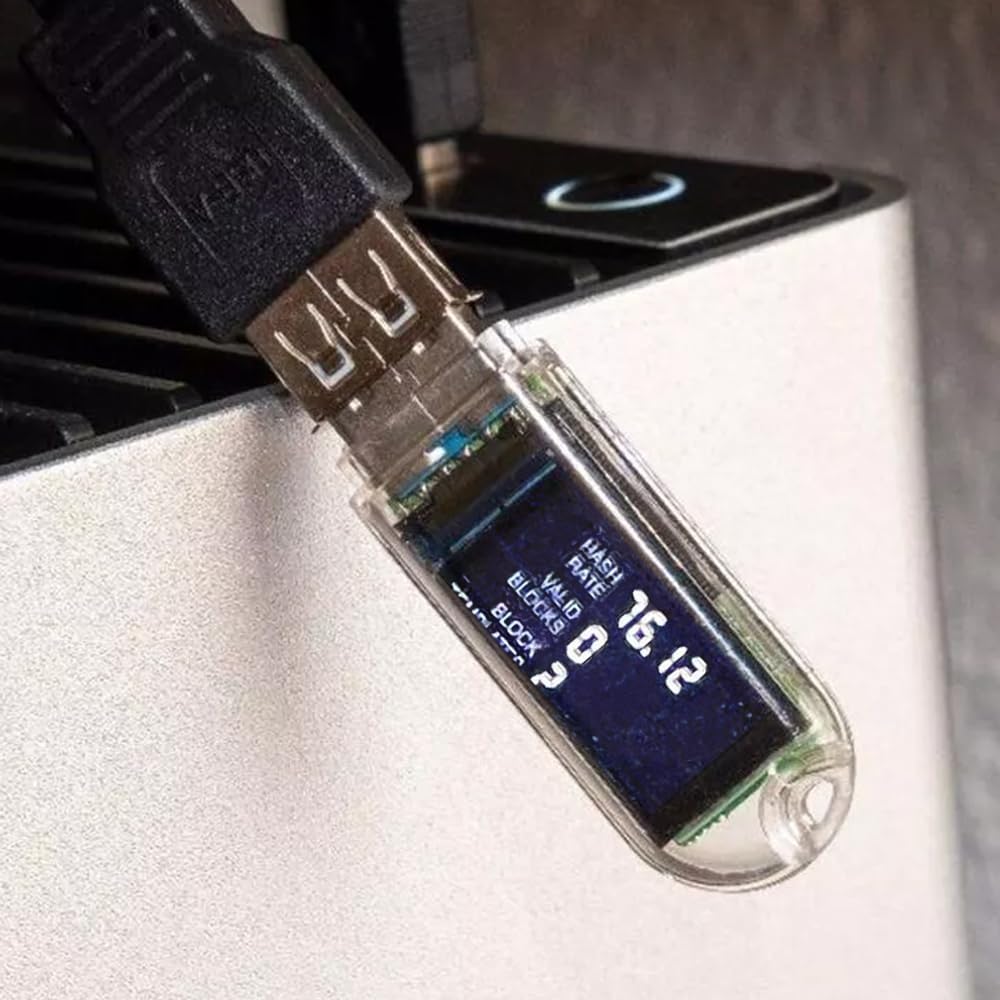
Image: A close-up of the Lucky Miner LV03's mini display, showing real-time operational data such as hash rate and valid blocks.
Video: An official product video demonstrating the Lucky Miner LV03 in operation, including its connection to a USB hub and the display of mining status.
Operating Instructions
Once your LV03 miner is set up and running, its operation is largely automated. Here are key aspects of its functionality:
- Monitoring: The integrated mini display provides continuous updates on the miner's status, including its current hash rate and any blocks it has successfully processed.
- Remote Management: Through its 2.4G WiFi connection, you can remotely monitor and manage the device using a compatible application or web interface, as provided by the manufacturer. This allows for checking status and making minor adjustments without direct physical access.
- Lottery Mining: The LV03 participates in a Bitcoin lottery mining process, where there is a chance to win a Bitcoin block approximately every 10 minutes. Due to the nature of solo mining with a low hash rate, winning is infrequent and based on luck.
- Power Consumption: The device is designed for low power consumption (1W), making it suitable for continuous operation without significant energy costs.
Maintenance
To ensure the longevity and optimal performance of your Lucky Miner LV03, consider the following maintenance guidelines:
- Keep Clean: Regularly clean the device with a soft, dry cloth to prevent dust accumulation, especially around the USB connector and display.
- Environmental Conditions: Operate the miner in a cool, dry environment. Avoid extreme temperatures, humidity, and direct sunlight.
- Software Updates: Periodically check the manufacturer's official website or support channels for any available firmware or software updates. Updates can improve performance, add features, or resolve known issues.

Image: A screenshot illustrating the LV03 software update program interface, which is used to flash new firmware to the device, particularly for resolving WiFi connection issues.
Troubleshooting
If you encounter issues with your Lucky Miner LV03, refer to the following common problems and solutions:
- Device Not Powering On:
- Ensure the USB-A port provides sufficient power (2.4A recommended). Try a different USB port or power adapter.
- Check the USB connection for proper seating.
- Cannot Connect to WiFi:
- Verify that your WiFi network is 2.4Ghz. The LV03 does not support 5Ghz networks.
- Double-check the WiFi password entered during configuration. Incorrect passwords are a common cause.
- Ensure the miner is within range of your WiFi router.
- If WiFi password issues persist, a software update may be necessary. Refer to the 'Maintenance' section for guidance on updating the firmware.
- Miner Not Displaying Hash Rate or Mining Status:
- Confirm that the device is successfully connected to WiFi and has a valid Bitcoin wallet address configured.
- Restart the device by unplugging and re-plugging it.
- Check the manufacturer's support resources for specific diagnostic steps.
- No Mining Rewards:
- The LV03 is a lottery miner, meaning winning a Bitcoin block is rare and depends on chance. Consistent rewards are not guaranteed.
- Ensure your wallet address is correctly entered and is a valid Bitcoin address.
Specifications
| Feature | Detail |
|---|---|
| Brand | Lucky Miner |
| Model Name | LV03 |
| Hash Rate | 74KH/s (typical), up to 75Kh/s |
| Power Consumption | 1W |
| Connectivity | 2.4G WiFi Module |
| Interface | USB-A (USB Port 2.4A recommended) |
| Display | Mini Display for real-time status |
| Platform | Linux |
| Manufacturer | Samjimlucky |
| Warranty | 1 Month Warranty |
Warranty Information
The Lucky Miner LV03 comes with a 1 Month Warranty from the date of purchase. This warranty covers manufacturing defects under normal use. Please retain your proof of purchase for any warranty claims. The warranty does not cover damage caused by misuse, accidents, unauthorized modifications, or operation outside the specified environmental conditions.
Support
For technical assistance, troubleshooting beyond this manual, or warranty inquiries, please contact the seller or manufacturer directly. Refer to the contact information provided with your purchase or visit the official Lucky Miner website for support resources. Some support channels may include WhatsApp messaging services, as noted by users.