
1. Introduction
This manual provides detailed instructions for the setup, operation, and maintenance of your wonlex 4G Kids Smart Watch. Please read this guide thoroughly to ensure proper use and to maximize the features of your device.
The wonlex 4G Kids Smart Watch is designed to offer communication and safety features for children, including GPS tracking, video calling, and an SOS emergency function.
2. Package Contents
Verify that all items listed below are included in your package:
- Kids Smart Watch x1
- Speedtalk SIM Card x1
- Charging Cable x2
- Tempered Glass Screen Protector x1
- Alcohol Pad x1
- User Manual x1

Figure 2.1: Package Contents
3. Setup
3.1 SIM Card Installation
- Locate the SIM card slot on the left side of the smartwatch.
- Insert the Nano SIM card into the slot. Ensure the SIM card is correctly oriented as shown in the diagram.
- If you are concerned about the SIM card being removed, an additional SIM card slot is provided for secure installation.
Note: Only Nano SIM cards are compatible. Standard, cut, or Micro SIM cards will not work.
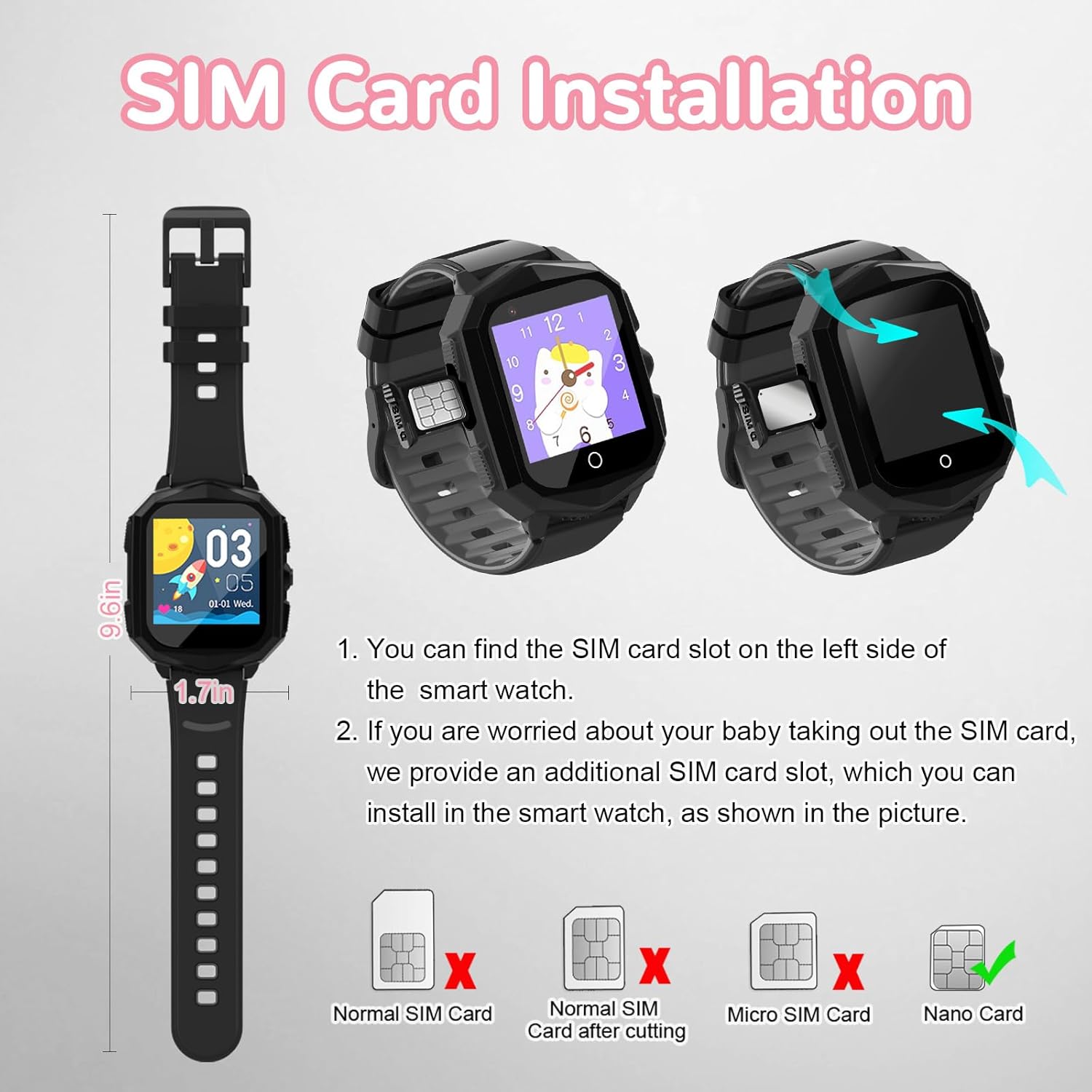
Figure 3.1: SIM Card Installation
3.2 SIM Card Activation
The package includes a Speedtalk SIM card. If you choose to use it, follow the activation instructions provided with the card. If you prefer an alternative, a T-Mobile 4G SIM card is recommended. Verizon is not compatible.
Important: After SIM activation, it may take up to 24 hours for GPRS and data settings to sync with your device. Ensure the watch is turned ON and placed in a good reception area. Do not install the SIM card until activation is complete.
Video 3.1: How to insert a SIM card and exchange a wallpaper (Seller: Wonlex)
3.3 App Download and Pairing
Download the dedicated app for the wonlex Smart Watch on your smartphone. Follow the in-app instructions to pair your device and configure settings.
Video 3.2: Product overview and features (Seller: Wonlex)
3.4 Charging the Watch
Connect the charging cable to the watch and a power source. The 680mAh battery typically charges fully in two hours, providing up to 72 hours of standby time.
4. Operating Instructions
4.1 Basic Navigation
The watch features a 1.4-inch OGS color touch screen. Swipe left/right or up/down to navigate through the menus and select applications.
4.2 Communication Features
- Video Calling: Initiate video calls with approved contacts directly from the watch.
- Voice Chat: Send and receive voice messages with family members or friends.
- SMS: Send and receive text messages.
- Family Group Chat: Participate in group chats with pre-approved family contacts.

Figure 4.1: Video Calling on the Smart Watch

Figure 4.2: Voice Chat Functionality
4.3 SOS Emergency Function
In case of an emergency, press and hold the SOS button for more than 3 seconds. The watch will automatically call pre-set family numbers and send emergency messages to guardians.
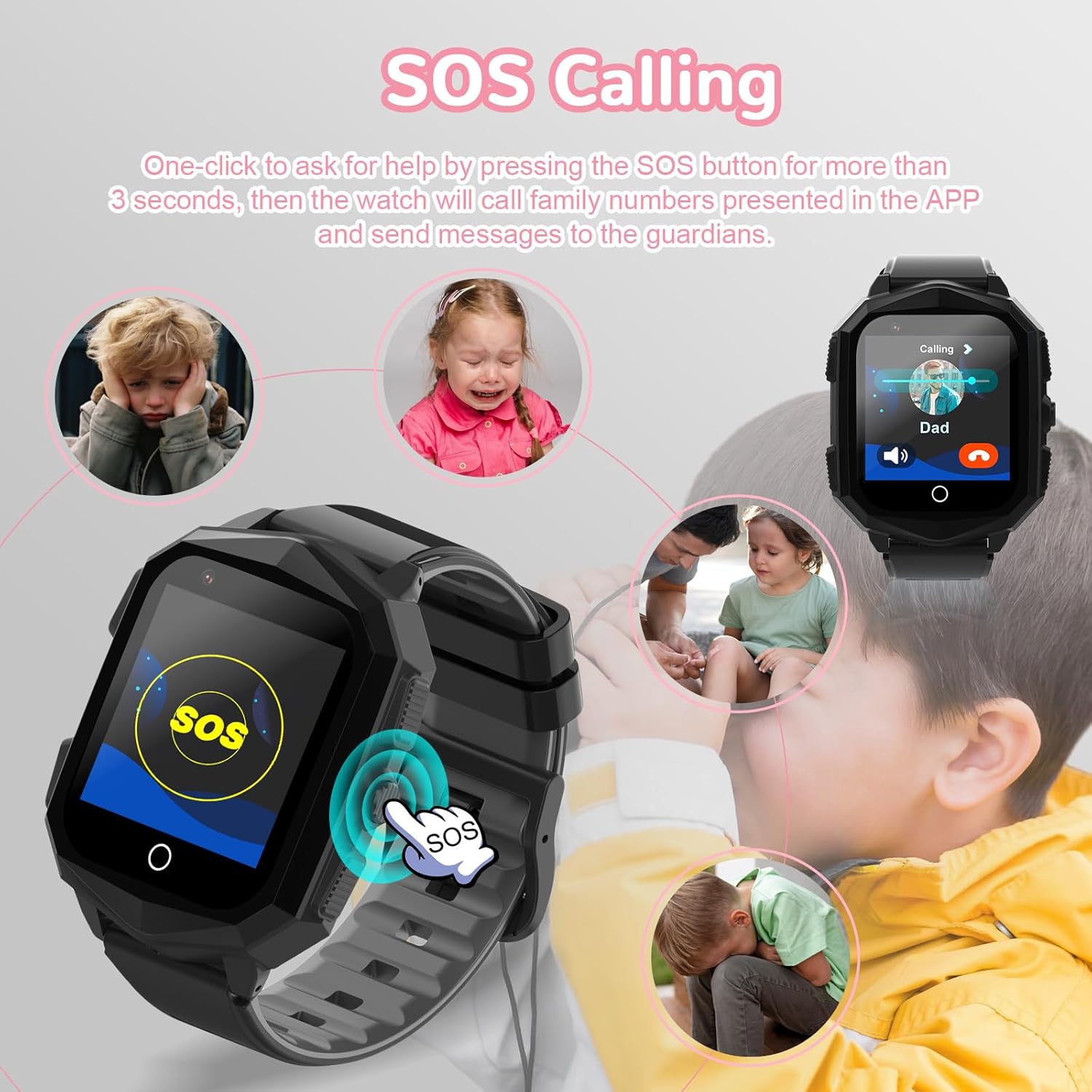
Figure 4.3: SOS Emergency Calling
4.4 GPS Tracking and Safety Zones
The watch features a built-in Wi-Fi GPS LBS locator for accurate positioning. Parents can monitor the child's real-time location and view historical routes through the companion app. Safety zones can be set up around key locations like home and school. Notifications will be sent to the parent's app if the child leaves a designated safety zone.

Figure 4.4: Real-time GPS Tracking
Video 4.1: GPS tracker and SOS safety alerts (Seller: SecuLife Inc.)
4.5 Camera Functionality
The watch includes a camera for taking photos and recording videos, allowing children to capture moments directly from their wrist.

Figure 4.5: Happy with Camera
4.6 Games and Educational Features
The watch comes with 7 pre-installed puzzle games designed to enhance reaction ability, logical thinking, and hand-eye coordination.

Figure 4.6: Puzzle Games
4.7 Additional Tools
The watch includes various useful tools:
- Clock & Alarms: Set alarms and manage time.
- Steps Counter (Pedometer): Track daily steps and activity levels.
- Stop Watch: For timing activities.
- Voice Recorder: Record voice notes.
- Calculator: Basic arithmetic functions.

Figure 4.7: Additional Smart Watch Tools
5. Maintenance
5.1 Water Resistance
The wonlex 4G Kids Smart Watch is IP67 waterproof. This means it is resistant to splashes and brief immersion in water. However, it is not recommended to wear the watch while swimming or showering. It is best to remove the watch when washing hands or engaging in other water-contact activities to prevent damage.
5.2 Cleaning
Wipe the watch regularly with a soft, dry cloth. For stubborn dirt, use a slightly damp cloth and then dry thoroughly. Avoid using harsh chemicals or abrasive materials.
6. Troubleshooting
6.1 Connectivity Issues
- No Signal/Network: Ensure the SIM card is correctly installed and activated. Check for good network reception in your area. If using your own SIM, ensure it is a T-Mobile 4G compatible card (Verizon is not supported).
- Data Not Syncing: After SIM activation, allow up to 24 hours for GPRS and data settings to fully sync. Ensure the watch is powered on and in an area with good signal.
6.2 GPS Location Inaccuracy
The watch uses Wi-Fi, GPS, and LBS for location tracking. For optimal accuracy, ensure the watch has a clear view of the sky for GPS signals and is within Wi-Fi range when available. LBS (Location Based Service) provides approximate location when GPS/Wi-Fi signals are weak.
7. Specifications
| Feature | Specification |
|---|---|
| Model | B0D7CMM391 |
| Display | 1.4-inch OGS Color Touch Screen |
| Battery Capacity | 680mAh |
| Standby Time | Up to 72 hours |
| Charging Time | Approx. 2 hours |
| Connectivity | 4G |
| Location Technology | Wi-Fi, GPS, LBS |
| Water Resistance | IP67 |
8. Warranty and Support
All smartwatches purchased from our official authorized store enjoy a one-year after-sales service. For any issues or support, please refer to the contact information provided in your package or visit the official wonlex website.