
1. Product Overview
The Sikoolet KF03 is a versatile 10-in-1 portable device designed for automotive emergencies and outdoor use. It combines a powerful car jump starter, a high-pressure air compressor, a mobile power bank, and an LED lighting system into a single compact unit.
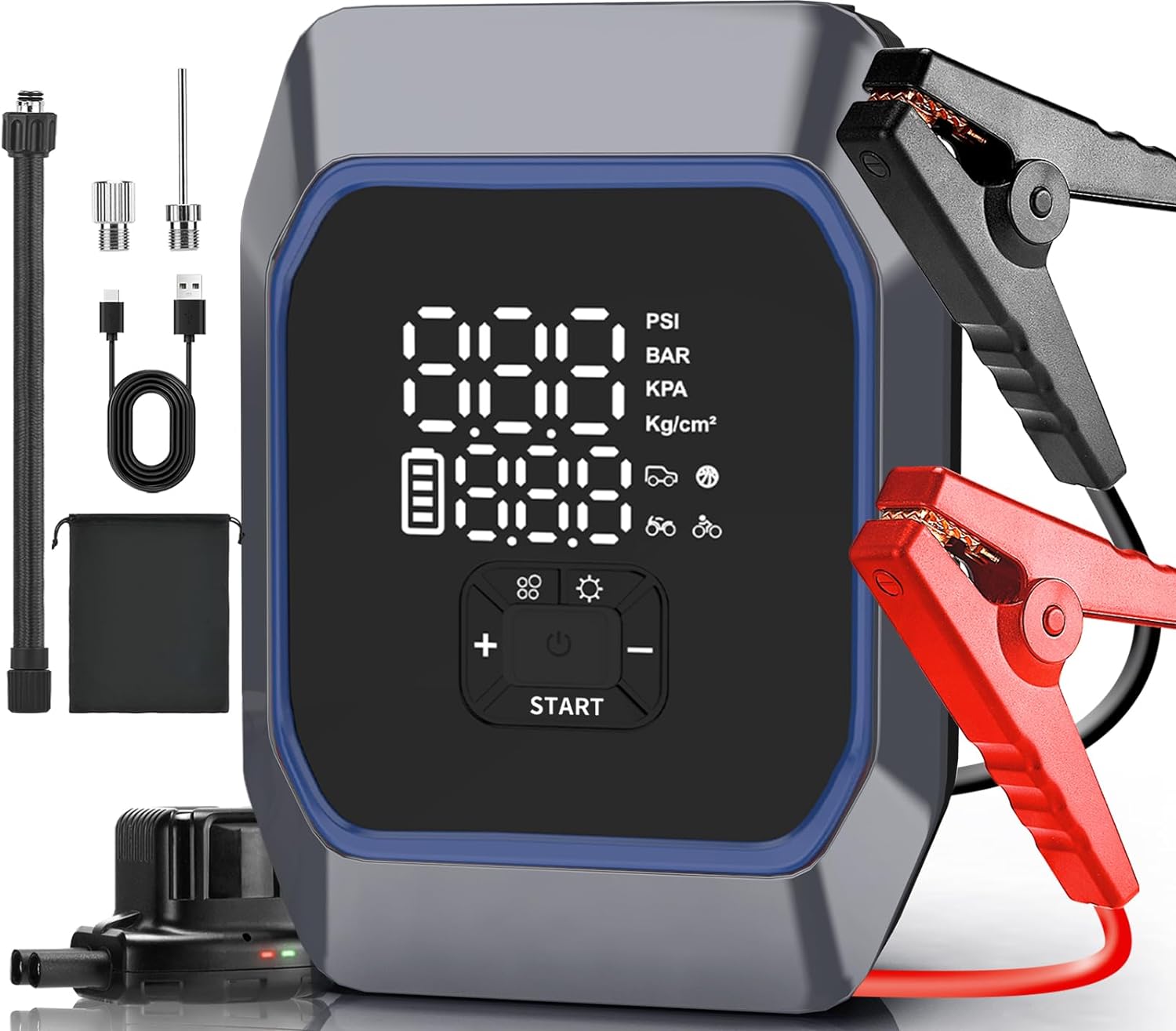
Image 1.1: The Sikoolet KF03 unit with included jumper cables, charging cable, pump tube, and air nozzles.
Key Features:
- 6000A Peak Current Jump Starter: Capable of starting all 12V gas engines and up to 10L diesel engines.
- 160PSI Air Compressor: Fast inflation for car tires, motorcycles, bicycles, and sports balls with smart preset and auto shut-off.
- Multi-Purpose Power Bank: Built-in high-capacity battery to charge phones, laptops, and other USB devices.
- 1000-Lumen LED Lighting: Features flashlight, strobe, and SOS modes for emergency situations.
- 5-inch Large Digital Screen: User-friendly display for clear readability of battery level, inflation mode, and real-time tire pressure.
- 10 Smart Safety Protections: Ensures safe operation against overcharging, short-circuiting, reverse connection, and more.
2. Safety Information
Read and understand all safety information before using this product. Failure to follow these instructions may result in electric shock, fire, or serious injury.
General Safety Precautions:
- Keep the device away from children.
- Do not expose the device to rain or wet conditions.
- Do not operate the device if it has been damaged or modified.
- Ensure proper ventilation during use and charging.
- Avoid direct contact with battery acid.
- Do not short-circuit the jumper clamps.
- Always connect the jumper clamps to the correct battery terminals (positive to positive, negative to negative).
- Disconnect the jumper clamps from the vehicle battery before disconnecting them from the jump starter.
Integrated Safety Protections:
The Sikoolet KF03 is equipped with 10 intelligent safety protections to ensure safe and reliable operation:
- Overcharge Protection
- Reverse Connection Protection
- Overcurrent Protection
- Extreme Temperature Protection
- Overvoltage Protection
- Short Circuit Protection
- Overheat Protection
- Low Voltage Protection
- Overload Protection
- Spark Proof Protection

Image 2.1: Visual representation of the 10 smart safety protections.
3. Setup and Charging
What's in the Box:

Image 3.1: All items included in the Sikoolet KF03 package.
- Sikoolet KF03 Car Jump Starter with Air Compressor (x1)
- Smart Jumper Cable (x1)
- Type-C Charging Cable (x1)
- Pump Tube (x1)
- Air Nozzles (x3)
- User Manual (x1)
- Storage Bag (x1)
Initial Charging:
Before first use, fully charge the Sikoolet KF03 unit. Use the provided Type-C cable to connect the device to a USB power adapter (not included). The digital screen will indicate the charging status. A full charge ensures optimal performance and readiness for emergencies.
4. Operating Instructions
4.1. Car Jump Starting
Use this function to start a 12V vehicle with a dead battery.
- Ensure the jump starter is sufficiently charged.
- Connect the smart jumper cable to the jump starter's output port.
- Attach the red (+) clamp to the positive terminal of the vehicle battery.
- Attach the black (-) clamp to the negative terminal of the vehicle battery.
- Once the indicator on the smart jumper cable turns green, start your vehicle.
- After the vehicle starts, immediately remove the jumper clamps from the vehicle battery, then disconnect the smart jumper cable from the jump starter.

Image 4.1: Step-by-step visual guide for jump starting a vehicle.
4.2. Tire Inflation
The integrated air compressor can inflate tires and other inflatables.
- Connect the pump tube to the inflation port on the KF03 unit.
- Attach the other end of the pump tube to the tire valve. Use appropriate air nozzles for other inflatables.
- Turn on the device. The screen will display the current tire pressure.
- Select the desired inflation mode (car, motorcycle, bicycle, ball, or custom) using the mode button.
- Adjust the target pressure using the '+' and '-' buttons.
- Press the 'START' button to begin inflation. The compressor will automatically stop once the preset pressure is reached.
- Disconnect the pump tube from the tire valve and the KF03 unit.

Image 4.2: Step-by-step visual guide for tire inflation.
4.3. Power Bank Function
The KF03 can charge various electronic devices via its USB output port.
- Connect your device's USB charging cable to the USB output port on the KF03.
- The KF03 will automatically begin charging your device.
- Monitor your device's charging status.

Image 4.3: The KF03 functioning as a multi-purpose power supply for various devices.
4.4. LED Lighting
The built-in LED light provides illumination and emergency signaling.
- Press the light button to cycle through the lighting modes: Flashlight, Strobe, and SOS.
- Press again to turn off the light.

Image 4.4: The KF03's LED light offering various modes for different situations.
5. Maintenance
- Cleaning: Wipe the device with a dry, soft cloth. Do not use harsh chemicals or abrasive cleaners.
- Storage: Store the KF03 in a cool, dry place, away from direct sunlight and extreme temperatures. It is recommended to store it in the provided storage bag.
- Charging: Recharge the unit every 3-6 months, even if not in use, to maintain battery health and extend its lifespan.
- Battery Care: Avoid fully discharging the battery frequently.
6. Troubleshooting
Common Issues and Solutions:
| Problem | Possible Cause | Solution |
|---|---|---|
| Device does not turn on. | Battery is depleted. | Charge the device fully. |
| Vehicle does not start after jump attempt. | Incorrect clamp connection; Vehicle battery too severely discharged; Vehicle issue beyond battery. | Check clamp polarity and connection; Try again after a few minutes; Consult a mechanic. |
| Air compressor does not inflate. | Pump tube not securely connected; Target pressure not set; Device battery low. | Ensure all connections are tight; Set a target pressure; Charge the device. |
| LED light not working. | Device battery low; Malfunction. | Charge the device; Contact customer support if issue persists. |
7. Specifications
| Feature | Specification |
|---|---|
| Brand | Sikoolet |
| Model | KF03 |
| Peak Current | 6000 Amps |
| Engine Compatibility | All Gas Engines / Up to 10L Diesel Engines |
| Air Compressor Pressure Range | 2 PSI - 160 PSI |
| LED Light Output | 1000 Lumens |
| Power Bank Output | 5V/1.5A (USB) |
| Operating Temperature | -4°F to 140°F (-20°C to 60°C) |
| Item Weight | 1.15 Kilograms (2.53 pounds) |
| Batteries | 4 Lithium Polymer batteries (included) |

Image 7.1: The KF03 is compatible with a wide range of vehicles.

Image 7.2: The KF03 is designed to operate effectively in extreme weather conditions.
8. Warranty and Support
Sikoolet offers a 24-month warranty for the KF03 Car Jump Starter with Air Compressor, covering manufacturing defects and malfunctions under normal use.
Additionally, lifetime technical support is provided to assist with any questions or issues you may encounter with your product.
For warranty claims or technical assistance, please contact Sikoolet customer service through the retailer where the product was purchased or visit the official Sikoolet website for contact information.