
1. Introduction
Thank you for choosing the ADORNEVE Twin Loft Bed. This manual provides essential information for the safe assembly, operation, and maintenance of your new loft bed. This innovative bed features an integrated L-shaped desk, LED lighting, a convenient charging station, and ample storage solutions, designed to optimize space in any room. Please read this manual thoroughly before assembly and retain it for future reference.

Figure 1: ADORNEVE Twin Loft Bed with L-Shaped Desk
2. Safety Information
Your safety is paramount. Please adhere to all safety guidelines during assembly and use.
- Weight Limit: The maximum weight capacity for the bed is 400 pounds. Do not exceed this limit.
- Guardrails: The top bed is equipped with 13.4-inch high full-length guardrails (MDF boards + high-density iron mesh) to prevent falls. Ensure they are securely installed before use.
- Anti-Tipping Device: Utilize the provided anti-tipping nails to securely fasten the bed to a wall. This prevents accidental tipping and enhances stability.
- Assembly: Assembly requires two adults. Follow the included installation manual precisely. Incorrect assembly can lead to instability and injury.
- Ladder Safety: Ensure the ladder is firmly attached. Use caution when climbing or descending. The ladder rungs are designed for safety and comfort.
- Mattress: Use a mattress that fits the bed frame dimensions to prevent gaps.

Figure 2: 13.4-inch Safety Guardrail

Figure 3: Anti-Tipping Device Installation
3. Package Contents
Before beginning assembly, verify that all components listed below are present and undamaged. If any parts are missing or damaged, please contact customer support.
- 1 x Bed Frame
- 1 x L-Shaped Desk
- 3 x Fabric Drawers
- 1 x LED Light Strips
- 3 x Storage Shelves
- 1 x Power Outlets (Charging Station)
- 12 x Steel Slats
- 4 x Guardrails (MDF boards + high-density iron mesh)
- 1 x Installation Manual
- 1 x Easy Assemble Tools
4. Setup and Assembly
Assembly is required for this product. Please refer to the detailed Installation Manual included in your package for step-by-step instructions. It is recommended to have two adults for assembly.
Key Assembly Points:
- Frame Construction: The bed frame is constructed from heavy-duty square metal slats, which offer superior durability and stability compared to round structures.
- L-Shaped Desk: The L-shaped desk integrates seamlessly under the loft bed, providing a spacious workstation.
- Storage Integration: Install the 3 fabric drawers and 3-tier open storage shelves as indicated in the manual to maximize under-bed storage. The DIY iron mesh with 5 hooks can be attached for hanging accessories.
- Guardrails and Anti-Tipping: Ensure all guardrails are correctly installed and the anti-tipping device is secured to a wall stud for maximum safety.

Figure 4: Product Dimensions Overview

Figure 5: L-Shaped Desk Configuration

Figure 6: Integrated Storage Solutions
5. Operating Instructions
LED Lights:
The integrated RGB LED lights offer customizable ambiance for your space. Control the lights via the dedicated mobile application or the included remote control.
- Color Options: Choose from over 60,000 colors to match your mood or decor.
- Flashing Modes: Explore 29 different flashing modes for dynamic lighting effects.
- Music Sync Function: The built-in sensitivity-adjustable microphone allows the LED lights to change color and rhythm with sound and music.
- App Control: Download the specified app (details in the LED light manual) to control colors, modes, and timing functions directly from your smartphone.
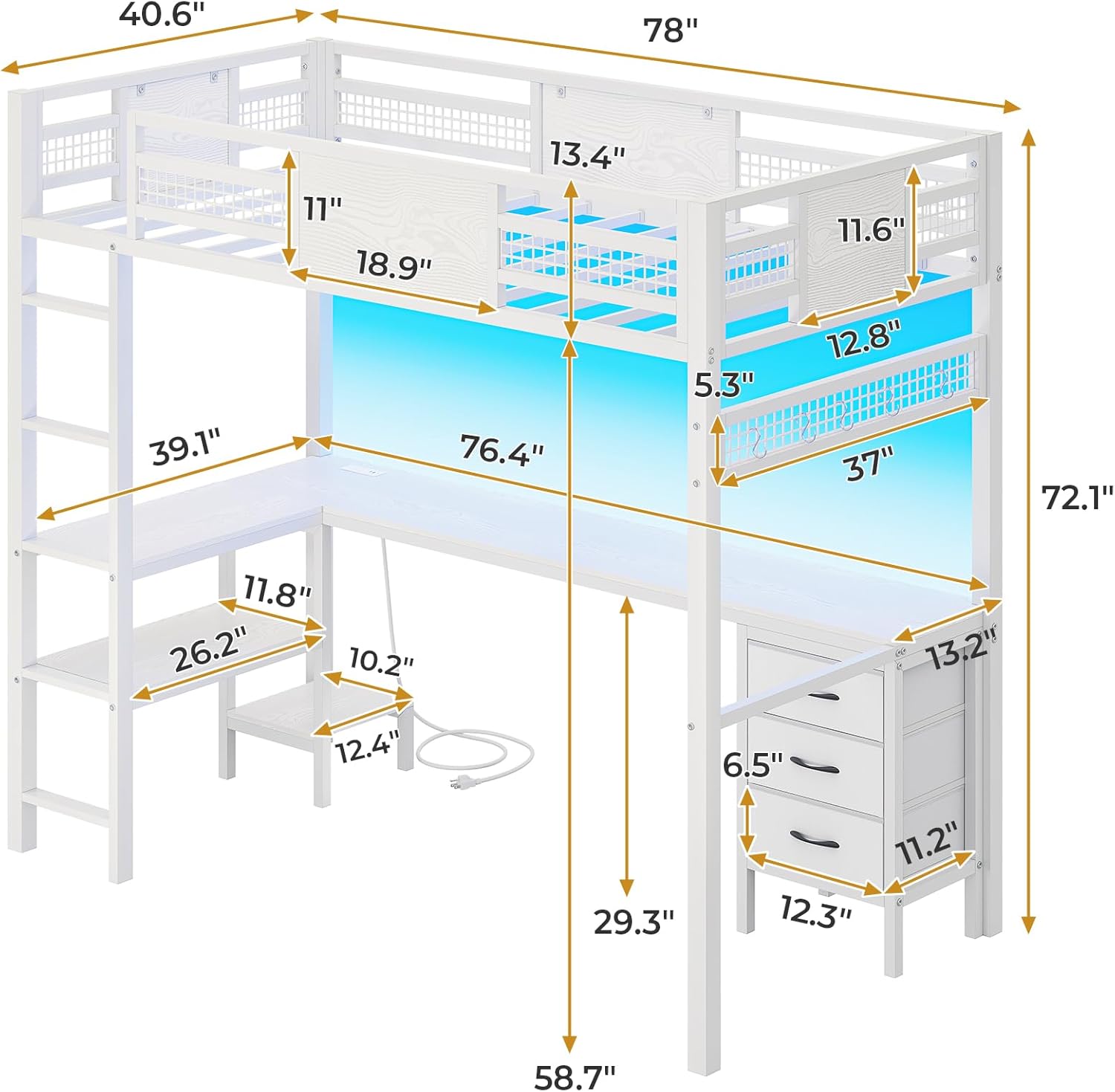
Figure 7: LED Light Features and Control
Charging Station:
The built-in charging station provides convenient power access for your electronic devices.
- AC Outlets: 2 x 120V/2A AC outlets for standard plugs.
- USB-C Port: 1 x 5V/3A USB-C port for fast charging compatible devices.
- USB-A Port: 1 x 5V/2A USB port for standard USB charging.

Figure 8: Built-in Charging Station
6. Maintenance
Proper maintenance ensures the longevity and appearance of your loft bed.
- Cleaning the Frame: Wipe the metal and MDF surfaces with a soft, damp cloth. Avoid harsh chemicals or abrasive cleaners that could damage the finish.
- Fabric Drawers: The fabric drawers are labeled as 'Dry Clean Only'. For minor spills, spot clean with a mild detergent and allow to air dry completely.
- Hardware Check: Periodically check all bolts and screws to ensure they remain tight. Re-tighten if necessary to maintain structural integrity.
- LED Lights: Ensure the LED light strips are free from dust. Do not attempt to repair or modify the electrical components.
7. Troubleshooting
If you encounter any issues with your ADORNEVE Loft Bed, refer to the following common solutions:
| Problem | Possible Cause | Solution |
|---|---|---|
| Bed feels unstable or wobbly | Loose bolts; Anti-tipping device not secured. | Ensure all bolts are tightened. Securely attach the anti-tipping device to a wall stud. |
| Squeaking noises | Loose connections; Friction between metal parts. | Re-tighten all hardware. Apply a small amount of lubricant (e.g., silicone spray) to contact points if necessary. |
| LED lights not working | Power connection issue; Remote/App not paired. | Check power supply connection. Ensure remote has fresh batteries or app is correctly paired via Bluetooth. Refer to the LED light manual. |
| Charging station not providing power | Power cord unplugged; Overload. | Verify the charging station's power cord is fully plugged into a working wall outlet. Avoid overloading the outlets. |
| Ladder rungs uncomfortable | Personal preference. | Consider adding soft padding or grip tape to the ladder rungs for increased comfort. |
8. Specifications
| Feature | Detail |
|---|---|
| Brand | ADORNEVE |
| Model Number | 510 |
| Size | Twin |
| Color | White |
| Product Dimensions (L x W x H) | 78" x 40.6" x 72.1" |
| Under-bed Clearance | 57.6 Inches |
| Item Weight | 123.2 pounds (56 Kilograms) |
| Weight Limit | 400 Pounds |
| Material | Metal (square heavy-duty slats), MDF boards, Fabric (drawers) |
| Special Features | L-Shape Desk, 3 Fabric Drawers, Storage Shelves, Charging Station (1 Type-C, 1 USB, 2 AC outlets), LED Lights (RGB, App/Remote control, Music Sync), 13.4" H Safety Guardrail, Noise Free, No Box Spring Needed, Space-Saving, Squeak Resistant |
| Assembly Required | Yes |
| Product Care Instructions | Dry Clean Only (for fabric drawers) |
9. Warranty and Support
ADORNEVE is committed to providing high-quality products. For specific warranty details, please refer to the warranty card included with your purchase or visit the official ADORNEVE website. If you have any questions, require assistance with assembly, or need to report missing/damaged parts, please contact ADORNEVE customer support through the retailer where the product was purchased.
Please have your model number (510) and purchase information ready when contacting support.