1. Product Overview
The Okinos Cypress 7 is an ATX PC case designed for high-performance computing, featuring a genuine walnut wood front panel and efficient cooling capabilities. This manual provides essential information for setting up, operating, and maintaining your PC case.

Image: The Okinos Cypress 7 PC case showcasing its genuine walnut wood front panel, blending natural aesthetics with modern design.

Image: A detailed view of the 1.5mm mesh design on the case's front panel, engineered for enhanced air intake and cooling efficiency.
2. Setup and Installation
2.1 Component Compatibility
- Motherboard Support: ATX, Micro-ATX, ITX
- CPU Cooler Max Height: 165 mm
- PSU Max Length: 240 mm

Image: An internal view illustrating the compatible dimensions for motherboards (ATX, Micro-ATX, ITX), CPU coolers (max 165mm height), GPUs, and PSUs (max 240mm length).
2.2 GPU Installation
- The Cypress 7 supports horizontal GPU installation only. Vertical GPU installation is not supported.
- GPU Max Length:
- Up to 415mm when fans are installed in front of the front panel.
- Up to 390mm when fans are installed at the rear of the front panel.
- Up to 280mm when a radiator is installed inside the right panel.

Image: Visual representation of GPU length compatibility, indicating maximum lengths based on fan placement and AIO installation.
Important Note: Installing a 240mm water cooler on the right side of the chassis may interfere with GPUs wider than 280mm.
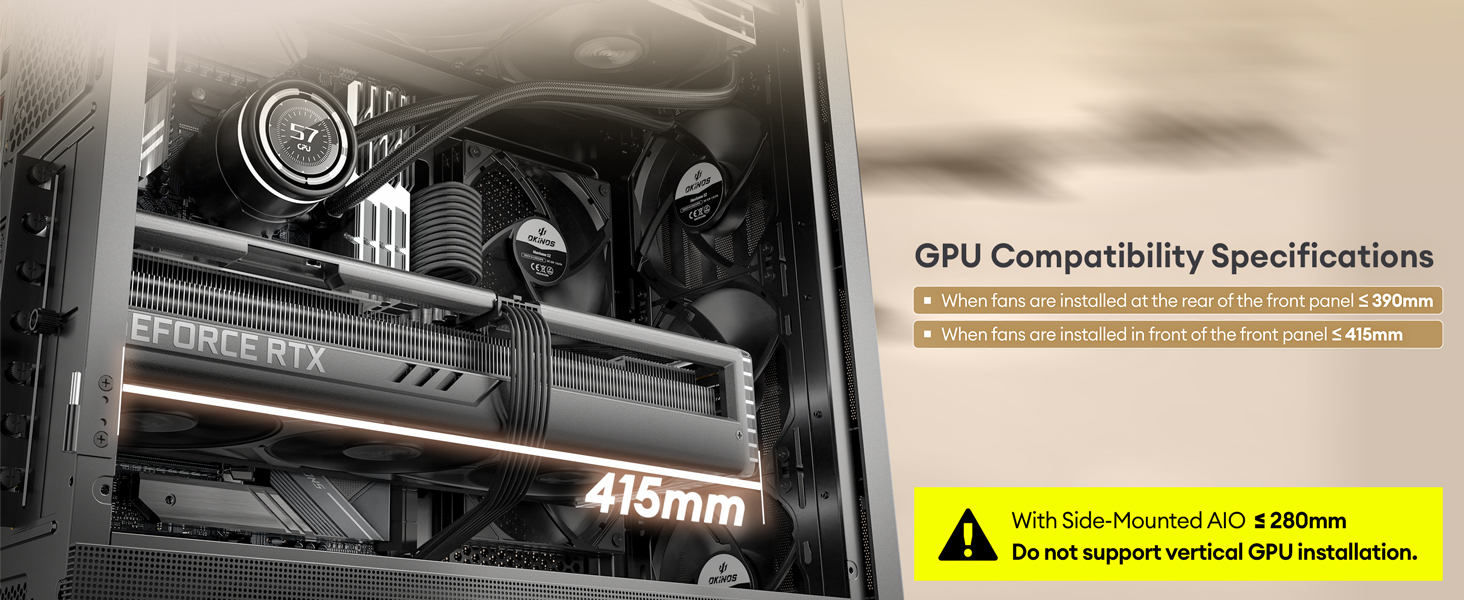
Image: A visual warning highlighting that a 240mm water cooler on the right side may conflict with GPUs exceeding 280mm in width.
2.3 Cooling System Setup
The Cypress 7 comes with 4 pre-installed 120mm PWM fans (3 front, 1 rear) for efficient cooling, providing an airflow volume of up to 200 CFM.

Image: Illustration of the pre-installed 3 front and 1 rear PWM fans, demonstrating the optimized airflow path within the chassis.
The case design includes increased horizontal air intake through front and right side panel openings for additional cooling.

Image: A visual explanation of the innovative design that enhances cooling through horizontal air intake from the front and right side panels.
CPU Cooling Options:
- Water Cooling Solution: Fans can be installed in front of the panel for direct water cooling.
- Air Cooling Solution: Fans can be installed behind the panel, utilizing a 37mm negative pressure space to improve airflow.

Image: A comparison illustrating the two primary CPU cooling configurations: water cooling with fans in front of the panel, and air cooling with fans behind the panel for enhanced air intake.
Radiator Support:
- Top Radiator: Up to 360mm
- Front Radiator: Up to 360mm
- Side Radiator: Up to 240mm
- Rear Radiator: Up to 120mm

Image: A diagram detailing the various radiator mounting options and their maximum supported sizes within the Cypress 7 chassis.

Image: Comprehensive diagram illustrating all possible fan and radiator configurations for achieving optimal cooling performance.
2.4 Storage Installation
The Cypress 7 supports up to 5 SSDs for flexible storage configurations.
- The side panel can accommodate 2 SSDs.
- Note: Installing SSDs on the side panel may limit additional fan or liquid cooling radiator installations in that area.

Image: A visual guide to the various SSD mounting points within the chassis, including the side panel locations.
3. Operating Instructions
3.1 Front Panel I/O Ports
The multi-functional front panel provides convenient access to essential ports and controls:
- Power Button: To turn the system on or off.
- Reset Button: To restart the system.
- Headphone/Mic Combo Jack: For audio input and output.
- USB 3.0 Ports (x2): For high-speed data transfer.
- Type-C 3.2 Gen 2 (10Gbps) Port: For ultra-fast data transfer with compatible devices.
USB Ports Usage Instructions: USB ports are primarily for data transfer and are not recommended for power charging, as most motherboards' USB ports support a maximum voltage of 5V.

Image: A detailed view of the front I/O panel, highlighting the Power button, Reset button, Headphone/Mic combo jack, two USB 3.0 ports, and the Type-C 3.2 Gen 2 port.
4. Maintenance
4.1 Interior Access
The magnetic tempered glass side panel provides quick and easy access to interior components, simplifying maintenance tasks such as cleaning or component upgrades.

Image: The PC case with its hinged, magnetic tempered glass side panel open, demonstrating easy access to internal components for maintenance.
4.2 Dust Protection
The Cypress 7 is equipped with magnetic dust filters on the top and side panels. These filters help prevent dust accumulation inside the case while maintaining optimal airflow. Regularly clean these filters to ensure efficient cooling and prolong component lifespan.

Image: The PC case with its magnetic dust filters highlighted, showing their placement on the top and side for superior dust protection and easy removal for cleaning.
5. Troubleshooting
If you encounter any issues during setup or operation, please consider the following general troubleshooting steps:
- Power Issues: Ensure all power cables (PSU, motherboard, GPU) are securely connected. Check the power supply switch.
- Component Detection: Verify that all internal components (RAM, GPU, storage drives) are properly seated in their respective slots.
- Cooling Performance: Ensure fans are spinning correctly and dust filters are clean. Check for any obstructions to airflow.
- Front Panel Ports: Confirm that the front panel connectors (USB, audio, power, reset) are correctly plugged into the motherboard headers.
For persistent issues, refer to the documentation for your individual PC components (motherboard, GPU, etc.) or contact Okinos customer support.
6. Specifications
| Feature | Specification |
|---|---|
| Brand | Okinos |
| Series | Cypress 7 |
| Model Name | Cypress 7 |
| Case Type | Mid Tower |
| Motherboard Compatibility | ATX, Micro-ATX, ITX |
| Material | Genuine Walnut Wood |
| Color | Black |
| Item Weight | 14.19 pounds |
| Product Dimensions (LxWxH) | 18.74 x 8.66 x 19.13 inches |
| Number of USB 3.0 Ports | 2 |
| Number of USB 2.0 Ports | 2 (Note: Product description mentions Type-C 3.2 Gen 2 and two USB 3.0, but specifications list 2x USB 2.0 and 2x USB 3.0. Following product description for accuracy of modern ports.) |
| Type-C Port | Type-C 3.2 Gen 2 (10Gbps) |
| Pre-installed Fans | 4 x 120mm PWM Fans |
| Cooling Method | Air, Water |
| Power Supply Mounting Type | Bottom Mount |
| GPU Max Length | Up to 415mm (without front fan) |
| CPU Cooler Max Height | 165mm |
| Radiator Support | Top: 360mm, Front: 360mm, Side: 240mm, Rear: 120mm |
| Storage Support | Up to 5 SSDs |
7. Warranty and Support
For information regarding product warranty, returns, or technical support, please refer to the official Okinos website or contact their customer service directly. Keep your proof of purchase for warranty claims.


