
VEVOR E330D
VEVOR Electric Paper Cutter User Manual
Model: E330D
Brand: VEVOR
1. Introduction and Overview
The VEVOR Electric Paper Cutter, Model E330D, is a robust and efficient desktop machine designed for precise paper cutting in various environments such as offices, schools, and printing plants. Constructed from high-quality steel plate, this cutter offers a 13-inch (330.2mm) cutting width and can handle a cutting thickness of up to 1.57 inches (40mm).
Key features include an H-type paper feeder for accurate positioning, infrared photoelectric protection for enhanced safety, and a user-friendly control panel with button operation. It is suitable for cutting a variety of materials including regular copy paper, soft leather, PVC cards, cardboard boxes, thick books, plastic films, and gray cardboard.

Figure 1.1: VEVOR Electric Paper Cutter with its complete set of accessories, including spare blade, cutting bar, casters, screwdriver, and Allen wrenches.
2. Safety Instructions
WARNING: Always read and understand all safety instructions before operating the machine. Failure to do so may result in serious injury or damage to the equipment.
- Dual-Key Operation: The machine requires both hands to simultaneously press the cutting buttons to initiate a cut. This is a critical safety feature to keep hands clear of the blade.
- Infrared Photoelectric Protection: The desktop paper cutting machine is equipped with infrared sensors that immediately stop operation when foreign objects or hands are detected in the cutting path. Do not attempt to bypass this safety mechanism.
- Emergency Stop Switch: Familiarize yourself with the location and operation of the emergency stop switch. In case of any malfunction or emergency, immediately press this switch to power off the machine.
- Power Disconnection: Always unplug the machine from the power outlet before performing any maintenance, cleaning, or when the machine is not in use.
- Keep Clear: Never place hands or any body parts near the cutting blade or paper pressing mechanism during operation.
- Stable Surface: Operate the machine on a flat, stable, and spacious surface to prevent tipping or instability.
- Supervision: Do not allow children or untrained individuals to operate the machine.
- Proper Ventilation: Ensure adequate ventilation around the machine during operation.
- Material Compatibility: Only cut materials specified in this manual. Do not attempt to cut metal, extremely hard plastics, or other unsuitable materials.

Figure 2.1: Safety features including infrared detection, dual-button cutting, and the emergency stop switch.
3. Components and Parts
The VEVOR Electric Paper Cutter consists of the main unit and several accessories. Understanding each component is essential for proper operation and maintenance.
- Main Machine Body: Houses the motor, cutting blade, paper pressing mechanism, and control panel.
- Cutting Blade: High-speed steel blade for precise cuts. A spare blade is included.
- Paper Press Hand-Wheel: Manual control for pressing paper firmly before cutting.
- Control Panel: Features power button, reset button, and dual cutting buttons.
- Infrared Sensors: Located along the cutting path for safety detection.
- Emergency Stop Switch: Red button for immediate power cut-off.
- Casters (Wheels): Four universal wheels for easy movement, with locking capability.
- Power Cord Inlet: For connecting the power cable.
- Fuse Holder: Protects the electrical circuit.
- Accessories: Includes a screwdriver, Allen wrenches, a spare cutting blade, and a spare cutting bar.

Figure 3.1: Included accessories for the VEVOR Electric Paper Cutter.
4. Setup and Installation
Follow these steps for the initial setup of your VEVOR Electric Paper Cutter:
- Unpacking: Carefully open the wooden crate and remove the machine case. Due to the machine's weight (approximately 128 pounds), ensure ample personnel are available for safe handling and lifting.
- Base Attachment: Detach any fixed screws on the mainframe's base that secure it for shipping.
- Secure Mainframe: Attach the mainframe to the case or a sturdy, flat, and spacious work area. Secure it firmly with screws to prevent movement during operation.
- Install Casters (Optional): If not pre-installed, attach the four universal casters to the base of the machine. Ensure they are securely fastened. These wheels allow for quick movement and can be locked into position when needed.
- Power Connection: Locate the power cord inlet on the machine. Ensure the machine's power switch is in the OFF position. Plug the power cord into the machine and then into a compatible 110V power outlet.

Figure 4.1: Step 1 shows plugging in the power and starting the machine.
5. Operating Instructions
Operating the VEVOR Electric Paper Cutter is designed to be straightforward and precise:
- Power On: Ensure the machine is properly plugged in. Press the 'POWER' button on the control panel to turn on the machine. The power indicator light will illuminate.
- Prepare Paper: Gather the paper or material you wish to cut. Ensure the stack is even and within the machine's maximum cutting thickness (40mm).
- Feed Paper: Manually feed the paper into the cutting area, aligning it against the back guide and side guide. The H-type paper feeder helps prevent movement and offset.
- Adjust Position: Use the scale ruler and the hand-cranked paper push design to precisely adjust the paper's position for the desired cut length. Micro-adjustments can be made for accuracy.
- Press Paper: Rotate the independent hand-wheel paper pressing mechanism to firmly clamp the paper stack. This ensures a clean, precise cut without rough edges.
- Initiate Cut: To perform a cut, simultaneously press both 'CUT' buttons on the control panel. The machine will execute the cut. The dual-key system is a safety measure.
- Reset (if needed): If you need to stop a cut or reset the machine, press the 'RESET' button.
- Remove Cut Material: Once the cut is complete, release the paper press and carefully remove the cut material.
- Power Off: When finished, press the 'POWER' button to turn off the machine and unplug it from the power outlet.

Figure 5.1: The control panel with clearly labeled buttons for operation.
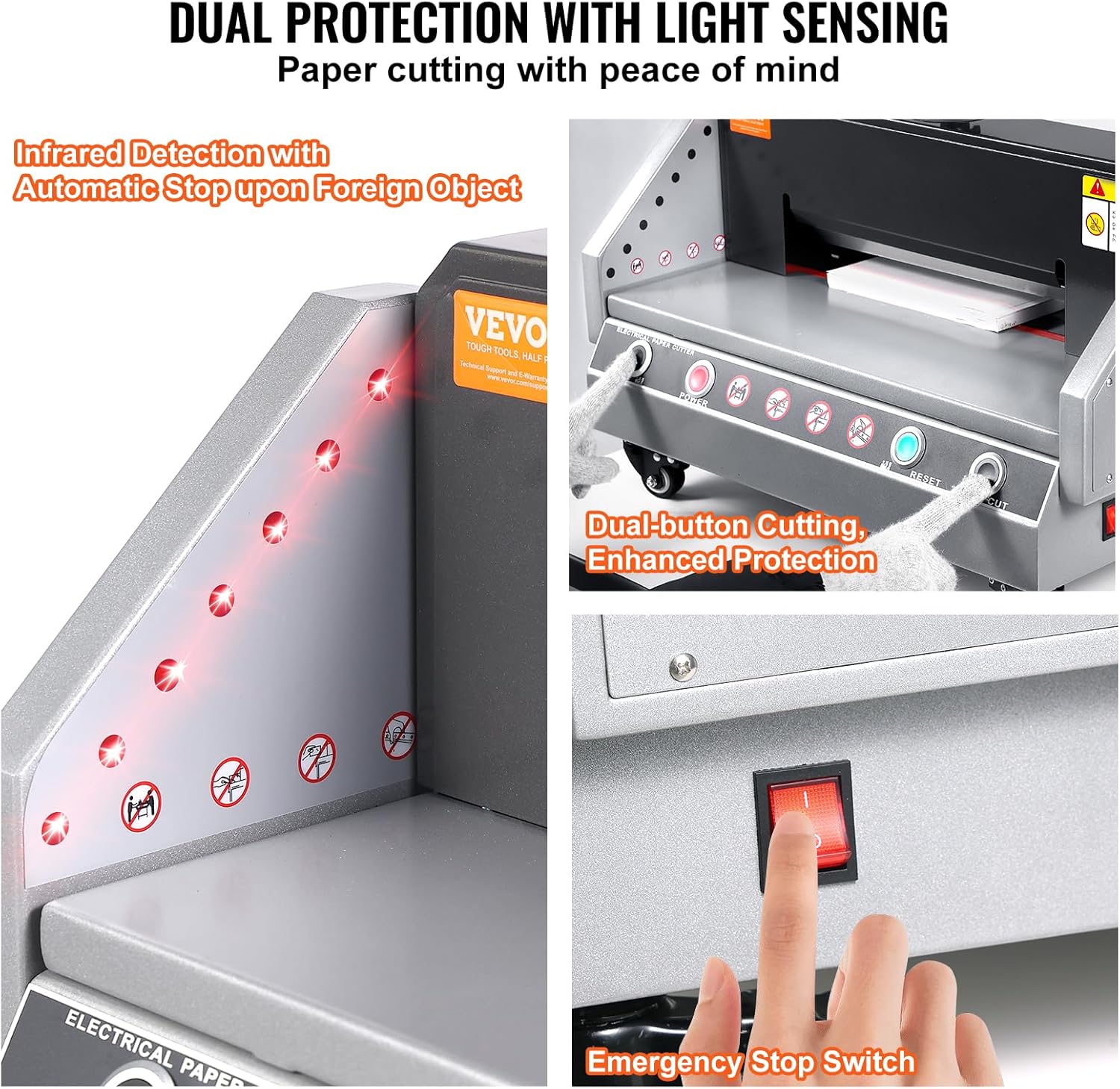
Figure 5.2: The hand-wheel for effortless paper pressing and the cutting mechanism for precision cuts.
6. Maintenance
Regular maintenance ensures the longevity and optimal performance of your paper cutter:
- Cleaning: Regularly clean the machine, especially the cutting area, guides, and control panel, with a soft, dry cloth. Remove any paper dust or debris after each use. Ensure the machine is unplugged before cleaning.
- Blade Inspection: Periodically inspect the cutting blade for sharpness and any signs of damage. A dull blade can lead to uneven or incomplete cuts.
- Blade Replacement: When the blade becomes dull, replace it with the spare blade provided. Refer to the detailed instructions in the full manual for safe blade replacement procedures. Always wear protective gloves when handling the blade.
- Cutting Bar Replacement: The cutting bar (the strip beneath the blade) will wear over time. Rotate or replace it as needed to ensure clean cuts. A spare cutting bar is included.
- Lubrication: Consult the full product manual for any specific lubrication requirements for moving parts.
- Fuse Check: If the machine does not power on, check the fuse located near the power inlet. Replace it with a fuse of the same rating if blown.
7. Troubleshooting
If you encounter issues with your VEVOR Electric Paper Cutter, refer to the following common troubleshooting steps:
| Problem | Possible Cause | Solution |
|---|---|---|
| Machine does not power on | No power supply; Power cord disconnected; Blown fuse; Internal electrical issue. | Ensure power cord is securely plugged into machine and outlet. Check if outlet has power. Inspect and replace fuse if blown (refer to Maintenance section). If problem persists, contact VEVOR support. |
| Incomplete or uneven cuts | Dull blade; Worn cutting bar; Paper not pressed firmly; Paper stack too thick; Improper paper alignment. | Replace or rotate the cutting blade. Replace or rotate the cutting bar. Ensure paper is firmly pressed by the hand-wheel. Reduce paper stack thickness. Re-align paper carefully using guides. |
| Machine stops during operation | Infrared sensor triggered; Overload; Emergency stop pressed. | Ensure no obstructions are in the cutting path. Reduce paper thickness if overloading. Check if emergency stop button is engaged and release it. |
| Paper jams | Excessive paper thickness; Misaligned paper; Debris in cutting path. | Reduce paper stack. Re-align paper. Clear any debris from the cutting area (ensure machine is unplugged). |
For issues not listed here or if solutions do not resolve the problem, please contact VEVOR customer support.
8. Specifications
Detailed technical specifications for the VEVOR Electric Paper Cutter, Model E330D:
| Specification | Value |
|---|---|
| Brand | VEVOR |
| Model Number | E330D (Electric Paper Cutter 0-330) |
| Cutting Width (Max) | 13 inches / 330.2 mm |
| Cutting Thickness (Max) | 1.57 inches / 40 mm |
| Min Cutting Size | 50 mm |
| Cutting Precision | ±0.1 mm |
| Paper Press Mode | Manual (Hand-Wheel) |
| Pushing Paper Mode | Manual |
| Voltage | 110V |
| Product Dimensions | 28 x 27.2 x 20.1 inches (600x500x280 mm) |
| Item Weight | 128 pounds |
| Material | High-quality Steel Plate |

Figure 8.1: Key dimensions and cutting capacity of the VEVOR Electric Paper Cutter.
9. Warranty and Support
VEVOR products are designed for durability and performance. For warranty information, technical support, or service inquiries, please refer to the warranty card included with your product or visit the official VEVOR website. You can also contact VEVOR customer support through the retailer where you purchased the product.
When contacting support, please have your product model number (E330D) and purchase date readily available.
Related Documents - E330D
 |
VEVOR E330D Electric Paper Cutter User Manual Comprehensive user manual for the VEVOR E330D Electric Paper Cutter, providing detailed instructions on safety, operation, maintenance, technical specifications, parts description, and troubleshooting. |
 |
VEVOR Electric Paper Cutter Specifications (E520T & E330D) Technical specifications and model details for VEVOR Electric Paper Cutters, including models E520T and E330D. |
 |
VEVOR E330D Electric Paper Cutter User Manual Comprehensive user manual for the VEVOR E330D Electric Paper Cutter, including safety instructions, installation, operation, blade replacement, and maintenance procedures. |
 |
VEVOR E330D Electric Paper Cutter User Manual Comprehensive user manual for the VEVOR E330D Electric Paper Cutter. Includes safety instructions, installation, operation, maintenance, and troubleshooting. |
 |
VEVOR H720T Electric Paper Cutter User Manual Comprehensive user manual for the VEVOR H720T Electric Paper Cutter, covering operation, safety, installation, technical specifications, maintenance, and troubleshooting. |
 |
VEVOR H720T Electric Paper Cutter User Manual Comprehensive user manual for the VEVOR H720T Electric Paper Cutter, covering safety precautions, installation, operation, adjustments, maintenance, and troubleshooting for optimal performance. |
Ask a question about this manual
Ask about setup, troubleshooting, compatibility, parts, safety, or missing instructions. Manuals+ will review the question and use this page’s manual context to help answer it.