
1. Introduction
This manual provides essential information for the safe and effective use of your KP Compatiable A910 2600mAh Li-ion 7.2V Battery. This battery is designed as a replacement for Pax A910 and A930 POS machine batteries, part number YW001. Please read this manual thoroughly before installation and use to ensure optimal performance and longevity of the battery.
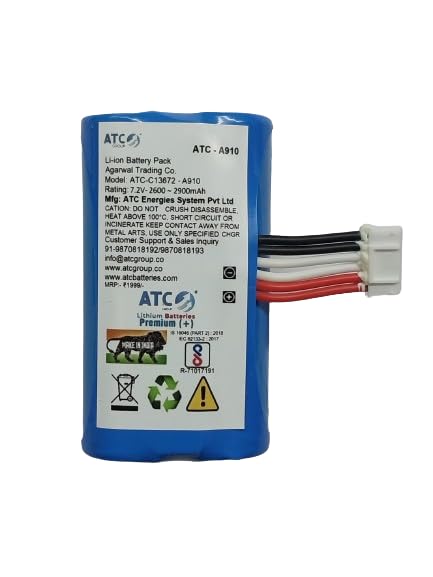
Image 1.1: Front view of the KP Compatiable A910 Li-ion Battery, showing the product label with specifications and warnings.
2. Setup and Installation
Before installing the new battery, ensure your device is powered off and disconnected from any power source. Refer to your device's user manual for specific battery compartment access instructions.
- Power Off Device: Completely shut down your Pax A910 or A930 device.
- Disconnect Power: Unplug the device from its charger or any external power supply.
- Locate Battery Compartment: Identify and open the battery compartment on your device. This usually involves removing a cover or panel.
- Remove Old Battery: Carefully disconnect and remove the old battery. Note its orientation for correct installation of the new battery.
- Insert New Battery: Align the KP Compatiable A910 battery with the connectors in the compartment. Gently push it into place until it is securely seated. Ensure the connector cable is properly attached.
- Secure Compartment: Close and secure the battery compartment cover.
- Initial Charge: It is recommended to fully charge the battery before its first use. Connect your device to its charger and allow it to charge until the device indicates a full charge.
3. Operating Instructions
The KP Compatiable A910 battery is a rechargeable Li-ion battery designed for consistent performance.
- Charging: Use only the original or manufacturer-approved charger for your Pax A910/A930 device. Overcharging or using incompatible chargers can damage the battery and device.
- First Use: For optimal battery life, it is advisable to fully charge the battery before its initial use and then allow it to discharge completely before recharging for the first few cycles.
- Normal Use: The battery provides power to your POS machine. Monitor the device's battery indicator to determine remaining charge.
- Recharging: Recharge the battery when the device indicates low power. Frequent partial discharges and recharges are generally acceptable for Li-ion batteries.
4. Maintenance and Care
Proper care extends the life of your battery.
- Temperature: Avoid exposing the battery to extreme temperatures (below 0°C or above 45°C). High temperatures can degrade battery performance and safety.
- Storage: If storing the battery for an extended period, store it in a cool, dry place with approximately 50% charge. Do not store fully charged or fully discharged.
- Cleaning: Keep the battery contacts clean. Use a dry, soft cloth to wipe off any dust or debris. Do not use liquids or abrasive cleaners.
- Physical Damage: Do not drop, puncture, or disassemble the battery. Avoid strong impacts.
- Disposal: Dispose of the battery responsibly according to local regulations. Do not dispose of it in household waste or by incineration. Li-ion batteries contain recyclable materials and should be recycled at designated collection points.
5. Troubleshooting
If you encounter issues with your battery, consider the following common solutions:
- Battery Not Charging:
- Ensure the charger is properly connected to both the device and a working power outlet.
- Verify that the charger is compatible with your Pax device.
- Check for any visible damage to the charging cable or port.
- Try restarting the device.
- Device Not Powering On:
- Ensure the battery is correctly installed and securely seated in its compartment.
- Confirm the battery has sufficient charge. Connect the device to a charger and wait a few minutes before attempting to power on.
- If possible, test with another known-good battery (if available) to rule out device issues.
- Short Battery Life:
- Ensure the battery has been fully charged.
- Check device settings for power-saving options.
- Reduce screen brightness or disable unnecessary features (e.g., Wi-Fi, Bluetooth) when not in use.
- Operating in very cold or hot environments can reduce battery performance.
If problems persist after attempting these steps, please contact customer support.
6. Technical Specifications
| Feature | Specification |
|---|---|
| Battery Type | Li-ion |
| Voltage | 7.2V (7.4V listed on product) |
| Capacity | 2600mAh |
| Watt-hours (Wh) | 19.24Wh |
| Compatible Models | Pax A910, Pax A930 |
| Part Number | YW001 |
| Dimensions (L x W x H) | 6.7 x 3.7 x 2.1 cm (2.62 x 1.46 x 0.83 inches) |
| Item Weight | 90 g |
| Reusability | Rechargeable |
| Country of Origin | India |
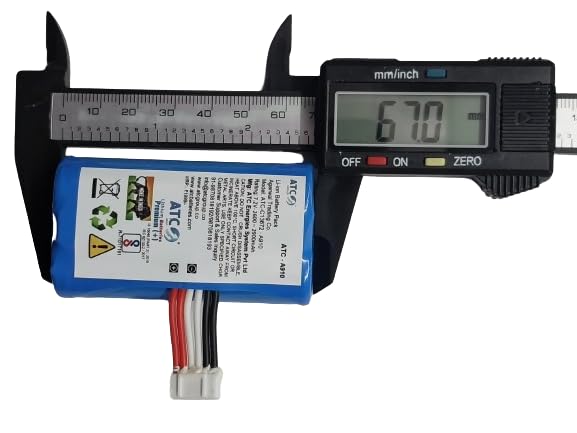
Image 6.1: Battery length measured at 67.0 mm.
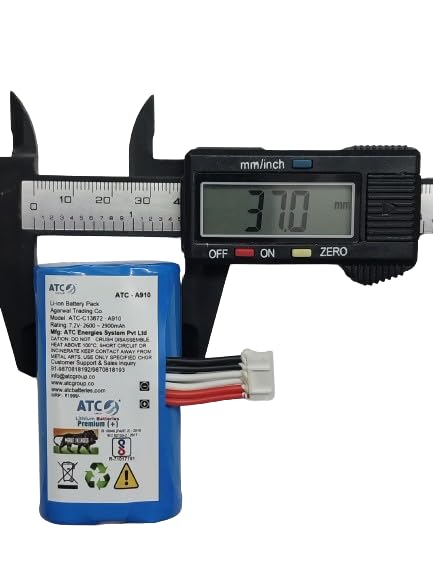
Image 6.2: Battery width measured at 37.0 mm.

Image 6.3: Battery thickness measured at 2.1 mm.
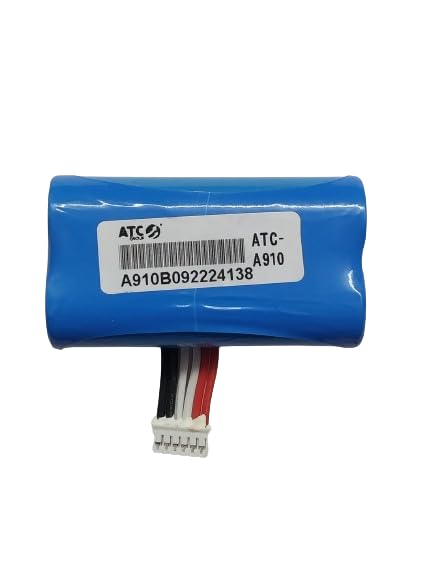
Image 6.4: Back view of the KP Compatiable A910 Li-ion Battery, showing the barcode and model number.
7. Warranty Information
Specific warranty details for this product are typically provided by the seller or manufacturer at the time of purchase. Please retain your proof of purchase for any warranty claims. For information regarding the warranty period and terms, refer to the product packaging or contact the seller directly.
8. Customer Support
For any questions, technical assistance, or support regarding your KP Compatiable A910 battery, please contact the seller or manufacturer through the following channels:
- Seller Contact: Refer to your purchase platform or invoice for seller contact details.
- WhatsApp Support: You may contact support via WhatsApp at 8689992258.
When contacting support, please provide your product model (A910) and a detailed description of the issue.