
1. Introduction
Thank you for choosing the FRYLINE BF-1 Under Desk Elliptical Machine. This manual provides essential information for the safe and effective use of your new elliptical. Please read it thoroughly before operation and retain it for future reference. This electric seated pedal exerciser is designed for low-impact exercise, ideal for maintaining activity while seated, improving circulation, and strengthening leg muscles.
2. What's in the Box
Upon unpacking, please ensure all items listed below are present and in good condition:
- Under Desk Elliptical Machine
- Remote Control
- User Manual (this document)
- Power Adapter (Charge)
3. Product Features
- Low-Impact Exercise: Designed for gentle, low-intensity workouts, suitable for seniors and individuals undergoing leg rehabilitation. Helps burn calories, improve cardiovascular health, and strengthen muscles without high impact.
- Automatic and Manual Modes: Offers 6 adjustable manual speed levels and 3 pre-programmed automatic modes (P1-P3). Pedals can move forward or backward to target different muscle groups.
- Silent Operation: Equipped with a silent system for quiet workouts, ensuring minimal disturbance in any environment.
- Remote Control: Convenient remote control allows for mode and speed adjustments without bending over, reducing strain.
- Easy Assembly & Portability: No assembly required; simply plug in and use. Features a built-in handle for easy movement and storage.
- Comfortable Foot Pedals: Textured footrests with a slight arch provide comfort and grip during use.

Image: Overview of key features including adjustable speeds, quiet operation, and remote control.
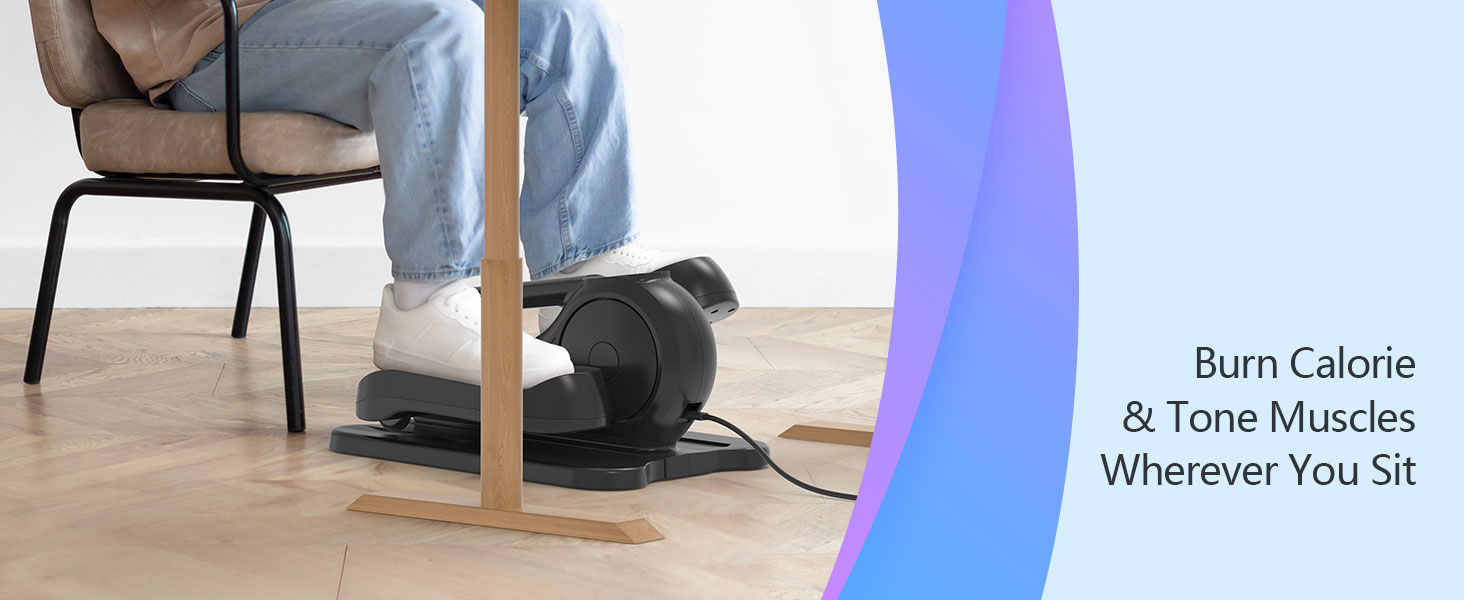
Image: The elliptical in use under a desk, emphasizing its ultra-quiet operation (less than 15dB).

Image: Benefits of using the elliptical for safe and stress-free exercise, focusing on joint health.

Image: Demonstrates the versatility of the elliptical for use in various settings, such as under a desk or while relaxing.

Image: Detail of the smooth wheels, contributing to the quiet operation of the machine.

Image: Highlights the product's ready-to-use nature, requiring no assembly.
4. Setup
- Unpack: Carefully remove the elliptical machine and all accessories from the packaging.
- Placement: Place the elliptical on a flat, stable surface. Ensure there is enough space around the machine for comfortable use and to prevent obstruction.
- Power Connection: Connect the power adapter to the elliptical's power port (located at the back) and then plug it into a standard electrical outlet.
- Remote Control Batteries: The remote control requires 2 AAA batteries (not included). Open the battery compartment on the back of the remote and insert the batteries, observing polarity.
5. Operating Instructions
5.1 Display Panel & Controls
The elliptical features an easy-to-read LCD display and control buttons on the unit, mirrored on the remote control.

Image: The easy-to-read LCD screen and control panel on the elliptical.
- POWER: Indicates if the machine is on or off.
- SCAN: Automatically cycles through display metrics (Speed, Time, Calorie).
- DIRECTION: Indicates the current pedal direction (forward/backward).
- SPEED: Displays the current speed level (1-6).
- TIME: Shows the elapsed exercise time.
- CALORIE: Displays estimated calories burned.
5.2 Remote Control Functions
The remote control provides convenient access to all functions.
- Red Button (Power): Turns the machine on/off.
- START/STOP: Starts or stops the pedal movement.
- DIRECTION: Changes the direction of the pedal rotation (forward/backward).
- MODE: Cycles through the 3 pre-programmed modes (P1, P2, P3) or selects manual mode.
- SPEED +/-: Increases or decreases the speed in manual mode (6 levels).
- FUNCTION: Toggles between displaying Speed, Time, and Calories on the screen.
5.3 Starting Your Workout
- Power On: Press the red power button on the remote control or the unit's control panel. The display will light up.
- Position Feet: Place your feet comfortably on the foot pedals. The textured surface and arch support are designed for stability.
- Select Mode:
- Manual Mode: Press the MODE button until no program (P1, P2, P3) is displayed. Then use the SPEED +/- buttons to select your desired speed level (1-6).
- Pre-programmed Modes: Press the MODE button to cycle through P1, P2, or P3. These modes automatically adjust speed for a varied workout.
- Start: Press the START/STOP button to begin pedaling.
- Adjust Direction: If desired, press the DIRECTION button to reverse the pedal movement.
- Monitor Progress: Use the FUNCTION button to view different metrics (Speed, Time, Calories) on the display.
- Stopping: Press the START/STOP button to pause or end your workout. To power off completely, press the red power button.
WARNING: DO NOT STAND ON THE MACHINE FOR USE. Serious injury may occur if the machine is used while standing.
6. Maintenance
Regular maintenance ensures the longevity and optimal performance of your elliptical machine.
- Cleaning: Wipe down the machine with a soft, damp cloth after each use to remove dust and sweat. Avoid abrasive cleaners or solvents. The foot pedals can be lifted for easier cleaning underneath.
- Storage: Store the elliptical in a cool, dry place away from direct sunlight and extreme temperatures. Use the built-in handle to move it easily.
- Inspection: Periodically check all parts for any signs of wear or damage. Ensure the power cord is not frayed or damaged.
7. Troubleshooting
If you encounter any issues with your FRYLINE BF-1 Elliptical, please refer to the following common solutions:
| Problem | Possible Cause | Solution |
|---|---|---|
| Machine does not power on. | Power cord not properly connected; power outlet not working. | Ensure power cord is securely plugged into the machine and a working outlet. Check if the outlet has power. |
| Remote control not responding. | Dead or incorrectly inserted batteries; remote out of range. | Replace AAA batteries, ensuring correct polarity. Point the remote directly at the machine's display. |
| Pedals are not moving smoothly. | Obstruction; machine needs cleaning. | Check for any foreign objects obstructing the pedals. Clean the area around and under the pedals. |
| Display shows "0000" and is blinking. | Machine is powered on but not yet started. | This is normal. Press the START/STOP button to begin your workout. |
8. Specifications
- Model Name: BF-1
- Brand: FRYLINE
- Product Dimensions (LxWxH): 16.3"D x 16"W x 8.5"H
- Item Weight: 7.21 Kilograms
- Material: Acrylonitrile Butadiene Styrene (ABS)
- Color: Black
- Maximum Weight Recommendation: 300 Pounds
- Number of Resistance Levels: 6 (Manual Speeds)
- Pre-programmed Modes: 3 (P1, P2, P3)
- Power Source: Electric (Charge included)
9. Warranty and Support
The FRYLINE BF-1 Under Desk Elliptical Machine comes with a 12-month warranty from the date of purchase. This warranty covers manufacturing defects and malfunctions under normal use.
For any questions, concerns, or warranty claims, please contact FRYLINE customer support through Amazon messages. Our dedicated customer support team is committed to resolving any issues you may encounter.