
1. Introduction
This manual provides essential information for the installation, operation, and maintenance of the DB37778 Compatible Spare Parts User Port Kit. This kit is designed for use with Domino A100, A200, and A300 series Continuous Inkjet (CIJ) printers. Please read this manual thoroughly before proceeding with any installation or maintenance to ensure proper function and safety.
Product Type: Spare Parts Kit
Part Number: DB37778
Compatibility: Domino A100, A200, A300 Series CIJ Printers
2. Safety Information
Always observe the following safety precautions:
- Ensure the printer is powered off and disconnected from the main power supply before installing or removing any components.
- Wear appropriate personal protective equipment (PPE) if required by your facility's safety protocols.
- Handle electronic components with care to prevent electrostatic discharge (ESD) damage.
- Refer to the original printer's service manual for specific safety guidelines related to the Domino A100, A200, or A300 series.
3. Kit Components
The DB37778 User Port Kit typically includes the following components:
- User Port Circuit Board
- Associated connecting cables/ribbon cables
- Mounting hardware (if applicable)
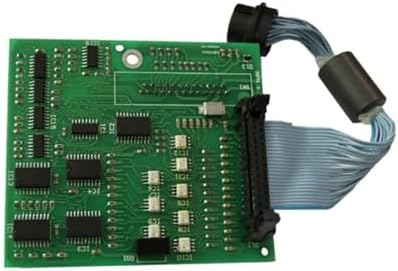
Figure 3.1: DB37778 User Port Kit. This image displays the green circuit board with various integrated circuits and connectors, along with a grey ribbon cable attached to a black connector, leading to a cylindrical ferrite bead and another black connector.
4. Setup and Installation
Installation of the DB37778 User Port Kit requires careful handling and adherence to the printer's service procedures. It is recommended that installation be performed by qualified personnel.
- Preparation:
- Power off the Domino A100/A200/A300 series printer and disconnect it from the power source.
- Open the printer's access panel to locate the existing user port assembly or the designated installation area.
- Ensure a clean, static-free work environment.
- Removal of Old Component (if applicable):
- Carefully disconnect any cables attached to the old user port board. Note their orientation and connection points.
- Unscrew or unclip the old user port board from its mounting points.
- Installation of New Kit:
- Align the new DB37778 User Port Circuit Board with the mounting points inside the printer.
- Secure the board using the appropriate screws or clips. Do not overtighten.
- Connect the ribbon cable and any other associated cables to the new user port board and the corresponding ports on the printer's main board or other modules. Ensure all connections are firm and correctly oriented.
- Final Checks:
- Visually inspect all connections to confirm they are secure.
- Close the printer's access panel.
- Reconnect the printer to the power source and power it on.
5. Operating Considerations
The DB37778 User Port Kit is a passive component that facilitates communication and connectivity within the Domino CIJ printer system. Its operation is integrated with the printer's overall functionality.
- Once installed, the user port should function automatically as part of the printer's system.
- Monitor the printer's diagnostic messages or status indicators for any errors related to the user port or connected peripherals.
- Refer to your Domino A100/A200/A300 printer's user manual for specific instructions on utilizing the user port functionalities (e.g., connecting external devices, data transfer).
6. Maintenance
The DB37778 User Port Kit itself requires minimal maintenance. However, regular checks of the surrounding environment and connections are recommended.
- Cleaning: Periodically inspect the user port and its connections for dust or debris. Use a soft, dry, lint-free cloth or compressed air to gently clean the area. Do not use liquid cleaners directly on the circuit board.
- Connection Integrity: Ensure all cables connected to the user port remain securely fastened. Loose connections can lead to intermittent functionality or errors.
- Environmental Conditions: Operate the printer within the recommended environmental conditions (temperature, humidity) to prevent damage to electronic components, including the user port.
7. Troubleshooting
If you encounter issues after installing the DB37778 User Port Kit, consider the following troubleshooting steps:
| Problem | Possible Cause | Solution |
|---|---|---|
| Printer does not recognize the user port or connected device. | Loose or incorrect cable connection. Incorrect installation of the board. Faulty cable or connected device. |
|
| Error messages related to user port. | Software/firmware incompatibility. Component failure. |
|
If troubleshooting steps do not resolve the issue, contact your supplier or a qualified service technician.
8. Specifications
| Attribute | Detail |
|---|---|
| Part Number | DB37778 |
| Product Type | User Port Kit (Spare Part) |
| Compatibility | Domino A100, A200, A300 Series CIJ Printers |
| Dimensions (Product) | 14 x 14 x 14 inches |
| Item Weight | 4 pounds |
| Manufacturer | Cijprinter |
| Color | White |
| UPC | 604542697607, 604542697669 |
9. Warranty and Support
For information regarding warranty terms and conditions for the DB37778 Compatible Spare Parts User Port Kit, please refer to the purchase documentation or contact your supplier directly. This product is a compatible spare part; warranty terms may differ from original equipment manufacturer (OEM) parts.
For technical support or further assistance, please contact the manufacturer, Cijprinter, or your authorized distributor.
Manufacturer: Cijprinter
10. Disclaimer
This manual is intended for informational purposes only. While every effort has been made to ensure the accuracy of the information contained herein, Cijprinter assumes no responsibility for errors or omissions, or for damages resulting from the use of the information contained herein. The information in this manual is subject to change without notice.
The DB37778 User Port Kit is a compatible spare part. Use of compatible parts may affect the original equipment manufacturer's warranty for the printer. Users are advised to consult their printer's warranty terms.