
1. Introduction
This manual provides essential information for the safe and efficient operation of your Bemonoc High Torque AC 110V Electric Motor. This 300W variable speed, reversible gear motor operates at 7.5 RPM and is designed for a wide range of industrial machinery and home applications. Please read this manual thoroughly before installation and use to ensure proper function and longevity of the product.
2. Safety Information
- Always disconnect power before performing any installation, maintenance, or troubleshooting.
- Ensure the motor is properly grounded to prevent electrical shock.
- Do not operate the motor in wet or damp conditions unless specifically designed for such environments.
- Keep hands, clothing, and tools clear of moving parts during operation.
- Verify that the power supply voltage matches the motor's specifications (110V AC).
- Mount the motor securely to a stable surface to prevent vibration and movement.
- If any unusual noise, smell, or smoke occurs, immediately disconnect power and investigate the cause.
3. Product Overview
3.1 Components Included
The package includes the following items:
- 1 x AC Motor (110V, 300W)
- 1 x Gearbox (integrated with motor)
- 1 x AC Governor (Speed Controller)
- 1 x Power Cord
- Wiring instructions

Figure 1: Included components - AC motor, speed controller, and power cord.
3.2 Key Features
- High Torque: Delivers 390 lb.in maximum rated torque for demanding applications.
- Variable Speed: Speed can be adjusted from 0 to 7.5 RPM using the included speed controller.
- Reversible Rotation: Capable of rotating in both clockwise (CW) and counter-clockwise (CCW) directions.
- Durable Construction: Features high-precision alloy steel gears and pure copper coils for extended lifespan and stable performance.
- Efficient Cooling: Built-in fan heatsink and cooling holes ensure good ventilation and heat dissipation.

Figure 2: Internal view highlighting pure copper coils for excellent conductivity and heat dissipation.

Figure 3: Illustration of alloy steel high-precision helical gears designed for smooth, quiet operation and reduced wear.
4. Specifications
| Specification | Value |
|---|---|
| Brand | Bemonoc |
| Model | 7.5RPM 300Watts |
| Power | 300 Watts |
| Voltage | 110 Volts (AC) |
| Speed | 0 - 7.5 RPM (Variable) |
| Max Rated Torque | 390 lb.in |
| Reduction Ratio | 1:180 (180k) |
| Shaft Diameter | 18 mm |
| Material | Copper (coils), Alloy Steel (gears) |
| Item Weight | 18 pounds |
| Package Dimensions | 13 x 8 x 6 inches |

Figure 4: Detailed dimensions of the motor unit.
5. Setup
5.1 Mounting
Securely mount the motor to a rigid and stable surface using appropriate fasteners. Ensure there is adequate clearance around the motor for ventilation and to prevent obstruction of moving parts.
5.2 Wiring Instructions
Refer to the wiring diagram below for connecting the motor to the speed controller and power supply. Ensure all connections are secure and insulated.
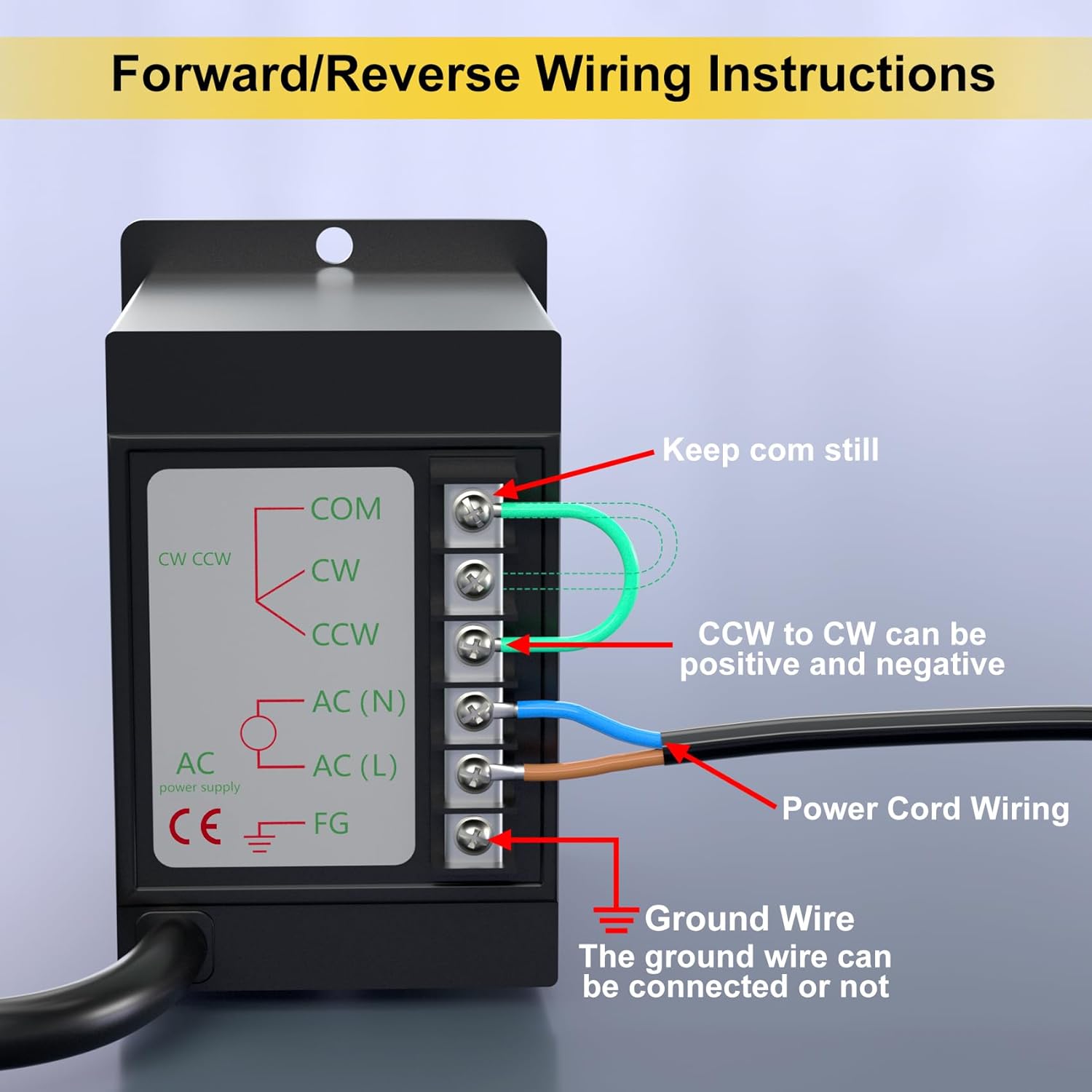
Figure 5: Forward/Reverse Wiring Instructions for the speed controller. Connect the power cord to AC(N) and AC(L). For direction control, connect COM to CW for clockwise rotation, or COM to CCW for counter-clockwise rotation. The ground wire can be connected or left unconnected based on local electrical codes and safety requirements.
- Connect the AC power supply (110V) to the AC(N) and AC(L) terminals on the speed controller.
- Connect the motor's wires to the corresponding terminals on the speed controller (COM, CW, CCW).
- To change rotation direction, connect the 'COM' terminal to either 'CW' (Clockwise) or 'CCW' (Counter-Clockwise) terminal. This can be done via a switch or by manually re-wiring.
- The ground wire (FG) should be connected to an appropriate ground point for safety, if required by your application or local regulations.
6. Operating Instructions
6.1 Power On/Off
After ensuring all connections are correct and secure, plug the power cord into a 110V AC outlet. Use the ON/OFF switch on the speed controller to power the motor.
6.2 Speed Adjustment
The motor's speed can be adjusted using the rotary knob on the speed controller. Turn the knob towards 'LOW' for slower speeds (down to 0 RPM) and towards 'HIGH' for faster speeds (up to 7.5 RPM).
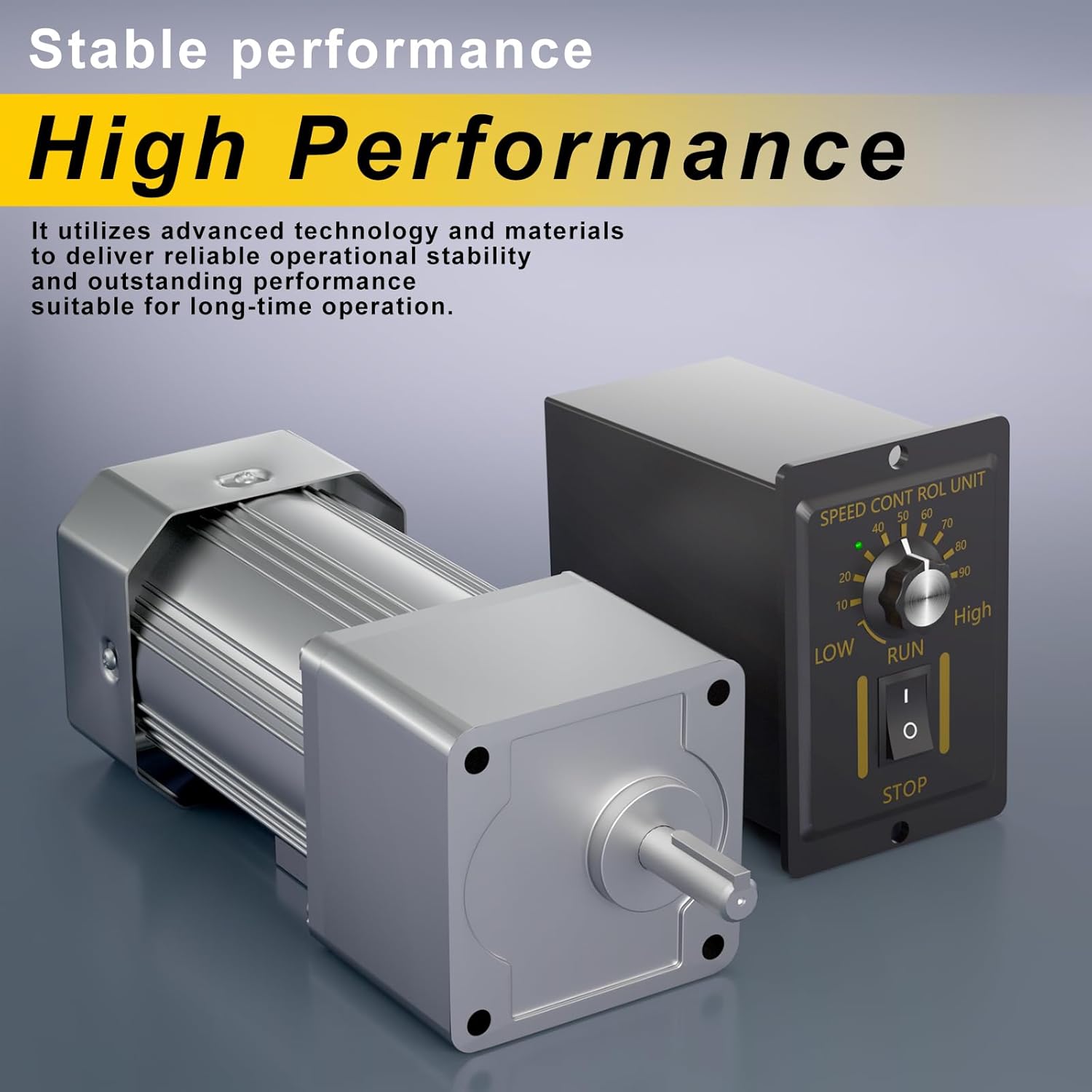
Figure 6: The speed controller allows for precise adjustment of motor speed.
6.3 Direction Reversal
To reverse the motor's direction, you must switch the connection between the 'COM' terminal and either 'CW' or 'CCW' terminals on the speed controller. Ensure the motor is powered off before changing wiring connections.

Figure 7: The speed controller supports reversible operation by adjusting wiring connections.
7. Maintenance
- Cleaning: Periodically clean the motor and speed controller with a dry, soft cloth to remove dust and debris. Do not use liquid cleaners or solvents.
- Ventilation: Ensure the cooling holes and fan heatsink are free from obstructions to maintain proper heat dissipation.
- Inspection: Regularly inspect all wiring connections for tightness and signs of wear or damage. Check for any unusual noises or vibrations during operation.
- Lubrication: The gearbox is typically sealed and pre-lubricated for life. Consult a qualified technician if lubrication is suspected to be an issue.
8. Troubleshooting
| Problem | Possible Cause | Solution |
|---|---|---|
| Motor does not start | No power supply; Loose wiring; Faulty switch/controller | Check power connection; Verify all wiring is secure; Test switch/controller functionality. |
| Motor runs intermittently | Loose connections; Overheating; Damaged internal components | Inspect wiring; Ensure proper ventilation; Contact support if issue persists. |
| Motor makes unusual noise | Misalignment; Worn gears; Foreign object | Check mounting and alignment; Inspect gearbox for damage; Remove any obstructions. |
| Speed control is erratic | Faulty speed controller; Inconsistent power supply | Test speed controller; Verify stable power input. |
| Motor overheats | Overload; Insufficient ventilation; High ambient temperature | Reduce load; Clear ventilation openings; Operate in a cooler environment. |
If you encounter problems not listed here or if the suggested solutions do not resolve the issue, please contact customer support.
9. Warranty and Support
For warranty information or technical support, please refer to the documentation provided with your purchase or contact Bemonoc customer service. Keep your purchase receipt as proof of purchase for any warranty claims.
Contact information can typically be found on the product packaging or the official Bemonoc website.