
Freepi NYQ3816
Freepi Walking Pad with Incline User Manual
Model: NYQ3816 | Brand: Freepi
Introduction
Thank you for choosing the Freepi Walking Pad with Incline. This manual provides essential information for the safe and effective operation, maintenance, and troubleshooting of your new fitness equipment. Please read this manual thoroughly before initial use and retain it for future reference.
Important Safety Instructions
- Always place the walking pad on a flat, stable surface.
- Ensure adequate clear space around the walking pad (at least 2 feet on all sides).
- Keep children and pets away from the equipment during operation.
- Do not operate the walking pad if it has a damaged cord or plug, or if it is not working properly.
- Consult a physician before starting any new exercise program.
- Maximum user weight capacity: 340 lbs (154 kg).
- Always wear appropriate athletic footwear.
- Unplug the walking pad from the power outlet when not in use or before cleaning/maintenance.
Package Contents
Verify that all components are present in the package:
- Freepi Walking Pad with Incline (x1)
- User Manual (x1)
- Hex Tool (x1)
- Remote Control (x1)
- Lubricants (x1 bottle)
- Power Cord (78.75 inches) (x1)
- Short Foot Pad (x2)
- Long Foot Pad (x2)

Figure 1: Included Package Contents
Setup and Assembly
1. Unpacking
- Carefully remove the walking pad and all accessories from the packaging.
- Inspect the unit for any damage. If damage is found, do not proceed with setup and contact customer support.
2. Placement
Place the walking pad on a firm, level surface. Ensure there is sufficient space around the unit for safe operation and to prevent obstruction.
3. Power Connection
- Connect the power cord to the walking pad's power input port.
- Plug the power cord into a grounded electrical outlet.
4. Remote Control Battery Installation
The remote control requires a CR2032 coin cell battery (not included). Open the battery compartment on the back of the remote control and insert the CR2032 battery with the positive (+) side facing up. Close the compartment securely.

Figure 2: Freepi Walking Pad in typical usage scenarios
Operating Instructions
1. Understanding the LED Display
The integrated LED display shows real-time workout data. This includes:
- Speed: Current speed in miles per hour (mph).
- Distance: Total distance covered during the current session.
- Time: Duration of the current workout.
- Calories: Estimated calories burned.
- Steps: Number of steps taken.

Figure 3: LED Display and Remote Control
2. Using the Remote Control
The remote control allows you to manage the walking pad's functions without interrupting your workout.
- Power Button: Turns the walking pad ON/OFF.
- Start/Stop Button: Initiates or pauses the workout.
- Speed +/- Buttons: Adjusts the speed of the running belt.
- Mode Button: Cycles through different display modes (e.g., time, distance, calories).
3. Operating Modes (4-in-1 Functionality)
The Freepi Walking Pad offers four distinct modes to suit various fitness needs:
- Walking Mode: Speed range 0.6 - 2.5 mph. Ideal for casual walking.
- Working Mode: Speed range 0.6 - 1.5 mph. Suitable for use under a desk while performing tasks.
- Running Mode: Speed range 3.0 - 3.8 mph. For light jogging or running.
- Hiking/Climbing Mode: Speed range 1 - 2.5 mph. Utilizes the incline feature for a more challenging workout.
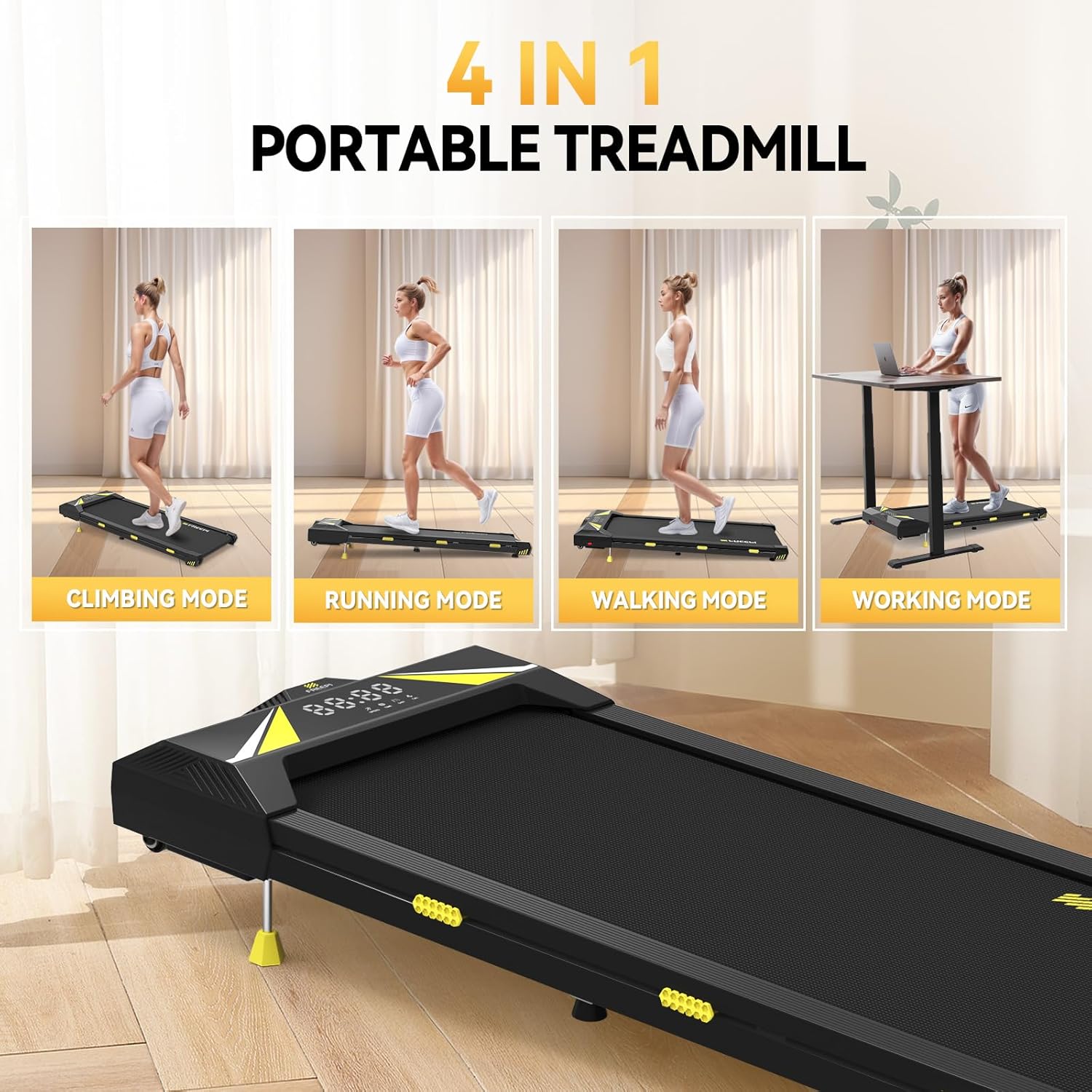
Figure 4: Four-in-One Operating Modes
4. Adjusting Incline
The walking pad features an adjustable incline from 0° to 4°. To adjust the incline, manually position the long foot pads at the rear of the unit. Ensure both pads are securely in place and at the same height to maintain stability.
Maintenance
Regular maintenance ensures the longevity and optimal performance of your Freepi Walking Pad.
1. Lubrication
The running belt requires periodic lubrication to reduce friction and extend its lifespan. Use the provided lubricant or a silicone-based treadmill lubricant. Apply a small amount of lubricant under the center of the running belt every 3-6 months, or after approximately 100 hours of use. Refer to the specific instructions on the lubricant bottle.
2. Cleaning
Wipe down the walking pad's surfaces with a damp cloth after each use to remove sweat and dust. Do not use abrasive cleaners or solvents. Ensure the unit is unplugged before cleaning.
3. Running Belt Adjustment
If the running belt becomes misaligned (drifts to one side) or feels loose, it may need adjustment. Use the hex tool to turn the adjustment bolts at the rear of the walking pad. Turn the bolt on the side towards which the belt is drifting clockwise to move it back to the center, or counter-clockwise to loosen. Adjust in small increments (quarter turns) and test the belt after each adjustment until it runs smoothly and centrally.

Figure 5: Multi-Layer Running Belt Construction
Troubleshooting
Refer to the table below for common issues and their solutions.
| Problem | Possible Cause | Solution |
|---|---|---|
| Walking pad does not power on. | Power cord not connected; outlet not working; power switch off. | Ensure power cord is securely plugged in. Check the wall outlet with another device. Ensure the main power switch on the walking pad is ON. |
| Remote control is unresponsive. | Battery dead or incorrectly installed; remote not paired. | Replace the CR2032 battery (ensure correct polarity). If still unresponsive, refer to the manual for remote pairing instructions (if applicable). |
| Running belt is misaligned or slipping. | Belt tension incorrect; belt needs centering. | Refer to the 'Running Belt Adjustment' section in Maintenance. Lubricate the belt if it feels dry. |
| Unusual noise during operation. | Lack of lubrication; loose components; foreign object. | Lubricate the running belt. Check for any loose screws or debris under the belt. If noise persists, contact customer support. |
| Display not showing data correctly. | Loose connection; sensor issue. | Ensure all connections are secure. Restart the walking pad. If the problem continues, contact customer support. |
Product Specifications
| Feature | Specification |
|---|---|
| Model Number | NYQ3816 |
| Product Dimensions (L x W x H) | 118.11 x 48.51 x 11.18 cm (46.5 x 19.1 x 4.4 inches) |
| Item Weight | 21.8 kg (48 lbs) |
| Maximum Weight Capacity | 340 lbs (154 kg) |
| Motor Horsepower | 2.5 HP (Peak) |
| Speed Range | 0.6 - 3.8 mph |
| Incline | Adjustable (0° - 4°) |
| Display Type | LED (Time, Calories, Steps, Speed, Distance) |
| Frame Material | Alloy Steel |
| Running Belt | 5-layer non-slip with 6 silicone shocks |
| Power Source | Corded Electric |
| Included Components | Remote Control, Hex Tool, Lubricants, Power Cord, Foot Pads |
Storage
The Freepi Walking Pad is designed for space-saving storage. Its compact design allows it to be easily stored under a sofa, bed, or in other small spaces. Built-in wheels facilitate effortless movement and repositioning.

Figure 6: Space-Saving Storage
Warranty and Customer Support
Your Freepi Walking Pad is covered by a manufacturer's warranty. Please refer to the warranty card included in your package for specific terms and conditions. For technical assistance, troubleshooting beyond this manual, or to inquire about warranty claims, please contact Freepi customer support through the retailer where you purchased the product or visit the official Freepi website.
no relevant documents