
1. Introduction
This manual provides essential information for the safe and effective operation of your HUINA 1/14 RC 2.4G 562 Water Sprayable Fire Truck. Please read this manual thoroughly before use to ensure proper setup, operation, and maintenance. Keep this manual for future reference.
2. Safety Information
- This product is recommended for users aged 18 years and up. Adult supervision is advised for younger users.
- Do not operate the RC fire truck near people, pets, or obstacles.
- Ensure the operating area is clear of hazards.
- Do not spray water directly at electrical outlets or devices.
- Always turn off the vehicle and remote control when not in use.
- Remove batteries from the vehicle and remote control during prolonged storage.
- Use only the provided charger and batteries. Do not overcharge batteries.
- Keep small parts out of reach of children to prevent choking hazards.
3. Package Contents
Verify that all items are present in the package:
- HUINA 1/14 RC 2.4G 562 Fire Truck
- 2.4G Remote Control
- 2 x Rechargeable Batteries (for truck)
- USB Charging Cable
- Instruction Manual (this document)

Image: The HUINA 1/14 RC Fire Truck, its remote control, a rechargeable battery, and a USB charging cable.
4. Setup
4.1. Battery Installation
4.1.1. Fire Truck Battery
- Locate the battery compartment on the underside of the fire truck.
- Open the battery compartment cover.
- Connect the rechargeable battery to the truck's power connector, ensuring correct polarity.
- Place the battery inside the compartment and close the cover securely.
4.1.2. Remote Control Batteries
- Open the battery compartment on the back of the remote control.
- Insert 2 AA batteries (not included) according to the polarity markings.
- Close the battery compartment cover.
4.2. Charging the Truck Battery
- Connect the rechargeable battery to the USB charging cable.
- Plug the USB charging cable into a standard USB power adapter (e.g., phone charger, computer USB port).
- The indicator light on the USB cable will show charging status (refer to charger instructions for specific light behavior).
- Charging typically takes 2-3 hours. Do not leave batteries charging unattended.
4.3. Filling the Water Tank
- Locate the water tank cap on the top of the fire truck.
- Carefully open the cap.
- Fill the tank with clean tap water using a small funnel or suitable container. Do not overfill.
- Securely close the water tank cap.

Image: A detailed view of the fire truck's water cannon and the area where the water tank is located.
5. Operating Instructions
5.1. Power On/Off
- Turn on the power switch on the fire truck.
- Turn on the power switch on the remote control. The remote control indicator light will flash.
- The remote control will automatically pair with the truck. Once paired, the indicator light on the remote will become solid.
5.2. Basic Driving Controls
Use the joysticks on the remote control for movement:
- Left Joystick (Up/Down): Forward/Backward movement.
- Right Joystick (Left/Right): Turn Left/Right.
5.3. Special Functions
The remote control features dedicated buttons for various functions:
- Water Spray: Press the designated button to activate the water spray function. The water cannon can spray water up to 5 meters.
- Lights: Press the light button to turn on/off the truck's headlights and flashing emergency lights.
- Sound: Press the sound button to activate/deactivate realistic engine sounds and siren effects.
- Ladder Lift/Lower: Use the corresponding buttons to raise or lower the fire truck's ladder.
- Ladder Rotation: Use the rotation buttons to rotate the ladder up to 270 degrees.
- Water Gun Adjustment: The water gun on the ladder can be manually adjusted up to 45 degrees for precise aiming.

Image: The front cabin of the fire truck with its blue emergency lights flashing.
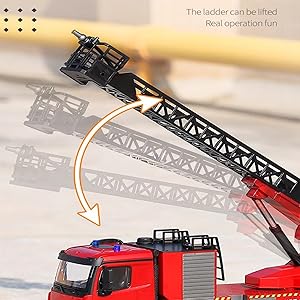
Image: The fire truck's ladder extending upwards, demonstrating its lifting capability.

Image: An illustration showing the fire truck's ladder rotating 270 degrees on its base.

Image: A close-up of the water gun at the end of the ladder, illustrating its 45-degree adjustable angle.
6. Maintenance
- Cleaning: Wipe the truck and remote control with a soft, dry cloth after each use. Do not use water or chemical cleaners.
- Water Tank: Empty the water tank after each use to prevent algae growth or blockages.
- Battery Care: Fully charge batteries before storage and recharge them every 3 months if not in use to maintain battery health.
- Storage: Store the fire truck and remote control in a cool, dry place away from direct sunlight and extreme temperatures.
7. Troubleshooting
| Problem | Possible Cause | Solution |
|---|---|---|
| Truck does not move or respond. | Low battery in truck or remote; Not paired; Power switch off. | Charge truck battery; Replace remote batteries; Ensure both power switches are ON and paired. |
| Water spray not working. | Water tank empty; Pump blockage; Low battery. | Refill water tank; Check for obstructions in the nozzle; Charge truck battery. |
| Lights or sound not working. | Low battery; Function not activated. | Charge truck battery; Press the respective light/sound button on the remote. |
| Short operating range or interference. | Environmental interference; Low remote battery. | Operate in an open area away from other 2.4G devices; Replace remote batteries. |
8. Specifications
- Model: HUINA 562
- Scale: 1/14
- Control Frequency: 2.4 GHz
- Product Dimensions: 25.2 x 12 x 9.6 inches
- Manufacturer: wheelfun
- Recommended Age: 18 years and up
- Features: Water spray function, realistic lighting, sound effects, lifting and rotating ladder.
9. Warranty
This product comes with a standard manufacturer's warranty against defects in materials and workmanship. Please retain your proof of purchase for warranty claims. For specific warranty terms and conditions, refer to the documentation provided at the time of purchase or contact customer support.
10. Support
For technical assistance, troubleshooting not covered in this manual, or spare parts inquiries, please contact the retailer or manufacturer directly. Contact information can typically be found on the product packaging or the seller's website.