
1. Introduction
This manual provides essential information for the safe and efficient operation of your Generic T3000 Ultra Series 9 Smartwatch. Please read it thoroughly before using the device and retain it for future reference.
The T3000 Ultra Series 9 Smartwatch features a durable metal design, Bluetooth connectivity for smartphone integration, and supports phone call functionality. It is designed for unisex adult users and offers a 4 cm AMOLED touchscreen display.
2. What's in the Box
Upon unpacking, please ensure all items are present and in good condition:
- Generic T3000 Ultra Series 9 Smartwatch (Black Casing)
- Black Strap
- Orange Strap
- Wireless Charging Cable
- User Manual (this document)
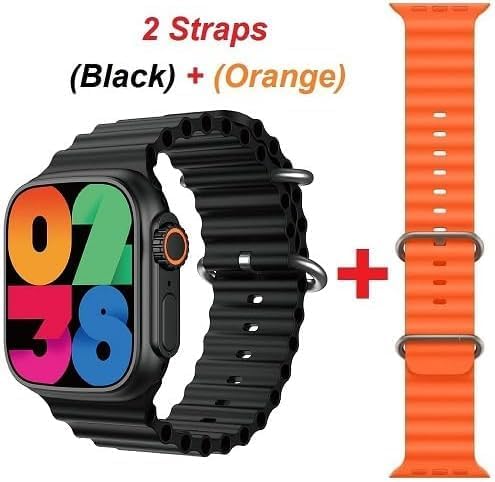
Image: The T3000 Ultra Series 9 Smartwatch shown with both the black and orange straps included in the package.
3. Product Overview
3.1. Watch Components
- Display: 4 cm AMOLED Touchscreen
- Casing: Durable Metal Alloy
- Straps: Steel Alloy (Black and Orange included)
- Control: Touch Control, Physical Buttons (specific button functions detailed in Operating section)
- Microphone: Integrated for call functionality

Image: A detailed view of the smartwatch's metal case, emphasizing its robust and lightweight construction.
4. Setup
4.1. Charging the Smartwatch
- Connect the wireless charging cable to a compatible USB power adapter (not included).
- Place the back of the smartwatch onto the wireless charging pad. Ensure the watch is correctly aligned for charging to begin.
- The watch display will indicate charging status. A full charge typically takes approximately 60 minutes to reach 80% capacity.
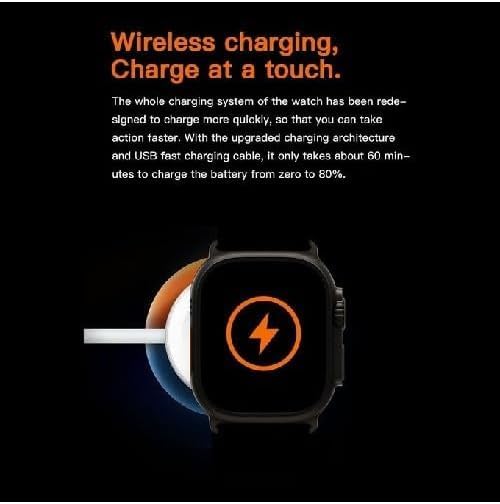
Image: The smartwatch being charged wirelessly, illustrating the ease of charging with a simple touch.
4.2. Pairing with Your Smartphone
- Ensure your smartwatch is sufficiently charged.
- Turn on the smartwatch by pressing and holding the power button.
- Enable Bluetooth on your smartphone.
- Download and install the companion application for the T3000 Smartwatch from your smartphone's app store. Refer to the watch's on-screen instructions or packaging for the correct app name.
- Open the companion app and follow the on-screen instructions to search for and pair with your T3000 Smartwatch.
- Confirm the pairing request on both your smartphone and the smartwatch.
5. Operating the Smartwatch
5.1. Basic Navigation
- Touchscreen: Swipe left, right, up, or down to navigate through menus and widgets. Tap to select items.
- Power Button: Press to wake/sleep the screen. Press and hold to power on/off or access power options.
- Crown/Rotary Button: Rotate to scroll through lists or adjust settings. Press to return to the home screen or confirm selections.
5.2. Making and Receiving Calls
Once paired with your smartphone, the T3000 Smartwatch allows you to manage phone calls directly from your wrist.
- Making a Call: Access the phone application on your smartwatch, select a contact or dial a number, and initiate the call.
- Receiving a Call: When a call comes in, the watch will display the caller ID. You can answer or reject the call directly from the watch screen.
- Audio: The integrated microphone and speaker allow for hands-free communication.
5.3. Notifications
The smartwatch will display notifications from your paired smartphone, including messages, social media alerts, and app updates. Manage notification settings through the companion app on your phone.
6. Maintenance
6.1. Cleaning
- Wipe the watch screen and casing with a soft, lint-free cloth.
- For stubborn marks, lightly dampen the cloth with water. Avoid using harsh chemicals or abrasive materials.
- Clean the straps regularly, especially after exercise, to prevent skin irritation.
6.2. Water Resistance
The T3000 Smartwatch is water-resistant. This means it can withstand splashes, rain, and brief immersion in shallow water. It is not suitable for swimming, diving, or high-pressure water activities. Avoid exposing the watch to hot water or steam.
7. Troubleshooting
| Problem | Possible Solution |
|---|---|
| Watch does not turn on | Ensure the watch is fully charged. Press and hold the power button for at least 10 seconds. |
| Cannot pair with smartphone | Ensure Bluetooth is enabled on both devices. Restart both the watch and phone. Check the companion app for pairing instructions. |
| Notifications not appearing | Verify notification permissions are granted to the companion app on your smartphone. Check notification settings within the app. |
| Inaccurate activity tracking | Ensure the watch is worn snugly on your wrist. Calibrate sensors if an option is available in the app. |
8. Specifications
| Feature | Detail |
|---|---|
| Model Name | T3000 (Hi Watch Pro) |
| Model Number | T3000 |
| Brand | Generic |
| Operating System | Android Wear 1.3 |
| Memory Storage Capacity | 32 MB |
| Battery Capacity | 1000 mAh |
| Connectivity Technology | Wireless |
| Wireless Communication Standard | Bluetooth |
| Positioning System | Smartphone GPS |
| Item Shape | Rectangular |
| Screen Size | 4 cm |
| Band Material Type | Steel Alloy |
| Case Material Type | Metal |
| Water Resistance Level | Water Resistant |
| Clasp Type | Push Button Foldover Clasp |
| Human Interface Input | Touchscreen |
| Supported Application | Phone |
| Control Type | Touch Control |
| Meter Type | Microphone |
| Style | Tactical and Wireless Watch |
| Color | Orange + Black |
| Band Color | Orange |
| Display Type | AMOLED |
| Compatible Devices | Smartphone |
| Compatible Phone Models | All current smartphone models |
| Target Audience | Unisex Adults |
| Included Components | 2 Straps (Black, Orange) |
| Wearable Computer Type | Smartwatch |
| Manufacturer | China |
| Country of Origin | China |
| Item Weight | 90 grams |
9. Warranty and Support
9.1. Warranty Information
This product is provided without an explicit warranty. Please refer to your retailer's return policy for any issues encountered shortly after purchase.
9.2. Customer Support
For further assistance or inquiries not covered in this manual, please contact the retailer or the point of purchase. Keep your purchase receipt as proof of purchase.