
Introduction
Thank you for choosing the Dylviw LED Magnifier Desk Lamp. This manual provides essential information for the safe and efficient use of your new magnifying lamp. Please read these instructions carefully before installation and operation, and retain them for future reference.

Image: The Dylviw LED Magnifier Desk Lamp, illustrating its versatile design with both clamp and stand configurations.
Safety Information
- Ensure the power source matches the lamp's requirements (Corded Electric).
- Do not expose the lens to direct sunlight, as it can concentrate light and cause fire hazards.
- Keep the lamp away from water or other liquids.
- Do not attempt to disassemble or repair the lamp yourself. Contact qualified service personnel.
- Avoid looking directly into the LED light source for extended periods to prevent eye strain.
- Ensure the clamp or stand is securely fastened to a stable surface before use.
Package Contents
Please check the package for the following items:
- LED Magnifier Lamp Head with Adjustable Arm
- Weighted Base (for stand configuration)
- C-Clamp (for clamp configuration)
- Power Adapter (Corded Electric)
- User Manual (this document)
Setup
1. Clamp Installation
- Unscrew the clamp to open its jaws.
- Attach the clamp to a stable surface (desk, shelf, workbench) with a thickness of up to 2.1 inches (approximately 5.3 cm).
- Tighten the clamp securely until the lamp is firmly in place.
- Insert the base of the lamp arm into the clamp's mounting hole and secure it with the retaining knob.

Image: A user performing detailed electronics work with the Dylviw LED Magnifier Desk Lamp securely attached via its clamp mount to a workbench.
2. Stand Installation
- Place the weighted base on a flat, stable surface.
- Insert the base of the lamp arm into the designated hole on the weighted base.
- Ensure the arm is fully seated and stable.
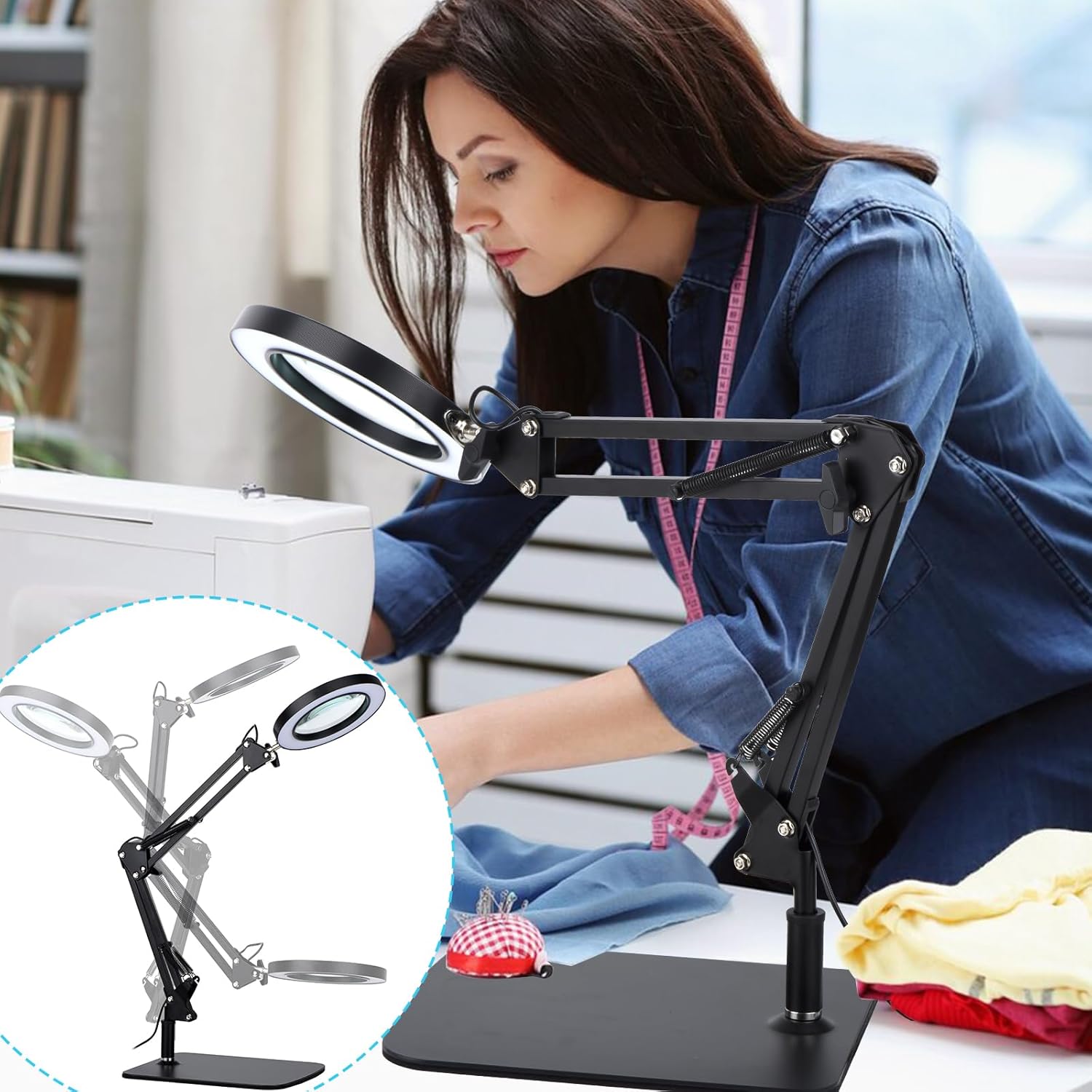
Image: A user engaged in sewing, utilizing the Dylviw LED Magnifier Desk Lamp mounted on its weighted stand for enhanced visibility.
Operating Instructions
1. Power Connection
Connect the power adapter to the lamp's power input port, then plug the adapter into a standard electrical outlet.
2. Power On/Off
Press the power button located on the control panel to turn the lamp on or off.
3. Adjusting Brightness (Stepless Dimming)
With the lamp on, press and hold the brightness adjustment button to cycle through brightness levels from 10% to 100%. Release the button when the desired brightness is reached.

Image: A visual guide demonstrating the stepless dimming capability and the three distinct color temperature selections available on the Dylviw LED Magnifier Desk Lamp.
4. Selecting Color Modes
Press the color mode button to switch between the three available color modes: White, Warm, and Cool light.
5. Adjusting the Arm and Lamp Head
The lamp features two metal swivel arms with 3 knobs and 4 springs, allowing for extensive adjustment. The arm can extend up to 20 inches. The lamp head can rotate 360 degrees, and the arm segments can be adjusted up/down, left/right, and forward/backward to position the magnifier and light precisely where needed.
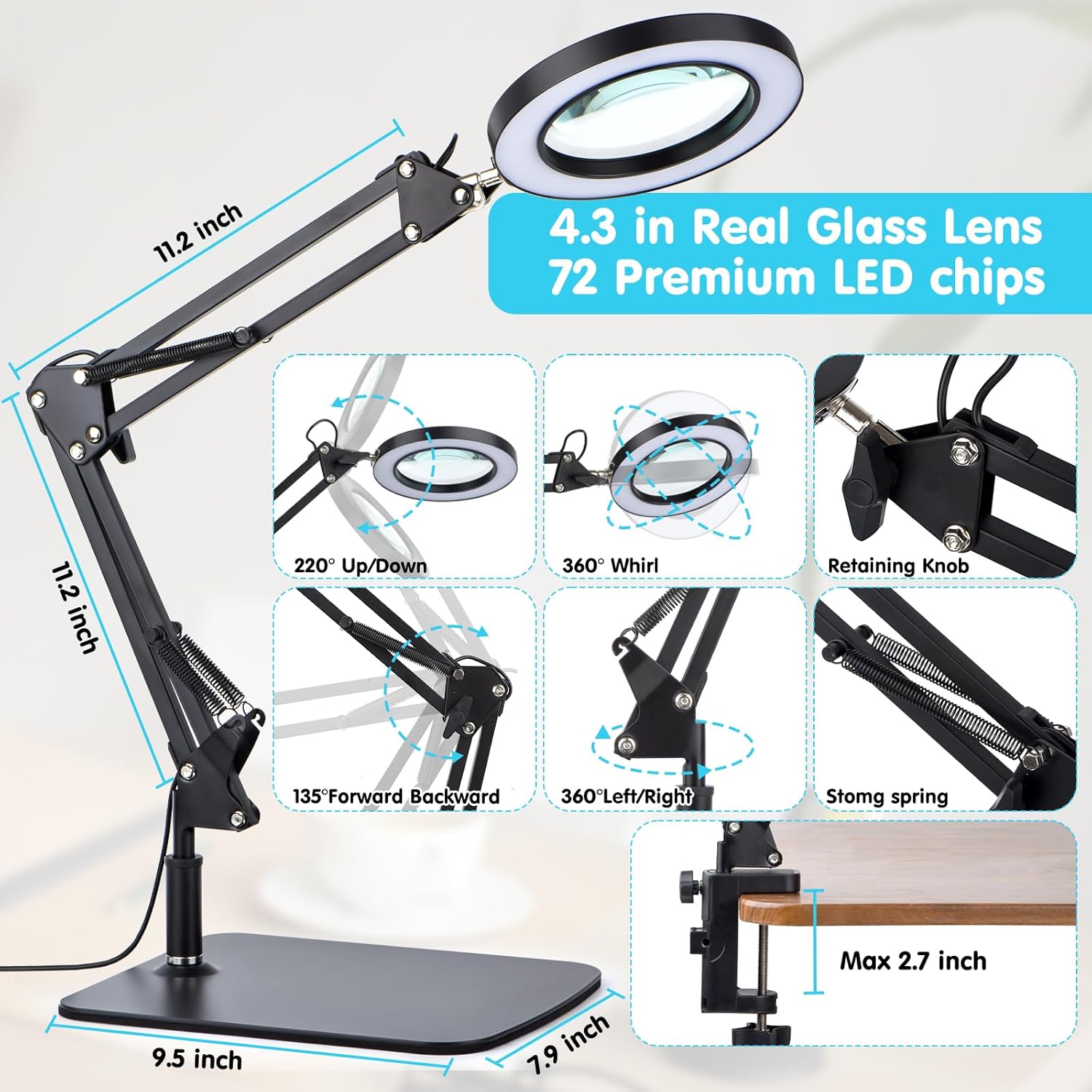
Image: A detailed diagram highlighting the adjustable components and key dimensions of the Dylviw LED Magnifier Desk Lamp, including arm articulation and lens size.
Maintenance
- Cleaning the Lens: Use a soft, lint-free cloth specifically designed for optics to clean the glass lens. Do not use abrasive cleaners or solvents.
- Cleaning the Lamp Body: Wipe the lamp body with a soft, damp cloth. Ensure the lamp is unplugged before cleaning.
- Storage: When not in use, fold the arm to a compact position to save space and protect the lens. Store in a dry, dust-free environment.
- Cable Care: Do not bend or crimp the power cable excessively. Avoid placing heavy objects on the cable.
Troubleshooting
| Problem | Possible Cause | Solution |
|---|---|---|
| Lamp does not turn on. | No power connection. Faulty power adapter. | Check if the power adapter is securely plugged into both the lamp and the wall outlet. Try a different outlet. If problem persists, contact support. |
| Light flickers or is dim. | Loose connection. Low power supply. | Ensure all connections are secure. Try adjusting the brightness settings. |
| Magnification is blurry or distorted. | Dirty lens. Incorrect viewing distance. | Clean the lens with a soft, lint-free cloth. Adjust the distance between your eye, the lens, and the object until clear focus is achieved. |
| Lamp arm is unstable. | Clamp/stand not secured. Over-extended arm. | Re-tighten the clamp or ensure the stand is on a flat, stable surface. Adjust the arm to a more balanced position. |
Specifications
- Model: DY-20-06
- Lens Material: Real Glass
- Lens Diameter: 4.2 inches (approximately 10.7 cm)
- Magnification Strength: 5 Diopters
- Light Source: 72 High-brightness LED lamp beads
- Power: Up to 10W
- Lumen Output: Up to 1200 lumens
- Color Modes: 3 (White, Warm, Cool)
- Dimming: Stepless (10% - 100%)
- Arm Extension: Up to 20 inches (approximately 50.8 cm)
- Clamp Compatibility: Surfaces up to 2.1 inches (approximately 5.3 cm) thick
- Power Source: Corded Electric
- Item Weight: 4.31 pounds (1.96 Kilograms)
- Product Dimensions: 8.9"L x 2"W (Lens head dimensions, arm length varies)
Warranty and Support
Dylviw products are designed for quality and reliability. For warranty information, technical support, or service inquiries, please refer to the contact information provided with your purchase or visit the official Dylviw website. Please have your model number (DY-20-06) and purchase date available when contacting support.