UNI-T UT620C+ Digital DC Low Resistance Meter
Instruction Manual
1. Introduction
The UNI-T UT620C+ is a high-precision digital DC low resistance meter designed for accurate measurement of resistance in various electrical components. It is ideal for testing cables, wires, coils, motors, transformer windings, and resistance between metal riveted parts and grounding electrodes. This manual provides detailed instructions for the safe and effective use of your UT620C+ meter.
2. Safety Information
Please read and understand all safety warnings and operating instructions before using this instrument. Failure to follow these instructions may result in injury or damage to the meter.
- Do Not Apply Voltage: Never apply external voltage to the input terminals of the meter. This instrument is designed for resistance measurement only.
- Battery Safety: Ensure correct battery polarity when installing. Do not short-circuit, disassemble, or expose batteries to high temperatures.
- Environmental Conditions: Use the meter within specified temperature and humidity ranges. Avoid using in wet or dusty environments.
- Maintenance: Only qualified personnel should perform repairs. Do not open the casing unless instructed for battery replacement.
- Proper Connection: Always ensure secure and correct connections of test leads to the device under test.
3. Product Overview
The UT620C+ is a robust and portable micro-ohm meter featuring a large LCD display and intuitive controls. It offers high resolution and accuracy for demanding resistance measurement applications.
3.1 Key Features
- Micro-ohm level measurement, resistance measurement range: 0.001mΩ~300.0KΩ.
- Resolution up to 1µΩ.
- Measurement current ≤ 1A.
- 500 groups of data storage.
- Large LCD display for clear readings.
- Automatic shutdown for power saving.
- Rechargeable lithium battery.
- Compact design, easy to carry and operate.
3.2 Components
The package includes the UT620C+ meter, test leads, power adapter, USB cable, and user manual.


4. Setup
4.1 Battery Installation and Charging
The UT620C+ uses a rechargeable lithium-ion battery. The battery is typically pre-installed. To access the battery compartment for inspection or replacement, remove the screws on the back cover.
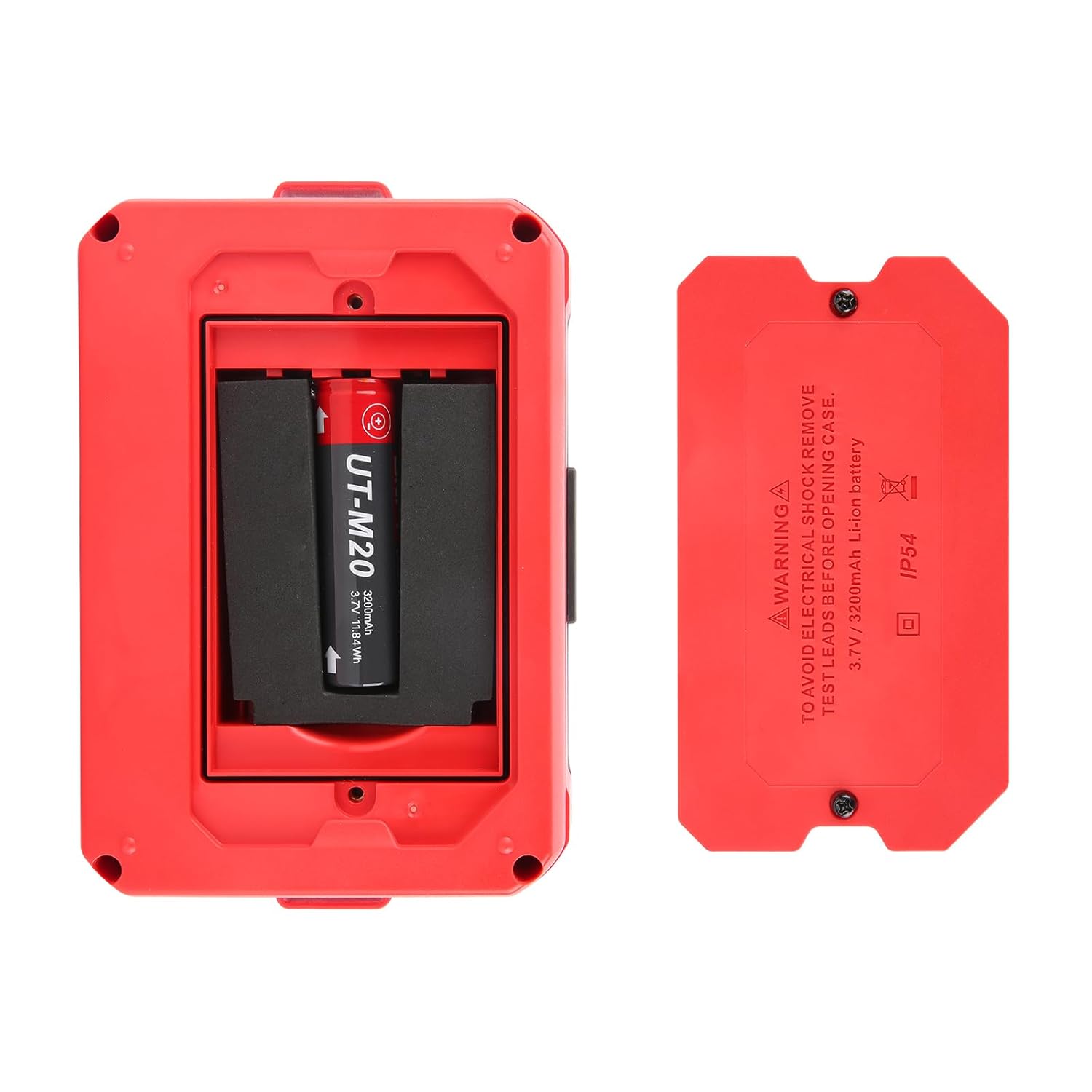
To charge the battery, connect the provided USB cable to the meter's USB port and the power adapter, then plug the adapter into a power outlet. The battery indicator on the display will show charging status.
4.2 Connecting Test Leads
The UT620C+ utilizes a four-wire (Kelvin) measurement method for high accuracy, which minimizes the effect of lead resistance. Connect the test leads to the C1, P1, P2, and C2 terminals on the top of the meter. Ensure the connections are firm.
5. Operating Instructions
5.1 Power On/Off
Press the Power button ( ) to turn the meter on. Press and hold the Power button to turn it off. The meter features an automatic shutdown function to conserve battery life.
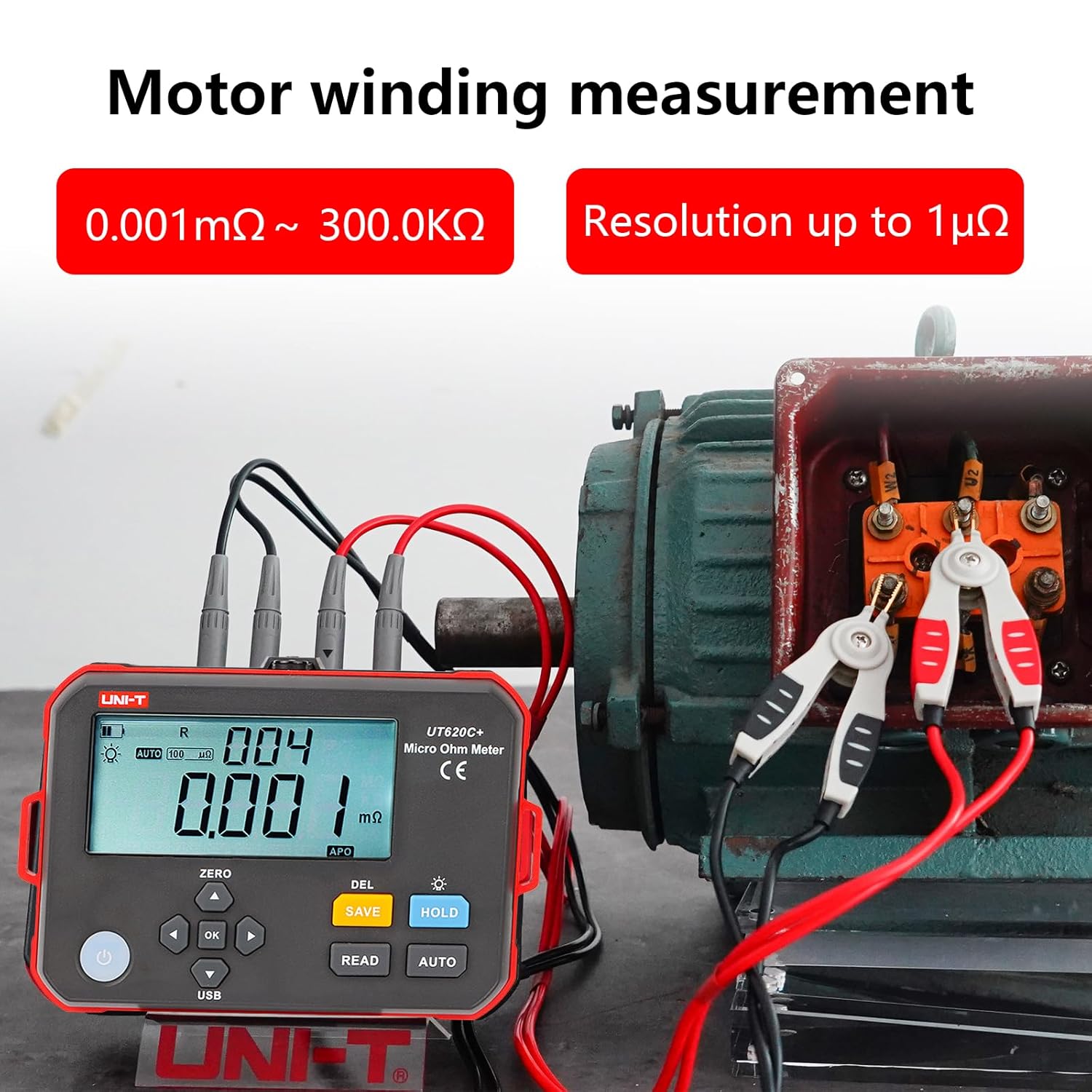
5.2 Resistance Measurement (Four-Wire Method)
The four-wire method ensures accurate measurements by separating the current-carrying leads from the voltage-sensing leads, thus eliminating the resistance of the test leads from the measurement.
- Connect the four test leads to the C1, P1, P2, and C2 terminals on the meter.
- Connect the other ends of the test leads to the device under test. Ensure good contact.
- Press the READ button to initiate a measurement. The meter will display the resistance value.
- For continuous measurement, use the AUTO mode.


5.3 Data Storage and Recall
The UT620C+ can store up to 500 groups of measurement data.
- To save the current measurement, press the SAVE button.
- To recall stored data, use the navigation buttons (▲ / ▼) and OK button to browse.
- To delete data, press the DEL button.

5.4 Line-Set Calibration
The meter supports line-set calibration to ensure accuracy. Refer to the on-screen prompts or specific sections in the full user manual for detailed calibration steps.

5.5 USB Interface
The UT620C+ features a USB Type-C interface for data transfer to a computer. This allows for further analysis and logging of measurement data using compatible software.

6. Maintenance
6.1 Cleaning
Wipe the meter's casing with a damp cloth and mild detergent. Do not use abrasive cleaners or solvents. Ensure the meter is dry before storage or next use.
6.2 Storage
When not in use for extended periods, store the meter in a cool, dry place, away from direct sunlight and extreme temperatures. It is recommended to fully charge the battery before long-term storage and recharge it periodically to maintain battery health.
6.3 Battery Care
To prolong battery life, avoid fully discharging the battery frequently. Recharge the battery when the low battery indicator appears. If the meter will not be used for a long time, remove the battery to prevent leakage.
7. Troubleshooting
| Problem | Possible Cause | Solution |
|---|---|---|
| Meter does not power on | Low or dead battery; Battery not installed correctly | Charge the battery; Check battery installation and polarity |
| Inaccurate readings | Poor test lead connection; Uncalibrated meter; External interference | Ensure secure connections; Perform line-set calibration; Move away from strong electromagnetic fields |
| Display shows "OL" (Overload) | Resistance value exceeds range; Open circuit | Check if the circuit is open; Ensure the resistance is within the meter's range |
| Cannot save data | Memory full | Delete unnecessary stored data |
8. Specifications
| Specification | Value |
|---|---|
| Resistance Measurement Range | 0.001mΩ ~ 300.0KΩ |
| Resolution | Up to 1µΩ |
| Measurement Current | ≤ 1A |
| Accuracy | ±0.1%FS (Full Scale) |
| Data Storage | 500 groups |
| Display | Large LCD |
| Power Source | Battery Powered (2 Lithium Ion batteries required, included) |
| Battery Type | 3.7V/3200mAh Li-ion battery |
| Min. Operating Voltage | 4.2 Volts |
| Interface | USB Type-C |
| Dimensions | 161mm x 117mm x 68mm (approx. 6.34 x 4.61 x 2.68 inches) |
| Weight | Approx. 1.8 kg (3.97 Pounds) |
| Color | Red & Black |
| Manufacturer | UNI-T |

9. Warranty and Support
UNI-T products are manufactured to high quality standards. For warranty information, technical support, or service, please contact your local distributor or visit the official UNI-T website. Keep your purchase receipt as proof of purchase.
For more information, you can visit the UNI-T Store on Amazon.