
LIWAN RBX-S40
LIWAN 4G LTE Cellular Security Camera Wireless (2-Pack)
Instruction Manual - Model: RBX-S40
1. Introduction
Thank you for choosing the LIWAN 4G LTE Cellular Security Camera. This wireless outdoor camera system is designed to provide robust surveillance in areas where traditional WiFi and power sources are unavailable. With its integrated solar panel, high-capacity battery, 2K resolution, 360° panoramic view, and advanced motion detection, it offers comprehensive security for various remote locations.
This manual provides detailed instructions for setup, operation, maintenance, and troubleshooting to ensure optimal performance of your security camera.
2. Product Overview & What's in the Box
The LIWAN 4G LTE Cellular Security Camera system includes all necessary components for immediate deployment. Please verify that all items listed below are present in your package.
Package Contents:
- LIWAN 4G LTE Cellular Security Camera (2 units)
- Solar Panel (2 units)
- 128GB Memory Card (2 units, pre-installed or included)
- SIM Card (2 units, with 300MB trial data)
- Mounting Accessories (screws, wall anchors)
- User Manual


3. Setup
3.1 Initial Charging
Before first use, ensure the camera's internal battery is sufficiently charged. Connect the solar panel to the camera and place the solar panel in direct sunlight for several hours, or charge the camera via its USB port if immediate use is required.
3.2 SIM Card & Memory Card Installation
Your camera comes with a pre-installed or included SIM card and a 128GB memory card. Ensure they are properly seated in their respective slots. The SIM card is essential for 4G LTE connectivity, and the memory card is for local video storage.
3.3 App Download & Account Creation
- Download the UBox app from your smartphone's app store (iOS App Store or Google Play Store).
- Open the UBox app and follow the on-screen instructions to create a new account.
3.4 Camera Pairing
- Power on the camera.
- In the UBox app, tap the "Add Device" or "+" icon.
- Follow the app's instructions to scan the QR code on the camera or manually add the device.
- Once connected, the camera will appear in your device list within the app.
3.5 Mounting the Camera
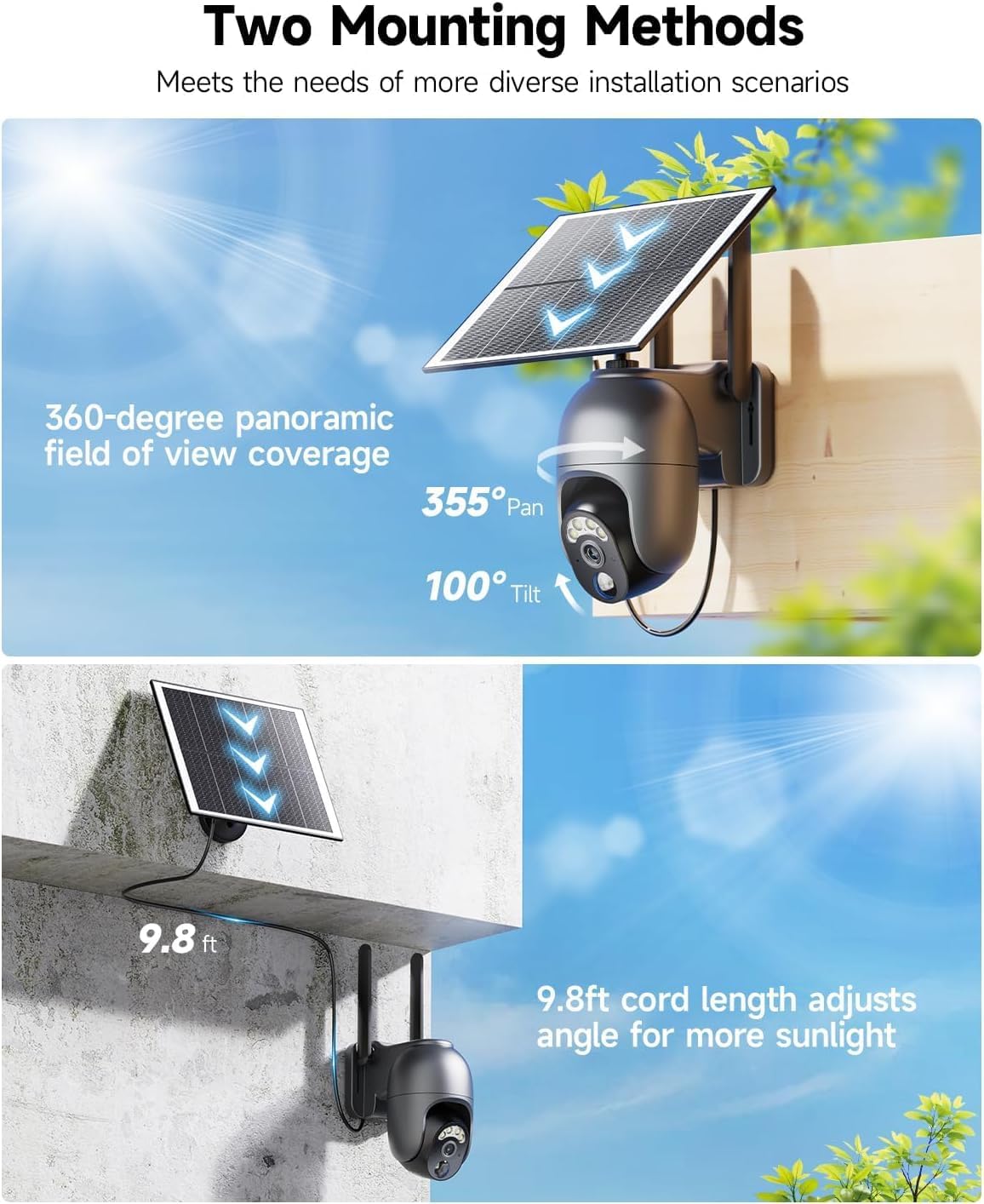
The camera offers two flexible mounting methods to suit various installation scenarios:
- Integrated Installation: Mount the camera and solar panel together as a single unit. This is ideal for direct sunlight exposure.
- Separate Installation: Mount the camera and solar panel separately using the provided 9.8ft cord. This allows you to place the solar panel in an optimal position for sunlight while the camera is placed for best surveillance coverage.
4. Operating the Camera
4.1 Live View & Panoramic Coverage
Access the live feed from your camera via the UBox app. The camera supports 355° horizontal pan and 100° vertical tilt, providing a 360° panoramic view of your monitored area. Use the controls in the app to adjust the camera's angle.

4.2 Motion Detection (PIR)
The camera is equipped with PIR (Passive Infrared) motion sensors that accurately detect human and animal movement, minimizing false alarms. When motion is detected, the camera will:
- Immediately push an alarm notification to your smartphone.
- Activate the built-in spotlight and siren (if configured).
- Begin recording video.

4.3 Two-Way Audio
Utilize the built-in microphone and speaker for real-time two-way communication. This allows you to speak to visitors or deter intruders directly through the UBox app.
4.4 Night Vision
The camera offers two night vision modes:
- Color Night Vision: When the spotlight is activated (e.g., upon motion detection), the camera provides full-color video even in low-light conditions.
- Infrared Night Vision: With the spotlight off, the camera uses infrared LEDs to capture clear black-and-white video in complete darkness.

4.5 Video Playback & Storage
Recorded videos can be accessed and played back anytime, anywhere via the UBox app. Storage options include:
- Local Storage: Videos are saved to the included 128GB memory card.
- Cloud Storage: A complimentary 30-day trial of cloud storage is available. After the trial, subscription plans can be purchased through the UBox app.

4.6 Cellular Data Plan
The included SIM card comes with a complimentary 300MB data trial for the first month. After the trial, data plans can be renewed via the UBox app. Please note that only the SIM card provided with the camera can be used to ensure compatibility and avoid potential device damage.
5. Maintenance
5.1 Solar Panel Cleaning
Regularly clean the surface of the solar panel to ensure maximum sunlight absorption and efficient charging. Use a soft, damp cloth to wipe away dust, dirt, or debris.
5.2 Battery Management
The camera's high-capacity rechargeable battery is continuously charged by the solar panel. For optimal battery life, ensure the solar panel receives adequate direct sunlight daily. In prolonged periods of low sunlight, the camera's battery level can be monitored via the UBox app.
5.3 Firmware Updates
Periodically check the UBox app for available firmware updates. Keeping your camera's firmware updated ensures access to the latest features, performance improvements, and security enhancements.
5.4 Weather Resistance
The camera is IP65 waterproof, designed to withstand various weather conditions including rain and dust. While it is built for outdoor use, avoid submerging the device in water.

6. Troubleshooting
If you encounter issues with your LIWAN 4G LTE Cellular Security Camera, please refer to the following common solutions:
- Camera Not Connecting: Ensure the SIM card is properly inserted and has an active data plan. Check cellular signal strength in the camera's location via the UBox app.
- Battery Not Charging: Verify the solar panel is clean and positioned to receive direct sunlight for several hours daily. Ensure the connection cable between the solar panel and camera is secure.
- False Motion Alarms: Adjust the PIR sensitivity settings in the UBox app. Consider the camera's placement to minimize detection of non-relevant movements (e.g., swaying branches).
- No Night Vision: Check if the night vision mode is enabled in the app. Ensure there are no obstructions blocking the camera's view or the infrared LEDs/spotlight.
- Poor Video Quality: Ensure the camera lens is clean. Check cellular signal strength, as poor signal can affect streaming quality.
For more detailed troubleshooting or persistent issues, please consult the FAQ section within the UBox app or contact LIWAN customer support.
7. Specifications
| Feature | Specification |
|---|---|
| Model Number | RBX-S40 |
| Indoor/Outdoor Usage | Outdoor |
| Power Source | Solar Powered |
| Connectivity Protocol | Cellular |
| Video Capture Resolution | 2K |
| Pan/Tilt Range | 355° Horizontal, 100° Vertical |
| Night Vision | Color Night Vision, Infrared Night Vision |
| Storage | 128GB Memory Card (Included), Cloud Storage (30-day trial) |
| Waterproof Rating | IP65 |
| Item Dimensions (L x W x H) | 5.71 x 2.76 x 4.72 inches |
| Item Weight | 5.03 pounds |
8. Warranty and Support
8.1 Warranty Information
Your LIWAN 4G LTE Cellular Security Camera is covered by a manufacturer's warranty. Please refer to the product packaging or the official LIWAN website for specific warranty terms and conditions. Retain your proof of purchase for warranty claims.
8.2 Customer Support
For technical assistance, product inquiries, or warranty support, please contact LIWAN customer service. You can typically find contact information within the UBox app or on the official LIWAN brand website. Our support team is dedicated to assisting you with any questions or issues you may have.
Thank you for choosing LIWAN. We are committed to providing reliable security solutions.