
Bifanuo TM009
Bifanuo 2-in-1 Walking Pad Instruction Manual
Model: TM009
Introduction
The Bifanuo 2-in-1 Walking Pad is a versatile fitness equipment designed for both home and office use. It functions as an under-desk treadmill for walking and can be adjusted for jogging or light running. Its compact and foldable design makes it ideal for spaces with limited room. This manual provides essential information for safe and effective operation, maintenance, and troubleshooting.
Key features include a powerful 2.25 HP quiet brushless motor, a 5-layer shock-absorbing anti-skid running belt, and a multi-functional LED display that tracks speed, distance, time, and calories burned. It also comes with a remote control for easy adjustments and a built-in phone bracket for entertainment during workouts.
Safety Information
Please read all instructions carefully before using the walking pad. Keep this manual for future reference.
- Ensure the walking pad is placed on a flat, stable surface with adequate clear space around it.
- Always attach the safety key clip to your clothing before starting the treadmill. This will immediately stop the machine in case of an emergency.
- Do not exceed the maximum weight capacity of 265 lbs (120 kg).
- Wear appropriate athletic footwear during use.
- Keep children and pets away from the walking pad during operation.
- Unplug the unit when not in use or before cleaning and maintenance.
- Do not operate if the power cord or plug is damaged.
Setup
The Bifanuo 2-in-1 Walking Pad arrives fully assembled, requiring minimal setup before first use.
- **Unboxing:** Carefully remove the walking pad from its packaging.
- **Placement:** Place the walking pad on a level, hard surface. Ensure there is sufficient space behind and to the sides of the unit for safe operation.
- **Unfolding (if applicable):** If the handle is folded down for walking pad mode, you can raise it for treadmill mode. Refer to the diagram below for the folding mechanism.
- **Power Connection:** Plug the power cord into a grounded electrical outlet.
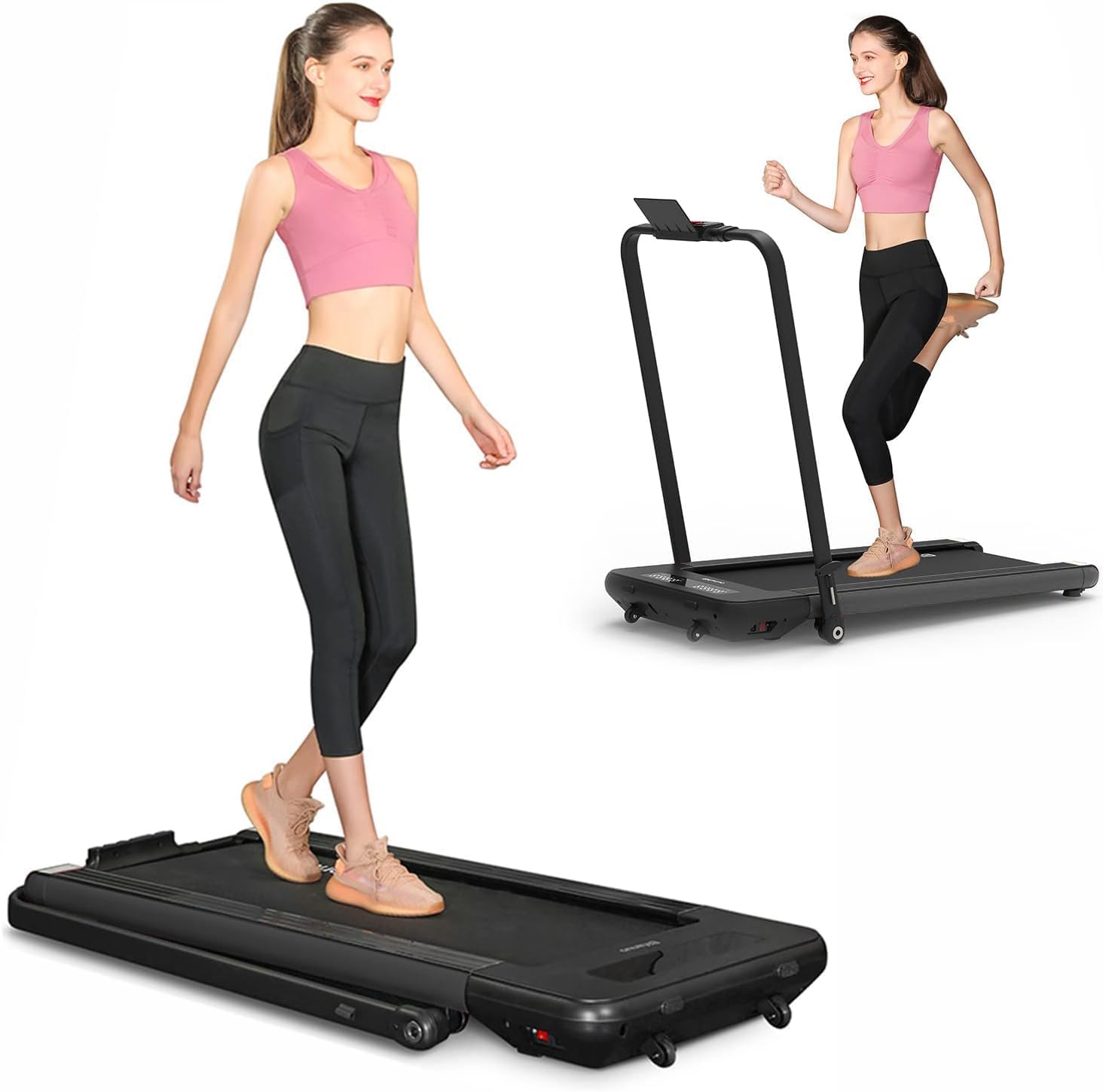
Figure 1: The Bifanuo 2-in-1 Walking Pad in both its walking (handle down) and running (handle up) configurations.

Figure 2: Illustration of the two operational modes: Running Mode (handle up) and Walking Mode (handle down).

Figure 3: The folding mechanism and compact storage capabilities of the walking pad, highlighting its dimensions and transport wheels.
Operating Instructions
- **Power On:** Ensure the safety key is properly attached to the console and your clothing. Press the START button on the console or remote control. The display will light up.
- **Start Walking/Running:** The belt will begin to move at a low speed (e.g., 0.5 MPH). Step onto the belt carefully.
- **Adjust Speed:** Use the "Speed +" and "Speed -" buttons on the console or remote control to adjust your desired speed. The speed range is 0.5-4 MPH.
- **Monitor Progress:** The LED display will show your speed, distance, time, and calories burned.
- **Using the Phone Bracket:** Place your smartphone or tablet in the built-in bracket for entertainment during your workout.
- **Stop:** To stop the walking pad, press the STOP button on the console or remote control, or simply pull the safety key.

Figure 4: The multi-functional LED display and remote control for tracking exercise data and adjusting settings.

Figure 5: The walking pad in use, highlighting its compact design suitable for various environments.
Maintenance
Regular maintenance ensures the longevity and optimal performance of your walking pad.
- **Cleaning:** Wipe down the walking pad with a damp cloth after each use to remove sweat and dust. Do not use abrasive cleaners.
- **Lubrication:** The running belt may require lubrication periodically (every 3-6 months depending on usage). Apply silicone lubricant under the belt as per the instructions provided with the lubricant.
- **Belt Adjustment:** If the running belt feels loose or off-center, refer to the detailed instructions in the full user manual for proper adjustment.
- **Storage:** When not in use, the walking pad can be easily folded and stored upright or flat to save space.

Figure 6: The multi-layered running belt designed for shock absorption and noise reduction, contributing to user comfort and joint protection.
Troubleshooting
If you encounter any issues with your Bifanuo Walking Pad, please refer to the common problems and solutions below. If the problem persists, contact customer service.
| Problem | Possible Cause | Solution |
|---|---|---|
| Walking pad does not power on. | Power cord not connected; Safety key not in place; Power switch off. | Check power connection; Ensure safety key is fully inserted; Turn on power switch. |
| Belt stops unexpectedly. | Safety key dislodged; Overload protection activated. | Re-attach safety key; Reduce load/weight on the belt. |
| Unusual noise during operation. | Loose components; Lack of lubrication; Belt misalignment. | Check for loose screws; Lubricate the belt; Adjust belt alignment. |
Specifications
| Feature | Detail |
|---|---|
| Brand | Bifanuo |
| Model Name | TM009 |
| Product Dimensions | 46.2"D x 20.3"W x 4.3"H |
| Folded Size | 23.1" x 20.3" x 4.3" |
| Material | Iron |
| Maximum Speed | 4 Miles per Hour |
| Minimum Speed | 0.5 Miles per Hour |
| Maximum Horsepower | 2.25 Horsepower |
| Maximum Weight Recommendation | 265 Pounds |
| Display Type | LED |
| Included Components | Remote Control |
| Assembly Required | No |
Warranty & Support
The Bifanuo 2-in-1 Walking Pad comes with a 1-year warranty from the date of purchase.
For any problems or inquiries regarding your product, please contact Bifanuo customer service through Amazon. Our team is available 24/7 to provide friendly assistance.
Related Documents - TM009
 |
Bifanuo SP008 Treadmill Instruction Manual Comprehensive instruction manual for the Bifanuo SP008 treadmill, covering safety guidelines, assembly, operation, maintenance, technical specifications, and troubleshooting. Learn how to set up and use your home fitness equipment effectively. |
 |
Bifanuo TM006 Instruction Manual Comprehensive instruction manual for the Bifanuo TM006 treadmill, covering safety guidelines, operating instructions, technical specifications, maintenance, and exercise guidance. |
Ask a question about this manual
Ask about setup, troubleshooting, compatibility, parts, safety, or missing instructions. Manuals+ will review the question and use this page’s manual context to help answer it.