

1. Introduction
This manual provides comprehensive instructions for the installation, operation, and maintenance of your Izrielar 370W Bluetooth WIFI Sliding Gate Opener. Please read this manual thoroughly before installation and use to ensure proper function and safety. This gate opener is designed for sliding gates weighing up to 800 kg and features 370W power, Bluetooth, and WIFI connectivity for convenient control.

The Izrielar sliding gate opener is suitable for various applications, including residential, commercial, and courtyard gates. It offers features such as adjustable automatic closing times, obstacle detection for safety, and manual release in case of power failure.
2. Safety Information
WARNING: Failure to follow these safety instructions may result in serious injury or property damage.
- Ensure all electrical connections are performed by a qualified electrician and comply with local regulations.
- Keep children and pets away from the gate area during operation.
- Do not attempt to repair or modify the gate opener yourself. Contact qualified service personnel.
- Regularly inspect the gate and opener for signs of wear, damage, or misalignment.
- The system includes intelligent IR sensors that detect obstacles. If an obstacle is detected during closing, the gate will automatically stop and reverse. Ensure these sensors are installed correctly and kept clear.
- In case of power failure, use the provided manual release keys to operate the gate.

3. Package Contents
Please verify that all items listed below are included in your package:
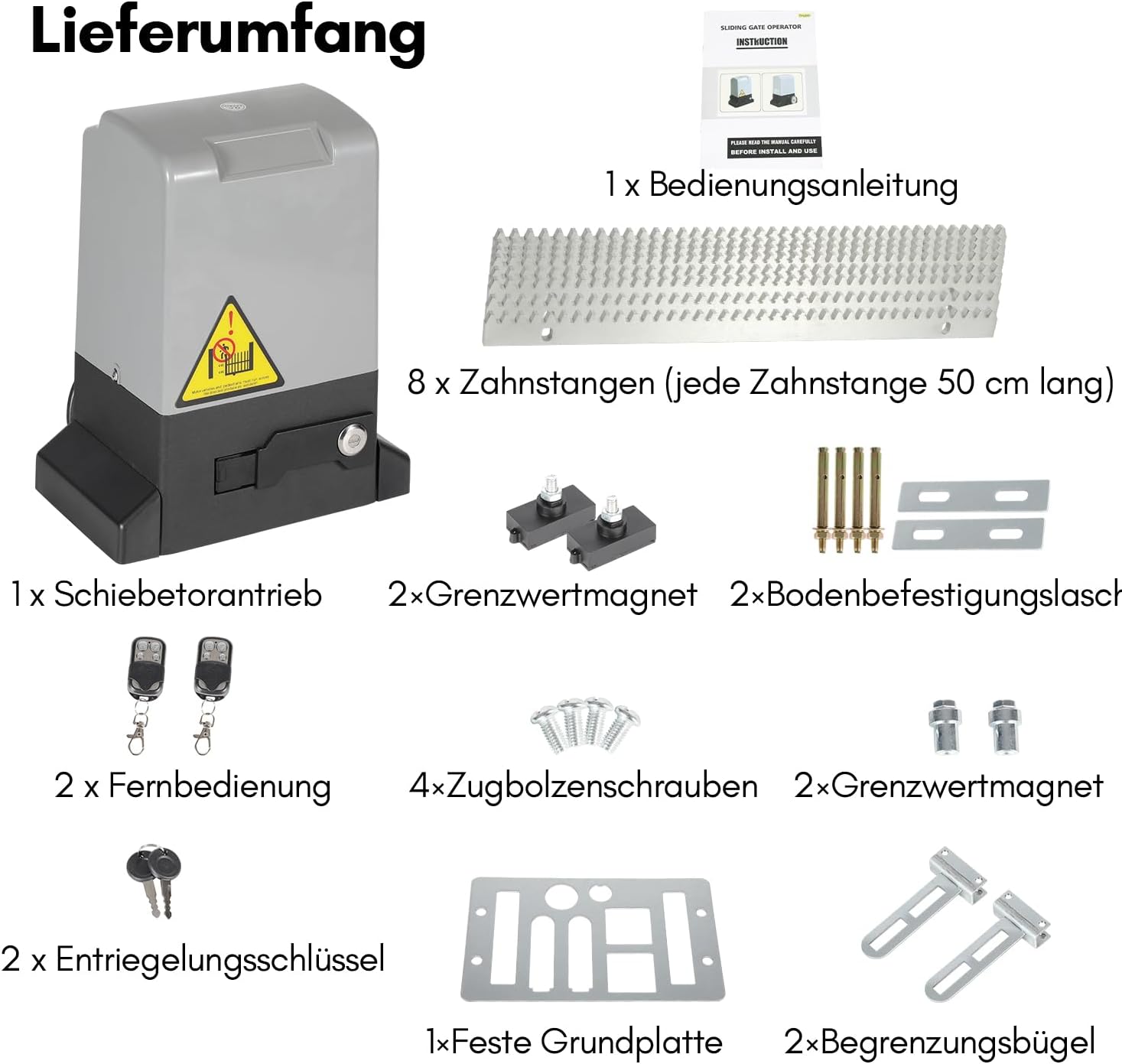
- 1 x Sliding Gate Opener (370W Motor)
- 1 x Instruction Manual
- 8 x Gear Racks (each 50 cm long, total 4 meters)
- 2 x Remote Controls
- 2 x Manual Release Keys
- 2 x Limit Magnets
- 2 x Floor Mounting Tabs
- 4 x Expansion Bolts
- 1 x Fixed Base Plate
- 2 x Limit Brackets
4. Specifications

| Feature | Specification |
|---|---|
| Rated Power | 370W |
| Max. Gate Weight | 800 kg |
| Max. Gate Length | 12 m |
| Running Speed | 12 m/min (39 ft/min) |
| Motor Speed | 1470 RPM |
| Voltage | 230V ± 10%, 50 Hz |
| Noise Level | < 58 dB |
| Remote Control Distance | Up to 50 m |
| Ambient Temperature | -20°C to +70°C |
| Protection Rating | IP44 (Waterproof, rain and snow resistant) |
| Connectivity | Bluetooth, WIFI |
5. Installation
Proper installation is crucial for the safe and efficient operation of your gate opener. It is recommended that installation be performed by individuals with appropriate technical knowledge.

5.1 Site Preparation
- Ensure the gate slides smoothly and is properly aligned before installing the opener.
- Clear any obstructions along the gate's path.
- Prepare a stable, level concrete pad for mounting the opener.
5.2 Mounting the Opener
- Position the fixed base plate on the concrete pad, ensuring it is level and correctly aligned with the gate.
- Mark the drilling points for the expansion bolts.
- Drill holes and secure the base plate using the provided expansion bolts.
- Mount the gate opener motor onto the secured base plate.
5.3 Installing Gear Racks
- Attach the gear racks to the bottom rail of the sliding gate. Ensure the racks are level and maintain a small clearance (approx. 1-2mm) between the rack and the motor's drive gear to allow for gate movement.
- Use the provided mounting hardware to secure the racks firmly.
- Ensure all rack sections are perfectly aligned to prevent binding.
5.4 Limit Switch Installation
- Install the limit magnets at the desired open and closed positions of the gate. These magnets trigger the internal limit switches to stop the gate.
- Ensure the magnets are securely fastened and correctly oriented for the opener to detect them.
5.5 Electrical Connections
- Connect the power supply (230V ± 10%, 50 Hz) to the gate opener's control board. Refer to the wiring diagram in the detailed manual for specific connections.
- Connect any optional accessories such as safety sensors (IR sensors), warning lights, or external control devices.
- Ensure all wiring is properly insulated and protected from environmental elements.
6. Operation
Your Izrielar gate opener offers multiple methods for convenient operation.

6.1 Remote Control Operation
The package includes two metal remote controls. These remotes allow you to open and close your gate from a distance of up to 50 meters.
- Press the designated button on the remote to open or close the gate.
- Ensure the remote has fresh batteries for optimal range and performance.

6.2 Smartphone App Control (Bluetooth/WIFI)
The motor contains a Wi-Fi module for remote control via your mobile phone. Download the dedicated Izrielar app (refer to the full manual for app details and setup instructions) to control your gate from anywhere.
- Pair your smartphone with the gate opener via Bluetooth or connect it to your home Wi-Fi network.
- Use the app interface to open, close, or stop the gate.
- The app may also offer advanced features like scheduling and status monitoring.
6.3 Manual Override
In the event of a power outage or if remote controls are unavailable, you can manually operate the gate using the provided release keys.
- Locate the manual release mechanism on the motor unit.
- Insert the key and turn it to disengage the motor, allowing the gate to be moved by hand.
- Remember to re-engage the motor after manual operation.
6.4 Automatic Closing Time
The gate opener can be configured to close automatically after a set period. Adjustable automatic closing times (e.g., 5, 10, or 20 seconds) can be set via the control board or smartphone app.
- Consult the detailed manual for instructions on how to set or adjust the automatic closing timer.
- Ensure the area is clear before enabling automatic closing.
7. Maintenance
Regular maintenance ensures the longevity and reliable performance of your Izrielar gate opener.

- Monthly: Inspect the gate's movement for any stiffness or obstruction. Clean the gear racks and lubricate them if necessary. Check the security of all mounting bolts.
- Quarterly: Test the safety features, including the obstacle detection sensors. Ensure they are clean and functioning correctly. Check remote control battery levels.
- Annually: Have a qualified technician inspect the electrical connections and internal components for wear or damage.
- Keep the area around the gate opener clear of debris, leaves, and snow.
- The motor is designed with overheat protection. If the temperature becomes too high, the motor will automatically cut power to prevent damage. Allow it to cool down before resuming operation.
8. Troubleshooting
This section addresses common issues you might encounter with your gate opener.
| Problem | Possible Cause | Solution |
|---|---|---|
| Gate does not move | No power; remote battery low; manual release engaged; obstruction. | Check power supply; replace remote batteries; disengage manual release; remove obstruction. |
| Gate stops unexpectedly | Obstacle detected by IR sensors; motor overheating; limit switch issue. | Clear sensor path; allow motor to cool; check limit magnet positions. |
| Remote control not working | Low battery; out of range; remote not programmed. | Replace battery; move closer to gate; re-program remote (refer to manual). |
| Gate makes unusual noise | Lack of lubrication; worn gears; misalignment. | Lubricate gear racks; inspect gears for wear; check gate and opener alignment. |
| WIFI/Bluetooth connectivity issues | Poor signal; incorrect app settings; device not paired. | Ensure strong signal; check app settings; re-pair device. |
If the problem persists after attempting these solutions, please contact customer support.
9. Warranty and Support
Your Izrielar 370W Bluetooth WIFI Sliding Gate Opener comes with a standard manufacturer's warranty. Please refer to the warranty card included in your package or contact Izrielar customer service for specific details regarding warranty coverage and duration.
For technical assistance, spare parts, or any other inquiries, please contact Izrielar customer support through the contact information provided in your product documentation or on the official Izrielar website.