
MZZYG KE40S 40M
MZZYG KE40S 40M Laser Distance Meter User Manual
Model: KE40S 40M | Brand: MZZYG
1. Introduction
Thank you for choosing the MZZYG KE40S 40M Laser Distance Meter. This device is designed for precise and fast distance measurements, offering a reliable solution for various applications in construction, interior design, and DIY projects. Please read this manual carefully before using the device to ensure safe and optimal operation.
2. Safety Information
Always observe the following safety precautions to prevent injury or damage to the device:
- Laser Radiation: This device emits Class 2 laser radiation. Do not stare into the laser beam or direct it at other people or animals.
- Battery Safety: Use only the specified battery type (2 x 1.5V AAA batteries). Do not mix old and new batteries, or different types of batteries. Remove batteries if the device will not be used for an extended period.
- Operating Environment: Do not use the device in explosive atmospheres or near flammable materials. Avoid exposing the device to extreme temperatures, humidity, or direct sunlight.
- Maintenance: Do not attempt to disassemble or modify the device. Repairs should only be performed by authorized service personnel.
- Cleaning: Clean the device with a soft, dry cloth. Do not use abrasive cleaners or solvents.
3. Product Overview
The MZZYG KE40S 40M Laser Distance Meter features a compact design with an intuitive interface for easy operation.
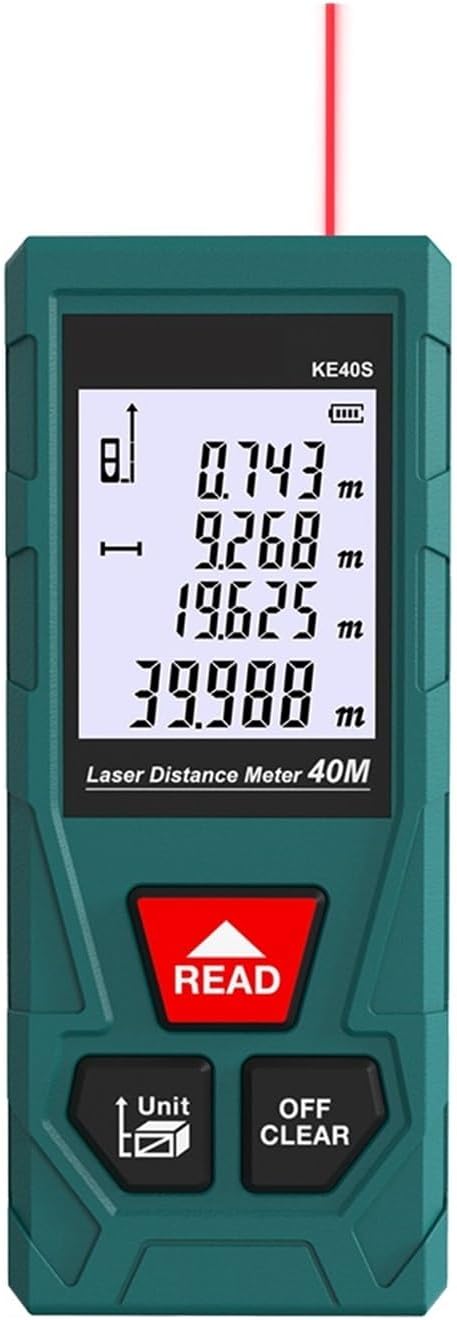
Figure 3.1: Front view of the MZZYG KE40S 40M Laser Distance Meter, showing the display and control buttons.

Figure 3.2: Detailed view of the device's features, including comfortable keys, the battery compartment, and high transparency lenses.

Figure 3.3: Close-up of the HD backlight display showing measurement readings clearly.

Figure 3.4: Diagram illustrating the precise and fast calculation chip, laser emission, and laser receiver components.

Figure 3.5: The compact and portable design of the laser distance meter, easily fitting into a pocket for convenient transport.
4. Setup
4.1 Battery Installation
The device requires 2 x 1.5V AAA batteries (not included). To install the batteries:
- Locate the battery compartment cover on the back of the device.
- Slide the cover open.
- Insert the two AAA batteries, ensuring correct polarity (+/-) as indicated inside the compartment.
- Close the battery compartment cover securely.
4.2 Powering On/Off
- To power on: Press the READ button.
- To power off: Press the OFF/CLEAR button and hold for approximately 3 seconds, or the device will automatically shut off after 20 seconds of inactivity (single measurement mode).
5. Operating Instructions
5.1 Single Distance Measurement
- Point the laser at the target.
- Press the READ button once. The measurement result will be displayed instantly.
5.2 Unit Conversion
To change the measurement unit (m/in/ft):
- Press the Unit button repeatedly to cycle through meters (m), inches (in), and feet (ft).
5.3 Clearing Measurements
To clear the current measurement or return to the previous screen:
- Press the OFF/CLEAR button briefly.
6. Calibration
The device supports auto-calibration for optimal accuracy. If you suspect the measurements are off, you can perform a calibration:
- The device has an auto-calibration range of ±9 mm. Refer to the on-screen prompts or specific button combinations (if available on your model) to initiate calibration. Typically, this involves a sequence of button presses while the device is off or in a specific mode.
- For the KE40S model, the auto-calibration feature is designed to maintain accuracy within its specified tolerance without manual user intervention for typical use.
7. Maintenance and Storage
7.1 Cleaning
- Wipe the device with a soft, damp cloth. Do not use harsh chemicals or abrasive cleaning agents.
- Keep the laser lens clean to ensure accurate measurements. Use a lens cleaning cloth if necessary.
7.2 Storage
- Store the device in a cool, dry place, away from direct sunlight and extreme temperatures.
- If storing for an extended period, remove the batteries to prevent leakage and damage to the device.
- Storage temperature: -20°C to 60°C (-4°F to 140°F).
- Storage humidity: 20% to 80% RH.
8. Troubleshooting
| Problem | Possible Cause | Solution |
|---|---|---|
| Device does not power on. | Batteries are dead or incorrectly installed. | Replace batteries with new 1.5V AAA batteries, ensuring correct polarity. |
| Inaccurate measurements. | Laser lens is dirty; target surface is too reflective or absorbent; device is not calibrated. | Clean the laser lens. Measure against a non-reflective, solid surface. The device has auto-calibration; ensure it's used within specified conditions. |
| Display is dim or blank. | Low battery power. | Replace batteries. |
| Device shuts off unexpectedly. | Automatic shutdown due to inactivity; low battery. | This is normal behavior after 20 seconds of inactivity. Replace batteries if it happens frequently during use. |
9. Specifications
| Feature | Detail |
|---|---|
| Measurement Accuracy | ±(2MM+d*1/10000) |
| Dimensions | 112 mm x 50 mm x 25 mm |
| Power Type | Battery powered (2 x 1.5V AAA batteries, not included) |
| Measurement Range | 0.05 to 40 M (for KE40S model) |
| Unit Options | m / in / ft |
| Automatic Shutdown | 20 seconds (single measurement) |
| Auto-calibration | ±9 mm |
| Storage Temperature | -20°C to 60°C (-4°F to 140°F) |
| Working Temperature | 0°C to 40°C (32°F to 104°F) |
| Storage Humidity | 20% ~ 80% RH |
| Weight | 50 grams |
10. Support
For any questions, technical assistance, or support regarding your MZZYG KE40S 40M Laser Distance Meter, please contact the seller or refer to the product listing on Amazon.it for further contact information.
Product Link: https://www.amazon.it/dp/B0D72VSQH4
Ask a question about this manual
Ask about setup, troubleshooting, compatibility, parts, safety, or missing instructions. Manuals+ will review the question and use this page’s manual context to help answer it.