
1. Introduction
This manual provides detailed instructions for the use and maintenance of your new Generic remote control, designed for seamless compatibility with the ONN ONA19SB003 Mini Soundbar Sound Bar Speaker. This remote is pre-programmed and requires no additional setup or coding. Simply insert batteries, and it is ready for immediate use.
2. Package Contents
Please verify that all items listed below are present in your package:
- 1 x Remote Control Unit
Note: Batteries are not included and must be purchased separately. No printed instruction manual is included in the package.
3. Setup: Battery Installation
To begin using your remote control, you must first install the required batteries. This remote typically uses a CR2025 coin cell battery.
- Locate the battery compartment on the back of the remote control.
- Depending on the design, you may need to slide a cover or press a latch to open the compartment. Refer to the image below for guidance.
- Insert one new CR2025 coin cell battery, ensuring the positive (+) side is facing upwards as indicated inside the compartment.
- Close the battery compartment securely until it clicks into place.

Figure 3.1: Rear view of the remote control, illustrating the battery compartment for a CR2025 coin cell battery.

Figure 3.2: Rear view of the remote control alongside a battery holder clip, indicating the battery type and insertion method.
Once batteries are installed, the remote is ready for use with your ONN ONA19SB003 Mini Soundbar. No programming is required.
4. Operating Instructions
This remote control provides full functionality for your ONN ONA19SB003 Mini Soundbar. Below is a description of each button's function:
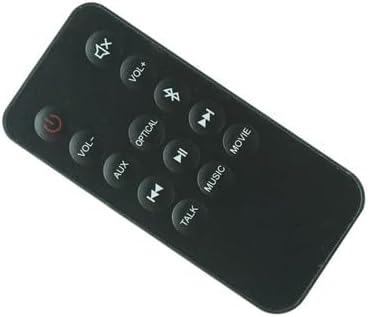
Figure 4.1: Front view of the remote control, displaying all functional buttons.
| Button | Function |
|---|---|
| Power (⏻) | Turns the soundbar On or Off. |
| Mute (🔇) | Mutes or unmutes the sound. |
| VOL+ | Increases the volume level. |
| VOL- | Decreases the volume level. |
| Bluetooth (☋) | Switches the soundbar to Bluetooth input mode. |
| AUX | Switches the soundbar to Auxiliary input mode. |
| OPTICAL | Switches the soundbar to Optical input mode. |
| Previous Track (⏮) | Skips to the previous track (in supported modes like Bluetooth). |
| Play/Pause (⏯) | Plays or pauses audio playback (in supported modes like Bluetooth). |
| Next Track (⏭) | Skips to the next track (in supported modes like Bluetooth). |
| MOVIE | Activates the Movie sound mode, optimizing audio for films. |
| MUSIC | Activates the Music sound mode, optimizing audio for music playback. |
| TALK | Activates the Talk sound mode, enhancing vocal clarity for dialogue. |
5. Troubleshooting
If you encounter issues with your remote control, please refer to the following common problems and solutions:
- Remote not responding:
- Ensure new batteries are correctly installed with the correct polarity.
- Replace old batteries with fresh ones.
- Check for any obstructions between the remote and the soundbar's sensor.
- Ensure you are within the effective operating range of the soundbar.
- Specific buttons not working:
- Clean the remote's surface and buttons with a soft, dry cloth to remove any dirt or debris.
- Verify that the soundbar is powered on and not in a standby mode that prevents remote interaction.
- Soundbar not responding to any remote:
- Power cycle the soundbar by unplugging it from the power outlet for a few minutes, then plugging it back in.
- Ensure the soundbar's own power button is functioning.
If problems persist after trying these steps, please refer to the "Warranty and Support" section for further assistance.
6. Specifications
| Feature | Detail |
|---|---|
| Brand | Generic |
| Model Compatibility | ONN ONA19SB003 Mini Soundbar Sound Bar Speaker |
| Special Feature | No additional programming required |
| Color | As shown (Black) |
| Max Number of Supported Devices | 1 (Soundbar) |
| Compatible Devices | Soundbar |
| Battery Type | CR2025 Coin Cell (not included) |
7. Maintenance
To ensure the longevity and optimal performance of your remote control, follow these maintenance guidelines:
- Cleaning: Use a soft, dry cloth to wipe the remote's surface. Do not use liquid cleaners or abrasive materials.
- Storage: Store the remote in a cool, dry place away from direct sunlight and extreme temperatures.
- Battery Replacement: Replace batteries promptly when the remote's performance degrades. Remove batteries if the remote will not be used for an extended period to prevent leakage.
- Avoid Drops: Protect the remote from physical shocks and drops, which can damage internal components.
8. Warranty and Support
Specific warranty information for this Generic remote control is not provided in the product details. For any warranty claims, technical support, or further assistance, please contact the seller directly through your purchase platform.
Please retain your purchase receipt as proof of purchase for any support inquiries.
