
Introduction
Thank you for purchasing the Kenko Digital Camera KC-ZM08. This compact digital camera is designed for ease of use, allowing you to capture everyday moments with its 5x optical zoom, touch panel operation, and various convenient features. Please read this manual thoroughly before using the camera to ensure proper operation and to maximize your enjoyment of its capabilities. Keep this manual in a safe place for future reference.
Package Contents
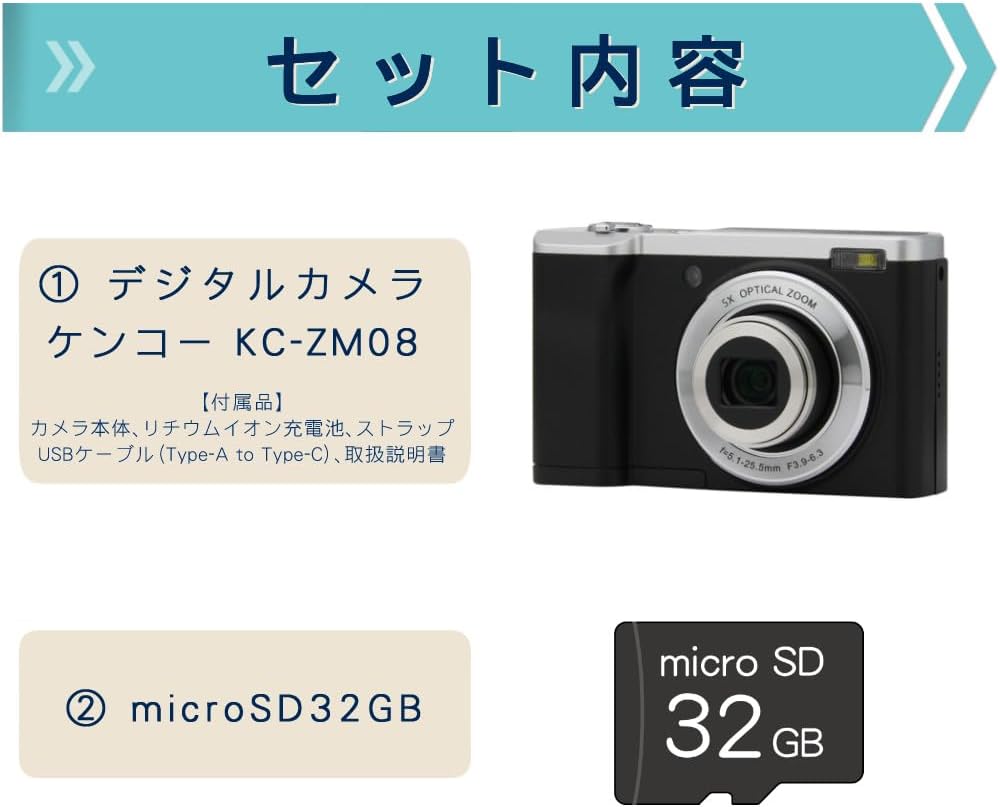
This package includes the Kenko Digital Camera KC-ZM08 and a 32GB microSD card, providing everything you need to start capturing photos and videos.
- Kenko Compact Digital Camera KC-ZM08
- Rechargeable Lithium-ion Battery
- Wrist Strap
- USB Cable (Type-A to Type-C)
- Instruction Manual
- microSD Card (32GB)
Key Features
5x Optical Zoom

The camera features a 5x optical zoom lens, covering a versatile range from wide-angle 28mm to telephoto 142mm (35mm equivalent). This allows for capturing a wide variety of scenes, from expansive landscapes to distant subjects.
Intuitive Touch Panel Operation

Easily change modes and settings with the responsive touch panel LCD monitor. This intuitive interface simplifies camera operation, making it quick and effortless to adjust your shooting preferences.
Convenient Rear Camera for Selfies

Switch to the rear camera with a single button press for easy selfies. You can capture both photos and videos while viewing yourself on the monitor, ensuring you get the perfect shot.
Shortest Shooting Distance: Approx. 10cm

When shooting at wide-angle, you can get as close as approximately 10cm to your subject, allowing for detailed close-up photography (with the front lens).
Built-in LED Flash and Constant Light

The camera not only has a built-in flash for still images but also features a constant LED light, which is convenient for video recording in low-light conditions.
Slow Motion Video Recording

Easily capture slow-motion videos to add a creative touch to your recordings.
Time-Lapse Shooting
The camera supports time-lapse shooting, automatically capturing images at set intervals to create dynamic time-lapse videos.
Self-Timer Function
Utilize the self-timer for group photos with friends and family, or for convenient self-portraits.
Webcam Capability
Connect the camera to your computer via USB to use it as a webcam for video calls and live streaming.
Digital Image Stabilization (for Video)
Reduce camera shake during video recording with the built-in digital image stabilization feature, ensuring smoother footage.
Setup Guide
- Charge the Battery: Insert the rechargeable lithium-ion battery into the camera. Connect the camera to a USB power source using the provided USB Type-A to Type-C cable. The charging indicator will show the charging status. Ensure the battery is fully charged before first use.
- Insert microSD Card: Open the card slot cover and gently insert the provided 32GB microSD card until it clicks into place. Ensure the card is inserted in the correct orientation.
- Attach Wrist Strap: Securely attach the wrist strap to the camera to prevent accidental drops.
- Power On: Press and hold the power button to turn on the camera.
- Initial Settings: Follow the on-screen prompts to set the date, time, and language.
Operating Instructions
Taking Photos
- Select Photo Mode: Press the 'MODE' button to select the photo shooting mode.
- Frame Your Shot: Use the LCD screen to compose your image.
- Focus: Gently press the shutter button halfway down to focus. The focus frame will turn green when focus is achieved.
- Capture: Press the shutter button all the way down to take the picture.
Recording Videos
- Select Video Mode: Press the 'MODE' button to select the video recording mode.
- Start Recording: Press the shutter button to start recording. A red indicator will appear on the screen.
- Stop Recording: Press the shutter button again to stop recording.
Using the Touch Panel
Tap icons on the LCD screen to navigate menus, change settings like image size, ISO, exposure, and picture quality (Super Fine, Fine, Normal). Swipe to browse through captured media in playback mode.
Switching to Rear Camera
Locate the dedicated button for switching between the front and rear cameras. Press this button to activate the rear camera for convenient selfies or vlogging.
Playback Mode
Press the playback button to view your captured photos and videos. Use the navigation buttons or touch screen to scroll through your media.
Maintenance
- Cleaning the Lens: Use a soft, lint-free cloth specifically designed for camera lenses to gently wipe away dust or smudges. Do not use harsh chemicals.
- Cleaning the Body: Wipe the camera body with a soft, dry cloth. For stubborn dirt, slightly dampen the cloth with water and then wipe dry.
- Battery Care: Store the battery in a cool, dry place when not in use. Avoid fully discharging the battery for extended periods.
- Storage: When storing the camera for a long time, remove the battery and microSD card. Store the camera in a dry, well-ventilated area away from direct sunlight and extreme temperatures.
Troubleshooting
| Problem | Possible Cause / Solution |
|---|---|
| Camera does not power on. | Battery may be depleted. Charge the battery fully. Ensure the battery is inserted correctly. |
| Cannot take photos/record videos. | microSD card may be full or not inserted correctly. Check card status or replace. Ensure sufficient battery charge. |
| Images are blurry. | Ensure the lens is clean. Check focus by pressing the shutter button halfway. Hold the camera steady during shooting. |
| Touch screen is unresponsive. | Restart the camera. Ensure the screen is clean and dry. |
Specifications
| Feature | Detail |
|---|---|
| Model Name | KC-ZM08 |
| Brand | Kenko |
| Optical Zoom | 5x |
| Digital Zoom | 2x |
| Photo Sensor Technology | CMOS |
| Effective Still Resolution | 56 MP |
| Video Capture Resolution | 1080p |
| Minimum Focal Length | 28 mm |
| Maximum Focal Length | 142 mm |
| Image Stabilization | Digital (for video) |
| Compatible File Formats | JPEG, MP4 |
| Display Size | 2.8 inches |
| Flash Type | Built-in (Auto, Always On) |
| Connectivity | USB |
| Battery Type | Lithium-ion |
| Product Weight | 148 grams (excluding accessories, battery) |
| Dimensions | Approx. 100 x 62 x 32 mm |
Warranty and Support
The Kenko Digital Camera KC-ZM08 comes with a 1-year manufacturer's warranty. For technical support, troubleshooting assistance, or warranty claims, please refer to the contact information provided in the separate warranty card or visit the official Kenko website.
Please retain your proof of purchase for warranty purposes.
Product Videos
Kenko Digital Camera KC-ZM08 Overview
This video provides a general overview of the Kenko Digital Camera KC-ZM08, highlighting its compact design and ease of use for everyday photography and casual walks.
Digital Camera KC-ZM08 Features
A short video showcasing various features of the KC-ZM08 digital camera.


