
1. Introduction
This manual provides essential information for the safe and effective operation, maintenance, and care of your SUNDERWELL Electric Heavy Duty 3-Wheel Mobility Scooter, Model EX02. Designed for seniors and adults, this scooter offers enhanced mobility with a robust 500 lbs capacity. Please read this manual thoroughly before using your scooter to ensure proper understanding and to maximize your experience.

Figure 1: SUNDERWELL EX02 Electric Heavy Duty 3-Wheel Mobility Scooter (Red model shown).
2. Safety Information
Your safety is paramount. Always adhere to the following guidelines:
- This product is intended for adult and senior use only.
- Always wear appropriate safety gear, including a helmet, when operating the scooter.
- Ensure the safety belt is securely fastened before each use.
- Familiarize yourself with all controls, including speed adjustment, brakes, horn, and lights, before operating.
- Avoid operating the scooter under the influence of alcohol or medication that may impair your judgment or reaction time.
- Do not exceed the maximum weight capacity of 500 lbs.
- Exercise caution on uneven terrain, inclines, and slippery surfaces. The anti-tipping rollers are designed to enhance stability but do not eliminate all risks.
- Regularly inspect tires, brakes, and battery connections for proper function.
- Keep hands and feet clear of moving parts.
For further safety details, refer to the included safety manual.
3. Setup and Initial Preparation
The SUNDERWELL EX02 mobility scooter is shipped fully assembled and ready to ride. No complex assembly is required. Upon delivery, ensure all components are present and undamaged.
3.1 Unpacking and Inspection
- Carefully remove the scooter from its packaging.
- Inspect the scooter for any signs of shipping damage. Report any issues to the carrier and manufacturer immediately.
- Confirm all accessories are included: remote key, charger, rearview mirrors, and any additional storage components.
3.2 Battery Connection and Initial Charge
The scooter is equipped with a 48-volt 20-ah lead-acid battery. Ensure the battery is properly connected before first use.
Video 1: Product Installation Instructions. This video demonstrates the general installation and setup process for a mobility scooter, including battery connection and initial checks.
3.3 Seat and Armrest Adjustment
The seat is adjustable for optimal comfort. Adjust the seat height and position, and the armrests, to suit your preference.

Figure 2: Rear view of the scooter, highlighting the adjustable seat and anti-tipper wheels for stability.
4. Operating Instructions
Familiarize yourself with the controls before operating the scooter.
4.1 Powering On/Off
- Insert the remote key into the ignition.
- Turn the key to the 'ON' position. The LCD monitor screen will illuminate.
- To power off, turn the key to the 'OFF' position and remove it.
4.2 Speed Control
The scooter features a variable speed control dial, allowing adjustment from 7.5 mph to 15 mph. Rotate the dial to select your desired speed.

Figure 3: Speed adjustment dial on the handlebar for precise control.
4.3 Driving the Scooter
- Once powered on, gently press the throttle lever to move forward or backward.
- Use the handlebars to steer.
- Apply the front and rear brakes as needed. The parking brake should be engaged when stationary.
Video 2: XW-E02 Powered Mobility Scooter. This video provides a brief overview of the scooter's features and shows it in operation, demonstrating its mobility.
4.4 Lighting and Horn
The scooter is equipped with a front headlight (high/low beam), rear running/brake lights, and turn signals for visibility. Use the horn to alert others.
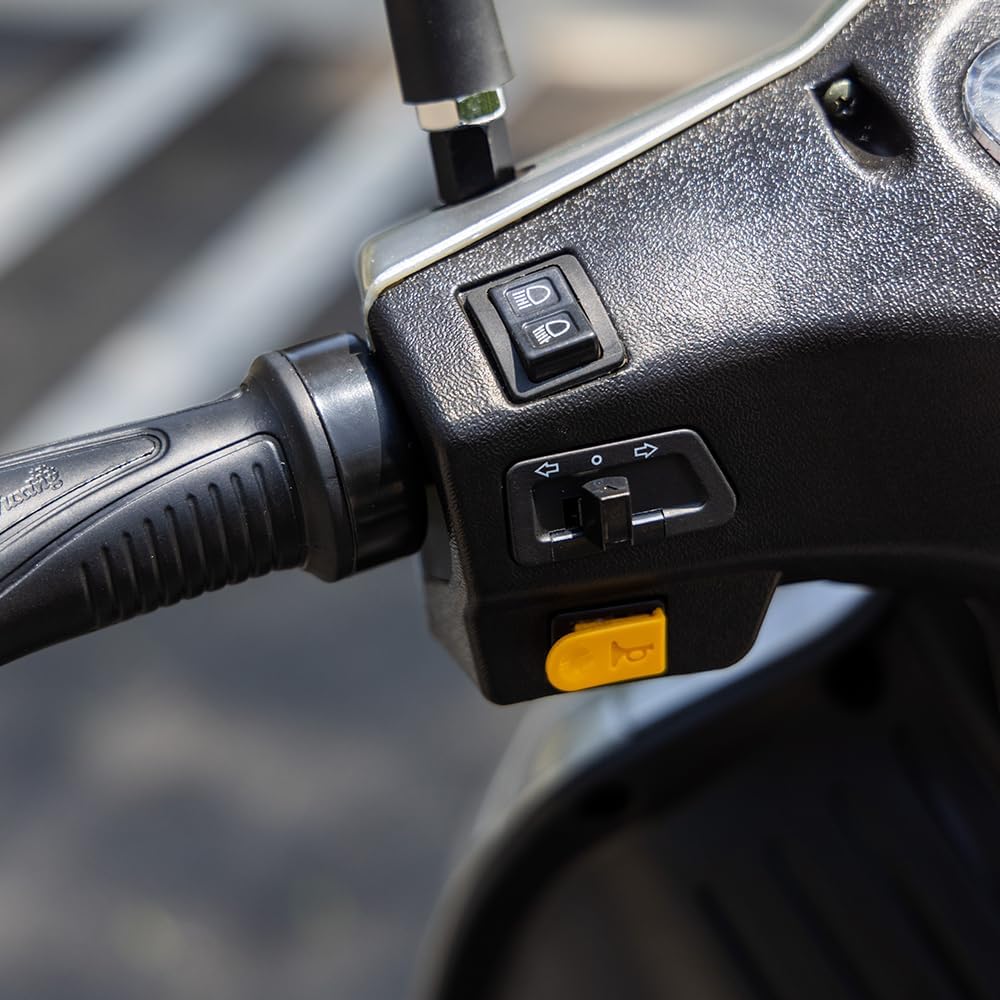
Figure 4: Controls for lights and horn located on the handlebar.
5. Key Features
- Powerful Motor & Battery: Equipped with an 800-watt brushless motor and a 48-volt 20-ah lead-acid battery, providing a travel range of 25-31 miles on a single charge.
- Comprehensive Lighting: Features a front headlight with high/low beam, rear running/brake lights, and turn signals for enhanced visibility and road safety.
- User-Friendly Controls: Includes an LCD monitor screen displaying speed and range, speed control dial, parking brake, and remote key functionality.
- Comfort & Convenience: Adjustable seat with comfortable backrest and armrests. Two storage spaces, a phone holder, and a USB charger port are integrated for user convenience.
- Safety Enhancements: Features a safety belt, anti-tipping rollers, anti-theft system with siren warning, front shock absorbers, and a 4.5-inch ground clearance for a secure and smooth ride.
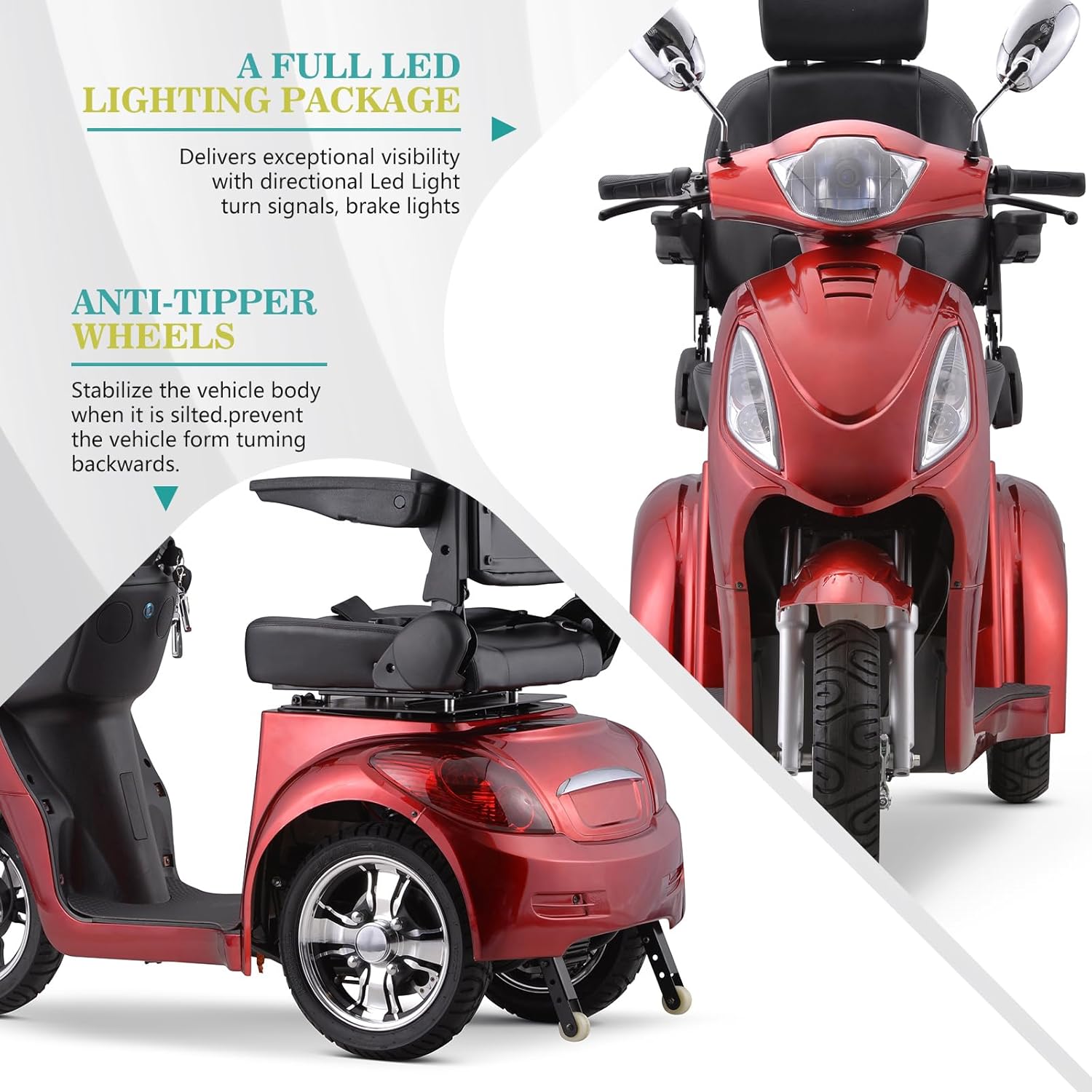
Figure 5: Visual representation of the full LED lighting package and anti-tipper wheels.
6. Maintenance
Regular maintenance ensures the longevity and optimal performance of your scooter.
- Battery Care: Charge the battery fully after each use. Avoid completely draining the battery. Store the scooter in a cool, dry place when not in use.
- Cleaning: Clean the scooter regularly with a damp cloth. Avoid using harsh chemicals or direct water spray on electrical components.
- Tire Pressure: Check tire pressure periodically and maintain it at the recommended level for optimal ride quality and safety.
- General Inspection: Periodically check all nuts, bolts, and fasteners for tightness. Inspect brake cables and lights for proper function.
7. Troubleshooting
If you encounter any issues, refer to the following common troubleshooting steps:
- Scooter does not power on: Ensure the battery is fully charged and properly connected. Check that the key is fully inserted and turned to the 'ON' position.
- Loss of power or reduced range: This may indicate a low battery charge. Fully charge the battery. If the issue persists, the battery may need replacement.
- Unusual noises: Stop the scooter immediately and inspect for any loose parts or obstructions. Contact customer support if the noise continues.
- Brakes not functioning properly: Check brake cables for tension and wear. Adjust or replace as necessary.
For issues not listed here, please contact SUNDERWELL customer support.
8. Specifications
| Feature | Detail |
|---|---|
| Model Number | EX02 |
| Product Dimensions | 57.5"D x 27.6"W x 52.8"H |
| Item Weight | 230 Pounds |
| Weight Capacity | Up to 500 lbs |
| Motor | 800-watt brushless motor |
| Battery | 48-volt 20-ah lead-acid battery |
| Max Speed | 15 mph (variable speed control) |
| Travel Range | 25-31 miles on a single charge |
| Ground Clearance | 4.5 inches |

Figure 6: Detailed dimensions of the SUNDERWELL EX02 scooter.
9. Warranty and Support
SUNDERWELL provides the following limited warranty for your mobility scooter:
- Frame: Lifetime warranty.
- Battery and Motor: 12-month warranty.
- Electronic Components: 6-month warranty.
- Limited warranty for other parts.
For any questions or support, please contact SUNDERWELL customer service. Our support team is located in California, USA.
Important Note: Please be aware that if the mobility scooter is ridden or used, returns for a refund may be subject to restocking fees.

