
1. Important Safety Instructions
Please read and understand all safety instructions before operating the TB600 Portable Power Station. Failure to follow these instructions may result in electric shock, fire, or serious injury.
- Do not disassemble, repair, or modify the unit.
- Do not expose the unit to fire or high temperatures.
- Do not use or store the unit in direct sunlight or in hot environments.
- Keep the unit away from water, moisture, and corrosive substances.
- Ensure proper ventilation during use and charging. Do not block ventilation openings.
- Keep out of reach of children and pets.
- Use only approved accessories and chargers.
- In case of fire, use a dry powder fire extinguisher. Do not use water.
2. Product Overview
The Best of Battery TB600 is a portable power station designed to provide reliable power for various devices, both indoors and outdoors. It features a 556Wh LiFePO4 battery, 600W AC output, and multiple charging ports.
2.1 Package Contents
- 1 x BEST OF BATTERY TB600 Portable Power Station
- 1 x AC adapter
- 1 x Solar connector (DC7909 to MC4)
- 1 x User Guide
Note: Solar panel is not included and must be purchased separately.
2.2 Product Diagram
Familiarize yourself with the ports and controls of your TB600 unit.
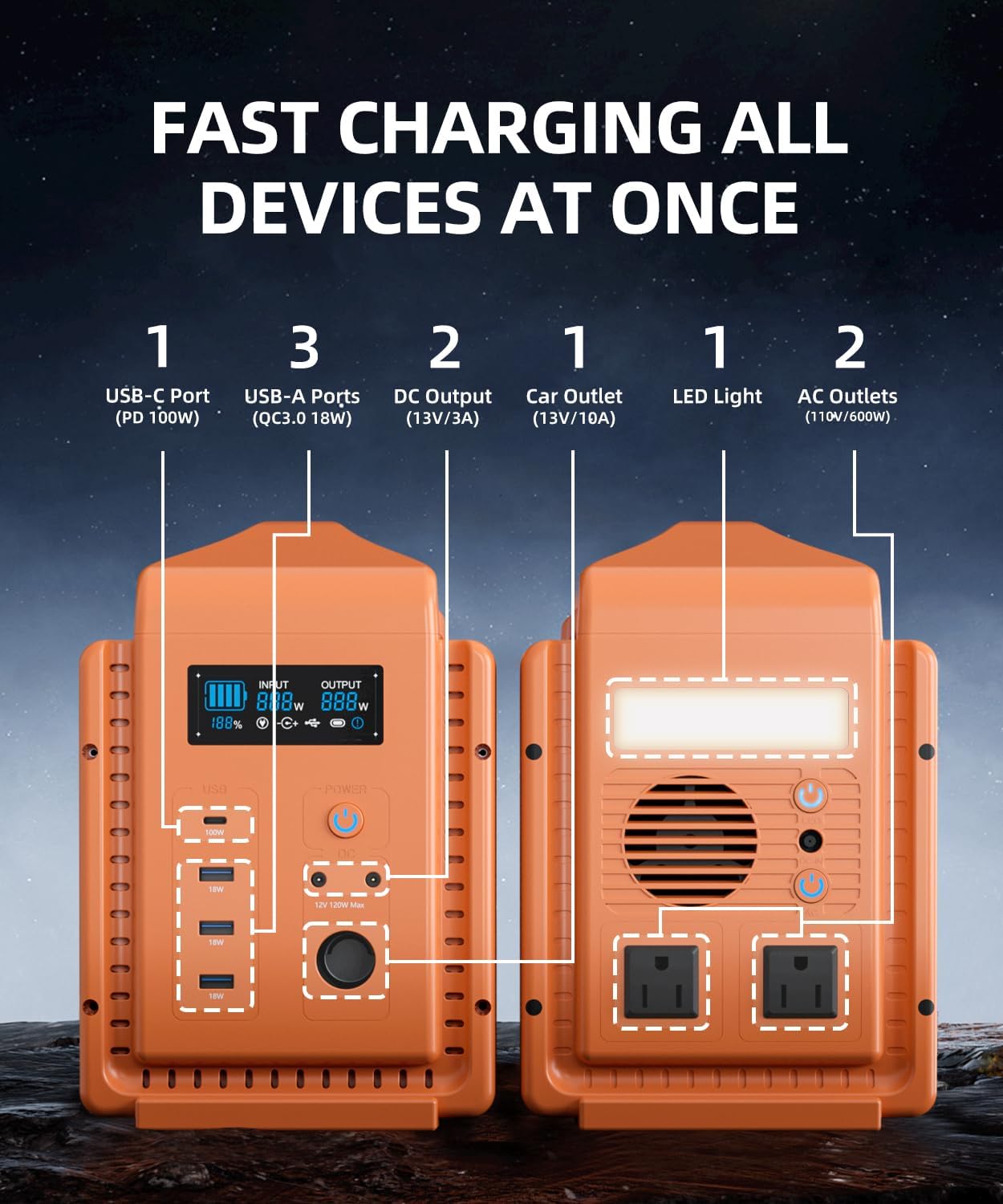
Image: Front and rear view of the TB600 Portable Power Station, highlighting the USB-C port, USB-A ports, DC output, car outlet, LED light, and AC outlets.
- Input/Output Display: Shows real-time power input, output, and battery level.
- USB Ports: 1x PD 100W USB-C, 3x QC3.0 USB-A ports for charging mobile devices.
- DC Output: 2x DC5521 ports (13V/3A) and 1x Car Port (13V/10A) for DC-powered devices.
- AC Outlets: 2x 110V/600W (Peak 1200W) AC outlets for household appliances.
- Power Button: Turns the unit on/off.
- LED Light: Integrated light with multiple modes.
3. Setup and Initial Use
3.1 Initial Charging
Before first use, fully charge your TB600 Portable Power Station. This ensures optimal battery performance and calibration.
- Connect the provided AC adapter to the AC input port on the TB600.
- Plug the AC adapter into a standard wall outlet.
- The display will show charging status. The unit is fully charged when the battery indicator shows 100%.
- Charging time with AC adapter is approximately 6 hours. Dual charging (AC + USB-C PD) can reduce this to 3.5 hours.
3.2 Charging with Solar Panels (Optional)
The TB600 can be recharged using compatible solar panels (not included).

Image: The TB600 Portable Power Station connected to solar panels for recharging, demonstrating one of its five charging methods.
- Connect your solar panel (100W recommended) to the DC7909 to MC4 solar connector.
- Plug the DC7909 connector into the DC input port on the TB600.
- Position the solar panels in direct sunlight for optimal charging.
- The display will indicate solar charging. Charging time with a 100W solar panel is approximately 7 hours.
4. Operating Instructions
4.1 Turning On/Off
- To turn on: Press and hold the main power button for 3 seconds. The display will light up.
- To turn off: Press and hold the main power button for 3 seconds. The display will turn off.
4.2 Using AC Outlets
The TB600 provides two 110V AC outlets for powering standard household appliances up to 600W (1200W peak).
- Ensure the TB600 is powered on.
- Press the AC power button to activate the AC outlets. The AC indicator on the display will illuminate.
- Plug your appliance into an AC outlet.
- After use, press the AC power button again to turn off the AC output and conserve battery.
4.3 Using DC and USB Ports
The TB600 offers multiple DC and USB ports for charging various electronic devices.
- Ensure the TB600 is powered on.
- Press the DC power button to activate the DC and USB outputs. The DC/USB indicators on the display will illuminate.
- Connect your devices to the appropriate USB-C, USB-A, DC5521, or car port.
- After use, press the DC power button again to turn off the DC/USB output and conserve battery.
4.4 LED Light Operation
The integrated LED light has multiple modes for various situations.

Image: The TB600 Portable Power Station illuminating a campsite, demonstrating its four LED light modes: Lighting, SOS Lighting, Enhance Lighting, and Flash Lighting.
- To turn on/off: Short press the LED light button.
- To cycle modes: Short press the LED light button repeatedly to switch between Lighting, SOS Lighting, Enhance Lighting, and Flash Lighting.
5. Maintenance and Storage
5.1 General Maintenance
- Clean the unit with a dry, soft cloth. Do not use abrasive cleaners or solvents.
- Regularly check ports for dust or debris and clean if necessary.
- Ensure ventilation openings are clear.
5.2 Storage
- Store the TB600 in a cool, dry place, away from direct sunlight and extreme temperatures.
- For long-term storage, charge the unit to approximately 50-80% every 3-6 months to preserve battery health.
- Avoid storing the unit completely discharged or fully charged for extended periods.
5.3 Battery Information
The TB600 uses a premium Grade-A LiFePO4 battery, known for its durability and long lifespan.

Image: An internal view of the TB600 highlighting the LiFePO4 battery cells and the Battery Management System (BMS), which ensures safety and extends battery life.
- The LiFePO4 battery provides up to 3500+ charge cycles with a 10-year lifespan.
- The integrated Smart Battery Management System (BMS) protects against over-voltage, overcurrent, overload, over-discharge, short-circuit, low-temperature, high-temperature, and low-voltage.
6. Troubleshooting
If you encounter issues with your TB600, refer to the following common problems and solutions.
| Problem | Possible Cause | Solution |
|---|---|---|
| Unit does not turn on | Battery is completely discharged; Power button not pressed long enough. | Charge the unit using the AC adapter; Press and hold the power button for 3 seconds. |
| AC output not working | AC output not activated; Appliance exceeds 600W; Overload protection triggered. | Press the AC power button; Check appliance wattage; Disconnect appliance, turn off/on AC output. |
| DC/USB output not working | DC/USB output not activated; Device not compatible. | Press the DC power button; Ensure device is compatible with port specifications. |
| Unit not charging | Charger not connected properly; Faulty charger/cable; Solar panel not in direct sunlight. | Check all connections; Try a different charger/cable; Reposition solar panel. |
If the problem persists after attempting these solutions, please contact customer service for further assistance.
7. Specifications
Detailed technical specifications for the Best of Battery TB600 Portable Power Station.
| Feature | Specification |
|---|---|
| Model Name | TB600 Portable Power Station |
| Battery Type | LiFePO4 |
| Capacity | 556Wh |
| AC Output | 2 x 110V, 600W (Peak 1200W), Pure Sine Wave |
| USB-C Output | 1 x PD 100W |
| USB-A Output | 3 x QC3.0 (18W each) |
| DC Output | 2 x DC5521 (13V/3A) |
| Car Port Output | 1 x 13V/10A |
| Total Power Outlets | 9 |
| AC Input (Charging) | Via AC adapter |
| Solar Input (Charging) | DC7909 port, compatible with solar panels (not included) |
| USB-C Input (Charging) | PD 100W |
| Dimensions (L x W x H) | 11.34" x 6.1" x 9.45" |
| Weight | 21 pounds |
| Material | Aluminum Alloy, ABS |
| Special Features | Automatic Shut Down, Digital Display, Lightweight, Portable, Super Quiet, BMS |
8. Warranty and Support
8.1 Warranty Information
The Best of Battery TB600 Portable Power Station comes with a 2-year full device warranty from the date of purchase. This warranty covers manufacturing defects and workmanship under normal use.
The warranty does not cover damage caused by misuse, unauthorized modifications, accidents, or natural disasters. Please retain your proof of purchase for warranty claims.
8.2 Customer Support
For any questions, technical assistance, or warranty claims, please contact our dedicated customer service team. Refer to the contact information provided on the Best of Battery official website or your purchase documentation.
We are committed to providing excellent support and ensuring your satisfaction with the TB600 Portable Power Station.