
1. Product Overview
The G-ELEK Outdoor 24-Hour Mechanical Timer Outlet is designed for automated control of outdoor electrical devices. It features a 24-hour daily repeat cycle with 30-minute intervals, offering up to 48 ON/OFF setting options. A slide switch allows toggling between timer mode and always-ON mode. This heavy-duty, waterproof timer is suitable for various applications including outdoor lighting, garden irrigation, fountains, pool pumps, and security lights. It is CSA listed, ensuring compliance with safety standards for use in Canada and the United States.

Figure 1: G-ELEK Outdoor Timer in various application scenarios.
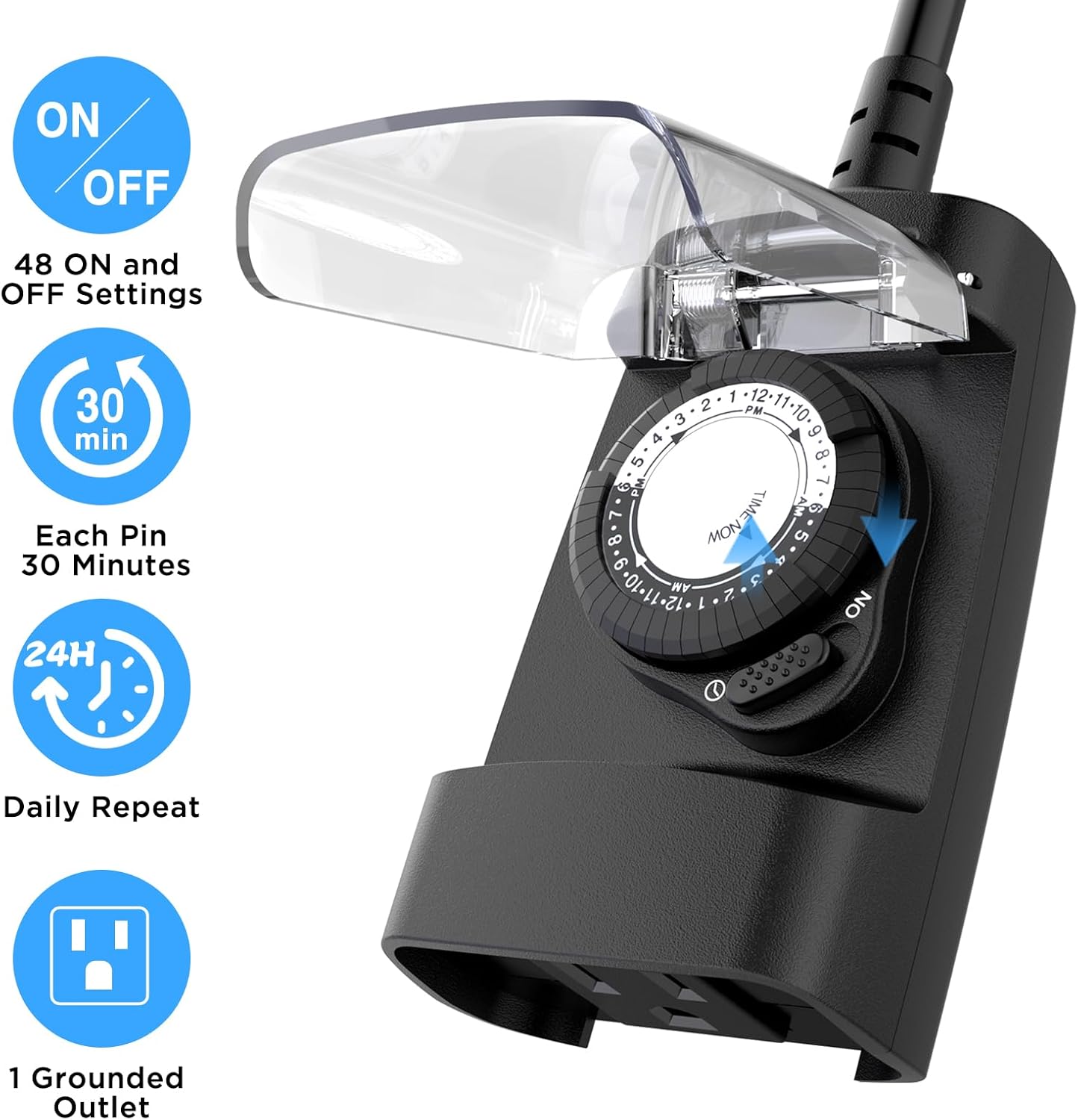
Figure 2: Key features of the G-ELEK Outdoor Timer.
2. Setup Instructions
Before initial use, ensure the timer is positioned vertically at least 2 feet above the ground to maintain its waterproof integrity. The timer features a 3-prong grounded plug for safe connection to an outdoor outlet. The clear protective cover helps shield internal components from environmental elements while allowing visibility of settings.

Figure 3: Proper vertical mounting for weatherproof operation.
Setting the Timer:
- Lift All Pins Up: Before setting, ensure all pins around the dial are in the 'up' position. This resets the timer for new programming.
- Set Current Time: Rotate the timer dial clockwise until the 'TIME NOW' arrow points to the current time. The dial indicates AM/PM hours.
- Set ON/OFF Times: Push down the pins corresponding to the desired 'ON' periods. Each pin represents a 30-minute interval. Pins in the 'down' position activate the connected device during that time.
- Select Operating Mode: Use the slide switch located below the dial to select the desired operating mode:
- 'I' (Always ON): The connected device will remain continuously powered.
- Timer Mode (Clock Icon): The connected device will operate according to the set ON/OFF pins.
- Plug In: Connect the timer's plug to a grounded outdoor electrical outlet. Then, plug your outdoor appliance(s) into the timer's outlet(s).
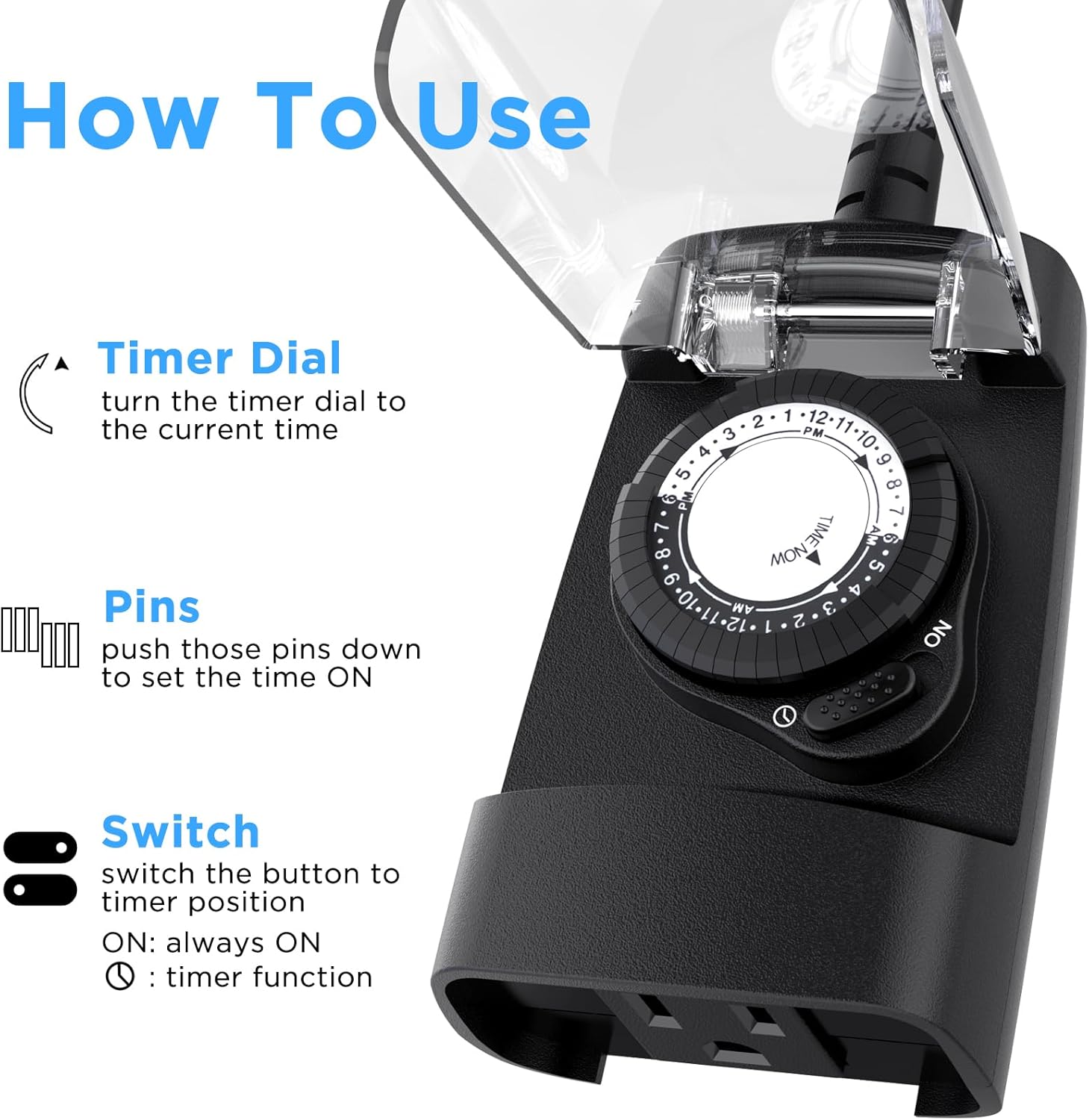
Figure 4: Step-by-step guide to setting the timer.
3. Operating Instructions
Once set up, the G-ELEK timer will automatically control your connected devices based on your programmed schedule. The internal mechanism will rotate the dial, and power will be supplied to the outlet(s) when the corresponding pins are pushed down.
Modes of Operation:
- Timer Mode: When the slide switch is set to the clock icon, the timer will activate and deactivate connected devices according to the pins pushed down on the dial. This mode provides daily repetition of your set schedule.
- Always ON Mode: When the slide switch is set to 'I', the timer bypasses the programmed schedule, and the connected device will receive continuous power.
- OFF Mode: When the slide switch is set to 'O', the timer will cut power to the connected device, regardless of the pin settings.
Video 1: Official G-ELEK demonstration of the outdoor timer's features and basic operation.
4. Maintenance
The G-ELEK Outdoor Timer is designed for durability and minimal maintenance. The clear protective cover is integral to its waterproof rating. Ensure the cover is securely closed after adjusting settings to protect internal components from dust, debris, and moisture. Periodically inspect the timer and its connections for any signs of wear or damage. If any damage is observed, discontinue use and replace the unit.
5. Troubleshooting
- Device not turning ON/OFF at set times:
- Verify that the slide switch is set to the 'Timer Mode' (clock icon).
- Ensure the 'TIME NOW' arrow is correctly aligned with the current time on the dial.
- Check that the pins corresponding to your desired ON times are pushed down, and pins for OFF times are pulled up.
- Confirm the timer is receiving power from the wall outlet.
- Timer not receiving power:
- Ensure the timer's plug is fully inserted into a functional outdoor outlet.
- Check the circuit breaker for the outdoor outlet.
- GFI (Ground Fault Interrupter) trips when timer is plugged in:
- This may indicate a fault with the connected device or the timer itself. Try plugging a different device into the timer, or try the timer in a different GFI outlet. If the issue persists, discontinue use.
6. Specifications
| Specification | Value |
|---|---|
| Brand | G-ELEK |
| Model Number | 30ULD/3AOH |
| Color | Black |
| Material | Plastic |
| Product Dimensions (D x W x H) | 6.1"D x 3.5"W x 1.9"H |
| Number of Settings | 48 (30-minute intervals) |
| Output Capability | 125V/15A/1875W, 1/2HP |
| Grounded Outlet | 1 |
| Cable Length | 6 inches (UL approved PVC cable) |
| Certifications | CSA Listed |

Figure 5: Physical dimensions and cable details of the timer.
7. Warranty and Support
For warranty information or technical support, please refer to the product packaging or contact G-ELEK customer service directly. Contact details are typically provided with the product documentation or on the manufacturer's official website.