
COMFEE' CRD20L1B1BPH
COMFEE' Compact Rice Cooker Instruction Manual
Model: CRD20L1B1BPH
1. Product Overview
The COMFEE' Compact Rice Cooker is a versatile 9-in-1 multi-cooker designed for ease of use and perfect results. Its compact size makes it ideal for couples and small families, while its advanced features ensure perfectly cooked grains every time.
Key Features:
- Multi-Function: 9 digital cooking programs including quick rice, white rice, brown rice, porridge, grains, mixed rice, steam, soup, and stew.
- Effortless Operation: User-friendly LCD Touch control panel with automatic keep warm for 24 hours and a 24-hour delay timer. Fast cooking for quick meals.
- Compact Capacity: 4 cups uncooked / 8 cups cooked capacity, perfect for 1-3 people.
- Easy to Clean: Features a detachable and washable inner lid and a non-stick inner pot.
- Fuzzy Logic Technology: Automatically adjusts temperature and cooking time based on moisture content for consistently fluffy rice.
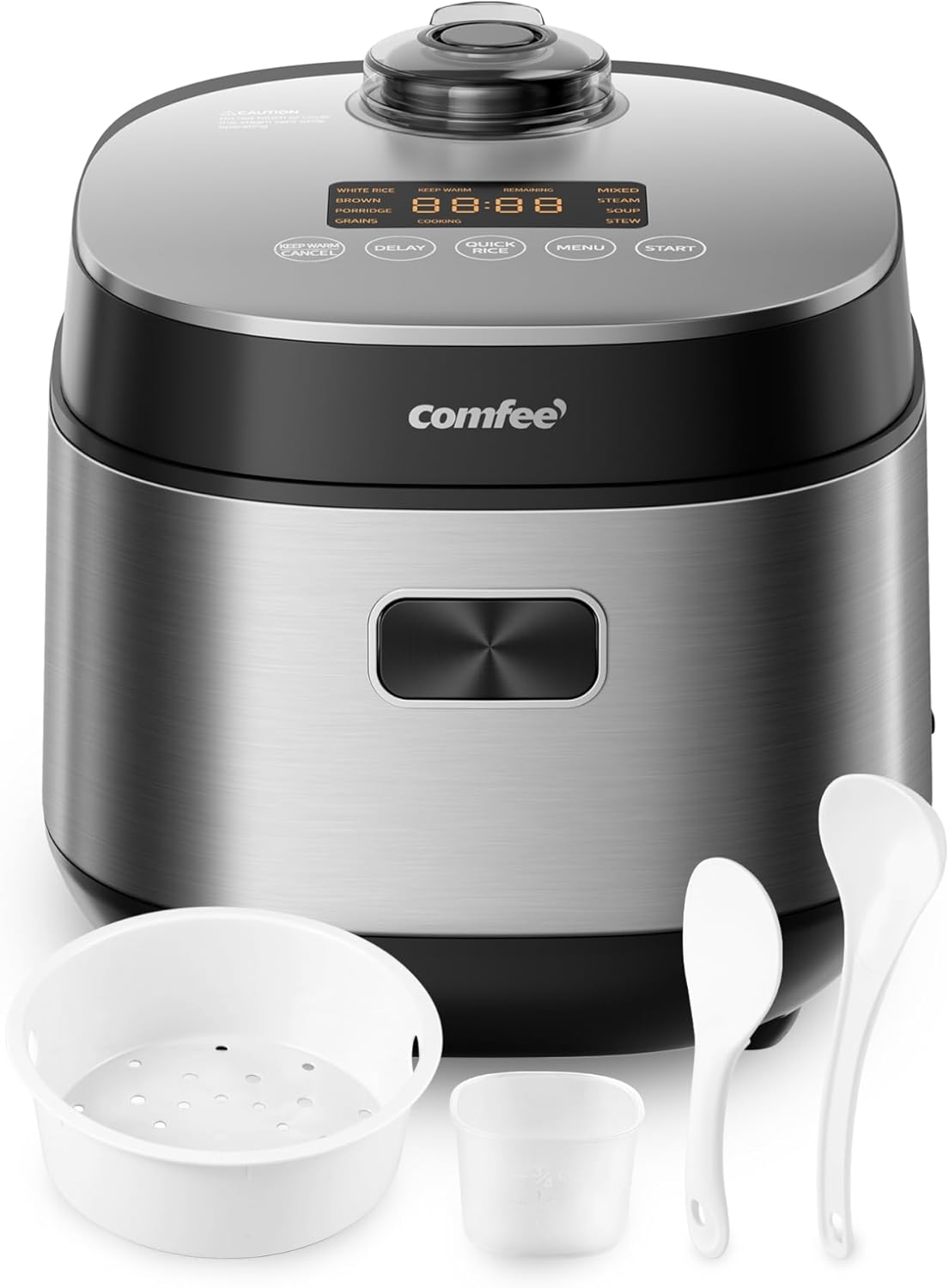
Image: The COMFEE' Compact Rice Cooker in grey, shown with its included rice paddle, soup ladle, measuring cup, and steamer basket.
2. What's in the Box
Upon unboxing your COMFEE' Compact Rice Cooker, you will find the following components:
- COMFEE' Compact Rice Cooker Unit
- Non-stick Inner Pot
- Steamer Basket
- Measuring Cup
- Rice Paddle
- Soup Ladle
- Power Cord

Image: The rice cooker displayed with various cooked dishes, illustrating its 9-in-1 functionality.
3. Setup
Before first use, ensure all packaging materials are removed. Wash the inner pot, steamer basket, measuring cup, and utensils with warm, soapy water. Wipe the main unit with a damp cloth. Ensure all parts are dry before assembly.
- Place the inner pot securely into the main unit.
- Add desired ingredients (e.g., rice and water) to the inner pot.
- Close the lid firmly until it clicks into place.
- Plug the power cord into the rice cooker and then into a power outlet.
Video: An official product video demonstrating the unboxing, setup, and basic components of the COMFEE' Compact Rice Cooker.
4. Operating Instructions
Cooking Functions:
The rice cooker offers 9 preset cooking programs:
| Program | Description |
|---|---|
| White Rice | For perfectly cooked white rice. |
| Brown Rice | Optimized for brown rice. |
| Porridge | Ideal for creamy porridge. |
| Grains | For various types of grains. |
| Mixed Rice | For rice mixed with other ingredients. |
| Steam | For steaming vegetables, meat, etc. (use steamer basket). |
| Soup | For preparing soups. |
| Stew | For slow-cooked stews. |
| Quick Rice | Fast cooking mode for white rice (approx. 30 minutes). |
Basic Operation:
- After adding ingredients and closing the lid, press the MENU button to cycle through the cooking programs.
- Once your desired program is selected (e.g., White Rice, Brown Rice, Steam), press the START button. The cooker will begin the cooking process.
- For quick cooking of white rice, simply press the QUICK RICE button, then START.
- To use the DELAY TIMER, select your program, then press DELAY and adjust the desired delay time before pressing START.
- The cooker will automatically switch to KEEP WARM mode once cooking is complete. To cancel any program or switch to Keep Warm, press KEEP WARM/CANCEL.

Image: The rice cooker highlighting its 30-minute Quick Rice function, ideal for fast meal preparation.

Image: The rice cooker illustrating its 24-hour Keep Warm and Delay Timer functions, allowing for flexible meal planning.
5. Maintenance and Cleaning
Regular cleaning ensures optimal performance and longevity of your rice cooker. The non-stick inner pot and detachable inner lid make cleaning simple.
- Always unplug the rice cooker and allow it to cool completely before cleaning.
- Remove the inner pot and detachable inner lid. These parts can be washed by hand with warm, soapy water.
- Wipe the exterior of the main unit with a damp cloth. Do not immerse the main unit in water.
- Ensure all parts are thoroughly dry before reassembling and storing the cooker.

Image: Close-up view of the rice cooker's non-stick inner pot and detachable inner lid, emphasizing ease of cleaning.
Video: An official product video demonstrating the ease of cleaning the detachable inner lid and non-stick inner pot of the rice cooker.
6. Troubleshooting
If you encounter any issues with your COMFEE' Compact Rice Cooker, please refer to the following general advice. For more detailed troubleshooting, consult the full user manual (PDF link below) or contact COMFEE' customer support.
- Cooker not turning on: Ensure the power cord is securely plugged into both the cooker and a working electrical outlet.
- Rice is too hard/soft: Adjust the water-to-rice ratio according to the type of rice and your preference. Ensure the inner pot is properly seated.
- Rice sticking to the pot: Ensure the non-stick coating is intact and that you are using the correct water-to-rice ratio.
- Steam escaping excessively: Check that the lid is properly closed and the steam vent is clear.
7. Specifications
| Attribute | Value |
|---|---|
| Brand | COMFEE' |
| Model Name | CRD20L1B1BPH |
| Capacity | 4 Cups (Uncooked) / 8 Cups (Cooked) |
| Product Dimensions | 9.96"D x 8.54"W x 9.06"H |
| Power Source | Corded Electric |
| Wattage | 350 watts |
| Voltage | 120 Volts |
| Material | Stainless Steel (Exterior), Plastic (Lid) |
| Color | Grey |
| Item Weight | 6.6 pounds |
| Product Care Instructions | Hand Wash |
8. Warranty and Support
For detailed warranty information and customer support, please refer to the official Instructions for Use (IFU) document provided by COMFEE'.
You can download the full PDF user manual here: Instructions for Use (PDF)
For further assistance, please contact COMFEE' customer support directly.
Ask a question about this manual
Ask about setup, troubleshooting, compatibility, parts, safety, or missing instructions. Manuals+ will review the question and use this page’s manual context to help answer it.