
iMeshbean DL22261
iMeshbean 4400LB Automatic Sliding Gate Opener User Manual
Model: DL22261 | Brand: iMeshbean
1. Introduction
Thank you for choosing the iMeshbean 4400LB Automatic Sliding Gate Opener. This system is designed to provide convenient and secure access control for your sliding gate, supporting gates up to 4400 lbs and 40 feet in length. This manual provides detailed instructions for proper installation, operation, and maintenance to ensure optimal performance and longevity of your gate opener.
2. Safety Information
WARNING: Failure to follow these safety instructions could result in serious injury or property damage.
- Read all instructions carefully before installation and operation.
- Ensure the gate area is clear of people, pets, and obstructions before operating.
- Do not allow children to play with or operate the gate opener or its controls.
- Disconnect power to the gate opener before performing any maintenance or repairs.
- Ensure all electrical connections comply with local codes and regulations.
- Only use genuine replacement parts and accessories.
- In case of power failure, use the manual release key to operate the gate.
3. Package Contents
Verify that all components listed below are included in your package:
- 1 x Sliding Gate Opener Unit
- 1 x Wireless Keyboard
- 2 x Manual Release Keys
- 4 x Remote Controls
- Installation Accessories (bolts, brackets, etc.)
- Instruction Manual

Figure 3.1: Complete kit contents of the iMeshbean Automatic Sliding Gate Opener.
4. Setup and Installation
4.1 Site Preparation
- Ensure the gate slides smoothly and is properly aligned.
- Clear any debris or obstructions from the gate's path.
- Verify adequate space for the opener unit beside the gate.
4.2 Mounting the Motor Unit
- Position the motor unit on a stable, level surface next to the gate.
- Mark the drilling points for the mounting bolts.
- Drill holes and secure the motor unit firmly using the provided hardware.

Figure 4.1: Internal components and powerful 750W motor of the gate opener.
4.3 Installing the Chain
- Attach the drive chain securely to the gate.
- Route the chain around the motor's sprocket, ensuring proper tension.
- Connect the ends of the chain, making sure it is taut but not overly tight.

Figure 4.2: Close-up of the chain drive mechanism for smooth operation.
4.4 Electrical Connections
- Connect the power supply to the motor unit according to the wiring diagram in the separate wiring guide.
- Install any optional accessories such as safety sensors (photocells) or external keypads.

Figure 4.3: Smart obstruction detection sensors for enhanced safety.
4.5 Limit Switch Adjustment
- Adjust the limit switches to define the open and closed positions of the gate.
- Test the gate's movement to ensure it stops precisely at the desired points.
5. Operating Instructions
5.1 Control Modes
The iMeshbean gate opener supports multiple control methods:
- Remote Control: Use the provided 4-button remotes to open, close, or stop the gate.
- Wireless Keypad: Enter your programmed code on the wireless keypad for gate operation.
- Mobile APP Control: Control the gate from your smartphone via the dedicated app (requires Wi-Fi connection for the operator).
- Manual Release Key: For power outages or emergencies, use the manual release key to disengage the motor and operate the gate manually.

Figure 5.1: Overview of multiple control modes.
5.2 Remote Control Operation
Press the corresponding button on your remote to:
- Open the gate.
- Close the gate.
- Stop the gate mid-cycle.

Figure 5.2: Using the remote control from a vehicle.
5.3 APP Control
Download the dedicated iMeshbean app to your smartphone. Once paired with your gate opener, you can:
- Open/close/stop the gate remotely.
- Set scheduled timers for gate operation.
- Monitor gate status.
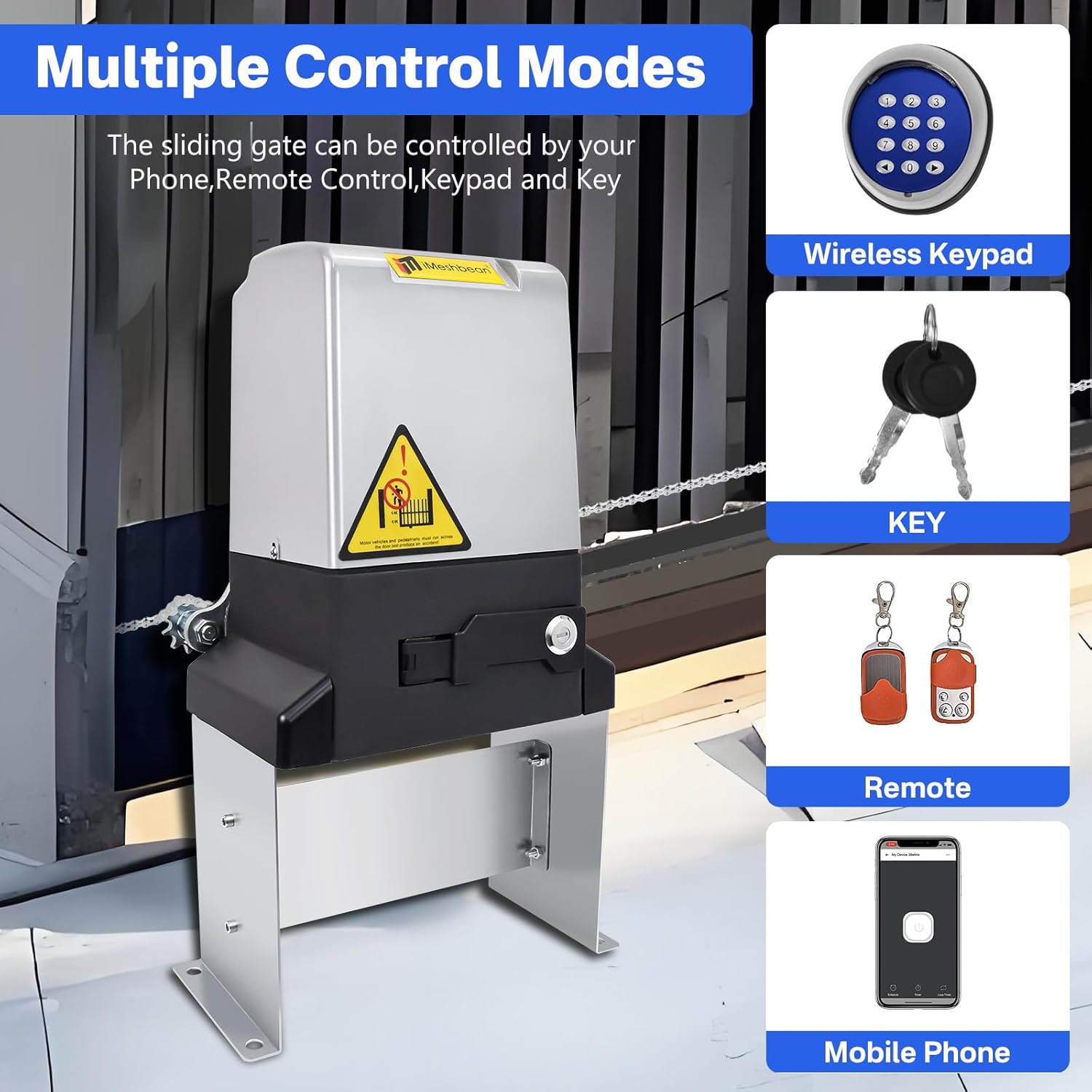
Figure 5.3: Controlling the gate via the mobile application.
5.4 Manual Release
In case of power failure or if you lose your remote, insert the manual release key into the lock on the motor unit and turn it to disengage the motor. This allows you to open or close the gate by hand.

Figure 5.4: Manual release mechanism for power outages.
5.5 Automatic Closing Function
The gate opener features an automatic closing function. You can set the automatic closing time to 5, 10, or 20 seconds after the gate reaches the fully open position.
6. Maintenance
Regular maintenance ensures the longevity and reliable operation of your gate opener:
- Monthly: Inspect the gate for smooth movement, ensuring no binding or dragging. Clean the chain and lubricate if necessary.
- Quarterly: Check all mounting bolts and hardware for tightness. Inspect electrical connections for corrosion or damage.
- Annually: Have a qualified technician inspect the entire system, including motor, sensors, and controls.
- Keep the area around the motor unit clear of debris, dirt, and vegetation.
7. Troubleshooting
Refer to the following table for common issues and their solutions:

Figure 7.1: Visual troubleshooting guide.
| Problem | Possible Cause | Solution |
|---|---|---|
| Power indicator off | No 110V power input; Fuse broken; Short circuit | Check power supply; Replace fuse (12A/250V); Check for short circuits. |
| Motor does not stop at end of run | Limit switch adjustment needed; Magnet not adjusted properly | Adjust limit switches; Adjust magnet according to instructions. |
| Gate does not open/close with remote/keypad | Power issue; Clutch not closed; Remote battery low; Interference | Check power; Re-close clutch; Replace remote battery (23A or 27A 12V); Adjust antenna. |
| Gate stops or reverses unexpectedly | Obstruction detected; Sensor issue; Motor overload | Remove obstruction; Check/clean sensors; Adjust motor thrust. |
| Cannot connect to Wi-Fi/APP | Poor 4G line number; Incorrect Wi-Fi connection | Check network signal; Follow APP connection steps carefully. |
| Gate shakes during operation | Uneven floor; Loose mounting bolts | Ensure level installation; Tighten all mounting bolts. |
8. Specifications
| Feature | Specification |
|---|---|
| Model Number | DL22261 |
| Max Gate Weight | 4400 lbs |
| Max Gate Length | 40 ft |
| Motor Power | 750W |
| Gate Moving Speed | 40 ft/min (8 inches/second) |
| Product Dimensions | 10.5 x 13 x 5.8 inches |
| Color | Black+Gray |
| Included Components | Sliding Gate Opener Unit, Wireless keyboard, 2 Manual Release Keys, 4 Remote Controls, Accessories, Instruction manual |
| Manufacturer | Bizslink |
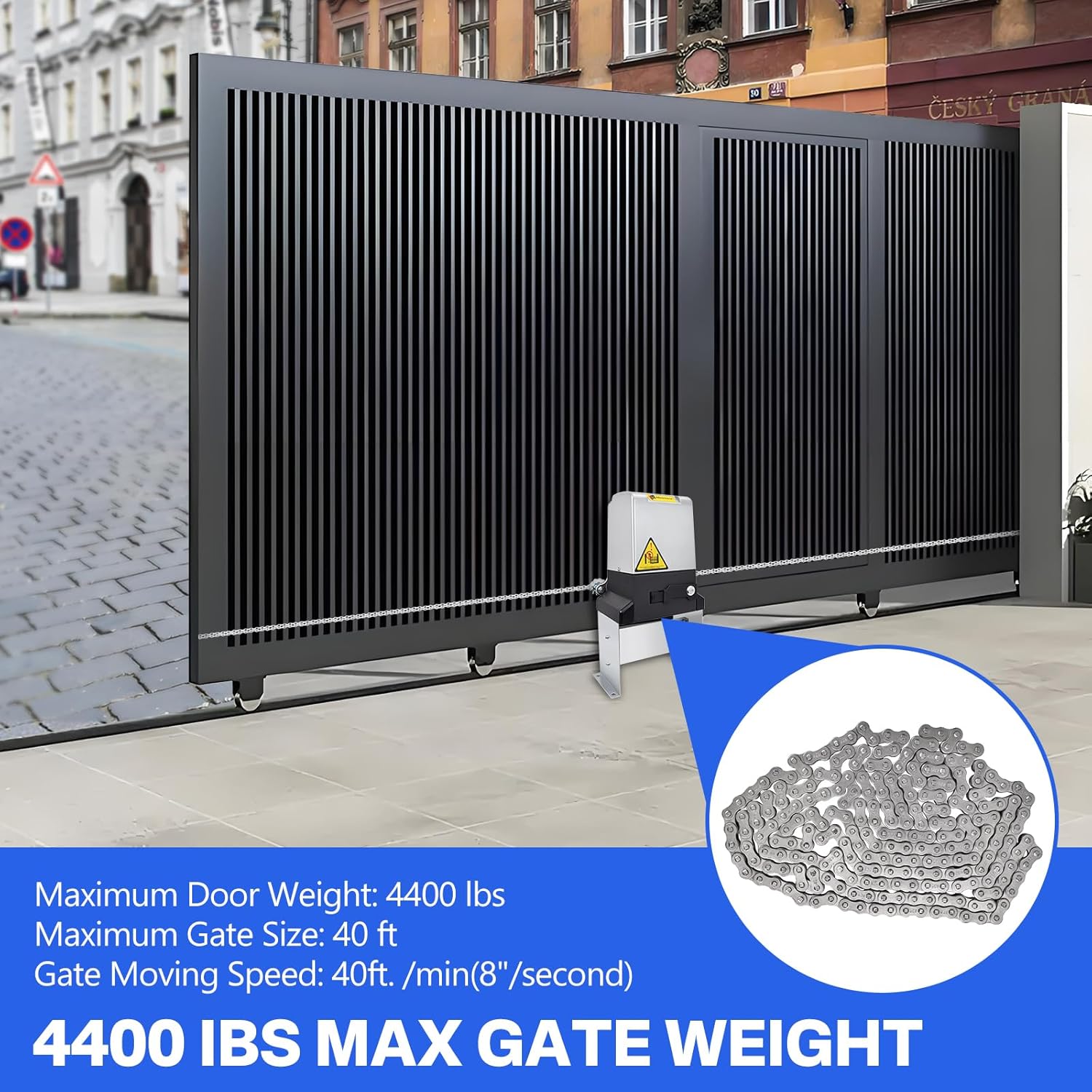
Figure 8.1: Gate opener supporting heavy gates up to 4400 lbs.
9. Warranty and Support
This iMeshbean product comes with a standard manufacturer's warranty covering defects in materials and workmanship. Please refer to the warranty card included in your package for specific terms and conditions.
For technical support, troubleshooting assistance, or warranty claims, please contact iMeshbean customer service through the retailer's platform or the contact information provided on the product packaging.
no relevant documents
Ask a question about this manual
Ask about setup, troubleshooting, compatibility, parts, safety, or missing instructions. Manuals+ will review the question and use this page’s manual context to help answer it.