
BOATSHON IEN01
BOATSHON IEN01 Industrial Endoscope Camera User Manual
Model: IEN01 | Brand: BOATSHON
1. Introduction
This manual provides essential instructions for the safe and effective use of your BOATSHON IEN01 Industrial Endoscope Camera. Please read this manual thoroughly before operating the device and retain it for future reference.
The BOATSHON IEN01 is a versatile inspection tool featuring a 1920P HD camera, 8 adjustable LED lights, and a 16.5ft semi-rigid cable. It is designed for inspecting hard-to-reach areas in various applications, including vehicle repairs, plumbing, and home appliance maintenance. The device is IP68 waterproof, allowing for use in wet environments.

Image 1.1: The BOATSHON IEN01 Industrial Endoscope Camera connected to a smartphone, demonstrating its use for inspection.
2. Safety Information
- Do not use the endoscope in extreme temperatures (recommended operating temperature: 14-176 °F / -10-80 °C).
- Ensure the camera lens is clean for optimal image clarity. Use a soft, clean cloth for cleaning.
- Keep the device away from strong magnetic fields unless using the magnetic attachment for retrieval.
- Always ensure your mobile phone's battery is above 20% for stable device operation.
- This device is for industrial inspection purposes only. Do not use for medical or personal examination.
3. Package Contents
Verify that all items are present in your package:
- Endoscope Camera with Cable (1)
- Magnet Attachment (1)
- Hook Attachment (1)
- Mirror Attachment (1)
- Protective Cap (1)
- User Manual (1)
- USB/Type-C/iOS Adapters (Integrated or separate, as per model)

Image 3.1: The endoscope camera with its various attachments and connection adapters.
4. Product Overview
The BOATSHON IEN01 features a compact camera head with integrated LED lighting, connected to a flexible semi-rigid cable for easy maneuverability. The cable terminates in a multi-interface connector for broad compatibility with mobile devices.
- Camera Head: 7.9mm diameter, 1920P HD resolution.
- LED Lights: 8 adjustable LED lights for illumination in dark environments.
- Cable: 16.5ft (approximately 5 meters) semi-rigid cable, allowing for flexible shaping and stable positioning.
- Control Unit: Integrated control for LED brightness adjustment and photo/video capture.
- Connectivity: USB, Type-C, and Lightning (iOS) interfaces for wide device compatibility.
- Waterproof Rating: IP68 for use in wet and underwater conditions.

Image 4.1: Detailed view of the endoscope camera head, highlighting its 1920P HD resolution capabilities.

Image 4.2: Demonstration of the semi-rigid cable's ability to maintain its shape for stable inspection.
5. Setup Guide
5.1 App Installation
- Search for "UseePlus" in your device's App Store (for iOS) or Google Play Store (for Android).
- Download and install the "UseePlus" application.
- Alternatively, scan the QR code provided in the physical user manual to directly access the app download page.

Image 5.1: Visual guide for downloading the "UseePlus" app and connecting the endoscope.
5.2 Connecting to Your Device
The endoscope is compatible with Android 4.2+ and iOS 9.0+ systems. It includes adapters for USB, Type-C, and Lightning ports.
- Select the appropriate adapter for your smartphone or tablet (USB, Type-C, or Lightning).
- Connect the endoscope cable to the selected adapter.
- Plug the adapter into your mobile device's charging/data port.
- Open the "UseePlus" app. The camera feed should appear automatically. If not, ensure the OTG function is enabled on Android devices (if applicable) and your phone's battery is above 20%.
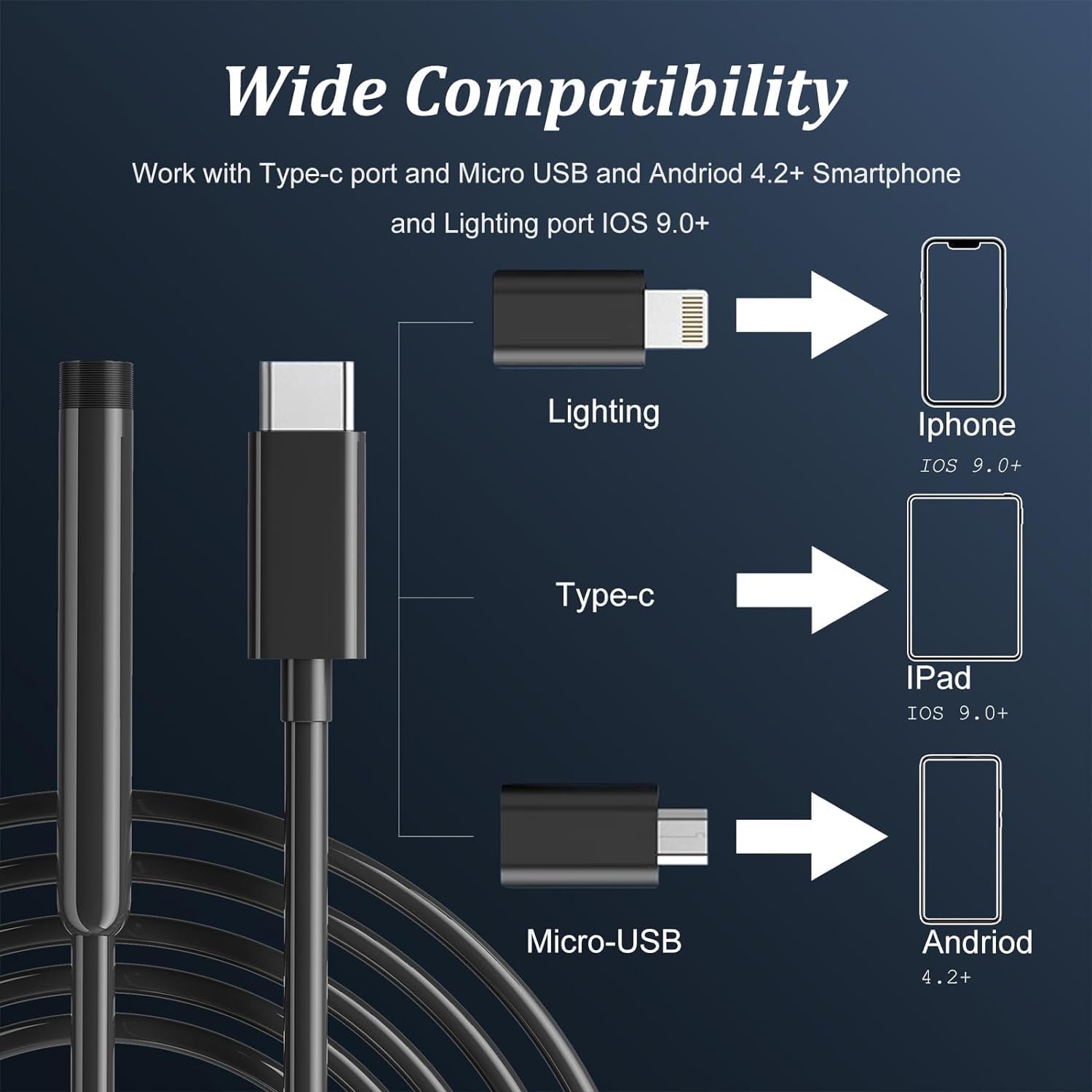
Image 5.2: The endoscope's multi-port design ensures compatibility with various mobile devices.
5.3 Attaching Accessories
The endoscope comes with three useful attachments: a hook, a magnet, and a mirror. These can be screwed onto the camera head after removing the protective cap.
- Hook: Useful for retrieving small objects from tight spaces.
- Magnet: Ideal for picking up metallic items like screws or nuts.
- Mirror: Allows for side-viewing in narrow areas, providing a different perspective.

Image 5.3: The included hook, magnet, and mirror attachments enhance the endoscope's utility.
6. Operating Instructions
6.1 Adjusting LED Lights
The endoscope features 8 adjustable LED lights to illuminate dark inspection areas. Use the control wheel on the cable to adjust the brightness to your desired level.
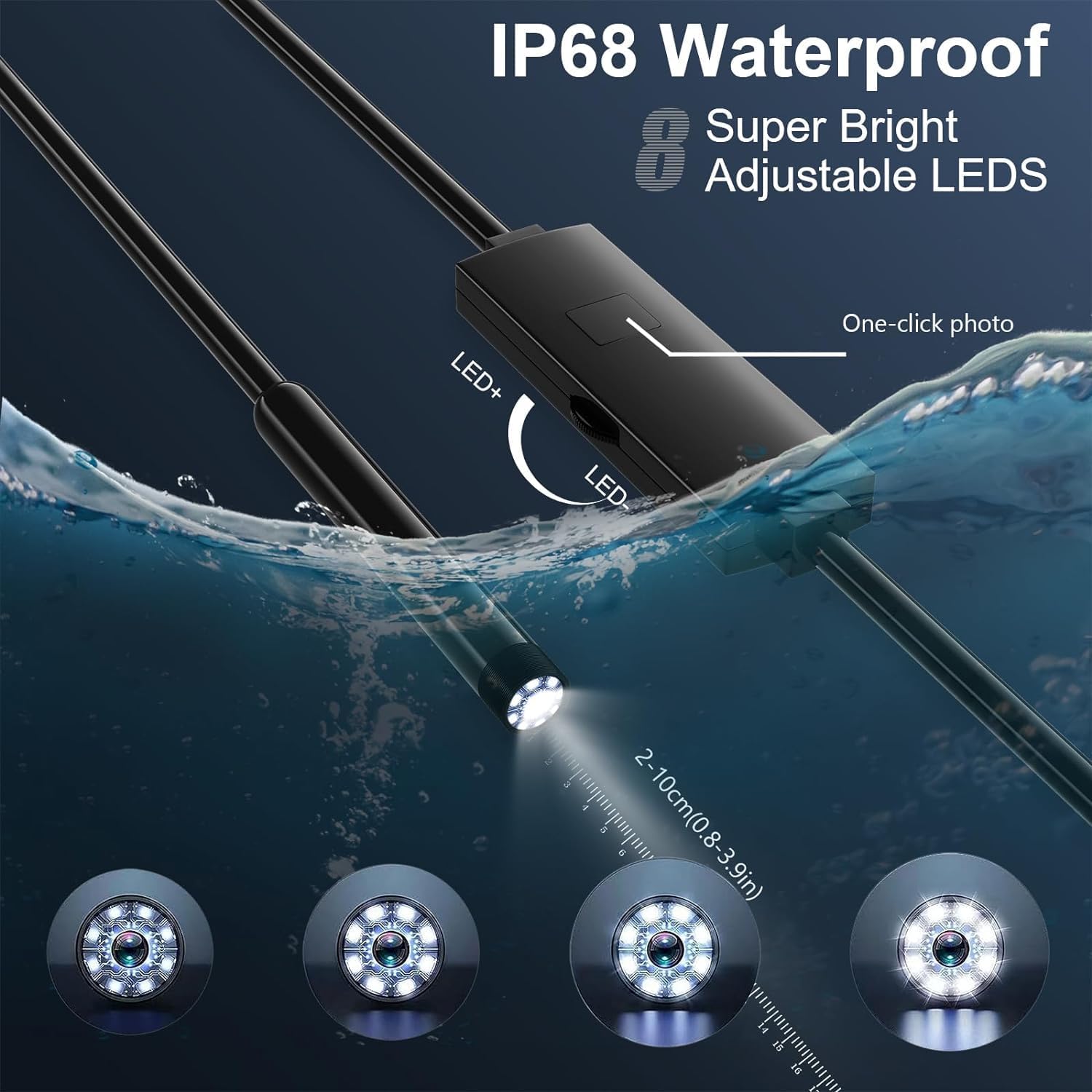
Image 6.1: The endoscope's adjustable LED lights provide clear visibility in various conditions, including underwater.
6.2 Capturing Photos and Videos
Once connected to the "UseePlus" app, you can switch between photo and video modes directly within the application. Use the on-screen buttons to capture images or start/stop video recording. Captured media will be saved to your device's gallery.
6.3 Using the Endoscope for Inspection
Guide the semi-rigid cable into the area you wish to inspect. Observe the live feed on your connected device. Adjust the cable's shape as needed to navigate obstacles. Utilize the hook, magnet, or mirror attachments for specific tasks as described in Section 5.3.
Video 6.2: A demonstration of the BOATSHON IEN01 endoscope camera in action, showing its use in a sink drain and a car engine, including the functionality of the magnet attachment.
7. Maintenance
- Cleaning: After each use, especially in dirty or wet environments, gently wipe the camera head and cable with a clean, soft, damp cloth. For stubborn grime, a small amount of mild soap can be used, followed by a clean water rinse and thorough drying. Ensure no moisture enters the USB/adapter connections.
- Lens Care: The best imaging focal length is 2cm-10cm. To maintain optimal image quality, regularly clean the camera lens with a clean, soft cloth. Avoid abrasive materials that could scratch the lens.
- Storage: Store the endoscope in a cool, dry place, away from direct sunlight and extreme temperatures. Coil the cable loosely to prevent kinks or damage.
8. Troubleshooting (FAQ)
- Q: The app does not display pictures.
A: Check whether the camera light is on. If it is off, or if the interface is not in good contact, please re-plug the endoscope into your device. Ensure the app has necessary permissions.
- Q: Imaging picture is not clear.
A: The best imaging focal length of the product is 2cm-10cm. Please calibrate the distance from the object you are viewing. Also, clean the front of the camera lens with a clean, soft cloth to achieve the best imaging effect.
- Q: The camera is hot.
A: It is normal for the camera to heat up, especially when the LED light is on at its highest brightness. This does not affect normal use or service life.
- Q: Android phone cannot supply power to the device.
A: Please ensure that the OTG function of your Android phone is turned on in its settings.
- Q: Device not connecting to iOS/Android.
A: Ensure your device is running Android 4.2+ or iOS 9.0+. Verify the correct adapter is used and securely connected. Restart the app and reconnect the endoscope.
9. Specifications
| Feature | Detail |
|---|---|
| Model Number | IEN01 |
| Camera Resolution | 1920x1440P HD (2.0MP CMOS) |
| Video Capture Resolution | 1080p |
| Camera Diameter | 7.9mm (8.0mm probe technology) |
| Cable Length | 16.5ft (approx. 5 meters) |
| Cable Type | Semi-rigid |
| LED Lights | 8 Adjustable LEDs |
| Waterproof Rating | IP68 |
| Focal Length | 2cm-10cm (0.8-3.9 inches) |
| Compatibility | Android 4.2+, iOS 9.0+ (USB, Type-C, Lightning) |
| Operating Temperature | 14-176 °F (-10-80 °C) |
| Item Weight | 6.7 ounces |
| Package Dimensions | 5.2 x 5.08 x 1.5 inches |
10. Warranty and Support
BOATSHON provides 24-hour online customer service and a 1-year 100% satisfactory warranty for this product. If you have any questions or are unsatisfied with your purchase, please contact the after-sales support staff for assistance or a refund.
Contact information for support can typically be found on the product packaging or through the retailer where the item was purchased.
Ask a question about this manual
Ask about setup, troubleshooting, compatibility, parts, safety, or missing instructions. Manuals+ will review the question and use this page’s manual context to help answer it.