
1. Introduction
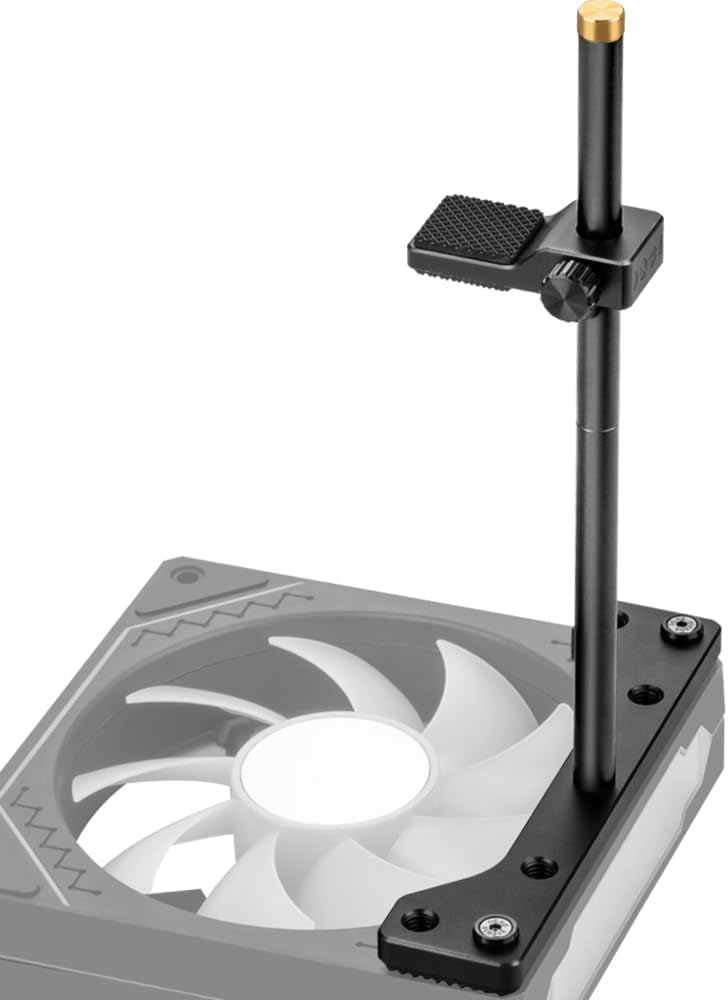
The JOYJOM GPU Support Bracket BT230aUS is designed to provide stable support for heavy graphics cards, preventing sag and potential damage to your motherboard's PCIe slot. Constructed from durable CNC aluminum, this adjustable bracket integrates seamlessly with 12cm fan mounts, offering a reliable solution for maintaining the integrity of your PC build.
2. Product Overview
This GPU support bracket features a robust design optimized for performance and compatibility. Key features include:
- Dedicated Fan Mount: Specifically designed for integration with 12cm case fans.
- Premium Construction: Full aluminum design with CNC processing ensures durability and a precise fit.
- Adjustable Height: The support height is adjustable from 0.63 inches to 6.3 inches, accommodating various graphics card sizes and case layouts.
- Modular Design: Can be detached into two 3.1-inch parts for flexible installation on either bottom or top fan mounts.
- Non-Slip Protection: Equipped with non-slip rubber pads on the base and support arm to prevent scratching the graphics card and ensure stable positioning.
- Wide Compatibility: Includes various screws to fit most 12mm fans and PC cases (ITX, MATX, ATX).
3. Package Contents
Please verify that all components are present in the package:
- 1 x JOYJOM GPU Support Bracket (unassembled)
- Assorted Mounting Screws for 12cm Fans

4. Setup and Installation
Follow these steps to install your GPU Support Bracket:
- Prepare Your System: Power off your computer and disconnect it from the power source. Open your PC case to access the interior.
- Identify Mounting Location: Determine whether you will mount the bracket on a bottom-mounted 12cm fan or a top-mounted 12cm fan. The bracket supports both configurations.
- Assemble the Bracket:
- Rotate the main stand pole onto the base plate until secure.
- Attach the adjustable support arm to the stand pole.
- Mount to Fan: Align the base plate of the support bracket with the screw holes of your 12cm fan. Use the appropriate mounting screws provided in the package to secure the bracket firmly to the fan. Ensure the bracket is stable.
- Position and Adjust: Carefully lower your graphics card into its PCIe slot. Adjust the height of the support arm by loosening the knob, sliding the arm up or down until it makes firm, level contact with the underside of your graphics card. Ensure the non-slip rubber pad on the arm is directly beneath the graphics card. Tighten the knob to secure the arm's position.
- Final Check: Verify that the graphics card is level and securely supported, and that the bracket does not interfere with any other components or airflow.


5. Operation
Once properly installed and adjusted, the JOYJOM GPU Support Bracket operates passively by providing continuous physical support to your graphics card. No further user interaction is required during normal computer operation. The bracket maintains the graphics card's horizontal alignment, preventing sag and reducing stress on the PCIe slot.
6. Maintenance
The GPU Support Bracket requires minimal maintenance:
- Cleaning: Periodically wipe the bracket with a dry, soft cloth to remove dust. Avoid using harsh chemicals or abrasive materials.
- Stability Check: Occasionally check that the support arm remains securely tightened and that the bracket is firmly attached to the fan.
- Pad Integrity: Ensure the non-slip rubber pads are intact and providing adequate grip.
7. Troubleshooting
If you encounter issues with your GPU Support Bracket, refer to the following:
- Bracket Does Not Fit:
- Ensure your case has a 12cm fan mount in the desired location (bottom or top).
- Verify that the adjustable height range (0.63-6.3 inches) is suitable for your graphics card and case clearance.
- Graphics Card Still Sags:
- Re-adjust the support arm to ensure it makes firm, upward contact with the graphics card.
- Confirm that the bracket is securely mounted to the fan and does not wobble.
- Ensure the non-slip rubber pad is correctly positioned and providing adequate friction.
- Screws Do Not Fit Fan:
- The package includes various screws. Select the set that matches the threading and length required for your specific 12cm fan and case.
8. Specifications
| Brand | JOYJOM |
| Model Number | BT230aUS |
| Material | Aluminum |
| Finish Type | Anodization |
| Color | Black |
| Adjustable Height Range | 0.63 - 6.3 inches |
| Item Weight | 5.9 ounces (0.17 Kilograms) |
| Package Dimensions | 7.24 x 4.37 x 1.46 inches |
| Mounting Type | Pole Mount (for 12cm fan) |

9. Warranty and Support
For warranty information or technical support, please contact JOYJOM customer service through the retailer where the product was purchased or visit the official JOYJOM website. Please retain your proof of purchase for warranty claims.