
Gaiatop AF-01
Gaiatop AF-01 5-Inch Portable Desk Fan User Manual
Model: AF-01 | Brand: Gaiatop
1. Introduction
Thank you for choosing the Gaiatop AF-01 5-Inch Portable Desk Fan. This manual provides essential information for the safe operation, maintenance, and troubleshooting of your new fan. Please read it thoroughly before use and retain it for future reference.

Image 1.1: The Gaiatop AF-01 5-Inch Portable Desk Fan in purple.
2. Important Safety Instructions
To reduce the risk of fire, electric shock, or injury, please observe the following safety precautions:
- Ensure the power source voltage matches the fan's requirements (120V AC).
- Do not immerse the fan, plug, or cord in water or other liquids.
- Unplug the fan from the outlet when not in use, before cleaning, or before moving it.
- Keep fingers, pencils, or any other objects away from the fan blades when it is operating.
- Do not operate any fan with a damaged cord or plug. If the cord or plug is damaged, contact customer support.
- Do not use the fan near windows, as rain may create an electrical hazard.
- This appliance is not intended for use by persons (including children) with reduced physical, sensory or mental capabilities, or lack of experience and knowledge, unless they have been given supervision or instruction concerning use of the appliance by a person responsible for their safety.
3. Package Contents
Verify that all items are included in your package:
- Gaiatop AF-01 Air Circulation Fan
- AC Power Plug (4.92 ft undetachable cable)
- User Manual

Image 3.1: Contents included in the Gaiatop AF-01 package.
4. Product Overview
The Gaiatop AF-01 is a compact and powerful 5-inch desk fan designed for personal cooling and air circulation. It features a 360° adjustable tilt and three-speed settings.
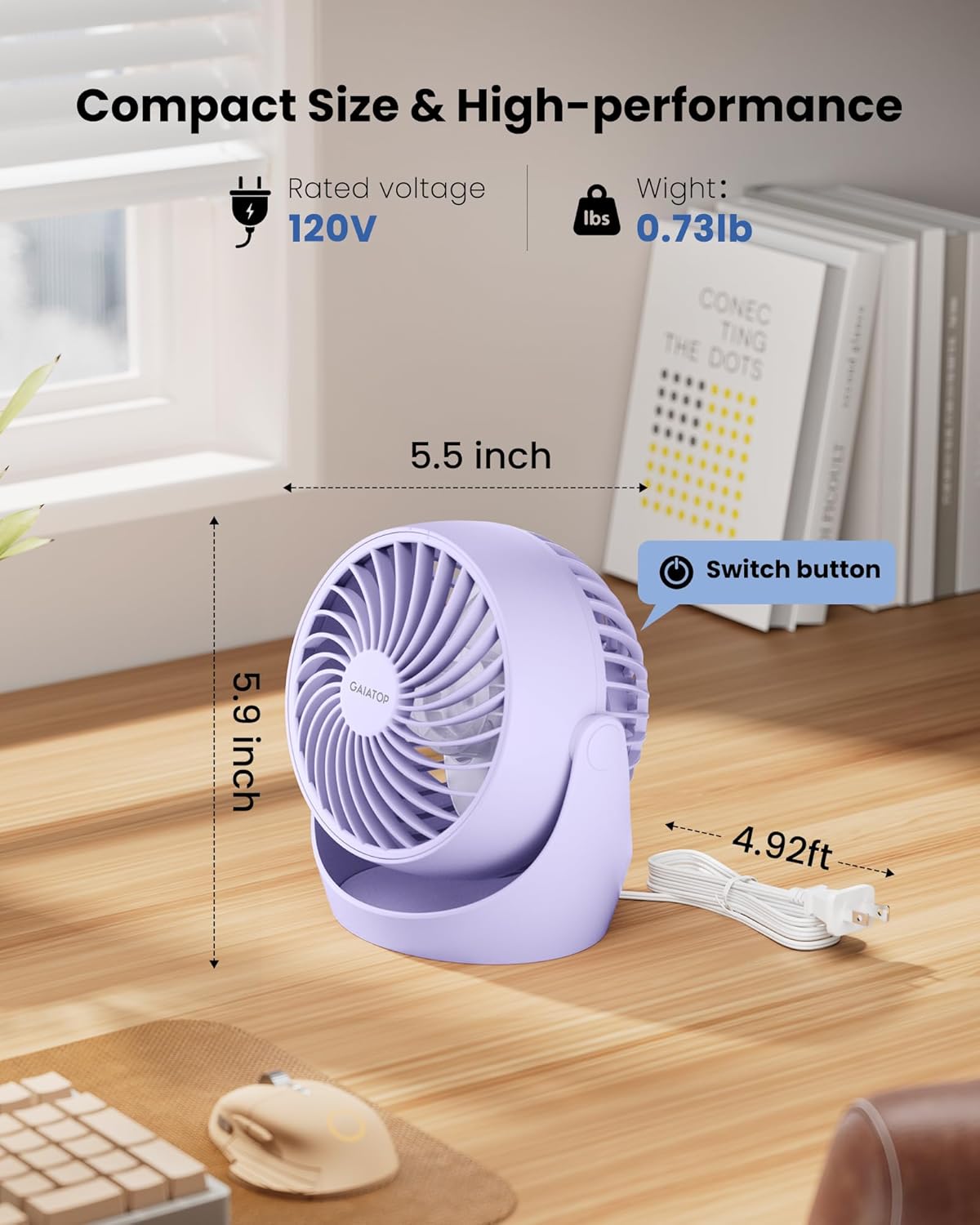
Image 4.1: Product dimensions and key features. The fan measures approximately 5.59"D x 5.65"W x 4.33"H and weighs 0.73 lbs. The power switch is located on the back.
Key Features:
- Compact Design: Small footprint (5.59"D x 5.65"W x 4.33"H) and lightweight (0.73 lb) for easy placement.
- Powerful Airflow: Deep-pitched blades and aerodynamic design for strong air circulation.
- 3-Speed Settings: Adjustable fan speeds for customized cooling (1st: 3.9 m/s, 2nd: 5.4 m/s, 3rd: 6.2 m/s).
- 360° Adjustable Tilt: Manually adjust the fan head to direct airflow precisely.
- Quiet Operation: Operates with minimal noise, approximately 30dB.
- Easy to Clean: Detachable front cover for convenient blade and grille cleaning.
- Stable Base: Equipped with 4 rubber pads to reduce vibration and prevent slipping.
5. Setup
- Unpack: Carefully remove the fan and all accessories from the packaging.
- Placement: Place the fan on a stable, flat surface. Ensure there are no obstructions to the airflow.
- Connect Power: Plug the AC power cord into a standard 120V electrical outlet.

Image 5.1: Proper placement and power connection of the fan.
6. Operating Instructions
6.1 Power On/Off and Speed Control
The fan features a single control button for power and speed adjustment.
- Power On (Speed 1): Press the switch button once to turn on the fan at the lowest speed setting (1st speed: 3.9 m/s).
- Adjust Speed (Speed 2): Press the button a second time for medium speed (2nd speed: 5.4 m/s).
- Adjust Speed (Speed 3): Press the button a third time for the highest speed (3rd speed: 6.2 m/s).
- Power Off: Press the button a fourth time to turn off the fan.

Image 6.1: Fan speed settings and airflow velocity.
6.2 Adjusting Fan Tilt
The fan head can be manually adjusted 360 degrees to direct airflow as needed.
- Gently hold the fan base and tilt the fan head to your desired angle. The fan will remain in the set position.

Image 6.2: Demonstrating the 360° adjustable tilt feature.
7. Maintenance and Cleaning
Regular cleaning ensures optimal performance and extends the lifespan of your fan.
- Unplug: Always unplug the fan from the power outlet before cleaning.
- Remove Front Cover: Gently twist the front grille counter-clockwise to detach it from the fan body.
- Clean Blades and Grille: Use a soft, damp cloth or a mild detergent solution to wipe the fan blades and the front grille. For stubborn dust, a soft brush can be used.
- Dry Thoroughly: Ensure all parts are completely dry before reassembling.
- Reattach Front Cover: Align the front grille with the fan body and twist clockwise until it clicks securely into place.
- Exterior Cleaning: Wipe the exterior of the fan with a soft, dry cloth. Do not use abrasive cleaners or solvents.

Image 7.1: Step-by-step guide for cleaning the fan.
8. Troubleshooting
If you encounter issues with your fan, please refer to the following common problems and solutions:
| Problem | Possible Cause | Solution |
|---|---|---|
| Fan does not turn on. | No power supply. Power cord not properly connected. | Ensure the fan is plugged into a working 120V outlet. Check if the power cord is securely connected. |
| Weak airflow. | Fan speed set too low. Dust accumulation on blades/grille. | Increase the fan speed by pressing the control button. Clean the fan blades and grille as per maintenance instructions. |
| Unusual noise during operation. | Fan not on a stable surface. Obstruction near blades. Loose front cover. | Place the fan on a flat, stable surface. Check for any foreign objects near the blades and remove them. Ensure the front cover is securely attached. |
If the problem persists after trying these solutions, please contact Gaiatop customer support.
9. Specifications
| Brand | Gaiatop |
| Model Name | AF-01 |
| Product Dimensions | 5.59"D x 5.65"W x 4.33"H |
| Item Weight | 0.73 lbs (9.9 ounces) |
| Color | Purple |
| Power Source | AC (120V) |
| Wattage | 6.8 watts |
| Number of Power Levels | 3 |
| Noise Level | 30 dB |
| Max Wind Speed | 6.2 m/s |
| Control Method | Touch (Button) |
| Indoor/Outdoor Usage | Indoor |
10. Warranty and Customer Support
Gaiatop products are manufactured to high-quality standards. For information regarding warranty coverage, please refer to the warranty card included with your purchase or visit the official Gaiatop website.
If you have any questions, concerns, or require technical assistance, please contact Gaiatop customer support through the retailer where you purchased the product or visit the Gaiatop brand store:
Ask a question about this manual
Ask about setup, troubleshooting, compatibility, parts, safety, or missing instructions. Manuals+ will review the question and use this page’s manual context to help answer it.