
LEDIARY LNY-0000
LEDIARY 42-inch Ceiling Fan with Light
Model: LNY-0000
Brand: LEDIARY
Introduction
Thank you for choosing the LEDIARY 42-inch Ceiling Fan with Light. This product is designed to provide efficient air circulation and adjustable lighting for various indoor and outdoor spaces, including bedrooms, living rooms, and patios. Featuring a reversible DC motor, multiple speed settings, and adjustable color temperature, this fan offers comfort and versatility. Please read this manual thoroughly before installation and operation to ensure proper use and safety.
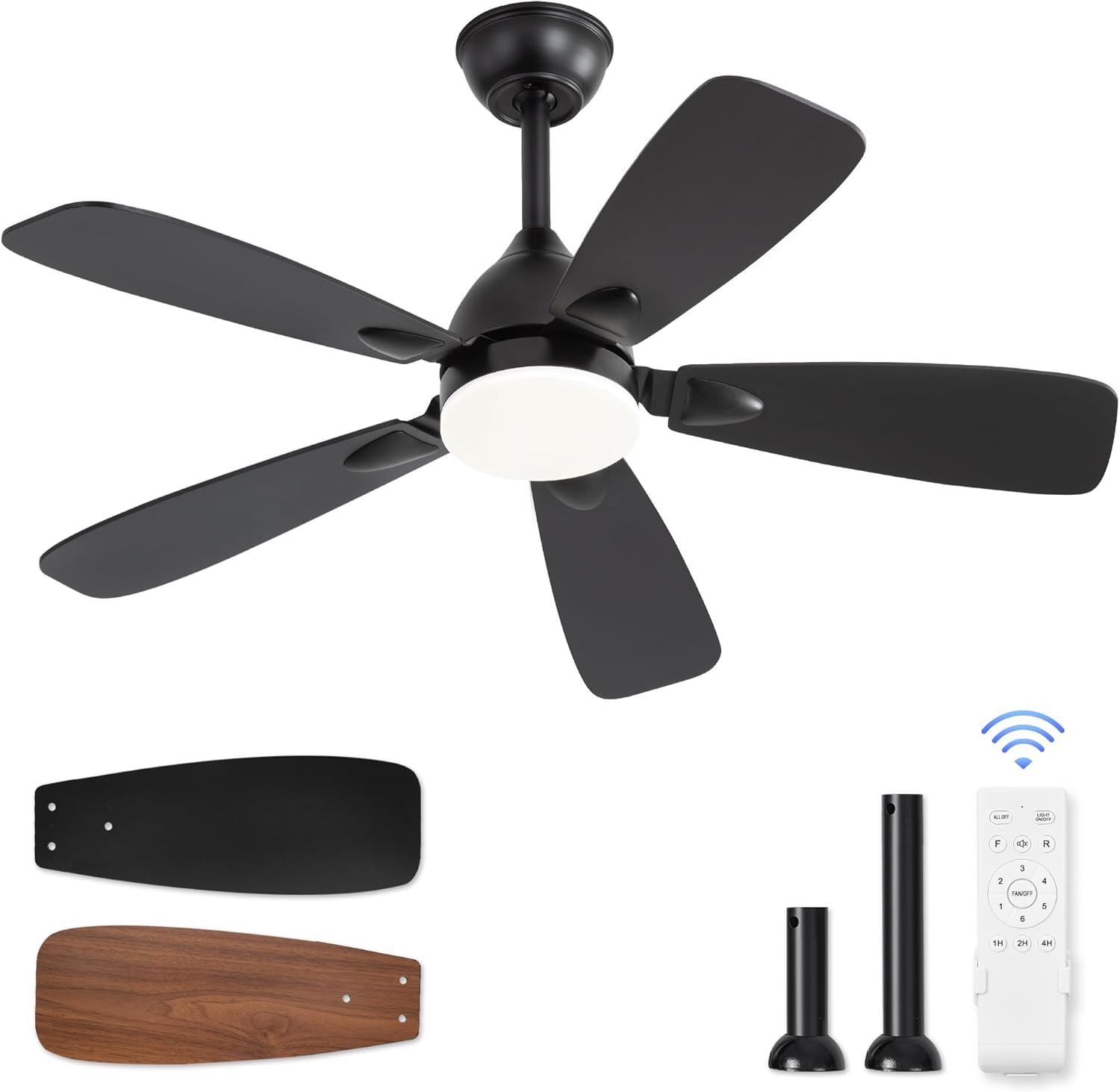
Figure 1: LEDIARY 42-inch Ceiling Fan with Light components.
Safety Information
To reduce the risk of electric shock, fire, or injury to persons, read and follow all instructions carefully before installing, operating, or servicing this product.
- Ensure the power is turned off at the circuit breaker before installation or maintenance.
- All wiring must be in accordance with national and local electrical codes.
- The fan must be mounted with a minimum of 7 feet (2.1 meters) clearance from the trailing edge of the blades to the floor.
- The mounting structure must be capable of supporting a minimum of 35 pounds (15.9 kg).
- Do not operate the fan if any part is damaged. Contact customer service for replacement parts.
- Do not insert objects into the path of the fan blades.
- This appliance is not intended for use by persons (including children) with reduced physical, sensory or mental capabilities, or lack of experience and knowledge, unless they have been given supervision or instruction concerning use of the appliance by a person responsible for their safety.
Package Contents
Verify that all components are present before beginning installation:
- Ceiling Fan Motor Housing
- Fan Blades (5 pieces, reversible black/walnut)
- Light Kit with LED Module
- Remote Control with Wall Mount
- Downrods (4-inch and 8-inch)
- Mounting Bracket
- Hardware Pack (screws, washers, wire nuts)
- Instruction Manual
Setup and Installation
Follow these steps for a safe and efficient installation. It is recommended to have two people for installation.
- Prepare for Installation:
Turn off power at the main circuit breaker. Clear the installation area. Ensure the junction box is securely fastened to the building structure and can support the fan's weight.
- Install Mounting Bracket:
Attach the mounting bracket to the outlet box using the screws provided. Ensure it is firmly secured.
- Assemble Downrod and Fan Motor:
Select the desired downrod (4-inch or 8-inch). Feed the fan wires through the downrod. Secure the downrod to the fan motor housing with the provided pin and screw. Ensure the three plastic shipping stabilizers are removed from the motor housing before proceeding.

Figure 2: Illustration of easy installation steps.
- Hang the Fan:
Carefully lift the fan assembly and place the downrod ball into the mounting bracket opening. Rotate the fan until the tab in the mounting bracket aligns with the slot in the downrod ball.
- Make Electrical Connections:
Connect the fan wires to the household wires according to the wiring diagram in the detailed instructions. Use the provided wire nuts. Ensure all connections are secure.
- Attach Fan Blades:
Attach each fan blade to the motor housing using the screws provided. Choose either the black or walnut side of the blade to face downwards.

Figure 3: Double-sided fan blades for versatile styling.
- Install Light Kit:
Connect the light kit wires to the fan motor wires. Secure the light kit to the bottom of the fan motor housing.

Figure 4: Detailed view of LED light, DC motor, and fan blades.
- Final Assembly:
Secure the canopy to the mounting bracket. Restore power at the circuit breaker.
Operating Instructions
The LEDIARY ceiling fan is controlled by the included remote control. Install two AAA batteries (not included) into the remote control.
Remote Control Functions:

Figure 5: Remote control layout and functions.
- ON/OFF Button: Turns the fan and light on or off.
- Light ON/OFF Button: Controls the light independently.
- Color Temperature Adjustment (CCT): Press the light button repeatedly to cycle through 3000K (Warm Light), 4500K (Natural Light), and 6000K (Cold White Light).

Figure 6: Adjustable color temperatures.
- Fan Speed Buttons (1-6): Adjusts the fan speed from 1 (lowest) to 6 (highest).

Figure 7: Fan speed levels and their effects.
- Reversible DC Motor (Forward/Reverse):
Press the "F/R" button to change the fan's rotation direction.
- Summer Mode (Downward Airflow): Blades rotate counter-clockwise, pushing cool air down.
- Winter Mode (Upward Airflow): Blades rotate clockwise, drawing cool air up and circulating warm air trapped near the ceiling.

Figure 8: Reversible DC motor for year-round comfort.
- Timer Settings (1H/2H/4H): Sets the fan and light to turn off automatically after 1, 2, or 4 hours.

Figure 9: Timer function for automatic shut-off.
- Memory Function: The light features a memory function. If the light is turned off for more than 10 seconds and then turned back on, it will resume the last used color temperature. If turned on within 10 seconds, the color temperature may cycle.
Quiet Operation:
The fan is designed for ultra-quiet operation, with noise levels below 35 dB, ensuring a peaceful environment.

Figure 10: Noise level comparison.
Maintenance
Regular maintenance helps ensure the longevity and optimal performance of your ceiling fan.
- Cleaning:
Periodically clean the fan blades and motor housing with a soft, damp cloth. Do not use abrasive cleaners or solvents, as they may damage the finish. Ensure power is off before cleaning.
- Blade Care:
Check blade screws periodically to ensure they are tight. Loose blades can cause wobbling and noise.
- Light Kit:
The LED module is integrated and generally does not require replacement. If the light malfunctions, contact customer service.
- General Inspection:
Inspect the fan annually for any signs of wear, loose connections, or unusual noises. Address any issues promptly.
Troubleshooting
If you encounter issues with your fan, refer to the following common problems and solutions:
| Problem | Possible Cause | Solution |
|---|---|---|
| Fan does not start |
|
|
| Fan wobbles |
|
|
| Light does not work |
|
|
| Remote control not working |
|
|
Specifications
| Feature | Detail |
|---|---|
| Model Name | Y24FSD0019-1801 (LNY-0000) |
| Product Dimensions | 42"D x 42"W x 17"H (with 8" downrod) |
| Blade Size | 16.3" length, 6.3" width |
| Downrods Included | 4" and 8" |
| Power Source | AC 120V |
| Wattage (Light) | 18 watts |
| Lumen Output | 1800 LM |
| Color Temperature | 3000K (Warm), 4500K (Natural), 6000K (Cold White) |
| Fan Speeds | 6 |
| Motor Type | Reversible DC Motor |
| Noise Level | Below 35 dB |
| Control Method | Remote Control |
| Indoor/Outdoor Usage | Indoor, Outdoor |
| Recommended Room Size | 10x10 FT to 15x15 FT |

Figure 11: Product dimensions and room suitability.
Warranty and Customer Support
LEDIARY provides a 2-year customer support for this product. If you have any questions, require assistance with installation, or need replacement parts, please contact LEDIARY customer service. Our dedicated team is available to assist you and ensure your satisfaction.
For support, please visit the official LEDIARY store or contact their customer service channels as provided with your purchase documentation.